


Frames per second (fps) is the number of still images a video shows each second. It is also called frame rate. Film runs at 24 fps, most streaming and broadcast video at 30, and sport, gaming and screen capture at 60. Higher frame rates look smoother and cost more bandwidth.
This page is for anyone choosing a number in an encoder, a camera menu or a stream settings screen. It has the standard frame rates explained one by one, says which industry settled on each of those fps standards, and covers what to set for a live stream, what variable frame rate does to an encoder, and what the eye actually does with frames. Every figure below comes from a specification or a platform's own documentation, dated.
Common frame rates & What each one is for?
The typical video frame rates cluster around five values: 24, 25, 30, 50 and 60 frames per second. Encoder menus write the setting as frame rate, framerate or fps and broadcast documents call it frame frequency, but the frame rate meaning does not change between them. Which value is standard where is a question of broadcast history, not of which one looks best.
This frame rate comparison covers those five standard frame rates per second, the standard each belongs to, what it suits and what it costs.
| Frame rate | Where it is the standard | Best for | The catch |
|---|---|---|---|
| 24 fps | Digital cinema. The DCI specification requires 24.000 Hz | Film and cinematic video | Motion judder on fast pans, and 3:2 pull-down to reach 30 fps |
| 25 fps | PAL regions. A listed ITU-R BT.709 picture rate | European broadcast and archive material | Apple asks for 50 fps, not 25, from a live PAL source |
| 30 fps | The starting point on YouTube Live and Amazon IVS | Talking heads, webinars, most live video | Not enough for fast sport or 60 Hz screen capture |
| 50 fps | The PAL high frame rate | European sport and fast motion | Doubles the frames a 25 fps bitrate budget was built for |
| 60 fps | The ceiling for HLS delivery | Sport, gaming, screen capture | Amazon IVS recommends it only at 720p and above |
The reading that matters in that frames per second comparison: different frame rates suit different destinations, so choose from the destination rather than from the camera. The frame rate differences above are resolved by conversion, and conversions cost quality no bitrate increase recovers.
Two of those values are specified rather than conventional. The DCI Digital Cinema System Specification states at item 3.1.4.2 that a digital cinema master must support 24.000 Hz, with 48.000 Hz allowed for 2K content only, which is why the frame rate of film is 24 and movie frames per second have not moved. Broadcast standards define frame rate in hertz rather than fps: ITU-R BT.709-6, the HDTV parameter recommendation, lists picture rate in section 5.5 as 60, 60/1.001, 30, 30/1.001, 50, 25, 24 and 24/1.001 Hz. Television frames per second are therefore regional: 25 and 50 where PAL was the standard, 30 and 60 where NTSC was.
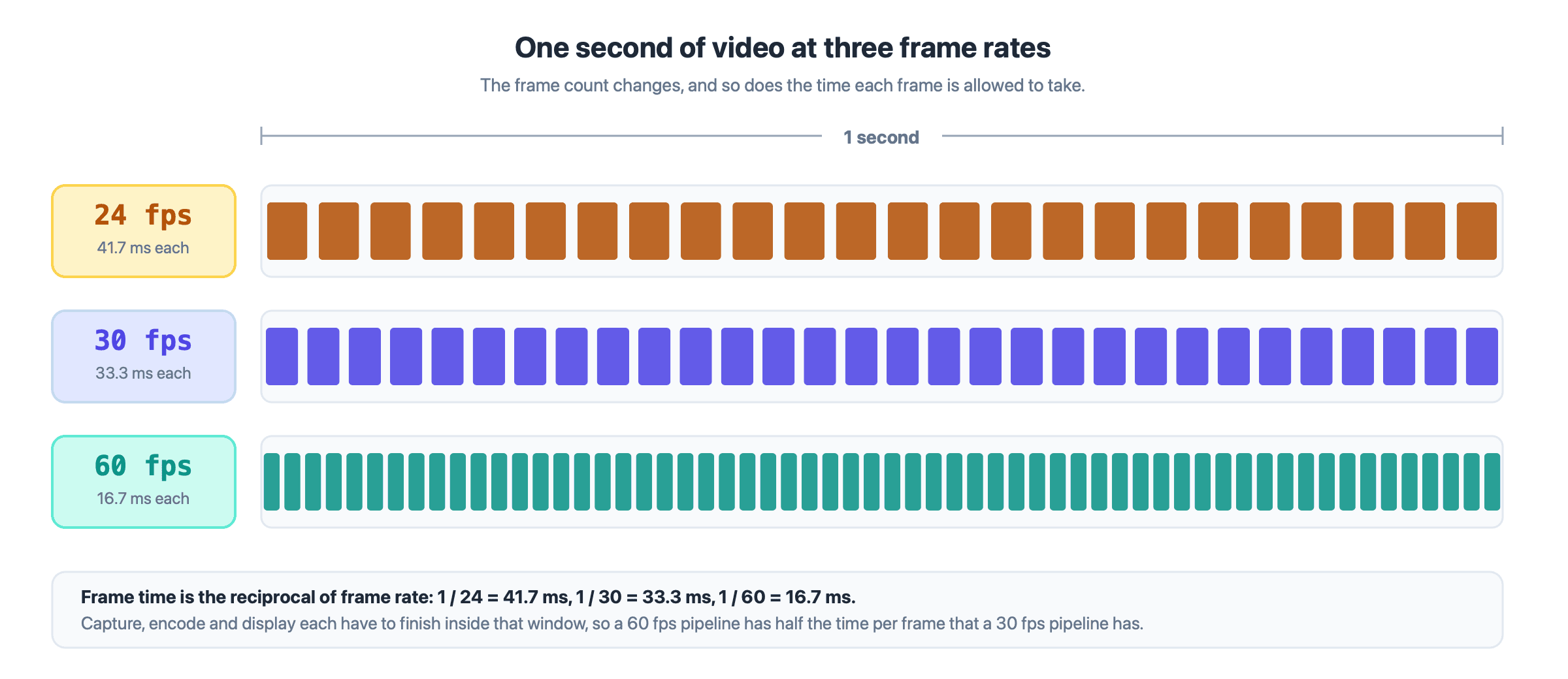
The same second of video at three frame rates. The frame duration, not the frame count, is what an encoder and a display work with.
24 fps vs 30 fps
The 24 frame rate vs 30 question is settled by the destination, not by quality. 24 fps is the film frame rate and carries the motion character an audience reads as cinema. 30 fps is the normal frame rate for streaming, conferencing and North American broadcast, and holds up better on fast movement. Converting between them is the real cost: ITU-R BT.709 describes 3:2 pull-down to make a 30 Hz copy from a 24 frame per second original, and that cadence survives into whatever encodes the result.
Why some frame rates have a .97 or a .94
The fractional rates are that same ITU-R list divided by 1.001: 29.97, 59.94 and 23.976. Apple's HLS authoring specification, linked in the next section, lists all three alongside the whole numbers as supported rates, so a file marked 29.97 is normal rather than broken. The consequence is arithmetic. A timeline counted in whole 30 fps frames runs about 0.1% fast against a clock, so long-form projects track the fractional rate rather than rounding it.
Frame rate for live streaming
Live streaming uses a 30fps frame rate by default and a 60 fps frame rate for fast motion, and the choice changes both the bitrate you need and the length of your GOP, the group of pictures between two key frames. A live stream is encoded, segmented and delivered in one pass, so its frame rate is bound to other settings in the encoder.
The table lists the fps rates three platforms publish, read on 22 September 2026.
| Platform | Frame rates accepted | What it asks for on a live stream | Stated in |
|---|---|---|---|
| Apple HLS authoring spec | 23.976, 24, 25, 29.97, 30, 50, 59.94, 60. Nothing above 60 | 60 or 59.94 from an NTSC or ATSC source, 50 from a PAL source | Items 1.16 to 1.19 |
| YouTube Live | Up to 60 fps | 30 or 60, with a separate bitrate row for each | Live encoder settings |
| Amazon IVS | Up to 60, including the PAL 25 and 50 rates | 30 at 480p, 30 or 60 at 720p and 1080p | Streaming configuration |
Two lines in that table are worth more than the rest. Apple's item 1.19 states that frame rates above 60 fps shall not be used, so 60 is a hard ceiling for anything delivered to Apple devices over HLS, or HTTP Live Streaming. Items 1.16 and 1.17 then ask for 59.94 or 60 from NTSC and ATSC sources and 50 from PAL, which is higher than the 30 fps most streaming guides suggest.
Doubling the frame rate does not double the bitrate. YouTube's live encoder table gives the H.264 recommendation for 1080p at 30 fps as 10 Mbps and for 1080p at 60 fps as 12 Mbps, a 20% increase for twice the frames, and moves 720p from 4 Mbps to 6 Mbps. The extra frames are cheap because each sits closer in time to its neighbour, so the difference an encoder stores is smaller. What 60 fps costs is headroom: on a connection already marginal at 30 fps, the encoder fits twice as many frames under the same ceiling and degrades something to do it.
Frame rate and keyframe alignment
Frame rate decides how many frames sit inside a GOP, because most encoders express the keyframe interval in seconds and convert. At a two second interval, 30 fps produces a 60 frame GOP and 60 fps a 120 frame GOP. Apple's authoring specification asks at item 1.13 for key frames every two seconds, and Amazon IVS gives two seconds at every resolution tier above.
The trap is an encoder whose keyframe field counts frames rather than seconds. Set it to 60 while running 30 fps and the interval is two seconds; change the frame rate to 60 and the same 60 silently becomes one second. Re-check that field after every frame rate change, and if the stream goes out over HTTP, read how HLS cuts a stream into media segments first, because segment length is built on both numbers.
Frame rate on a real-time path
A WebRTC sender treats frame rate as a request rather than a setting. The W3C Media Capture and Streams specification defines frameRate as a constrainable property on a video track, so an application asks the source for a rate and the user agent supplies what the hardware and conditions allow.
That matters when bandwidth drops, because an encoder under pressure gives up either frames or pixels and cannot keep both. Moving content suffers most from lost frames, text and shared screens from lost detail. VideoSDK exposes that as an optimization mode on a video track, where the motion setting will "degrade resolution in order to maintain frame rate" and the text and detail settings do the opposite, as its optimize video track guide documents.
What is variable frame rate?
Variable frame rate, or VFR, means each frame carries its own timestamp and the gap between frames is allowed to change. Constant frame rate, or CFR, spaces every frame evenly. A screen recorder that emits a frame only when the picture changes produces VFR, and so does a phone camera that lengthens its exposure in low light.
VFR is efficient at capture and awkward everywhere after it. Any tool that assumes a constant rate reads the file as evenly spaced, so picture and sound drift apart further the longer the recording runs. Cinema rules it out at the master: the DCI specification requires a digital cinema master's frame rate to remain constant.
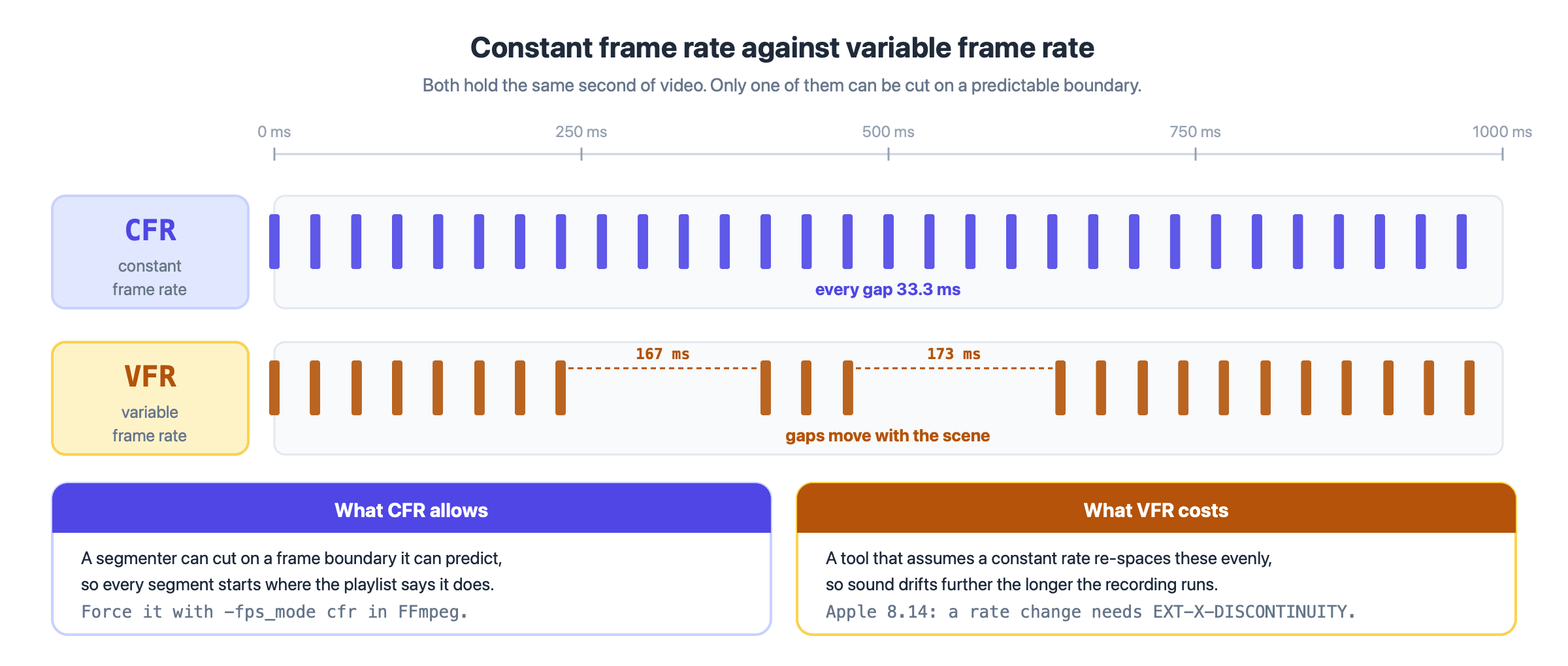
CFR spaces frames evenly, so a segmenter can cut on a predictable boundary. VFR does not, and the gap moves with the scene.
Streaming is stricter still. Apple's authoring specification requires at item 8.14 that a frame rate change be marked as a discontinuity with an EXT-X-DISCONTINUITY tag, and warns at item 9.23 that nonsimilar frame rates may cause playback issues. A VFR source in a live encoder forces a choice between rewriting timestamps and emitting discontinuities some players handle badly.
Force CFR at the first encode. In FFmpeg that is -fps_mode cfr, which the FFmpeg documentation describes as duplicating and dropping frames to reach exactly the requested constant frame rate, paired with -r. In OBS and most broadcast encoders the output is already CFR, so the setting to check is the capture device.
How many frames per second can the human eye see?
The human eye does not work in frames, so the question has no number as an answer. Vision is continuous, and what changes with frame rate is not whether you see the image but which artefacts you notice: judder on a pan, strobing on a wheel, flicker on an edge.
The measurement usually quoted is the critical flicker fusion rate, the point where modulated light stops looking like flicker, reported somewhere between 50 and 90 Hz. That figure understates what the eye can resolve. In Humans perceive flicker artifacts at 500 Hz, published in Scientific Reports in February 2015, Davis, Hsieh and Lee showed that when a display contains a high frequency spatial edge, "flicker artifacts disappear only over 500 Hz" for the median viewer, and several participants saw them above 800 Hz.
None of that argues for 500 fps video, because flicker is how a display refreshes its light while frame rate is how often the content changes. It does mean that anyone capping the eye at 30 or 60 is describing a display convention, not a limit of vision.
Key takeaways
- Frames per second counts the still images a video shows each second, and frame rate is the same measurement under a different name.
- The standard frame rates are 24 for cinema, 25 and 50 in PAL regions, 30 and 60 for streaming, and the fractional variants are those divided by 1.001.
- Apple's HLS authoring specification forbids anything above 60 fps, which makes 60 the working ceiling for delivery to Apple devices.
- Doubling the frame rate raises YouTube's recommended bitrate by 20 to 50%, not by 100%, because consecutive frames are more alike.
- Variable frame rate is fine at capture and a problem afterwards, so force constant frame rate before a file reaches an encoder.
Conclusion
Frame rate is one of the few encoder settings that changes three things at once: how motion looks, how much bitrate the stream needs, and how many frames sit inside each group of pictures. Decide it from the destination, keep it constant, and re-check the keyframe field whenever you change it. If you are building a live product where hosts stream in real time and an audience watches over HLS, the interactive live streaming pattern carries both paths, and each one handles frame rate differently.
Frequently asked questions
What does frame rate mean in video?
Frame rate means how many individual images a video contains for each second of running time, written as frames per second or fps. One frame per second means one still image a second, so a 30 fps clip holds thirty. That is the whole frame rate definition, and the meaning of frame rate is identical in a camera, an editor and an encoder. It is independent of resolution.
How many frames per second should a video be?
Match the frame rate to where the video will play. Use 24 fps for film and cinematic work, 25 or 50 in PAL regions, 30 fps for most streaming and conferencing, and 60 fps for sport, gaming and screen capture. Anything above 60 is wasted on an HLS path, which does not accept it.
What is a good frame rate for live streaming?
30 fps is a good frame rate for most live streams and 60 fps is the right choice for fast motion. Amazon IVS recommends 30 at 480p and 30 or 60 at 720p and 1080p, and YouTube accepts up to 60 fps. Whatever fps rate you pick, keep it constant. Lower rates such as 15 fps or 5 frames per second stay valid for low-motion sources: Amazon IVS gives a security camera as its example.
What fps is real life?
Real life has no fps, because nothing samples it. People asking how many fps is real life are usually reaching for the refresh rate of the screen in front of them, which is a property of that display rather than of vision. Frame rate only becomes visible when a recording samples motion coarsely enough that your eye can tell one frame from the next.
What is frame time?
Frame time is the same measurement expressed in milliseconds instead of frames per second, and the two are reciprocals. 24 fps is 41.7 ms per frame, 30 fps is 33.3 ms and 60 fps is 16.7 ms. Frame time is the more useful figure when you are budgeting a capture and encode path, because every stage has to finish inside it. Over a minute, 30 fps is 1,800 frames per minute.