



Use hls.js when you want only an HLS streaming engine, you will supply your own controls, and you need documented low-latency HLS support. Use Video.js 8 when you want a complete player with live-edge controls and standard-latency HLS through its bundled VHS engine. You rarely need both, because Video.js 8 does not use hls.js by default.
The hls.js vs Video.js question comes up whenever a team has a live HLS URL and needs a live stream player for the web. This guide, for front-end developers working on live streams rather than video on demand, compares hls.js 1.7.3 and Video.js 8.24.1, current as of 29 September 2026; every feature claim comes from each project's own documentation or published code. If you need the protocol first, read how HTTP Live Streaming works; for the broader checklist, see the requirements every HLS video player has to meet.
hls.js vs Video.js: a streaming engine and a player framework
hls.js and Video.js sit at different layers, which is why the comparison confuses people. hls.js is a JavaScript library that implements an HTTP Live Streaming (HLS) client: it loads playlists and segments and feeds them to the browser through Media Source Extensions (MSE), according to the hls.js README. It draws no buttons. You control playback through the standard <video> element, and the README points to Media Chrome for a custom interface.
Video.js is a player: controls, skins and plugins around the <video> element, plus an HLS engine. In Video.js 8 that engine is videojs-http-streaming (VHS), which the VHS README says has shipped in the default Video.js build since version 7. VHS also plays MPEG-DASH; hls.js plays HLS only.
So the real choice is between two engines, hls.js or VHS, and whether you want the Video.js interface on top. The Video.js 10 release candidate, published 9 September 2026 and not yet a stable release, has two HLS elements: <hls-video>, which runs on Video.js's own engine, and <hlsjs-video>, which is powered by hls.js.
Live HLS feature comparison
The table compares the two stable stacks on what matters for a live stream. Each cell comes from that project's README, docs or npm entry, read on 29 September 2026, except the size row, which is measured as described below the table.
| Criterion | hls.js 1.7.3 | Video.js 8.24.1 with VHS 3.17.5 |
|---|---|---|
| Published on npm | 11 Sep 2026 | 10 Sep 2026 (VHS: 19 Jun 2026) |
| Role | HLS engine, no interface | Player with interface and bundled engine |
| Formats | HLS | HLS and MPEG-DASH |
| Low-latency HLS | Documented: partial segments, blocking playlist reload, delta updates, rendition reports | Docs conflict: the supported-features page says on the roadmap; the changelog says on by default since VHS 3.0.0 |
| Live controls | None; use <video controls> or your own interface | Live label by default; seek bar and SeekToLive button with liveui: true |
| Safari and iPhone | MSE on macOS Safari 10+; iOS 17.1+ through ManagedMediaSource | Native HLS on Safari by default |
| Content protection | Encrypted Media Extensions (EME) digital rights management (DRM) with FairPlay, PlayReady and Widevine on fragmented MP4 | Through the videojs-contrib-eme plugin |
| Captions | CEA-608/708 closed captions, WebVTT, IMSC1 text profile | CEA-608 and CEA-708 captions (708 parsing on by default); in-manifest WebVTT |
| Minified JS, gzip | 188 kB full build, 119 kB light build | 201 kB including VHS, plus 12 kB of CSS |
| Licence | Apache 2.0 | Apache 2.0 |
Sizes are the jsDelivr files for these versions, compressed with gzip -9 on 29 September 2026. For a live project, read the low-latency HLS (LL-HLS) row first: if your packager emits LL-HLS, hls.js lists support in its README, while VHS's supported-features page and changelog disagree.
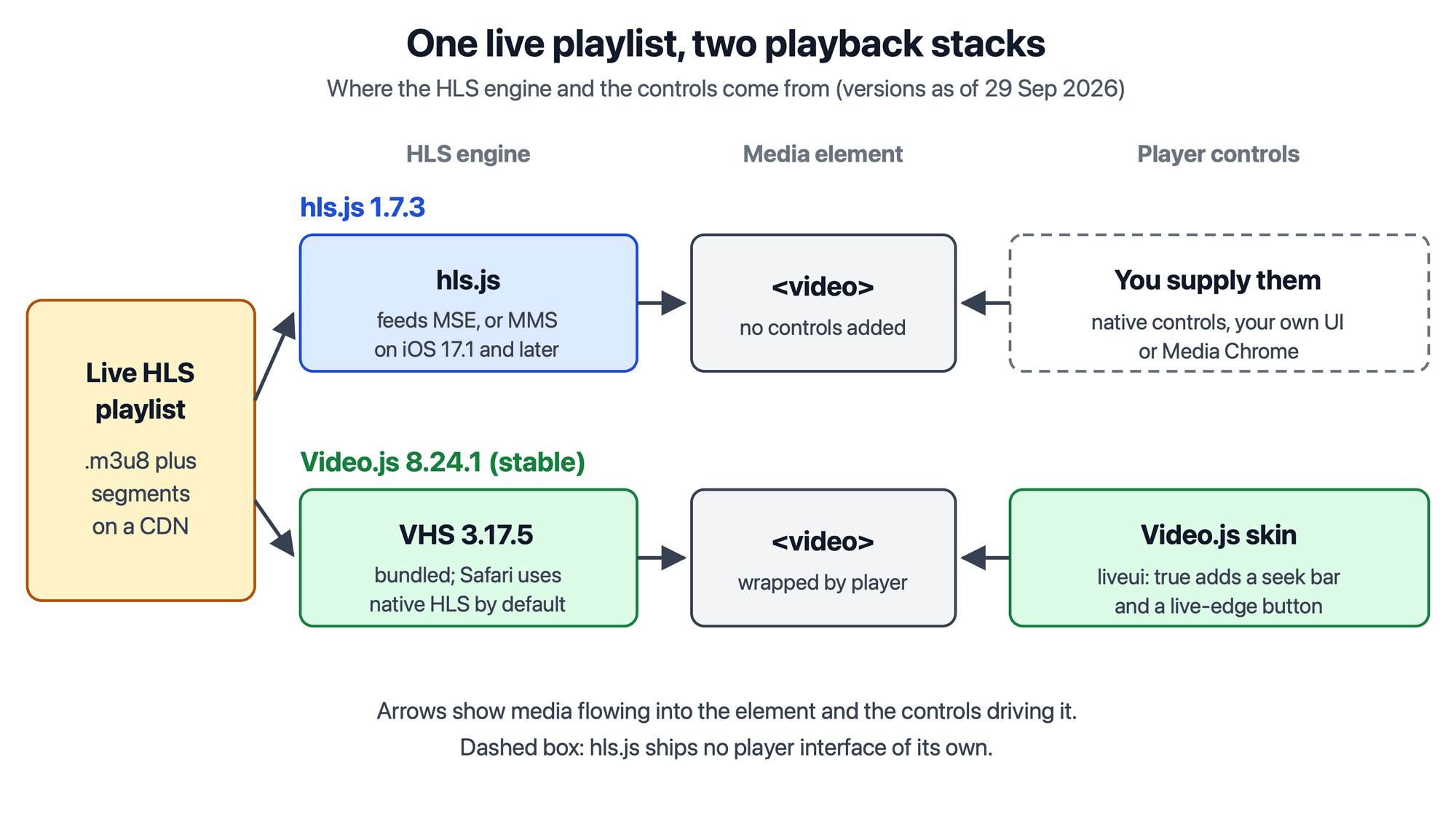
hls.js stops at the engine; Video.js 8 wraps its own VHS engine and the video element in a player interface.
Playing a live stream with hls.js
An hls.js player is two parts: the hls.js engine and the controls you add yourself. The embed block below is copied verbatim from the hls.js README, section "Embedding HLS.js".
<script src="https://cdn.jsdelivr.net/npm/hls.js@1"></script>
<!-- Or if you want the latest version from the main branch -->
<!-- <script src="https://cdn.jsdelivr.net/npm/hls.js@canary"></script> -->
<video id="video"></video>
<script>
  var video = document.getElementById('video');
  var videoSrc = 'https://test-streams.mux.dev/x36xhzz/x36xhzz.m3u8';
  if (Hls.isSupported()) {
    var hls = new Hls();
    hls.loadSource(videoSrc);
    hls.attachMedia(video);
  }
  // HLS.js is not supported on platforms that do not have Media Source
  // Extensions (MSE) enabled.
  //
  // When the browser has built-in HLS support (check using `canPlayType`),
  // we can provide an HLS manifest (i.e. .m3u8 URL) directly to the video
  // element through the `src` property. This is using the built-in support
  // of the plain video element, without using HLS.js.
  else if (video.canPlayType('application/vnd.apple.mpegurl')) {
    video.src = videoSrc;
  }
</script>
For a live page, pin a version (hls.js@1.7.3) instead of @1, replace the on-demand test URL with your live .m3u8, and add the controls attribute, which the README's <video> element lacks. The README checks Hls.isSupported() first because Chrome 147 reports native HLS support yet can fail on some streams.
The live defaults come from the hls.js API documentation. liveSyncDurationCount is 3, so on a playlist that declares no hold-back, playback starts three target durations behind the live edge, in line with section 6.3.3 of RFC 8216, and the docs warn that lowering it "is likely to cause playback stalls". lowLatencyMode defaults to true, which starts LL-HLS streams at the playlist's PART-HOLD-BACK instead, and maxLiveSyncPlaybackRate is 1, which disables catching up by speeding playback. Worker, buffer and event settings are in configuring hls.js for production.
Video.js live stream playback with VHS
A Video.js live stream plays through VHS in version 8, with the Video.js controls around it. The first block is the "Source" example from the VHS README; the second is from the Video.js Live Support guide. Both were copied verbatim on 29 September 2026.
var player = videojs('some-video-id');

player.src({
  src: 'https://d2zihajmogu5jn.cloudfront.net/bipbop-advanced/bipbop_16x9_variant.m3u8',
  type: 'application/x-mpegURL',
  withCredentials: true
});
var player = videojs('some-player-id', {liveui: true});
Both assume Video.js 8 is loaded on the page with a player element carrying the ID they name, as the Video.js getting started page shows. That page's CDN links load 8.23.8, so change the version in them to 8.24.1. In the first block, swap the sample stream for your live playlist and drop withCredentials unless your CDN needs cookies. The VHS README recommends player.src() or a <video-js> element so the browser does not play the HLS natively.
The liveui option is false in the default options of Video.js 8.24.1, so the stock live interface hides the seek bar and shows a live label. With liveui: true, viewers get a seek bar across the live window and a SeekToLive button whose dot turns red at the live edge; player.liveTracker exposes the edge to your code.
Where each option breaks on a live stream
hls.js breaks when delivery is not ready for it. The README requires cross-origin resource sharing (CORS) headers permitting GET on every HLS resource, so a playlist that plays natively in Safari can still fail through hls.js in Chrome. The ES module (ESM) builds do not bundle the transmuxer Web Worker, so transmuxing runs on the main thread unless you set workerPath. On iPhone, hls.js needs iOS 17.1 or later; older devices take the native fallback in the embed block.
Video.js 8's main gap on a live stream is low-latency HLS. The VHS supported-features page lists LL-HLS as on the roadmap and not available, yet the VHS 3.0.0 release notes say LL-HLS support is on by default, and the VHS 3.17.5 source still turns the llhls option on unless you pass llhls: false. With the project's own pages in conflict, test your LL-HLS stream in Video.js 8 before relying on it. The live guide says the liveui interface does not work with Android's native HLS, which lacks seekable ranges during live streams; VHS avoids that by default, because its overrideNative option is on everywhere except Safari, according to the VHS README. VHS's experimentalUseMMS option, which uses ManagedMediaSource on iPhone when overrideNative is on, currently disables AirPlay.
Both break when viewers need sub-second delay: HLS players start behind the live edge by design, so use a WebRTC player for sub-second playback. A digital video recorder (DVR) window, the rewindable part of a live playlist, only reaches back as far as the playlist does; for watching a stream after it ends, see how video on demand works.
Which video player should you use for live streams?
The right video player for live streams depends on low-latency HLS, the interface you want and the formats you serve. Apply these rules in order:
- If your packager emits LL-HLS, use hls.js, because its README lists LL-HLS support, while VHS's own pages disagree on whether it has it.
- If you are building a custom interface, use hls.js and ship only the engine.
- If you want finished controls and plugins at standard latency on a stable release, use Video.js 8 with
liveui: true. - If you also serve MPEG-DASH, Video.js 8 plays both through VHS; read HLS vs MPEG-DASH before settling on the protocol.
These rules are an opinion based on the documented features, not a benchmark. If you need a React video player for live HLS, both libraries run inside a component, and the wrappers are compared in React HLS player libraries.
Playing a VideoSDK HLS stream in the browser
A media server publishes the live playlist URL; the player does the rest. In VideoSDK, startHls() starts an HLS livestream of a meeting, and when onHlsStateChanged reports HLS_PLAYABLE, hlsUrls.playbackHlsUrl carries a live URL with playback support. The VideoSDK HLS player setup guide (last updated 4 September 2026) plays it with hls.js and falls back to the native <video> source when Hls.isSupported() is false; it names no other player. Its example sets liveSyncDurationCount to 1, below the hls.js default of 3, and sets maxBufferLength to 0 and maxMaxBufferLength to 1, against hls.js defaults of 30 and 600 seconds. The hls.js API documentation describes maxBufferLength as the buffer length hls.js tries to reach and warns that lowering liveSyncDurationCount "is likely to cause playback stalls", so test these values against your own stream before copying them. VideoSDK's docs do not cover Video.js, so test that path yourself before relying on it.
Glossary
Media Source Extensions (MSE): The browser API that lets JavaScript append media segments to a <video> element.ManagedMediaSource (MMS): The MSE variant that shipped in Safari 17 on Mac and iPad and reached iPhone in Safari 17.1, according to WebKit. hls.js has used it on iPhone since version 1.5.0.
Low-Latency HLS (LL-HLS): The HLS extension that adds partial segments and blocking playlist reloads to cut delay; see how LL-HLS differs from standard HLS.
VHS (videojs-http-streaming): The HLS and MPEG-DASH engine bundled with Video.js 7 and 8.
Live edge: The newest playable point in a live playlist, which players stay a few target durations behind.
Key takeaways
- The hls.js vs Video.js choice is really an engine choice, hls.js or VHS, plus whether you want the Video.js interface on top.
- hls.js 1.7.3 lists LL-HLS support in its README; for the VHS engine inside Video.js 8, the supported-features page says it is on the roadmap, while the changelog says it has been on by default since VHS 3.0.0.
- Choose hls.js for LL-HLS or a custom interface, and Video.js 8 with
liveui: truefor finished live controls at standard latency. - Neither library makes HLS a real-time channel; for sub-second delay, viewers need a WebRTC player.
Pin the version you test and read the changelog before upgrading. If you are producing the live stream as well as playing it, start with the VideoSDK HLS documentation; a new account comes with a $20 credit.
Frequently asked questions
Does Video.js use hls.js?
Video.js 8, the current stable release, does not use hls.js by default; its HLS engine is VHS, maintained in the Video.js GitHub organisation. The hls.js README lists three community plugins, videojs-hlsjs, videojs-hls.js and videojs-contrib-hls.js, that run hls.js inside Video.js. Check each plugin's latest release against Video.js 8 before adopting one.
Can Video.js play low-latency HLS?
Its documentation disagrees. The VHS supported-features page, read on 29 September 2026, says the low-latency features from the second edition of the HLS specification are on the roadmap but not available, while the VHS 3.0.0 release notes say LL-HLS support was enabled by default, and the 3.17.5 source still turns it on. Test your own LL-HLS stream before relying on Video.js 8 for it.
Do you need hls.js on Safari and iPhone?
No. Safari on macOS, iPadOS and iOS plays HLS natively through the plain <video> element, and VHS uses that native player on Safari by default. hls.js is optional there; it supports macOS Safari 10 and later, iPadOS 13 and later, and iOS 17.1 and later through ManagedMediaSource. Use it there when you want one engine and one configuration in every browser.