


Use Mesh WebRTC for one-to-one calls or tightly controlled rooms with only a few participants. Use an SFU for interactive multiparty calls that need low latency, flexible layouts, and selective video delivery. Use an MCU when constrained endpoints need one composed stream. VideoSDK uses managed SFU routing for production video, audio, and interactive streaming applications.
Choosing between SFU vs MCU vs Mesh WebRTC determines how much bandwidth each participant needs, where media gets processed, how your application scales, and whether the server can access unencrypted media.
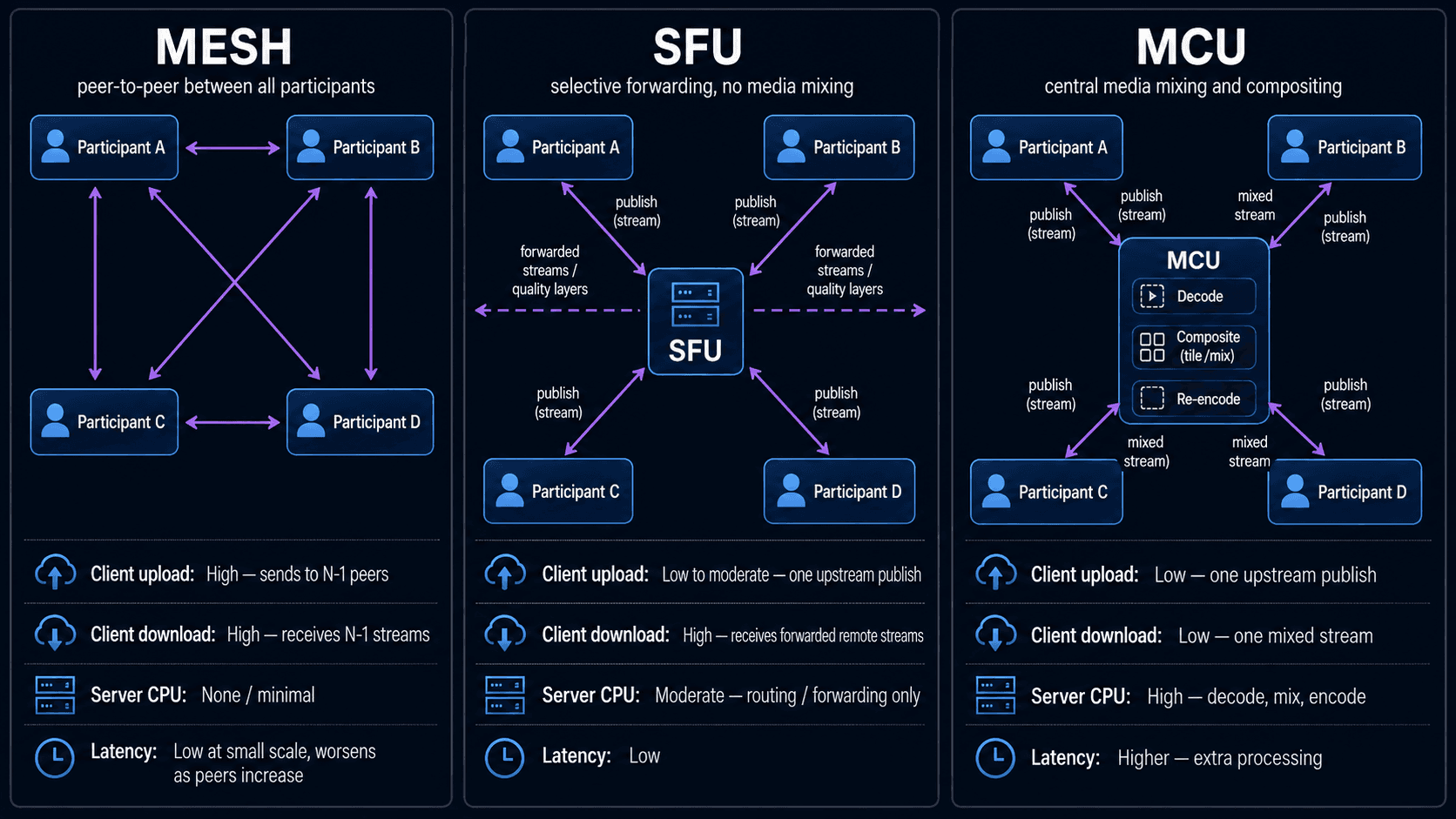
Mesh sends media directly between every participant. An SFU receives each stream once and selectively forwards encoded streams. An MCU decodes incoming streams, mixes them, and sends one or more composed outputs. For most modern multiparty applications, an SFU is the practical default. Mesh remains useful for small calls, while MCU architecture still fits legacy endpoints, server-controlled layouts, and specialized media-processing workflows.
VideoSDK provides a managed SFU-based room architecture, so developers can build multiparty video without operating signaling, routing, congestion control, and media servers themselves. Its React SDK also exposes multistream publishing and server-side controls for pausing incoming streams.
SFU vs MCU vs Mesh WebRTC: Quick Comparison
SFU is usually the strongest default for interactive group calls, but each topology solves a different infrastructure problem.
| Factor | Mesh | SFU | MCU |
|---|---|---|---|
| Media path | Peer to every peer | Participant to SFU to selected recipients | Participant to MCU to composed output |
| Client upload | Grows with every participant | Usually one stream or one simulcast set | Usually one stream |
| Client download | One stream per remote participant | Selected remote streams and layers | One composed stream |
| Client processing | High as the room grows | Moderate, depends on received streams | Low |
| Server processing | No central media processing | Packet forwarding and stream selection | Decode, mix, compose, and re-encode |
| Server bandwidth | Minimal, excluding TURN | High egress at scale | Moderate to high |
| Added media latency | Lowest on a direct route | Low | Highest of the three |
| Layout control | Client-side | Client-side | Server-side |
| End-to-end encryption potential | Straightforward between peers | Possible with encoded-frame encryption | Conflicts with server-side mixing |
| Best fit | One-to-one and tiny rooms | Interactive multiparty applications | Fixed composites and constrained endpoints |
The IETF describes mesh, media-mixing, and selective-forwarding as distinct RTP topologies. A media-mixing server creates a new outgoing stream, while a selective forwarding middlebox routes source streams without creating a conventional composite.
What Are Mesh, SFU, and MCU?
Mesh, SFU, and MCU are media-routing topologies, not separate replacements for the WebRTC standard.
WebRTC defines browser and application APIs for capturing, sending, receiving, and securing real-time media. The topology determines how those WebRTC media connections are arranged once more than two participants join.
What Is Mesh WebRTC?
Mesh WebRTC is defined as a topology where every participant establishes a media connection with every other participant.
Mesh works by making each device encode and upload a separate copy of its media for every remote peer. A four-person room requires each participant to maintain three outgoing and three incoming media paths.
The total number of peer-to-peer connections is:
Connections = N × (N - 1) ÷ 2
For six participants:
Connections = 6 × 5 ÷ 2 = 15
The IETF’s mesh topology shows each endpoint communicating directly with the other endpoints in the RTP session.
Mesh does not always mean packets avoid all servers. Signaling still requires an application server, and media may travel through a TURN relay when a direct ICE path cannot be established.
What Is an SFU?
An SFU is defined as a media server that receives encoded streams and selectively forwards them to other participants.
An SFU works by accepting one published stream or simulcast set from each participant. It then decides which source, quality layer, or media type each receiver should get.
The server normally avoids decoding every video frame. This keeps processing latency and CPU usage lower than an MCU, though the SFU may consume substantial network bandwidth as it forwards many streams.
RFC 7667 associates selective forwarding with simulcast and scalable video coding. Modern SFU implementations such as mediasoup also expose simulcast, SVC, and transport-wide bandwidth estimation as core routing capabilities.
VideoSDK follows this managed SFU model. For example, its SDK can instruct the server to stop forwarding selected incoming media, and its multistream configuration publishes several video resolutions for receiver-specific selection.
What Is an MCU?
An MCU is defined as a media server that processes multiple incoming streams and creates a new mixed output.
An MCU works by decoding incoming audio or video, arranging or mixing the uncompressed media, encoding the result, and sending it to participants.
RFC 7667 calls this a “Media-Mixing Mixer.” The standard explains that an MCU may produce one common tiled layout or personalized layouts for individual recipients. It also identifies three costs: media-processing resources, quality loss from re-encoding, and additional latency.
The advantage appears at the endpoint. A participant may need to decode only one video stream, regardless of how many people are in the room.
How Mesh WebRTC Scales
Mesh shifts infrastructure work to participant devices, causing upload bandwidth and encoder load to grow linearly per user and quadratically across the room.
Assume every participant sends a 1.5 Mbps video stream and everyone sees everyone else.
For N participants and bitrate B:
Per-participant upload = (N - 1) × B
Per-participant download = (N - 1) × B
Aggregate room upload = N × (N - 1) × B
For six participants:
Per-participant upload = 5 × 1.5 Mbps = 7.5 Mbps
Per-participant download = 5 × 1.5 Mbps = 7.5 Mbps
Aggregate upload = 6 × 5 × 1.5 Mbps = 45 Mbps
That simplified calculation excludes audio, retransmissions, protocol overhead, screen sharing, and TURN relay traffic.
Bandwidth is only part of the problem. Each participant may also run multiple encoders, encryption contexts, congestion controllers, and peer connections. Mobile devices can hit thermal, battery, and CPU limits before the network reaches its theoretical capacity.
When to Use Mesh WebRTC
Use Mesh when:
- The product is strictly one-to-one.
- Rooms normally contain two or three participants.
- Direct peer media is a hard architectural requirement.
- You want to avoid central media-server bandwidth.
- Every participant uses a predictable network and capable device.
Mesh is not a safe default for rooms whose size, device mix, or network conditions can change after launch.
A TURN server can also erase the expected “no media server” cost advantage. When direct NAT traversal fails, TURN relays the encrypted packets and incurs bandwidth costs without providing SFU-style stream selection.
How an SFU Scales WebRTC
An SFU reduces participant upload requirements by accepting each published stream once, then moving the scaling burden to server egress and receiver decoding.
In a single-encoding model:
Per-participant upload ≈ B
Maximum participant download ≈ (N - 1) × B
SFU ingress ≈ N × B
SFU maximum egress ≈ N × (N - 1) × B
The SFU’s theoretical full-room egress can still grow quadratically. Production systems control it through active-speaker selection, pagination, last-N forwarding, stream subscriptions, paused off-screen video, simulcast, and SVC.
This distinction matters. An SFU does not eliminate bandwidth. It moves upload pressure away from participant devices and gives the application a central point for selecting what each receiver actually needs.
Simulcast and SVC
Simulcast sends multiple independently encoded versions of the same video. For example, a publisher may send high, medium, and low resolutions. The SFU forwards the version that fits each receiver’s layout and available bandwidth.
Scalable Video Coding encodes one stream with layers that can be selectively forwarded or dropped. Both approaches let the SFU adapt delivery without decoding and recomposing the video.
VideoSDK’s current multistream documentation gives a concrete example: a 720p-capable device may publish 720p, 360p, and 90p layers. VideoSDK can then deliver an appropriate layer based on the receiving participant’s network.
Simulcast increases sender upload above the single-stream formula because several encodings are published. That extra upload buys better receiver adaptation and avoids forcing every participant to download the highest-quality stream.
When to Use an SFU
Use an SFU when:
- Rooms can grow beyond a few participants.
- Participants need separate video tiles.
- The UI supports active-speaker, gallery, sidebar, or custom layouts.
- Receivers have different network conditions.
- The application needs selective subscriptions.
- You need screen sharing, recording, moderation, or server analytics.
- Low interactive latency matters.
- The same room serves web, mobile, desktop, or embedded clients.
An SFU is not automatically cheap. A large room with many visible publishers can create significant egress, and each receiver must still decode the streams it receives.
How an MCU Processes WebRTC Media
An MCU lowers endpoint complexity by moving decoding, layout, mixing, and encoding into centralised infrastructure.
A typical MCU receives one stream from each participant. The server decodes those inputs and creates a composite, such as a 3 by 3 gallery. It then encodes the composite and sends it to each participant.
A simple common-layout model looks like this:
Per-participant upload ≈ B
Per-participant download ≈ C
MCU input decoding jobs = N
MCU output encoding jobs = 1 or more
C is the composite bitrate. If every participant receives a personalized layout, the MCU may need several output encoders rather than one.
This server-side processing makes MCU capacity harder to predict from bandwidth alone. Resolution, frame rate, codec, number of layouts, hardware acceleration, and compositing effects all influence CPU or GPU requirements.
When to Use an MCU
Use an MCU when:
- Legacy endpoints can decode only one stream.
- A SIP or hardware-conferencing environment requires a composed feed.
- The application needs a fixed server-controlled layout.
- Client devices are severely resource-constrained.
- Server-side overlays, watermarks, or transformations must appear identically for every viewer.
- A single composite output is required for downstream broadcasting.
An MCU is not the preferred choice when every user needs independent participant tracks, the lowest possible processing delay, or media that the server cannot decrypt.
Which WebRTC Topology Is Best?
The best WebRTC topology is the least complex option that still survives your largest room, weakest device, and worst expected network.
Use the following decision sequence.
- Start with room size. For strict one-to-one calls, Mesh may be sufficient. For unpredictable or multiparty rooms, evaluate an SFU first.
- Check the required layout. Independent participant tiles favor an SFU. One fixed composite favors an MCU.
- Model the weakest client. An MCU minimizes receiver decoding. An SFU lets you reduce subscriptions and video layers. Mesh offers little central control.
- Define the encryption boundary. If the server must never access encoded media content, Mesh or an E2EE-capable SFU is more suitable than an MCU.
- Calculate both client and server bandwidth. SFU client upload is efficient, but server egress can dominate operating cost.
- Decide who operates the infrastructure. Self-hosting offers control but requires media-server operations. A managed platform such as VideoSDK removes that operational layer.
- Plan recording and broadcast outputs separately. Interactive delivery and composed recording do not have to use the same media path.
Conditional Verdict
- Choose Mesh for strict one-to-one communication or tiny controlled rooms.
- Choose SFU for most multiparty video calling, audio rooms, interactive classrooms, telehealth sessions, and live collaboration.
- Choose MCU for single-stream endpoints, fixed compositions, and server-side media transformation.
- Choose a hybrid when participants need low-latency SFU delivery but recordings or broadcasts need an MCU-style composite.
Security and End-to-End Encryption
Topology changes which systems must access media content and therefore changes the achievable encryption model.
Standard WebRTC connections protect media in transit using secure transport. That protection does not automatically mean media remains encrypted from every intermediary involved in the call.
Mesh Security
In Mesh, each peer negotiates secure media directly with every other peer. A TURN relay can transport packets without decoding their media payloads.
This architecture provides a simple trust boundary, but every participant remains an endpoint with access to the media it receives.
SFU Security
An SFU needs enough packet and stream metadata to route media, request keyframes, and select layers. Traditional hop-by-hop WebRTC transport allows the SFU to receive and forward protected streams between separate peer connections.
Application-layer frame encryption can place another encryption layer around encoded media. The W3C WebRTC Encoded Transform specification exposes encoded-frame transforms and SFrame cipher suites for this class of design.
With this pattern, an SFU can route encrypted frames while endpoints retain content keys. Some server-side capabilities may become unavailable, including media transcription, content moderation, server-side visual processing, or conventional compositing.
MCU Security
An MCU must normally decode media before mixing it. That requires access to the media content at the server.
This makes a conventional MCU incompatible with strict end-to-end encryption where only participant endpoints possess decryption keys. You must either trust the MCU as an endpoint, weaken the encryption boundary, or use specialized trusted processing.
The security question is therefore not “Does WebRTC use encryption?” The useful question is “Which components are allowed to decrypt the media?”
Using SFU and MCU Together
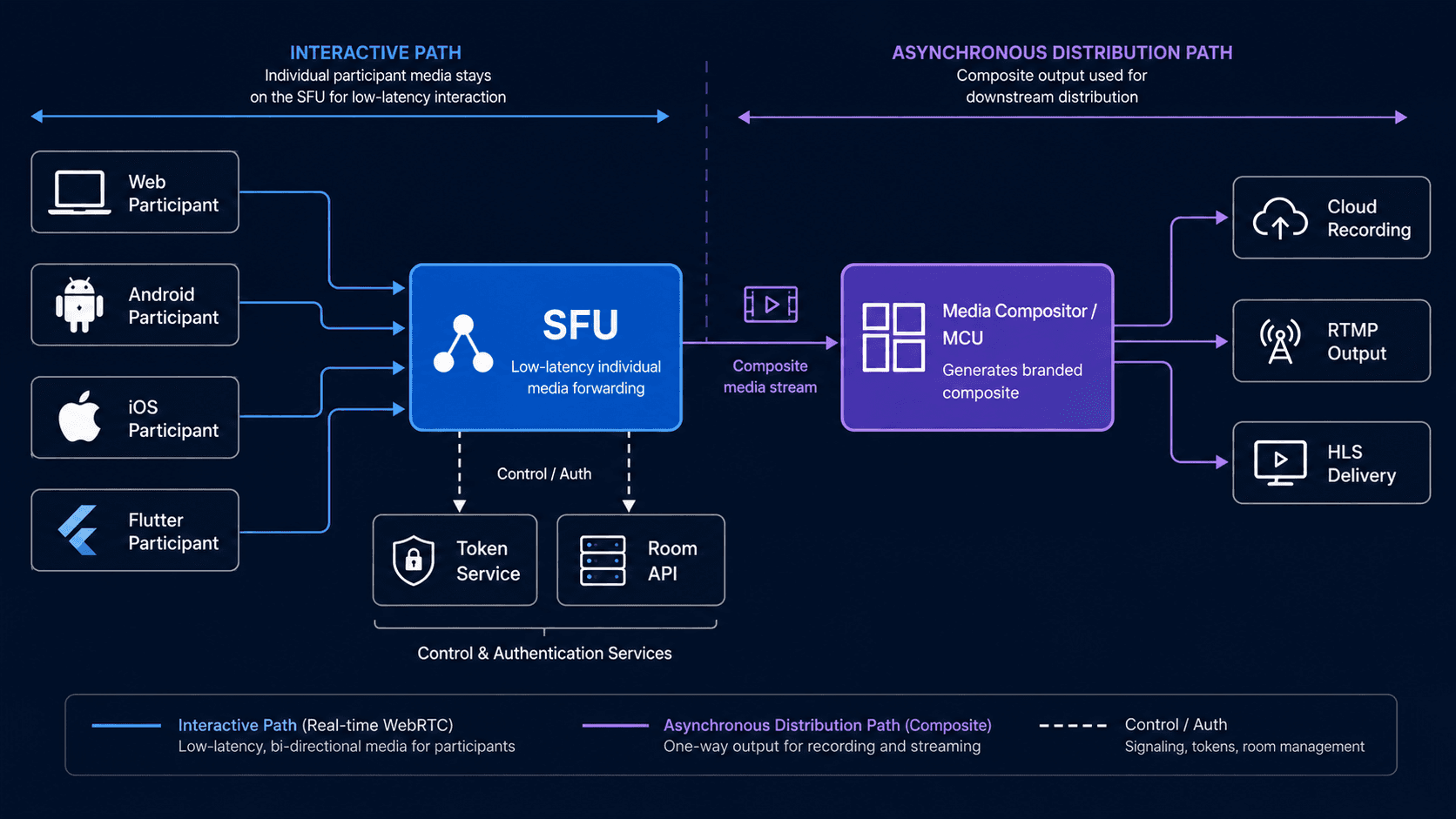
A hybrid SFU plus compositor architecture separates interactive delivery from media production.
Participants can exchange individual low-latency streams through an SFU. A separate compositor can subscribe to selected streams, decode them, create a branded layout, and send the result to recording, RTMP, or HLS infrastructure.
This gives interactive participants flexible client-side layouts while producing one consistent broadcast or evidence file.
A second hybrid pattern uses Mesh for one-to-one calls and migrates to an SFU when another participant joins. This can reduce media-server use, but live topology migration adds signalling, state synchronisation, reconnection, and quality-transition complexity.
For many teams, keeping one SFU path for both one-to-one and group calls is operationally safer, even if it is not the theoretical minimum-cost path.
How VideoSDK Uses Managed SFU Routing
VideoSDK is suitable when a team wants SFU behavior without deploying and operating its own media-server fleet.
VideoSDK organizes communication around rooms, participants, and media streams. Its SDKs and REST APIs handle room creation, participant lifecycle, publishing, subscriptions, recording, and related RTC workflows.
The managed model is most relevant when your engineering team wants to control the application experience but not the packet-routing infrastructure.
Configure Multistream Publishing in React
VideoSDK’s React MeetingProvider accepts a server-generated token and a multiStream option. Current documentation lists multiStream as enabled by default and recommends disabling it for one-to-one calls.
import { MeetingProvider } from "@videosdk.live/react-sdk";
import MeetingView from "./MeetingView";

export default function VideoRoom({
  token,
  meetingId,
  participantName,
  expectedParticipants = 4,
}) {
  if (!token || !meetingId) {
    return <p>Missing meeting credentials.</p>;
  }

  return (
    <MeetingProvider
      token={token}
      config={{
        meetingId,
        name: participantName || "Guest",
        micEnabled: true,
        webcamEnabled: true,
        multiStream: expectedParticipants > 2,
      }}
    >
      <MeetingView />
    </MeetingProvider>
  );
}
Generate the token on your backend. VideoSDK’s MeetingProvider documentation explicitly requires an authentication token generated by the server.
Stop Forwarding Off-Screen Video
VideoSDK’s pauseAllStreams() and resumeAllStreams() methods control incoming remote media. The underlying server-side operation tells the SFU to stop or resume forwarding the chosen media type.
import { useEffect } from "react";
import { useMeeting } from "@videosdk.live/react-sdk";

export default function VisibilityBandwidthControl() {
  const { pauseAllStreams, resumeAllStreams } = useMeeting();

  useEffect(() => {
    const handleVisibilityChange = () => {
      try {
        if (document.hidden) {
          pauseAllStreams("video");
        } else {
          resumeAllStreams("video");
        }
      } catch (error) {
        console.error("Unable to update remote video forwarding:", error);
      }
    };

    document.addEventListener("visibilitychange", handleVisibilityChange);

    return () => {
      document.removeEventListener(
        "visibilitychange",
        handleVisibilityChange
      );
    };
  }, [pauseAllStreams, resumeAllStreams]);

  return null;
}
This is one practical advantage of an SFU: the application can stop unnecessary delivery without asking every remote publisher to renegotiate its camera stream.
Where VideoSDK May Not Fit
VideoSDK is not the right choice for every infrastructure strategy.
A self-hosted SFU may fit better when you need full control over packet routing, server placement, custom congestion algorithms, or infrastructure source code. An MCU-specific platform may fit better when every output requires custom server-side composition or transcoding.
A managed platform also creates usage-based operating costs and platform dependency. Teams with strict on-premise, air-gapped, or unusual media-processing requirements should validate deployment and data-routing options before choosing it.
Production Factors Most Comparisons Miss
Real WebRTC failures usually come from networks, devices, and operational assumptions rather than the topology diagram itself.
TURN Usage
Test how often calls require TURN in your target regions and enterprise networks. A Mesh call relayed through TURN still consumes server bandwidth, while retaining Mesh’s multiple-stream upload pattern.
Receiver Decode Capacity
An SFU can forward 20 streams, but that does not mean a mobile device should decode 20 videos. Limit visible tiles, pause hidden tracks, and request lower layers for thumbnails.
Simulcast Upload Cost
Simulcast reduces receiver waste but increases sender upload. Test the sum of all published layers on ordinary mobile and home networks.
Firewall and Pre-Call Testing
Camera permission, microphone permission, UDP reachability, TURN fallback, browser codec support, and available upload bandwidth should be checked before a high-stakes call.
VideoSDK provides a runPreCallTest() flow that connects to its SFU using a token and tests media and network readiness before the participant joins a room.
Failure Domains
Mesh has no single media-routing server, but one weak participant can still have several poor connections. An SFU creates central infrastructure dependencies, so multi-region routing, health checks, failover, and observability matter.
Recording Architecture
Decide whether you need:
- Individual participant tracks
- One composite recording
- Separate audio and video files
- Live RTMP output
- Post-call transcription
- Tamper-evident evidence storage
The answer may require an SFU plus a separate recording or composition pipeline rather than one topology for every output.
Modeled Example: Six-Person Tutoring Room
A six-person tutoring room shows why SFU architecture normally outperforms Mesh while preserving more flexibility than an MCU.
Assume one tutor, five students, and 1.5 Mbps source video.
Mesh
Each participant uploads five streams:
5 × 1.5 Mbps = 7.5 Mbps upload per participant
The tutor’s laptop must encode five copies and decode five incoming videos. A student on mobile data faces the same connection count.
SFU
Each participant publishes one stream or simulcast set to the SFU. The application displays the tutor in high resolution and students as lower-resolution thumbnails.
When the tutor shares a screen, the application can prioritize the screen and active speaker while pausing videos outside the visible page.
MCU
Each participant sends one stream and receives one classroom composite. Client requirements are low, but students cannot independently enlarge a participant without the MCU producing another composition.
For an interactive tutoring application, the SFU offers the strongest balance. For a low-powered classroom appliance that only displays one fixed grid, an MCU may be reasonable.
A VideoSDK implementation can use multistream publishing, participant-level rendering, and SFU forwarding controls while the application retains its own classroom layout. VideoSDK’s rendering guide exposes participants through useMeeting and individual media state through useParticipant.
SFU vs MCU vs Mesh WebRTC Decision Checklist
A topology decision should be based on measured constraints rather than a universal participant threshold.
| Question | Mesh signal | SFU signal | MCU signal |
|---|---|---|---|
| Are calls permanently one-to-one? | Strong | Possible | Weak |
| Can rooms grow unpredictably? | Weak | Strong | Moderate |
| Do users need independent video tiles? | Moderate | Strong | Weak |
| Are endpoints unable to decode several streams? | Weak | Moderate | Strong |
| Must the server never decode media? | Strong | Strong with suitable E2EE | Weak |
| Is one fixed composed output required? | Weak | Requires compositor | Strong |
| Do receivers have different bandwidth? | Weak | Strong with layers | Moderate |
| Does the team want managed infrastructure? | Not required | VideoSDK or another managed SFU | Specialized provider |
| Is full packet-routing control required? | Strong client control | Self-hosted SFU | Self-hosted MCU |
| Is server-side visual processing required? | Weak | Requires separate processor | Strong |
Do not select Mesh only because the first version has three participants. Select it only when product rules prevent the room and feature set from expanding.
Definitions Glossary
WebRTC topology: The arrangement of endpoints and media-processing servers through which real-time audio, video, and data travel.
Mesh: A multiparty topology where every participant maintains a direct media connection with every other participant.
Selective Forwarding Unit: A media server that receives encoded streams and selectively forwards chosen sources or layers without creating a conventional mixed video.
Multipoint Control Unit: A media-processing server that decodes several inputs and creates one or more new mixed outputs.
Simulcast: A publishing technique where a sender encodes the same camera source at several resolutions or bitrates for receiver-specific selection.
Scalable Video Coding: A codec structure that divides one encoded stream into dependency layers that can be selectively forwarded or discarded.
TURN server: A relay used when endpoints cannot establish a direct media route through normal ICE connectivity checks.
VideoSDK room: A managed real-time session identified by a meeting ID, containing participants and their published audio, video, screen-share, or data streams.
Key Takeaways
- Mesh is appropriate for one-to-one communication and tiny fixed rooms, but its bandwidth and peer-connection count rise quickly.
- An SFU is the strongest default for interactive multiparty WebRTC because it reduces publisher upload and enables selective delivery.
- An MCU reduces endpoint decoding by creating one composite stream, but server processing, latency, and trust requirements increase.
- SFU server egress can remain substantial, so applications must control subscriptions, visible tiles, and quality layers.
- Strict end-to-end encryption is incompatible with conventional MCU mixing because the server must decode media.
- VideoSDK provides managed SFU routing, multistream publishing, participant media APIs, and server-side controls for remote stream forwarding.
Conclusion
The correct choice in SFU vs MCU vs Mesh WebRTC depends on room size, endpoint capacity, layout control, encryption boundaries, and operational ownership. Mesh fits controlled one-to-one calls. MCU fits fixed composite outputs and constrained clients. SFU fits most interactive multiparty applications.
To test an SFU-based implementation, follow the VideoSDK React quickstart or create a free account at videosdk.live.
Still deciding between Mesh, SFU, MCU, or a hybrid WebRTC architecture?
Join the VideoSDK Discord community to discuss your architecture, ask implementation questions, and get feedback from developers building production video and audio applications.
Prefer an open community discussion? Share your use case or architecture question in r/videosdklive.
What is the main difference between SFU, MCU, and Mesh WebRTC?
The main difference is where media gets duplicated or processed. Mesh duplicates streams at each participant, an SFU forwards selected encoded streams through a server, and an MCU decodes and combines streams into a new output.
Is SFU better than MCU for WebRTC?
An SFU is better than an MCU for most interactive multiparty applications because it preserves individual streams, supports flexible layouts, and avoids continuous server-side transcoding. An MCU is better when endpoints need one composed stream or when the server must generate a fixed layout.
How many participants can Mesh WebRTC support?
Mesh WebRTC commonly works best for one-to-one calls or rooms containing only a few participants. There is no universal hard limit because bitrate, device CPU, browser, TURN usage, resolution, and network quality determine when performance becomes unacceptable.
Does an SFU decode video?
An SFU does not normally decode and re-encode every video stream. It inspects the packet and stream information needed for forwarding, congestion control, subscription decisions, simulcast selection, and SVC layer selection.
Can an SFU support end-to-end encryption?
Yes, an SFU can support application-layer end-to-end encryption when endpoints encrypt encoded frames and the server forwards them without possessing content keys. This design can restrict server-side recording, transcription, moderation, and composition features.
When should an MCU be used?
An MCU should be used when recipients need one composed stream, endpoints cannot decode several videos, or the server must apply a fixed layout or media transformation. It should not be the default when independent tracks, minimum processing latency, or strict endpoint-only encryption are required.
Does VideoSDK use an SFU?
Yes, VideoSDK uses managed SFU routing for real-time rooms. Its documentation includes SFU-level controls for pausing incoming forwarding and multistream publishing for receiver-specific resolution selection.
Can Mesh, SFU, and MCU be combined?
Yes, Mesh, SFU, and MCU concepts can be combined in a hybrid system. A common design uses an SFU for interactive participants and an MCU-style compositor for recording or broadcast output, while another design uses Mesh for one-to-one calls and migrates larger rooms to an SFU.