


Video KYC for cooperative banks is V-CIP, the RBI's Video-based Customer Identification Process, which urban, state and central co-operative banks may use under their 2025 KYC Directions. A trained bank official verifies the customer's identity over a live, recorded video call instead of a branch visit. Small finance banks (SFBs) may use it under their own 2025 Directions. In every case the bank "may" use V-CIP; it is allowed, not compulsory.
The RBI's 2016 KYC Master Direction has been replaced by the 2025 KYC Directions, a separate text for each type of regulated entity, all dated 28 November 2025. Para 79 of the UCB and Rural Directions (para 80 for SFBs) repeals the earlier KYC directions for those banks. The V-CIP rules sit in each text under different paragraph numbers. For the basics, see what video KYC is.
Building V-CIP for a co-operative bank or a small finance bank?
VideoSDK gives you the video layer: a waiting lobby where the official admits the customer, delivery of recordings to your own cloud bucket and a geo-tag recording template that watermarks the coordinates your app sends. A new account comes with a $20 credit.
RBI V-CIP applicability to cooperative and small finance banks
| Bank type | Directions that apply | V-CIP paragraphs | Record keeping |
|---|---|---|---|
| Urban co-operative banks (primary co-operative banks under section 5(ccv) read with section 56 of the Banking Regulation Act, 1949) | UCB KYC Directions, 2025, RBI/DOR/2025-26/291 | 25 (when V-CIP may be used), 26 (minimum standards) | 49 |
| State co-operative banks and central co-operative banks (the latter often called DCCBs), as defined in the NABARD Act, 1981 | Rural Co-operative Banks KYC Directions, 2025, RBI/DOR/2025-26/316 | 25, 26 | 49 |
| Small finance banks | SFB KYC Directions, 2025, RBI/DOR/2025-26/200 | 27, 28 | 51 |
Paragraph numbers here are those of the co-operative bank Directions. The SFB Directions have the V-CIP text at paras 27 and 28 with the same sub-paragraph numbers, so 26(2)(xiv) is 28(2)(xiv) for an SFB. Para 25 says what a bank may use V-CIP for:
- customer due diligence (CDD) for new individual customers, proprietors, and the authorised signatories and beneficial owners of legal entity customers
- converting accounts opened through Aadhaar OTP based e-KYC in non-face-to-face mode
- updation and periodic updation of KYC for eligible customers
Is video KYC compulsory for co-operative banks?
No. The Directions say "The bank may undertake V-CIP", so a co-operative bank can keep onboarding customers in branches. Once a bank offers V-CIP, every session must meet the standards in para 26. Para 43(1) also says the bank "shall provide the same as the first option to the customer for remote onboarding" (para 45(1) for SFBs). NBFCs follow the NBFC KYC Directions, 2025 instead; see our guide to video KYC for NBFCs in India.
What the RBI requires in a V-CIP session
Para 26 has three parts: infrastructure, procedure and records. This table summarises what to design for; read the full text before you sign off a design.
| Requirement (para 26) | What it means for the build | Controls to use |
|---|---|---|
| Infrastructure in the bank's own premises; the connection must originate from the bank's own secured network domain (26(1)(i)) | Agents run sessions from the bank's network, not from home Wi-Fi | Agent console on the bank's network; firewall rules for the video service |
| Cloud allowed if the bank owns the data, data and video move to the bank's servers right after the session, and the provider "shall retain no data" (26(1)(i)) | Recordings and captured images must land in the bank's systems | Recordings delivered to the bank's own storage; captured images saved in your own system |
| End-to-end encryption between the customer device and the hosting point; consent recorded in an auditable and alteration-proof manner (26(1)(ii)) | An encryption design your auditor can sign off; a consent step before the call | Consent screen and a tamper-proof consent record in your system |
| Block connections from IP addresses outside India or spoofed IP addresses (26(1)(iii)) | Location check at join | Geo IP Restriction (Enterprise plan), for location-based blocking |
| Recordings carry live GPS coordinates and date and time stamps (26(1)(iv)) | Location watermark on the recording | Geo tag recording template |
| Liveness and spoof detection, and face matching (26(1)(v)); specific gestures such as blinking or smiling are not mandatory for the liveness check | Checks on captured images | Face Spoof Detection and Face Match APIs (Enterprise plan) |
| Run only by officials of the bank specially trained for this purpose (26(2)(i)) | Agent roles and training | Agent login and role checks in your app |
| A dropped call means a fresh session (26(2)(ii)) | No resuming a half-finished session | Connection-state handling on the customer page and the console |
| Vary the sequence or type of questions; reject the session if the customer is being prompted (26(2)(iii), (iv)) | Question bank in the agent console | Your agent workflow |
| Identity from Aadhaar OTP e-KYC, offline Aadhaar (XML or Secure QR within three working days), CKYCR or an e-document such as DigiLocker (26(2)(vi), (viii)) | Document capture and checks | Image capture, OCR API |
| Capture a PAN card image unless the customer gives an e-PAN, and verify PAN with the issuing authority (26(2)(xi)); printed e-documents are not valid (26(2)(xii)) | PAN capture step | Image capture, OCR API, your PAN verification provider |
| Account operational only after concurrent audit (26(2)(xv)) | A review queue after the call | Your case management system |
| Data and recordings stored in India with date and time stamps (26(3)(i)); activity log and the official's credentials preserved (26(3)(ii)) | India-region storage and an audit log | Own storage in an India region; Geo Fencing keeps connections to INDIA servers (Enterprise plan) |
Assisted V-CIP and rural branches
Many co-operative bank and SFB customers live where mobile data is weak or need help with a smartphone. Para 26(2)(xiv) says the bank "shall permit assisted V-CIP" through Business Correspondents (BCs), "only at the customer end", and must keep the details of the BC who assisted. For the build:
- Run the customer page on the BC's device. Log the BC's identity with the session record. The official still runs the session from the bank's premises and network.
- Test the network before the call. Use the pre-call scores to warn the customer and pick a starting media configuration. VideoSDK's low-bandwidth best practices cover the settings you can tune, and our guide to video calls in low-connectivity areas covers the WebRTC side.
- Show the connection state on both screens with
onMeetingStateChanged(connection state events). - Treat a dropped call as a fresh session under 26(2)(ii). Mark the dropped session incomplete in your CBS and never mark KYC as verified from a partial session.
Own premises or cloud: what the RBI text allows
Para 26(1)(i) says the bank "shall house the technology infrastructure in its own premises" and the connection "shall necessarily originate from its own secured network domain". It allows a cloud model if the bank owns the data, all data including the recording moves to the bank's own or leased servers right after the session, and the provider "shall retain no data". VideoSDK is a cloud video service, so a design built on it uses the cloud route:
- Agents connect only from the bank's secured network. Allow the video service through the bank's firewall; VideoSDK's video KYC guide covers the rules and a Cloud Proxy option.
- Recordings and images go to the bank's systems. VideoSDK can deliver recordings to the bank's own AWS S3, Azure Blob or Google Cloud Storage, configured per API key (recording storage). Choose an India region, and save captured images in your own system after the session.
- The bank owns the data. Put data ownership, location, deletion and audit rights in the outsourcing agreement. Talk to us about what VideoSDK keeps during and after a session, so your compliance team can check it against "shall retain no data".
How do you architect V-CIP on VideoSDK?
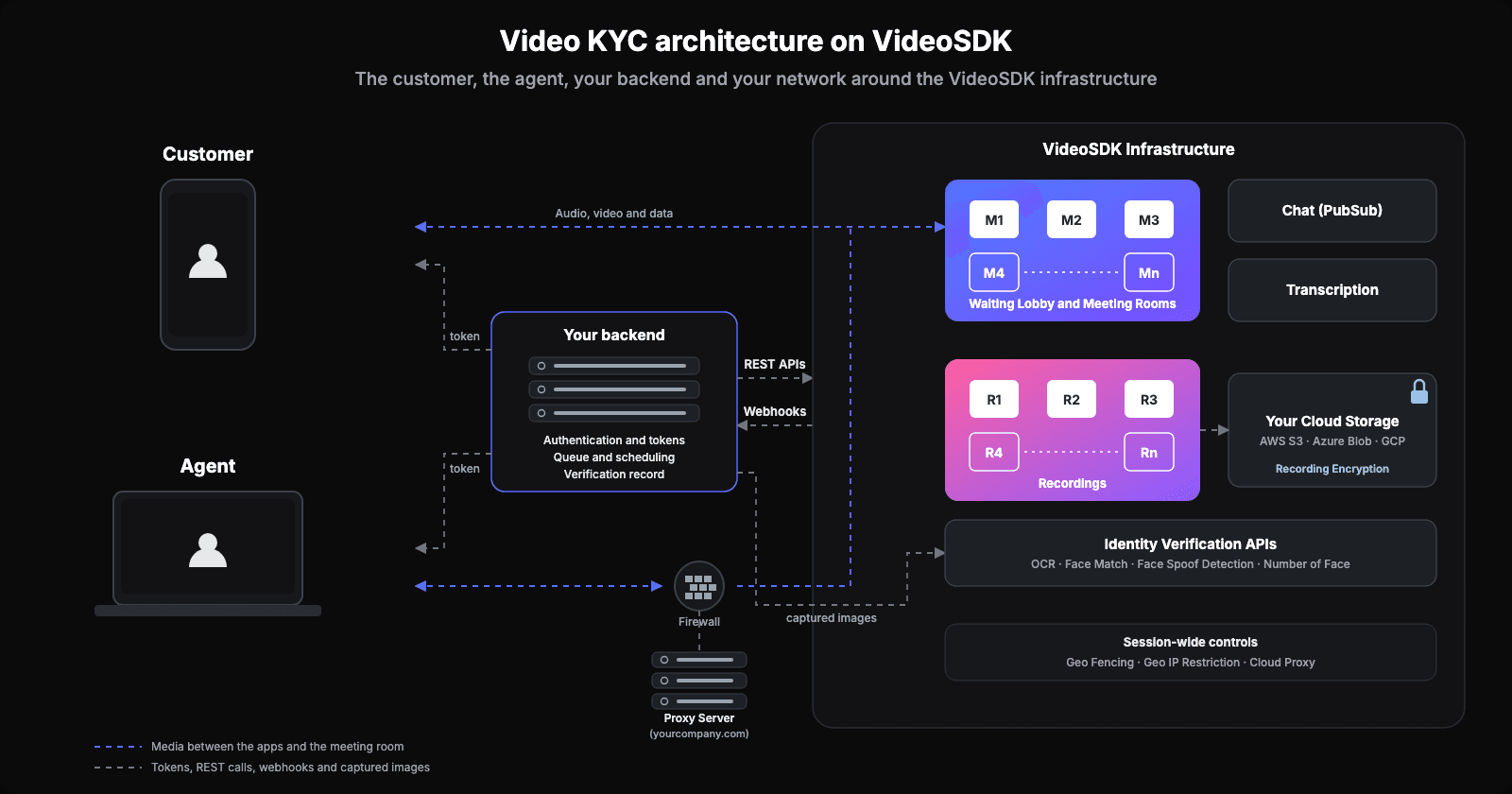
A V-CIP system on VideoSDK has five parts:
- Your backend creates a room for each session with the Create a Room API, issues tokens, runs the queue of waiting customers and stores the verification record.
- The customer page and the agent console are a mobile web page and a browser app built with the React SDK, so customers do not install an app.
- The Identity Verification APIs run from your backend on images captured during the call (Enterprise plan).
- Recording writes the session to the bank's own storage, with an optional location watermark.
- The core banking system (CBS) receives the verified data, the recording reference and the audit fields once the concurrent audit passes.
Building the customer page and agent console
Customers who verify once should not have to install an app. VideoSDK's video KYC guide has the customer join from a phone or a browser. Build the customer side as a mobile web page and the agent side as a browser console, both with the React SDK (see supported browsers). The guide gives code for each step:
- Pre-call. Precall setup covers permissions and device tests, and
runPreCallTest()scores uplink and downlink quality from 1 (bad) to 5 (excellent). - Tokens and lobby. The agent's token has
allow_joinandallow_mod; the customer's hasask_join, so the customer waits in the waiting lobby until the agent's console callsallow(). A denied customer stays connected until your page callsleave(). - Agent console. Our post on building a video KYC agent dashboard covers the screens.
Document and face checks with the VideoSDK identity APIs
Capture images on the customer's own device, not from the video stream in the agent's console, because the stream may use a lower-resolution layer on a weak network. The agent sends a capture request over PubSub, the customer's page calls captureImage() on its own camera and sends the image back, and the console saves it in your own system. Set persist to false on these messages so images stay out of the message history. The rear camera suits the document and the front camera the face.
Call the Identity Verification APIs from your backend, never from the customer's device. Each takes a Base64 image with the data:image/jpeg;base64, prefix and a VideoSDK token in the Authorization header with no prefix. All four are on the Enterprise plan.
| API | Endpoint | Returns |
|---|---|---|
| OCR | POST https://api.videosdk.live/ai/v1/ocr (front and back of the document) | idType, idNumber, name, dateOfBirth, address, gender, mobileNumber |
| Face Match | POST https://api.videosdk.live/ai/v1/face-verification/verify | whether the two faces match (verified) |
| Face Spoof Detection | POST https://api.videosdk.live/ai/v1/face-verification/detect-spoof | a spoof flag and an accuracy value |
| Number of Face Detection | POST https://api.videosdk.live/ai/v1/face-verification/detect-faces | the number of faces in the image |
Treat these results as inputs: your application decides whether a verification passes, fails or goes to manual review. For liveness checks, see our guide to liveness detection.
Recording the session
The RBI requires a recording with live GPS coordinates and date and time stamps (26(1)(iv)), stored in India (26(3)(i)). VideoSDK's video KYC guide recommends this setup:
- Start recording when the room is created, if the whole session must be recorded. Show the consent notice first, then add a
recordingentry toautoStartConfigin the Create a Room request. - Do not verify until recording has started. Both apps get
onRecordingStateChangedwithRECORDING_STARTED, and your backend gets therecording-startedwebhook. Store the file in the bank's storage, as above. - Close the room if recording fails. Add an
onFailureentry withactionset toclose-roomand awaitTimein seconds (the guide suggests 30). - Add the location watermark. The geo tag recording template renders the coordinates your app publishes on the
GEO_TAGtopic. It is not independent proof of location, so capture the coordinates from the device at the start of the call. - Encrypt at rest if you need to. Recording encryption uses a separate AES key per recording, wrapped with your RSA public key, and cannot be on together with transcription for the same API key.
Geo-fencing, encryption, retention and audit log
For every V-CIP control with its test and audit evidence, see our video KYC compliance checklist. It numbers the minimum standards as para 27 of the Commercial Banks Directions, so read each V-CIP paragraph one lower for a co-operative bank (26) and one higher for an SFB (28).
Geo-fencing
Geo Fencing restricts connections to VideoSDK servers in the regions you choose, wherever the customer connects from. Geo IP Restriction allows or denies a join based on the location of the IP address. Both are on the Enterprise plan; contact sales. A VPN can hide a customer's location, so keep the GPS capture too.
Encryption
Para 26(1)(ii) asks the bank to ensure end-to-end encryption of data between the customer device and the hosting point of the V-CIP application, "as per appropriate encryption standards". Para 26(1)(viii) has CERT-In empanelled auditors test the V-CIP infrastructure, including its end-to-end encryption capabilities. Ask your vendor for the documents your security team and auditor need.
Data retention
Keep recordings, captured images and the activity log in systems in India, with date and time stamps (26(3)(i), (ii)). Para 26 sets no separate retention period. Para 26(3)(i) applies the general record-management rules to V-CIP data, and para 49(2) says identification records must be kept "for at least five years after the business relationship has ended" (para 51(2) for SFBs). Ask your compliance team how that applies to recordings.
Audit log fields
For each V-CIP session, write these to your CBS or case system:
- room ID and session ID
- customer and account identifiers
- the official's employee ID and credentials used (26(3)(ii))
- the BC's details, for an assisted session (26(2)(xiv))
- consent record with its timestamp (26(1)(ii))
- session start and end times, and the connection log
- the questions asked and the customer's answers
- OCR output, face match, spoof check and face count results
- PAN verification result (26(2)(xi))
- recording file path, and the GPS coordinates captured at the start
- concurrent audit status, auditor ID and decision (26(2)(xv))
Frequently asked questions
Which RBI rules apply to video KYC at a small finance bank?
The Small Finance Banks KYC Directions, 2025 (RBI/DOR/2025-26/200) apply to video KYC at a small finance bank. V-CIP is in paras 27 and 28, with sub-paragraph numbers matching paras 25 and 26 for co-operative banks.
Can a Business Correspondent help a customer with video KYC?
A Business Correspondent can help a customer with video KYC at the customer's end only (para 26(2)(xiv)), and the bank must keep the details of the BC who assisted.
What documents does a customer need for a video KYC call?
A customer needs one accepted identity source: Aadhaar OTP based e-KYC, offline Aadhaar generated within three working days of the call, CKYCR records, or an equivalent e-document such as DigiLocker. The customer also shows a PAN card on camera or provides an e-PAN. Printed copies of e-documents are not valid (26(2)(vi), (viii), (xi), (xii)).
Is the 2016 KYC Master Direction still the rule for co-operative banks?
The 2016 KYC Master Direction has been replaced by the 2025 KYC Directions. Para 79 of the UCB and Rural Directions (para 80 for SFBs) repeals the earlier KYC directions for those banks. A co-operative bank reads the Urban or Rural Co-operative Banks text, and a small finance bank reads the Small Finance Banks text.
Build your V-CIP flow on VideoSDK. Sign up for VideoSDK to get API keys and follow the video KYC guide; a new account comes with a $20 credit (pricing). Planning V-CIP for a co-operative bank or a small finance bank that needs Geo Fencing, the identity APIs or recordings in your own storage? Talk to our team, or see the video KYC solution.