


A keyframe, or I-frame, is a video frame stored as a complete picture that a decoder can render without reference to any other frame. The P and B frames around it store only what changed. The keyframe interval is how often an encoder emits one, and it sets how fast a player can start, seek or switch quality.
If you searched what is a keyframe and landed on animation tutorials, this is the other keyframe: the one in video encoding and live streaming. Most of the material under that phrase describes After Effects and CSS, where a keyframe is a marker you place on a timeline. This page is about the frame an encoder writes: the frame types inside a group of pictures, the interval streaming platforms ask you to set, and what the OBS 0 value actually does.
I, P and B frames and the GOP
A keyframe is one of three frame types a video encoder produces, and the only one that stands on its own. The W3C WebCodecs specification defines a key chunk as “an encoded chunk that does not depend on any other frames for decoding”, and notes it is commonly called a key frame.
| Frame type | What it stores | Decodes on its own | Typical size |
|---|---|---|---|
| I-frame (keyframe) | A complete picture | Yes | Largest |
| P-frame | Differences from earlier frames | No | Smaller |
| B-frame | Differences from earlier and later frames | No | Smallest |
Keyframes are the only frames a decoder can enter a stream at, which turns their spacing into a configuration decision rather than an encoder detail.
In H.264 the precise term is IDR, for instantaneous decoding refresh. RFC 6184 defines an IDR picture as one that resets the decoding process, so that every picture after it in decoding order decodes without inter prediction from anything before it. An ordinary I-frame is coded without reference to other frames, but later frames may still reference pictures from before it. Only an IDR guarantees a clean entry point, which is why streaming specifications ask for IDRs rather than I-frames.
B-frames are the reason decode order and display order differ. A B-frame references a frame that comes after it on screen, so the decoder has to receive that later frame first. Cutting B-frames is a standard step when a pipeline is tuned for the lowest possible delay.
A group of pictures, or GOP, is the run of frames from one keyframe up to the frame before the next. Cloudflare’s Stream documentation, cited below, treats the two terms as interchangeable, writing of a “GOP duration (keyframe interval)”. GOP length is the number most encoder settings screens expose, whether they label it GOP size, keyframe interval or keyframe frequency.

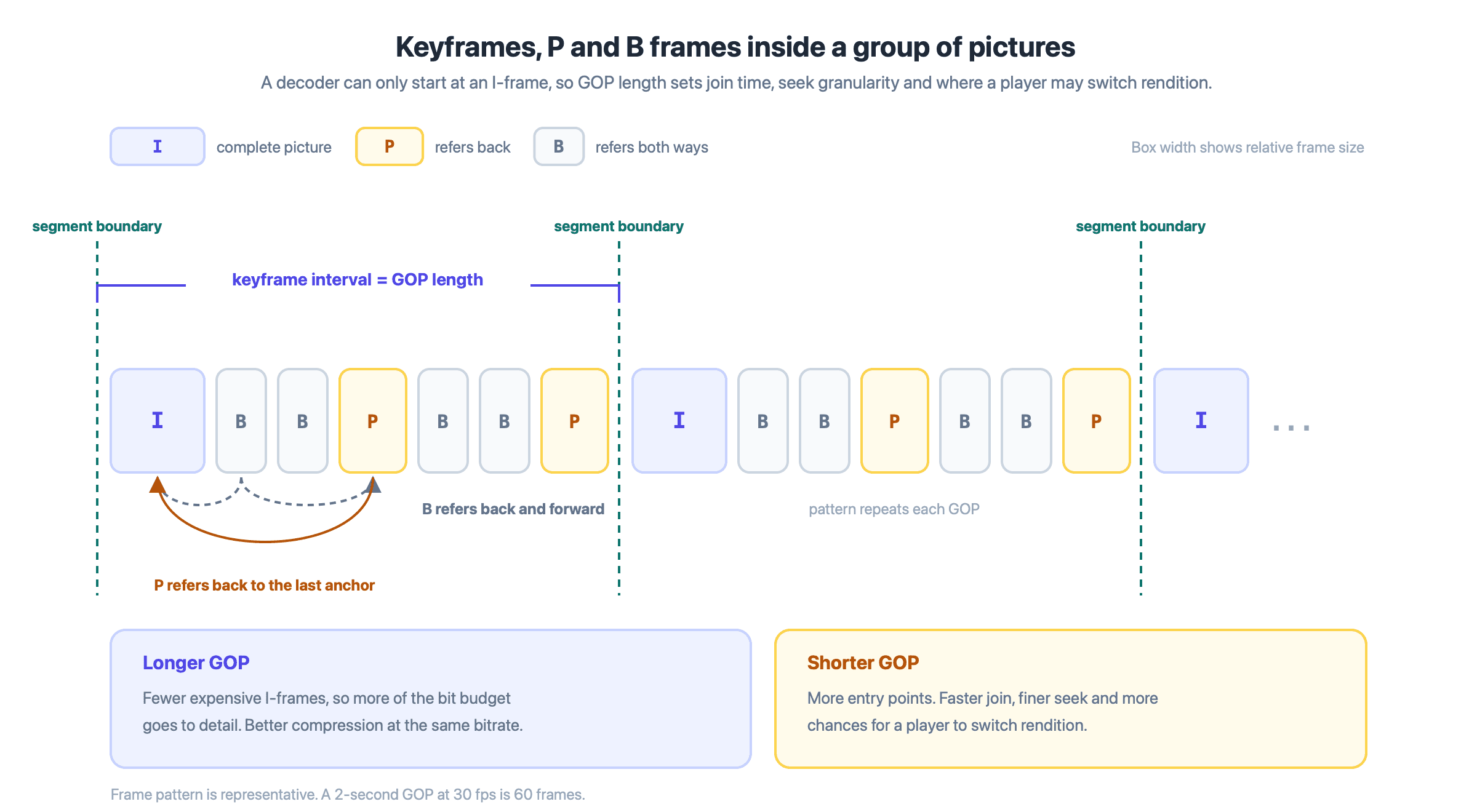
Each GOP opens with a keyframe. A player can only begin decoding, seek, or switch rendition at one of those openings, so GOP length sets the granularity of all three.
GOP length is a single trade. Keyframes are the expensive frames, so a longer GOP leaves more of a fixed bit budget for the P and B frames that carry detail, while a shorter one softens the picture under motion but lets a decoder start more often. Every recommendation below is a position on that trade.
Keyframe interval for live streaming
The keyframe interval is the longest an encoder will go before emitting another keyframe, and for a live stream it is usually two seconds. The reason is segment alignment rather than picture quality. HLS cuts a stream into short media segments requested one at a time over HTTP, and each segment has to be independently decodable.
RFC 8216, the HLS specification, states in section 3 that a media segment carrying H.264 should contain an IDR. Apple’s HLS Authoring Specification, linked in the table below, turns that into a requirement at item 7.4: “Video segments MUST start with an IDR frame.” A segment therefore cannot be shorter than the keyframe interval, because it would have no keyframe to start with.
Two further items explain the two-second convention. Item 1.13 states that key frames should be present every two seconds; item 7.5 states that target durations should be six seconds. A six-second segment built from three two-second GOPs satisfies both and leaves the packager free to cut at any of the three keyframes.
Rendition switching depends on the same boundaries. The EXT-X-INDEPENDENT-SEGMENTS tag in RFC 8216 section 4.3.5.1 signals that every media segment decodes on its own, and Apple’s item 9.11 tells authors to set it when segments start with an IDR. An adaptive player changes quality at a segment boundary, so a viewer on a fluctuating connection gets a quality change only as often as a new keyframe arrives, and a viewer joining mid-stream waits for the next one before anything decodes.
When the interval runs long that machinery stops working: Amazon IVS documents that above five seconds it can no longer guarantee every playback segment begins with a keyframe. Going shorter is not free either. AWS’s IVS streaming configuration guide puts stream-start latency at six to seven seconds with a two-second interval against three to four at one second, but warns that one-second segments make an adaptive player switch rendition more often.
Low-latency HLS attacks the same delay from the other end, splitting each segment into parts of 200 to 500 milliseconds so a player can fetch the front of a segment before the rest exists; the LL-HLS guide covers that path. The interval itself stays at two seconds because it sits between those two failure modes, not because it is optimal for either.
What the platforms ask for
These are current published requirements, read on 22 September 2026. Each links to its source.
| Platform | Keyframe interval | Stated in |
|---|---|---|
| Apple HLS authoring spec | Every 2 seconds (SHOULD) | Item 1.13 |
| YouTube Live | 2 seconds recommended, do not exceed 4 | Live encoder settings |
| Amazon IVS | 2 seconds, or 1 for lower latency; avoid above 5 | Streaming configuration |
| Cloudflare Stream Live | 2 to 8 seconds; 2 to 4 for Low-Latency HLS | Start a live stream |
Two seconds satisfies all four, and only Cloudflare’s standard tier is comfortable above four. If one encoder feeds several destinations, two seconds is the setting that never needs revisiting per destination.
Keyframes on a real-time path
A WebRTC stream has no fixed keyframe interval, because nothing is being cut into segments. The receiver asks for a keyframe when it needs one: RFC 4585 defines the Picture Loss Indication message, which a decoder sends to tell the encoder it has lost “an undefined amount of coded video data”, and the sender may respond with an intra-picture subject to congestion control.
So on a WebRTC path keyframe cadence follows joins and packet loss and the stack handles it, while on an HLS path it follows the segmenter and it is yours to configure. Both can run from one session: VideoSDK’s useMeeting reference exposes startHls and stopHls on a live meeting, and only the HLS output of that session takes a keyframe interval.
OBS keyframe interval setting
The keyframe interval in OBS Studio is a single field labelled Keyframe Interval (0=auto), expressed in seconds, in the encoder settings for the software x264 encoder. It is the upper bound OBS passes to the encoder, and it is the one value every platform in the table above asks you to set.
What the 0 (auto) value actually does
Auto does not mean what most streamers assume. OBS ships the field defaulting to 0, and when it is 0 OBS does not pass a keyframe interval to x264 at all. x264 then applies its own default, which x264_param_default sets to 250 frames.
250 is a frame count, not a duration, so what it means in seconds depends on frame rate:
- At 30 fps: 250 / 30 = about 8.3 seconds
- At 60 fps: 250 / 60 = about 4.2 seconds
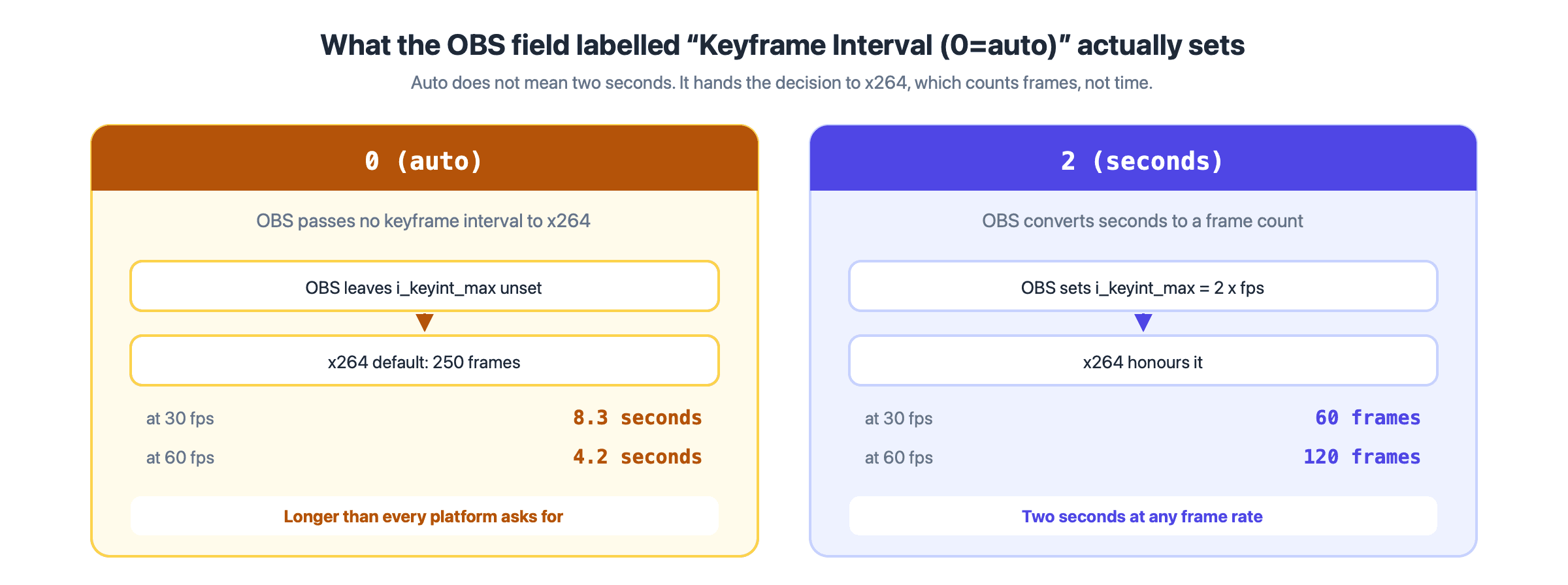
Auto is a frame count, not a duration, so what it means moves with frame rate.
Both exceed what every platform in the table above asks for. Entering 2 makes the interval explicit and independent of frame rate.
Two caveats. The 250-frame default belongs to x264, so a hardware encoder such as NVENC or QuickSync has its own field and its own default, and this number does not transfer. And scene-cut detection stays on unless you disable it, so a stream set to two seconds will still contain keyframes closer together whenever the picture changes sharply.
The other keyframe
In animation and video editing software, a keyframe is a marker on a timeline rather than a compressed frame: Adobe’s guide for Creative Cloud users describes it as choosing how elements of a graphic “will move or change over time”. The two senses share a name and nothing else, because that keyframe is an instruction you place while an encoding keyframe is a frame the encoder writes.
Key takeaways
- A keyframe, or I-frame, is a complete picture a decoder can start from, while the P and B frames around it store only differences.
- In H.264 the exact term is IDR, and only an IDR guarantees that nothing after it references a picture from before it.
- Keyframe interval sets GOP length, which decides how often a player can start, seek or change quality, and trades compression efficiency against all three.
- Two seconds satisfies Apple, YouTube, Amazon IVS and Cloudflare Stream at once, which is why it has become the default recommendation.
- OBS auto is not two seconds: 0 hands the setting to x264's 250-frame default, about 8.3 seconds at 30 fps.
Conclusion
Keyframes are the only frames a decoder can start from, so the interval you set decides how a stream behaves the moment someone joins, seeks or changes quality. Two seconds is the value that satisfies every platform in the table above, and OBS auto is not two seconds. Set the number explicitly, re-check it after any frame rate change, and confirm it against the documentation of whichever platform you ingest to. If you are weighing a real-time path against an HLS path, the interactive live streaming pattern runs both, and only the HLS side needs this number.
Frequently asked questions
Should the OBS keyframe interval be 0 or 2?
Set it to 2. The 0 value hands the decision to x264, which uses a 250-frame default: about 8.3 seconds at 30 fps and 4.2 seconds at 60 fps. Both exceed the two seconds recommended by Apple, YouTube and Amazon IVS, and the 30 fps figure is long enough to break segment alignment on some platforms. Entering 2 fixes the interval in seconds regardless of frame rate.
What happens if the keyframe interval is too high?
The visible symptom is usually a frozen or smeared picture at a quality switch, which reads as a network fault and is not one. Amazon IVS documents the cause: segments that do not begin with a keyframe "may result in decode errors or visual distortions" when a viewer starts playback or changes rendition. Viewers also wait longer before playback starts. Set the interval to 2 and turn scene change detection off before investigating bandwidth.
Does a shorter keyframe interval reduce video quality?
At a fixed bitrate, yes, slightly. Keyframes are the largest frames, so emitting them more often leaves fewer bits for everything else and the picture softens under motion. The effect is small between two and four seconds and grows below one second. Amazon IVS also notes that one-second intervals can increase buffering, because smaller segments make an adaptive player switch rendition more often.
Why does my encoder produce keyframes I did not ask for?
Scene-cut detection. Most encoders insert an unscheduled keyframe when the picture changes sharply, so a configured interval is an upper bound rather than a fixed cadence. In x264 the scenecut threshold defaults to 40 and the behaviour is on by default. Amazon IVS asks broadcasters to set scene change detection off, because irregular keyframes disturb the segment pattern its packager relies on.