


The Gemini Vision API is Google's multimodal interface that enables applications to understand and reason about images and videos. Developers use it to build features like visual question answering, automated content moderation, and real-time video analysis. When paired with a real-time communication platform like VideoSDK, you can route live participant video streams directly to the Gemini Vision API for instant multimodal AI processing.
Understanding the Gemini Vision API
Multimodal AI represents a fundamental shift from text-only models to systems that understand the world the way humans do. By processing sight, sound, and language simultaneously, these models unlock entirely new categories of applications. The Gemini Vision API provides developers with a direct pipeline into Google's most advanced vision-language models.
Instead of writing complex computer vision pipelines with separate object detection, optical character recognition, and image classification models, you can send a single image or video clip to the Gemini Vision API and ask natural language questions about its contents. This capability drastically reduces development time for applications that need to interpret visual data. It also lowers the barrier to entry, allowing frontend and backend developers without specialized computer vision backgrounds to build sophisticated visual reasoning features.
Core Capabilities of the Gemini Vision API
The Gemini Vision API consolidates multiple computer vision tasks into a single conversational interface. This unified approach means you can switch from captioning an image to performing complex object detection without changing your underlying infrastructure.
Image captioning allows the model to generate detailed, context-aware descriptions of visual content. This is essential for accessibility tools, digital asset management, and automated alt-text generation. Visual question answering lets developers query specific details within an image, such as asking what brand of shoes a person is wearing or whether a safety hazard is present in a manufacturing facility.
Object detection and segmentation go beyond simple classification. The API can identify the precise location and boundaries of multiple items in a scene, returning bounding box coordinates or segmentation masks. Video analysis extends these capabilities into the temporal domain. The model can understand motion, track objects across frames, and summarize events over time. By unifying these tasks, the Gemini Vision API eliminates the need to chain together multiple specialized models, reducing latency and infrastructure complexity.
Choosing the Right Input Method
Feeding visual data into the Gemini Vision API requires selecting the right input method for your specific latency and data volume constraints. The API supports several distinct ways to ingest media, each with unique architectural implications.
Passing an image via a public URL is the fastest way to get started. The API fetches the content directly from the web, which keeps your request payload small. However, the URL must be publicly accessible, which can create privacy challenges for user-generated content. Inline base64 encoding solves the privacy issue by embedding the image data directly within your request payload. This is useful for smaller images generated on the fly, though it significantly increases the size of the data sent over the network.
For larger files or when you need to reuse the same media across multiple queries, the File API allows you to upload assets once and reference them in subsequent calls. This is ideal for batch processing pipelines. Google Cloud Storage offers a robust solution for enterprise applications where images are already stored in buckets. Finally, YouTube URL support lets you analyze public video content without downloading the entire file first, which is perfect for content creators and educators looking to extract insights from existing video libraries.
When to Use the File API vs Inline Data
Deciding between the File API and inline base64 data comes down to file size, reuse frequency, and architectural state. Inline data is ideal for images under 20 megabytes that are processed once and discarded. It keeps your application stateless, meaning you do not have to manage file lifecycles or cleanup procedures.
However, if you are processing large video files or running multiple prompt variations against the same high-resolution image, the File API is the clear winner. It handles files up to 2 gigabytes, stores them temporarily on Google's servers, and avoids the overhead of re-encoding the data for every single API call. For production systems handling user-generated content, routing uploads through the File API ensures your application remains responsive and avoids network timeouts caused by massive inline payloads.
Prompt Engineering Best Practices
Interacting with the Gemini Vision API relies heavily on prompt engineering. Because the model is multimodal, your prompts must clearly instruct the model on how to balance its visual analysis with textual reasoning.
System instructions allow you to define the model's persona and constraints before it ever sees an image. For example, you can instruct the model to act as a strict safety inspector and only report violations, ignoring normal background elements. This prevents the model from generating unnecessary conversational filler.
When building programmatic pipelines, enforcing JSON output constraints is critical. By explicitly telling the model to return a specific JSON schema, you eliminate the need for fragile regular expressions to parse natural language responses. You can define exact keys, data types, and nested structures. The API will reliably format its visual findings into this schema, making database insertion and downstream processing trivial.
The API also exposes a thinking level parameter, which controls how much internal reasoning the model performs before answering. Lowering the thinking level reduces latency and cost for simple tasks, while raising it improves accuracy for complex spatial reasoning. Combining strict system instructions, JSON constraints, and tuned thinking levels results in a highly predictable and reliable vision pipeline.
Controlling Thinking Level for Spatial vs Complex Tasks
The thinking level parameter is a powerful lever for optimizing the Gemini Vision API. A low thinking level is perfect for straightforward tasks like reading text from a receipt, identifying the dominant color in an image, or counting distinct objects. The model responds almost instantly, keeping user-facing applications feeling snappy.
A high thinking level is necessary when the prompt requires complex spatial reasoning. If you need the model to determine if a stack of boxes will topple over, or to count the number of overlapping gears in a mechanical diagram, the model needs time to analyze the relationships between objects. In these scenarios, the model spends more compute cycles processing the visual layout. Tuning this parameter allows developers to balance cost and accuracy dynamically based on the complexity of the visual input, ensuring you only pay for heavy reasoning when it is actually required.
Video Understanding with Gemini
Video understanding is where the Gemini Vision API truly separates itself from legacy vision models. Instead of processing video frame by frame and losing temporal context, the API ingests entire video clips and reasons about events over time. You can ask the model to summarize a 10-minute instructional video, generate a quiz based on the concepts taught, or detect the exact moment a specific action occurs.
Google provides a streaming preview model designed for near-real-time video analysis. This is particularly powerful when combined with real-time communication platforms. For instance, developers can use VideoSDK's Python SDK to capture a participant's live video stream from a VideoSDK room and route those frames to the Gemini Vision API. This enables live AI commentary, real-time visual assistance, and interactive video-based tutoring applications.
Developers must be mindful of video size limits, typically capping around 2 gigabytes per file. When processing live streams from VideoSDK, the standard practice is to buffer short segments of video, upload them to the File API, and send the reference to the Gemini Vision API. This creates a sliding window of context that the AI can use to answer questions about what is happening in the live call right now.
Architecture Flow
Visualizing how data moves through a multimodal pipeline clarifies where latency occurs and how components interact. The following diagram illustrates a production architecture where a live video stream from a VideoSDK room is processed by the Gemini Vision API.
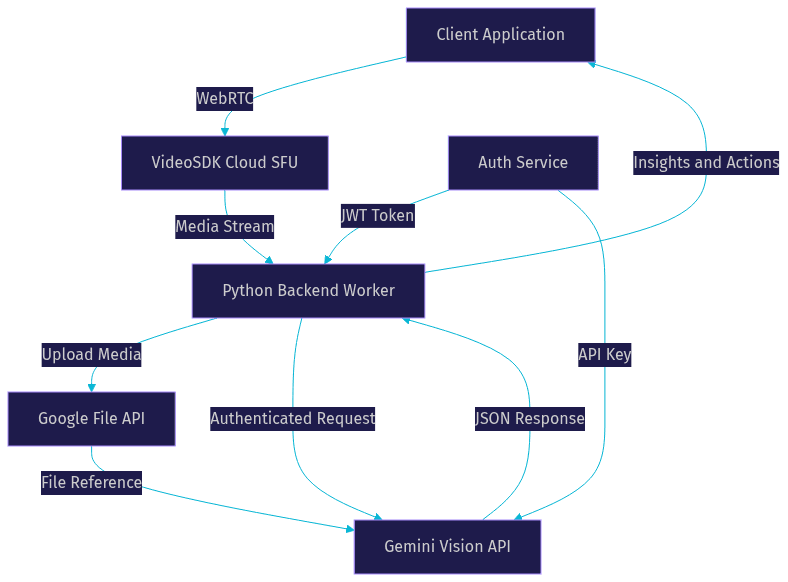
In this flow, the client joins a VideoSDK room and shares their camera. A backend Python worker, authenticated via a VideoSDK token, subscribes to the media stream. The worker uploads the relevant video chunks to the Google File API, then sends a prompt to the Gemini Vision API referencing the uploaded file. The API returns structured insights, which the worker relays back to the client. This architecture keeps heavy processing off the client device while maintaining low latency.
Cost and Performance Considerations
Running multimodal AI at scale requires careful cost management. The Gemini Vision API prices requests based on input and output tokens. Images and videos consume tokens based on their resolution and duration. High thinking levels and long system instructions increase input token counts, which directly impacts your billing.
To minimize costs, developers should resize images to the maximum dimension the model actually needs, which is often 768 pixels, rather than sending raw 4K video. The API downscales large images anyway, so sending massive files just wastes bandwidth and tokens. Caching responses for identical visual inputs can also reduce redundant API calls. If multiple users ask the same question about a popular product image, serving a cached response saves time and money.
Latency expectations should be set based on the model family. Flash models prioritize speed and are suitable for real-time interactions, like analyzing a live VideoSDK stream. Pro models offer higher accuracy at the cost of increased processing time, making them better suited for asynchronous batch processing jobs. When routing live VideoSDK streams to the API, use the Flash models to keep the conversational loop tight and avoid awkward pauses in your application.
Real-World Use Cases
The Gemini Vision API unlocks practical features across multiple industries. In e-commerce, platforms use the API for automated product tagging. A seller uploads a photo of a shirt, and the API extracts the color, pattern, fabric type, and style. The model then generates a complete product listing in seconds, drastically reducing the friction of onboarding new inventory.
In education, edtech platforms build video summarization tools. Students upload a recorded lecture, and the API generates a timestamped outline of key concepts. This makes study sessions more efficient and helps students find specific explanations without scrubbing through an hour of video. The API can even generate practice questions based on the visual diagrams shown during the lecture.
In robotics, developers use the API for object detection and spatial reasoning. A robot equipped with a camera can send its view to the API and ask for the safest path to pick up a specific object. This allows robotics engineers to leverage advanced vision models without training custom neural networks on their hardware.
Combining these capabilities with VideoSDK's interactive live streaming allows developers to build live shopping experiences. An AI host can watch a live stream of a product demonstration and describe the features to the audience in real time, answering viewer questions based on what is happening on camera.
Getting Started Checklist
Launching your first Gemini Vision API call requires a few foundational steps. First, create a project in the Google Cloud Console and enable the Generative Language API. Next, generate your API credentials and securely store them in your backend environment using a secrets manager. Never expose your API keys in frontend code.
Decide on your input method based on your file sizes, choosing between inline base64 for small images and the File API for larger videos. Write a clear system instruction that defines the model's role and the desired JSON output schema. Select the appropriate model family and set the thinking level based on your latency requirements. Finally, send your first request with a sample image and validate the structured response. If you are integrating this with a live video application, set up a VideoSDK meeting room to source your media streams and connect a backend worker to process the feed.
Definitions Glossary
Multimodal AI: Artificial intelligence models capable of processing and understanding multiple types of data simultaneously, such as text, images, and audio.
Gemini Vision API: Google's API interface for sending visual data to Gemini models, enabling tasks like image captioning, video analysis, and visual question answering.
File API: A Google service that allows developers to upload large media files and store them temporarily for processing by AI models, bypassing inline payload limits.
Thinking Level: A configuration parameter in the Gemini API that controls the amount of internal reasoning the model performs, allowing developers to trade latency for accuracy.
VideoSDK Room: A virtual meeting space created using VideoSDK where participants share real-time audio and video streams, which can be routed to AI models for processing.
Key Takeaways
- The Gemini Vision API provides a unified interface for image and video understanding, replacing complex computer vision pipelines with natural language prompts.
- Selecting the right input method, such as the File API for large videos or inline data for small images, is critical for managing latency and payload size.
- Tuning the thinking level parameter allows developers to optimize costs and response times based on the spatial complexity of the visual task.
- Combining the Gemini Vision API with VideoSDK enables powerful real-time applications, such as live AI video commentary and interactive visual assistance.
- Enforcing JSON output constraints in system instructions ensures the API integrates smoothly with programmatic backend workflows.
Conclusion
The Gemini Vision API represents a significant leap forward for developers building multimodal applications. By understanding the nuances of input methods, prompt engineering, and thinking levels, you can build robust visual reasoning features without maintaining specialized computer vision models. When you integrate these capabilities with real-time video infrastructure from VideoSDK, the possibilities expand into live interactive AI. Explore the VideoSDK documentation to learn how to capture participant streams, and check the official Gemini API guides to start experimenting with visual prompts today. What are you building with the Gemini Vision API? Drop a comment below to discuss your use case.
Free $20 Balance for AI Voice Agents & Video Calls
FAQ