


A VideoSDK Deepgram voice agent is a real-time AI assistant that streams audio via VideoSDK, transcribes speech with Deepgram STT, processes the text with an LLM, and returns spoken replies using Deepgram TTS. Follow the steps below to set up, configure, and deploy it at scale.
AI voice agents are moving from novelty to production necessity. Developers need sub-second response times to make conversations feel natural and engaging. Combining VideoSDK's low-latency WebRTC audio streaming with Deepgram's advanced speech AI creates a powerful solution for real-time conversational experiences. By the end of this guide, you will understand the architecture, setup, and deployment of a VideoSDK Deepgram voice agent ready for production use.
What is a VideoSDK Deepgram Voice Agent?
A VideoSDK Deepgram voice agent is a real-time AI assistant that uses VideoSDK for audio transport and Deepgram for speech recognition and synthesis. The agent joins a VideoSDK room as a participant, listens to human speech, processes the intent, and responds with synthesized audio. This architecture leverages the strengths of both platforms: VideoSDK handles the complexities of WebRTC media routing, while Deepgram provides high-speed, accurate speech-to-text and text-to-speech capabilities.
There are two primary pipeline options for building voice agents: realtime and cascade. A realtime pipeline sends audio directly to a multimodal model that handles understanding and generation in one step. A cascade pipeline breaks the process into discrete stages: speech-to-text, large language model processing, and text-to-speech. The cascade approach using Deepgram offers granular control over each stage, allowing developers to optimize latency and accuracy independently. This makes it easier to swap out components, such as using a different LLM, without reconfiguring the entire audio pipeline.
How the Architecture Works
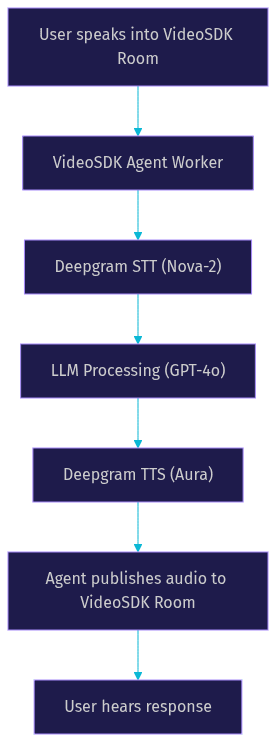
The architecture relies on four core components working in sequence to deliver a seamless conversational experience.
Real-Time Audio Streaming with VideoSDK
VideoSDK uses a room-based architecture where participants connect via WebRTC. The voice agent joins as a participant and subscribes to custom audio tracks from human users. VideoSDK handles the media routing, ensuring low-latency audio transport over a secure connection. The agent receives raw audio frames, which are then forwarded to the speech recognition service. This setup abstracts away the complexities of ICE negotiation, codec handling, and network traversal, letting developers focus on the AI logic.
Deepgram Speech-to-Text (STT)
Deepgram's Nova-2 model provides fast and accurate speech recognition. It supports multiple languages and offers streaming transcription with low latency. The VideoSDK agent worker streams the incoming audio to Deepgram, which returns text transcripts in real-time. Deepgram's API is designed specifically for real-time conversational AI, making it ideal for voice agents where immediate feedback is critical. The model handles background noise and varied accents effectively, improving the robustness of your agent.
Large Language Model Processing
Once the text is transcribed, it is sent to an LLM such as OpenAI's GPT-4o or Anthropic's Claude. The LLM processes the user's intent and generates a text response based on the agent's system prompt. This stage handles the conversational logic, context management, and function calling if the agent needs to perform external actions. The LLM's output is then passed to the text-to-speech component to be converted back into audio.
Deepgram Text-to-Speech (TTS)
Deepgram's Aura voice synthesis converts the LLM's text response back into audio. Aura is optimized for low latency, ensuring the spoken response feels immediate and natural. The synthesized audio is then published back into the VideoSDK room as a custom audio track, completing the conversation loop. The entire process from user speech to agent response happens in under a second when properly optimized.
Setting Up Your Environment
Preparing your environment correctly is crucial for a smooth development experience.
Required Accounts and API Keys
You need active accounts for VideoSDK, Deepgram, and an LLM provider like OpenAI. Generate API keys from each provider's developer dashboard. Store these keys securely using environment variables on your server. Never expose API keys in client-side code or public repositories. Use a server-side environment to manage secrets and inject them into your agent worker process at runtime. This practice prevents unauthorized access and keeps your billing secure.
Installing the VideoSDK Agents Package
The VideoSDK AI Agent SDK is Python-based and requires Python 3.9 or higher. You install the core package and the Deepgram plugin using the standard Python package installer. After installation, verify the package version against the VideoSDK GitHub releases to ensure compatibility with the latest features. The package includes the necessary modules for room connection, audio handling, and pipeline orchestration. Setting up a virtual environment is recommended to avoid dependency conflicts.
Configuring the Voice Agent
Configuration defines how your agent behaves and interacts with users.
Defining Agent Instructions and Persona
The agent's behavior is defined by a system prompt passed to the LLM. This prompt tells the LLM how to act, what tone to use, and what information to provide. A well-crafted prompt is specific and provides clear context. For example, a customer support agent prompt should include instructions to be polite, concise, and helpful, along with links to relevant documentation. The prompt is passed to the LLM during initialization and sets the baseline for all subsequent interactions. You can also inject dynamic context into the prompt, such as the user's name or account status, to personalize the conversation.
Managing Turn Detection and VAD
Voice Activity Detection (VAD) is critical for natural conversation. It determines when a user has finished speaking so the agent can begin processing. VideoSDK's turn detector monitors audio frames for silence. Once a threshold of silence is reached, the agent triggers the LLM response. Proper VAD configuration prevents the agent from interrupting users or waiting too long to respond. You can adjust the silence threshold and minimum speech duration based on your use case. For example, a fast-paced trading bot might use a shorter silence threshold than a relaxed virtual tutor.
Deploying the Agent in a VideoSDK Room
Deployment involves connecting your configured agent to a real-time communication session.
Generating a Meeting Token
VideoSDK uses token-based authentication to secure room access. You must generate a meeting token server-side using your VideoSDK API key and secret. This token authenticates the agent's connection to the room and defines its permissions. The token should be generated just before the agent joins and has a limited lifespan for security. You can create rooms and generate tokens using the VideoSDK REST API. This server-side step ensures that only authorized agents can join your VideoSDK rooms.
Joining the Room and Streaming Audio
With the token ready, the agent initializes the VideoSDK room connection. The agent joins as a participant with a specific role, typically a speaker or listener depending on the flow. It subscribes to audio tracks from other participants. When audio is received, it is fed into the Deepgram STT pipeline. When the TTS generates audio, the agent publishes it as a custom audio track to the room. This bidirectional audio flow is managed entirely by the VideoSDK Agent Worker, which handles the WebRTC connection lifecycle.
Production Considerations
Moving from development to production requires careful attention to performance and scale.
Latency Optimization
Latency is the most critical metric for voice agents. Optimize by choosing geographically close servers for your VideoSDK rooms and Deepgram streams. Use network-adaptive streaming to adjust audio bitrate based on connection quality. Ensure TURN servers are properly configured to handle restrictive network environments. Minimizing the processing time between STT, LLM, and TTS is essential for a natural feel. You can also use TTS caching for common responses to bypass the LLM and TTS stages entirely for frequent queries.
Scaling and Concurrent Sessions
Scaling voice agents requires careful resource planning. Each agent session consumes CPU and memory for audio processing. Use container orchestration like Kubernetes to manage agent worker processes. Implement load balancing to distribute sessions across multiple worker nodes. Monitor resource usage and set up alerts for high latency or failed connections. VideoSDK's architecture supports horizontal scaling for concurrent sessions. You can deploy the agent on VideoSDK Agent Cloud for managed scaling or self-host using Docker.
Common Pitfalls and Troubleshooting
Developers often encounter a few common issues when building voice agents. Token expiry is a frequent problem; ensure your token generation logic accounts for session duration and refreshes if needed. Microphone permissions can block audio access; verify browser and OS permissions for the end user. Deepgram quota limits can interrupt service; monitor your usage and upgrade your plan if necessary. Network issues can cause audio gaps; use VideoSDK's network quality indicators to diagnose problems. Always log audio frame sizes and STT response times to identify bottlenecks quickly.
Real-World Use Cases
VideoSDK Deepgram voice agents are used in various industries. Call centers use them for automated customer support and call routing, reducing wait times. Edtech platforms deploy them as virtual tutors for interactive learning and language practice. E-commerce sites use them as voice shopping assistants to help users find products. Healthcare providers use them for appointment scheduling and patient follow-ups. The low-latency audio and accurate transcription make them suitable for any real-time conversational application where a natural voice interface improves user experience.
Definitions Glossary
Room: A VideoSDK meeting room that participants join and share media streams within, identified by a unique room ID.
Agent Worker: The Python process that runs a VideoSDK AI agent and manages its session lifecycle.
Pipeline: The STT to LLM to TTS chain that processes speech and generates responses in a VideoSDK AI agent.
Turn Detection: The mechanism that decides when a user has finished speaking and the AI agent should respond.
VAD: Voice Activity Detection, the process of detecting the presence or absence of human speech in an audio stream.
Key Takeaways
- A VideoSDK Deepgram voice agent combines low-latency WebRTC audio with advanced speech AI for real-time conversations.
- The cascade pipeline allows granular control over STT, LLM, and TTS stages, making it easy to swap components.
- Proper VAD configuration is essential for natural conversation flow and preventing interruptions.
- Server-side token generation is required for secure room authentication and agent deployment.
- Production deployment requires attention to latency optimization, TTS caching, and horizontal scaling.
Conclusion
Building a VideoSDK Deepgram voice agent gives you a powerful tool for real-time conversational AI. The combination of VideoSDK's robust audio streaming and Deepgram's speech models creates a seamless user experience. Ready to build your own voice agent? Sign up for the VideoSDK free tier and check out the AI Agents documentation to get started. What are you building with VideoSDK? Drop a comment below.
Free $20 Balance for AI Voice Agents & Video Calls
FAQ