


A video streaming protocol is a set of rules governing how media data is packaged, transported, and delivered from a source to a player across a network. The right protocol determines whether your stream arrives in under a second or takes thirty seconds to buffer, whether it reaches ten viewers or ten million, and whether it plays on every device or just a subset. VideoSDK supports WebRTC-based ultra-low-latency delivery alongside HLS and RTMP ingest, letting you match the protocol to the use case rather than forcing a one-size-fits-all choice.
Introduction
Video traffic now accounts for the majority of all internet bandwidth, and the expectations placed on that traffic keep climbing. Viewers want instant playback, broadcasters want global reach, and developers want infrastructure that does not buckle under concurrent load. The protocol layer sits at the center of all three demands.
Every streaming architecture decision flows from protocol choice. If you pick a protocol optimized for one-to-many delivery, you gain scale but sacrifice interactivity. If you pick one built for real-time bidirectional media, you gain sub-second latency but face harder scaling problems at the edge. There is no universally superior option, and the landscape in 2026 is more nuanced than ever thanks to low-latency extensions, QUIC-based transport, and unified packaging formats.
This guide walks through the core protocols developers encounter when building streaming products, compares them across latency, transport, scalability, and use case, and provides a decision framework for choosing between them. You will also see how hybrid stacks combine protocols for different audience tiers, and how platforms like VideoSDK fit into the broader delivery picture.
What Are Video Streaming Protocols?
A video streaming protocol is defined as a standardized set of rules that govern how encoded video and audio data is segmented, transported over a network, and reassembled for playback on a client device. The protocol handles the delivery layer, not the compression or the file format.
Video streaming protocols work by taking a continuous media feed, breaking it into smaller chunks or packets, sending those chunks over a transport protocol such as TCP, UDP, or QUIC, and instructing the player how to request and reassemble them in order. Some protocols push media from server to client, while others let the client pull segments on demand using HTTP.
VideoSDK provides real-time streaming through its WebRTC-based architecture, which means media flows through a Selective Forwarding Unit (SFU) rather than a traditional CDN pull model. This is one of several delivery approaches covered in this guide, and understanding where each approach fits is the core value of a thorough video streaming protocols comparison.
How Video Streaming Protocols Differ from Codecs and Containers
Developers new to streaming often conflate protocols, codecs, and containers, but they operate at three distinct layers of the delivery stack.
A codec compresses and decompresses raw audio and video. H.264, H.265 (HEVC), AV1, and VP9 are codecs. They reduce bandwidth by exploiting spatial and temporal redundancy in the media. A container wraps the compressed media along with metadata, subtitles, and timing information into a single file or stream structure. MP4, WebM, and MKV are containers.
A protocol defines how those containers or their segments are transported across the network. HLS, DASH, RTMP, SRT, and WebRTC are protocols. You can deliver H.264 video inside an MP4 container over HLS, DASH, or WebRTC. The codec and container stay the same, but the delivery characteristics change dramatically based on the protocol you choose.
This three-layer model matters because protocol selection is independent of codec selection in most modern stacks. You can switch from HLS to DASH without re-encoding your source, provided your packaging layer supports both output formats.
Core Protocols Overview
HTTP Live Streaming (HLS)
HTTP Live Streaming, created by Apple, is the most widely supported video delivery protocol in use today. HLS works by segmenting encoded media into small files, typically two to ten seconds each, and publishing a manifest file that lists every segment and its URL. The player downloads the manifest, then fetches segments sequentially over standard HTTP.
Because HLS uses plain HTTP, it benefits from existing CDN infrastructure, firewall traversal, and HTTP/2 or HTTP/3 multiplexing. Its weakness is latency. Traditional HLS buffers several segments before playback, which means end-to-end delay typically lands between fifteen and thirty seconds. HLS is the default choice for video-on-demand and large-scale live broadcasts where interactivity is not required.
MPEG-DASH
MPEG-DASH (Dynamic Adaptive Streaming over HTTP) is the ISO-standardized counterpart to HLS. It works similarly by segmenting media and serving a manifest, but the manifest is an XML file called a Media Presentation Description (MPD) rather than Apple's M3U8 format. DASH segments can use any encoding format, which gives it broader codec flexibility than HLS in some configurations.
DASH enjoys strong cross-platform support outside the Apple ecosystem, particularly on Android devices, web browsers, and smart TVs. Like HLS, traditional DASH latency ranges from ten to thirty seconds. Many CDNs and players support both protocols, and packaging tools can generate HLS and DASH outputs from the same encoded source simultaneously.
Low-Latency HLS (LL-HLS)
Low-Latency HLS extends the standard HLS spec by introducing partial segments and a blocking playlist reload mechanism. Instead of waiting for a full segment to be ready, the player can request partial segments as they are being written. This brings HLS latency down to roughly two to five seconds, making it viable for near-live broadcasts without abandoning the HTTP-based delivery model.
Real-Time Messaging Protocol (RTMP)
RTMP was originally designed by Macromedia for Flash-based streaming. Today it survives almost entirely as an ingest protocol. Broadcasters send a single high-quality RTMP stream from their encoding software to a media server, which then transcodes and repackages it into HLS, DASH, or other delivery formats. RTMP uses TCP, which adds latency, but for one-to-one ingest from encoder to server, that tradeoff is acceptable.
Secure Reliable Transport (SRT)
SRT is an open-source protocol built on UDP that adds its own reliability and packet-loss recovery layer on top of the unreliable UDP transport. It is designed for delivering high-quality video over unpredictable networks, including satellite links, cellular bonds, and cross-continent contribution feeds. SRT supports encryption natively and handles jitter through a configurable latency buffer. For live event contribution where RTMP's TCP head-of-line blocking causes problems, SRT is increasingly the preferred ingest protocol.
WebRTC
WebRTC is a real-time communication protocol that achieves sub-second latency, often in the 200 to 500 millisecond range. It uses UDP-based transport with SRTP encryption and relies on an SFU or peer connection model rather than HTTP segment delivery. WebRTC is natively supported in modern browsers, which means no plugin is required for web-based playback. VideoSDK's video calling API and SDKs are built on WebRTC, making them suitable for interactive live streaming, video calls, and any scenario where viewers need to respond in real time. For larger audiences, VideoSDK's Interactive Live Streaming (ILS) mode lets viewers join as listeners and be promoted to speakers dynamically.
RTSP / RTP
Real-Time Streaming Protocol (RTSP) and Real-time Transport Protocol (RTP) are older protocols still common in IP camera surveillance, on-premise streaming setups, and legacy broadcast infrastructure. RTSP controls the stream session, while RTP carries the media packets over UDP. These protocols are rarely used for consumer-facing web streaming today, but they remain relevant for security camera feeds, robotics, and industrial video applications where browser playback is not a requirement.
CMAF (Common Media Application Format)
CMAF is a segmented media format designed to unify HLS and DASH delivery from a single set of encoded segments. With CMAF, you encode once, package into fragmented MP4 segments, and serve those same segments to both HLS and DASH manifests. This reduces storage and encoding costs while simplifying the packaging pipeline. CMAF also supports Low-Latency CMAF, which combines the unified format with partial-segment delivery for both LL-HLS and LL-DASH.
Choosing the Right Protocol: Decision Factors
No single protocol wins every scenario. The right choice depends on a combination of latency requirements, audience size, device compatibility, network conditions, security needs, and operational complexity.
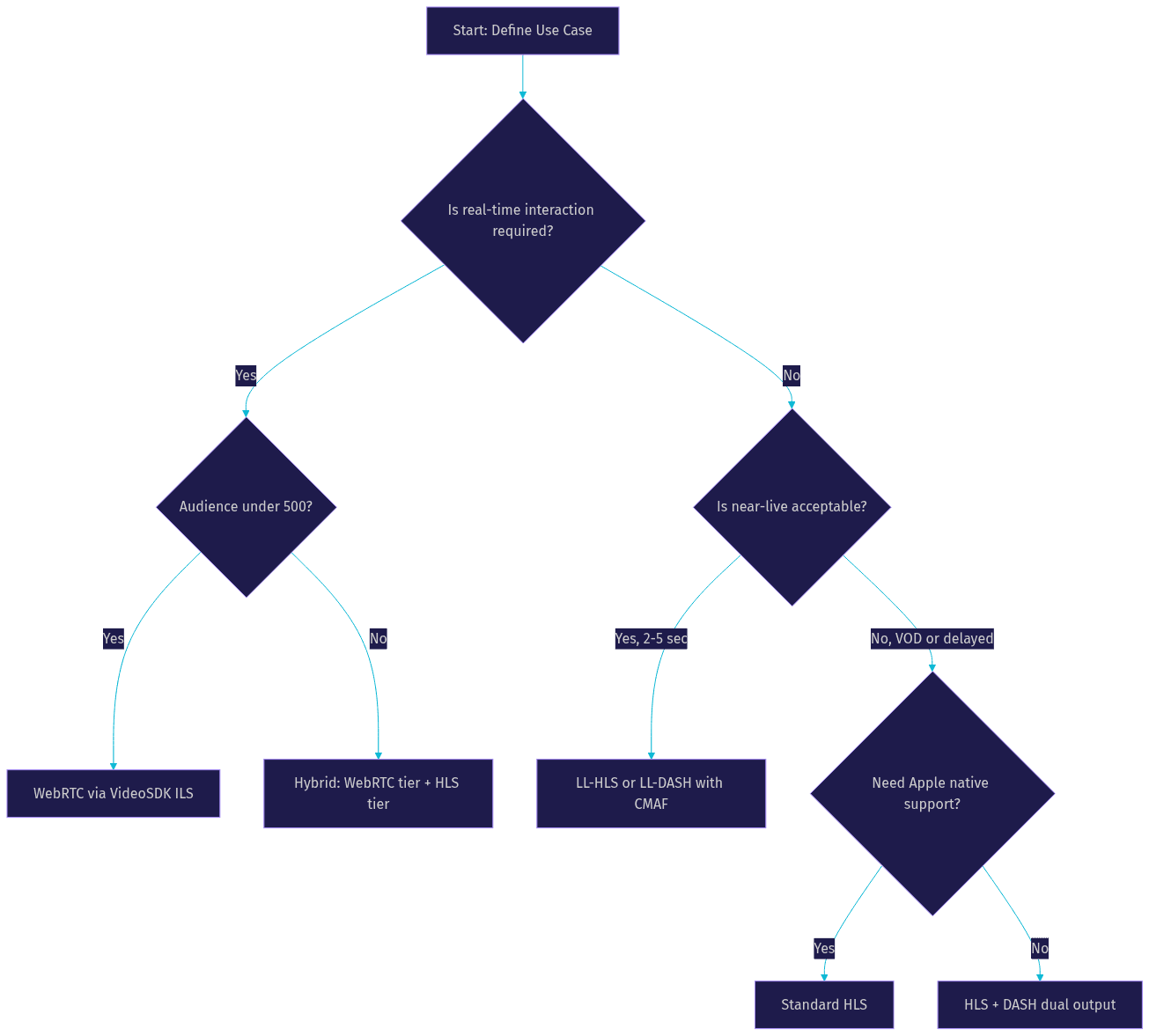
- Latency requirements: If your use case demands real-time interaction, such as a live auction, interactive Q&A, or video calling, WebRTC is the only protocol that delivers sub-second latency. For near-live broadcasts like sports streaming, LL-HLS or LL-DASH at two to five seconds is sufficient. For video-on-demand, standard HLS or DASH latency is irrelevant since the content is not live.
- Audience size: WebRTC scales well to several hundred concurrent viewers per SFU instance but requires additional infrastructure for larger audiences. HLS and DASH scale to millions because they leverage HTTP CDN caching. For very large live events, a hybrid approach using WebRTC for interactive tiers and HLS for the bulk audience is common.
- Device compatibility: HLS is supported natively on all Apple devices and most modern browsers. DASH has broader support on Android and web but requires a player library on iOS. WebRTC works in all modern browsers but may need native SDKs for smart TVs and older devices.
- Network conditions: Adaptive bitrate streaming is supported by HLS, DASH, and WebRTC, but the mechanisms differ. HLS and DASH switch between quality renditions at segment boundaries, which can cause visible quality shifts. WebRTC adapts more granularly in real time. VideoSDK's network-adaptive streaming adjusts bitrate and resolution automatically based on real-time bandwidth detection.
- Security and DRM: HLS and DASH have mature DRM ecosystems, including Widevine, FairPlay, and PlayReady integration. WebRTC uses SRTP encryption by default but has less mature DRM support. For premium content requiring studio-grade DRM, HLS or DASH is typically the delivery protocol.
- Operational complexity: HTTP-based protocols are simpler to operate because they reuse CDN infrastructure. WebRTC requires running SFU servers, managing signaling, and handling ICE connectivity, which adds operational overhead. Platforms like VideoSDK abstract this complexity away, but if you are building from scratch, factor in the engineering cost.
Protocol Comparison Matrix
The table below summarizes the core differences across the most common protocols developers evaluate.
| Protocol | Typical Latency | Transport | Scalability | Best Use Case |
|---|---|---|---|---|
| HLS | 15-30 seconds | TCP (HTTP) | Millions via CDN | VOD, large-scale live broadcast |
| LL-HLS | 2-5 seconds | TCP (HTTP) | Millions via CDN | Near-live sports, events |
| MPEG-DASH | 10-30 seconds | TCP (HTTP) | Millions via CDN | Cross-platform live and VOD |
| RTMP | 2-5 seconds (ingest) | TCP | Point-to-point | Encoder-to-server ingest |
| SRT | 0.5-2 seconds | UDP | Moderate | Contribution over poor networks |
| WebRTC | 0.2-0.5 seconds | UDP (SRTP) | Hundreds per SFU | Interactive streaming, calls |
| RTSP/RTP | Sub-second | UDP | Limited | Surveillance, on-premise |
| CMAF | Varies (format, not protocol) | TCP (HTTP) | Millions via CDN | Unified HLS/DASH packaging |
The most important row is WebRTC. It is the only protocol that delivers true real-time interactivity, but its per-SFU scaling ceiling means you need a different strategy for massive audiences. That is where hybrid stacks come in.
The decision tree below illustrates how to narrow your protocol choice based on the factors discussed above.
Hybrid Stacks: Combining Protocols for Different Tiers
Most production streaming platforms do not rely on a single protocol. They run hybrid stacks that combine protocols for different roles in the pipeline and different tiers of the audience.
A common pattern is RTMP or SRT for ingest, transcoding on a media server, and HLS or DASH for delivery. The ingest protocol handles the encoder-to-server leg where reliability matters more than latency, and the delivery protocol handles the server-to-viewer leg where CDN caching and device compatibility matter most.
Another pattern, increasingly popular for interactive live events, is a dual-tier delivery model. A WebRTC tier serves viewers who need to interact, ask questions, or join the stage. Simultaneously, an HLS tier serves the broader audience that just wants to watch. VideoSDK's ILS mode is designed for exactly this scenario, where viewers can be promoted to active speakers in real time while the platform also outputs an RTMP stream for simultaneous broadcast to YouTube or Twitch.
The architecture diagram below shows a typical hybrid streaming stack from ingest through delivery.
This architecture lets you serve a million-viewer HLS audience and a five-hundred-viewer interactive WebRTC audience from the same source feed, without compromising either tier's experience.
Implementation Best Practices
Ingest Considerations
Choose your ingest protocol based on your source equipment and network conditions. RTMP remains the most widely supported ingest format across encoding software and hardware, but it suffers from TCP head-of-line blocking on unstable connections. SRT is the better choice when your encoder supports it and your contribution path includes cellular bonds, satellite links, or cross-continent routes. WebRTC ingest is possible but less common in traditional broadcast workflows, though it is the native choice when the source is a browser-based participant, as is the case with VideoSDK rooms.
Packaging and Segmentation
Segment length directly affects latency and packaging efficiency. Traditional HLS uses six to ten second segments, which compounds into high end-to-end delay. Low-latency workflows use one to two second segments with partial-segment delivery. Key-frame alignment is critical: every segment must start with a keyframe, and your encoder's keyframe interval should match your segment duration. CMAF packaging reduces operational complexity by generating a single set of segments for both HLS and DASH output, which simplifies storage and reduces encoding costs.
CDN and Edge Delivery
For HTTP-based protocols, CDN configuration determines your global reach and startup performance. Use HTTP/2 or HTTP/3 at the edge to multiplex segment requests and reduce connection overhead. Configure cache headers so segments are cached aggressively at edge nodes but manifests are fetched with short TTLs to ensure viewers get fresh playlist updates. Geo-distribute your CDN origins to reduce round-trip time for viewers in different regions. For WebRTC delivery, edge SFU placement matters more than CDN caching, since each viewer maintains an active UDP session with a specific SFU instance.
Monitoring and Analytics
Track three core metrics throughout your streaming pipeline. Start-up delay measures how long a viewer waits between pressing play and seeing the first frame. Re-buffer ratio measures the percentage of playback time spent in a buffering state rather than active playback. Error rates track failed segment fetches, ICE connection failures, and player-side exceptions. VideoSDK provides session analytics through its REST APIs, letting you pull post-call metrics for participant quality, connection events, and media statistics. For HLS and DASH delivery, most CDNs expose real-time dashboards for cache hit ratios, origin fetch rates, and edge error rates.
Emerging Trends and Future Directions
The streaming protocol landscape continues to evolve. QUIC and HTTP/3 are replacing TCP-based transport for HTTP streaming, reducing connection setup time and improving performance on lossy networks. WebTransport, built on QUIC, is emerging as a potential successor to WebRTC for certain real-time use cases, offering a lighter-weight API for bidirectional media and data transport.
AI-driven adaptive bitrate is another trend gaining traction. Instead of relying on fixed bitrate ladders, machine learning models analyze network conditions, device capabilities, and content complexity to predict the optimal quality rendition in real time. This reduces re-buffering and improves perceived quality, particularly on mobile networks.
Low-latency extensions for both HLS and DASH continue to mature. Community efforts around LL-HLS and LL-DASH are narrowing the gap with WebRTC for near-live scenarios, though true sub-second interactivity still requires WebRTC. As these extensions gain broader player support, the line between interactive and scalable streaming will continue to blur.
Quick Recap
The right video streaming protocol depends on your latency budget, audience size, device targets, and security requirements. WebRTC wins for interactivity, HLS and DASH win for scale, SRT wins for reliable contribution, and CMAF unifies packaging. Most production platforms run hybrid stacks that combine these protocols for different pipeline roles and audience tiers. Prototype a hybrid stack using VideoSDK's Interactive Live Streaming for the interactive tier and RTMP output for simulcast to large platforms.
Definitions Glossary
Protocol: A standardized set of rules governing how media data is segmented, transported, and reassembled for playback across a network, independent of compression or file format.
Codec: A compression algorithm that reduces the size of raw audio and video by exploiting spatial and temporal redundancy, such as H.264, HEVC, or AV1.
Container: A file or stream structure that wraps compressed media along with metadata and timing information, such as MP4, WebM, or fragmented MP4 used in CMAF.
Adaptive Bitrate Streaming (ABR): A technique where the player dynamically switches between quality renditions based on available bandwidth, used by HLS, DASH, and WebRTC-based systems like VideoSDK.
CMAF (Common Media Application Format): A segmented media format that allows a single set of encoded segments to serve both HLS and DASH manifests, reducing encoding and storage costs.
SFU (Selective Forwarding Unit): A media server architecture that routes individual media streams between participants without mixing or transcoding, used by VideoSDK for WebRTC-based real-time communication.
LL-HLS (Low-Latency HLS): An extension to the HLS specification that introduces partial segments and blocking playlist reloads to reduce end-to-end latency to roughly two to five seconds.
Key Takeaways
- Video streaming protocols operate at the delivery layer, separate from codecs and containers, and choosing the right one determines your latency, scalability, and device reach.
- WebRTC is the only protocol that delivers true sub-second interactivity, making it essential for video calls, interactive live streaming, and real-time audience participation.
- HLS and DASH scale to millions of viewers via CDN caching but introduce ten to thirty seconds of latency in their standard forms, with low-latency extensions narrowing that gap.
- Hybrid stacks combining RTMP or SRT ingest with HLS or DASH delivery, plus a WebRTC tier for interactivity, are the production standard for large-scale live events.
- VideoSDK's WebRTC-based architecture with ILS mode and RTMP output provides a practical starting point for building a hybrid streaming stack without managing SFU infrastructure from scratch.
Conclusion
Choosing a video streaming protocol is not a single decision but a set of layered choices that span ingest, packaging, delivery, and audience tiering. The protocol you select for encoder-to-server contribution does not need to match the protocol you use for server-to-viewer delivery, and the protocol you use for an interactive audience does not need to match the one you use for a passive broadcast audience. Understanding the tradeoffs across latency, transport, scalability, and device compatibility is what separates a streaming architecture that scales gracefully from one that breaks under load.
If you are building an interactive streaming product, start with VideoSDK's video calling and ILS quickstart to prototype the WebRTC tier, then add RTMP output for simulcast to large platforms. You can explore the full REST API reference for room management, recording control, and session analytics. Sign up free at app.videosdk.live/login to get started with your free credits.
What are you building with VideoSDK? Drop a comment below, I would love to hear what kind of streaming use case you are working on.
Free $20 Balance for AI Voice Agents & Video Calls
FAQ