


Choosing the best interactive live streaming SDK API means scoring providers on glass-to-glass latency, scalability, platform coverage, built-in engagement features, and pricing transparency. VideoSDK delivers sub-second WebRTC-based interactive streaming with viewer-to-speaker promotion across React, Flutter, Android, iOS, and Unity, alongside a free tier to start prototyping. This guide gives you the evaluation criteria, a provider comparison, and a production checklist to make the right call.
Interactive live streaming has quietly split into two different engineering problems. One is broadcast: pushing video to a million passive viewers where ten seconds of delay is fine. The other is interaction: live shopping hosts answering questions, tutors calling students to the virtual stage, auction bidders reacting in real time. The second problem is where most teams pick wrong, because they reach for a standard HLS pipeline and discover too late that a 15-second delay kills the conversation.
If your audience needs to respond, vote, or join the stream, you need an interactive live streaming (ILS) SDK built on WebRTC, not a CDN-based broadcast API. This guide walks through what that means technically, the criteria that actually separate providers, how the leading options compare in 2026, and a production checklist so your first launch doesn't die on a corporate firewall.
What Is an Interactive Live Streaming SDK API?
An interactive live streaming SDK API is defined as a set of client libraries and server interfaces that let developers embed low-latency, two-way live video into an application, where viewers can become active participants without leaving the stream. The SDK handles media capture, encoding, transport, and playback on the client side, while the API layer handles room creation, participant management, recording, and orchestration on the server side.
The distinction between an SDK and a pure API matters here. A pure streaming API, like a typical HLS ingest-and-playback service, hands you endpoints and leaves playback, reconnection, and device handling to you. An SDK ships native components for each platform that already solve camera access, echo cancellation, adaptive bitrate, and reconnection. For interactive streaming, the SDK is non-negotiable: you cannot hand-roll sub-second media transport across browsers and mobile OSes in a reasonable timeline.
VideoSDK provides interactive live streaming through the same rooms-based architecture as its video calling SDK. A stream is a room; participants join with roles (host, co-host, viewer), and a viewer can be promoted to a speaker at runtime using the SDK's mode-switching capability. That single architectural decision is what makes interaction possible, because the media path is already bidirectional.
Core Components of a Live Streaming SDK
Every serious interactive streaming SDK is built from the same four components, and you should verify each one before committing.
Rooms and participants. A room is the container a stream runs in, identified by a unique room ID. Participants join with a role that determines whether they publish media, and the SDK emits join, leave, and state-change events your app subscribes to. Role-based streaming is what lets a viewer become a co-host mid-stream without a reconnect.
Media tracks and custom video streams. A track is a single audio or video source. Beyond the camera, custom video tracks let you publish screen share, canvas output, or composited layouts, which is essential for live shopping overlays and game broadcasts.
Security tokens and role-based access. Tokens are generated server-side from your API credentials and scoped to a room, a participant, and a role. Never ship your API secret to the client; the token server is the gatekeeper for who can speak and who can watch.
Network-adaptive streaming. The SDK continuously measures available bandwidth and adjusts bitrate and resolution per participant. Without this, your stream works in the office and collapses on hotel Wi-Fi.
How Interactive Live Streaming Differs From Traditional Broadcast
Traditional broadcast protocols like HLS and MPEG-DASH buffer aggressively to guarantee smooth playback, which produces 10 to 30 seconds of latency. That is acceptable for a sports replay or a product launch keynote. It is fatal for interaction: a viewer's question arrives after the host has moved on, and live shopping conversion drops because urgency evaporates.
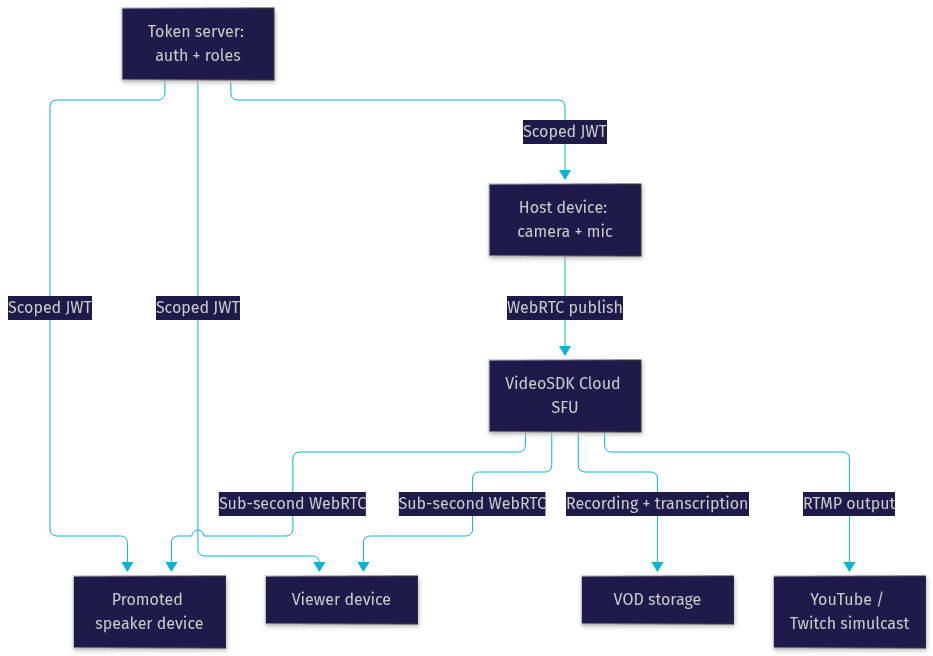
Interactive live streaming runs over WebRTC with a cloud-based SFU (Selective Forwarding Unit) architecture, delivering sub-second glass-to-glass latency. The trade-off is scale economics: WebRTC connections cost more per viewer-minute than CDN-delivered HLS. Many teams run both, using interactive streaming for the engaged core audience and RTMP output to simulcast the same stream to YouTube or Twitch for the long tail. VideoSDK supports exactly this pattern, with RTMP output built into the same SDK surface.
Key Evaluation Criteria for a Live Streaming SDK
Score every candidate provider on these eight dimensions before writing any integration code. Weight them by your use case, not by vendor marketing.
Glass-to-glass latency. Measure from camera sensor to viewer screen, not the vendor's transport-only number. Sub-second is the threshold for genuine interaction; anything above two seconds turns conversation into walkie-talkie.
Scalability ceiling. Ask two separate questions: how many concurrent publishers (hosts and promoted speakers) and how many concurrent viewers? Interactive platforms typically handle thousands of viewers per room; verify the ceiling before a live event becomes an outage.
Platform coverage. Your audience is on web, iOS, Android, and increasingly Flutter, React Native, and Unity. A provider with 10+ platform SDKs, like VideoSDK, saves you from maintaining a custom native bridge for the platforms it skips.
Pricing model transparency. Look for per-participant-minute pricing with a usable free tier, and check what counts as a participant. Some providers bill viewers as full participants; others, including VideoSDK, price viewer-mode connections differently, which changes your cost curve dramatically at scale.
Built-in interactive features. Chat, polls, Q&A, whiteboard, and viewer-to-speaker promotion should ship in the SDK. Building engagement tooling yourself is weeks of work you didn't budget.
Recording and VOD support. Composite and individual recording, plus post-call transcription and summaries, turn a one-time stream into reusable content.
Security and compliance. End-to-end encryption, geo-fencing, waiting rooms, and token-scoped access control are baseline for regulated industries like telehealth and edtech.
Documentation and developer support. Read the actual quickstart before signing up. Check whether the docs cover token generation, reconnection handling, and production deployment, and whether there's an active Discord or GitHub community. VideoSDK's code samples and 3,000+ member Discord community are good benchmarks for what healthy support looks like.
Comparing the Top Interactive Streaming SDK Providers
Here is how the leading providers stack up in 2026 against the criteria above. Treat this as a starting map, and run your own latency test on your target networks before committing.
VideoSDK is the strongest all-rounder for interactive use cases. It delivers sub-second ILS on the same SDK surface as its video calling product, supports viewer-to-speaker promotion, built-in chat, polls, and Q&A, RTMP output for simulcasting, and covers React, JavaScript, React Native, Android, iOS, Flutter, Unity, Python, and IoT. The free tier with credit for prototyping and the Prebuilt UI Kit make it the fastest path from zero to a working interactive stream.
Agora is the enterprise incumbent with enormous global infrastructure and strong scale, but pricing complexity and per-use-case product fragmentation make evaluation slower, and costs climb quickly at high viewer counts.
LiveKit is the leading open-source option, built on WebRTC with a self-hostable SFU. Choose it when you need full infrastructure control and have the DevOps capacity to run it; the trade-off is that you own scaling, monitoring, and TURN infrastructure.
Mux and Amazon IVS are excellent broadcast platforms with strong CDN delivery, but they are HLS-first. Latency sits in the several-second range even in low-latency modes, which rules out genuine audience interaction. Choose them for one-to-many broadcast, not interactive streaming.
Tencent TRTC offers solid latency and scale, particularly strong in Asian markets, but documentation and developer experience outside its home region lag the leaders.
| Provider | Latency | Platform Coverage | Interactive Features | Pricing Transparency | Best For |
|---|---|---|---|---|---|
| VideoSDK | Sub-second | 10+ platforms incl. Unity, IoT | Chat, polls, Q&A, role promotion, RTMP | High, free tier | Interactive streaming with audience participation |
| Agora | Sub-second | Broad | Strong, modular | Low, complex | Enterprise global scale |
| LiveKit | Sub-second | Good, open-source | Build-your-own | Self-hosted cost model | Teams needing infrastructure control |
| Mux | Seconds (HLS) | Web-first APIs | Limited | High | Broadcast and VOD at CDN scale |
| Amazon IVS | Seconds (HLS) | AWS-integrated | Limited | Medium | AWS-native broadcast workloads |
| Tencent TRTC | Sub-second | Good | Strong | Medium | Asian-market deployments |
The most important row is latency, because it is the one criterion you cannot engineer around later. If your use case requires interaction, an HLS-first provider is disqualified on that row alone, regardless of how good its CDN economics are.
The decision flow below maps the most common starting points to a provider category:
When to Choose an Interactive Live Streaming SDK API
Use scenario-based logic rather than brand loyalty. Each of these conditionals maps to a concrete architecture decision.
If you are building live shopping or live commerce, choose an interactive SDK with viewer promotion. Hosts need to pull a customer onto the stream to demo a product, and purchase windows depend on urgency. Sub-second latency plus in-stream chat and polls directly drive conversion. VideoSDK's ILS mode with role switching is built for exactly this pattern.
If you are building real-time tutoring or virtual classrooms, choose an SDK with co-host promotion and collaborative features. A teacher promoting a student to speaker, sharing a screen, and running a poll in the same room is the core loop. Latency above one second breaks the rhythm of Socratic teaching.
If you are building gaming tournaments or live auctions, prioritize latency and role-based access above all else. Bidders reacting within milliseconds to an auctioneer, or casters switching between player feeds, cannot tolerate buffering. Custom video tracks for composited game feeds are a must-have.
If you are running large-scale webinars or town halls with a passive audience, an HLS-first platform or an SDK with RTMP output is often more economical. Run the interactive core (speakers, Q&A) on WebRTC and simulcast the broadcast tier via RTMP. This hybrid is the standard production pattern for events above roughly ten thousand viewers.
If you are in telehealth, fintech, or any regulated vertical, filter providers on security first. End-to-end encryption, geo-fencing, waiting rooms, and token-scoped roles are disqualifying criteria if absent.
Production-Ready Integration Checklist
This is the sequence that takes you from a chosen SDK to a launch-ready stream, described without code. Work through it in order.
1. Pin your SDK version. Select the latest stable release for each platform you ship on, record the version numbers, and check the release notes for breaking changes. Version drift between web and mobile SDKs is a classic source of "works on Android, broken on iOS" bugs.
2. Set up a token server. Your API credentials live only on the server. It generates short-lived tokens scoped to a room, a participant identity, and a role, and exposes an endpoint your clients call before joining. Never embed the API secret in a client bundle.
3. Configure network-adaptive streaming. Enable automatic bitrate and resolution adjustment so the SDK degrades gracefully on poor connections instead of freezing.
4. Enable recording and VOD. Decide between composite recording (one file, the full layout) and individual recordings (one file per participant) before the event, and wire post-call transcription if you need searchable archives.
5. Test on low-bandwidth networks. Throttle your test devices to 3G-class bandwidth and verify the stream stays watchable. Also test mid-stream role promotion and participant disconnection recovery.
6. Deploy behind HTTPS with TURN fallback. WebRTC requires a secure context in browsers, and corporate firewalls often block direct UDP. Confirm your provider's TURN infrastructure handles those users, and test from a restrictive network before launch day.
The overall architecture you are aiming for looks like this:
Cost-Benefit Analysis Template for Streaming SDKs
Total cost of ownership for a streaming SDK has four components, and most teams only price the first one.
First, the per-participant-minute rate, split by role. Multiply expected speaker-minutes and viewer-minutes by their respective rates; the viewer rate dominates at scale, so confirm whether viewers are billed as full participants or at a lower tier. Second, bandwidth and egress, which some providers bundle and others bill separately, especially for RTMP simulcast and recording storage. Third, engineering time: a Prebuilt UI Kit can cut weeks off a launch compared to building custom streaming UI, and that salary cost usually dwarfs the API bill for early-stage products. Fourth, scaling factors: run the numbers at 10x your expected peak, because a pricing model that looks cheap at 100 viewers can invert at 10,000.
A practical template: estimate monthly active streaming hours, multiply by blended per-minute cost, add recording storage, add one engineer-month of integration time at your loaded rate, and compare that total across two or three finalists. VideoSDK's free tier with starting credit lets you prototype the full flow before any of this money is committed.
Common Pitfalls and How to Avoid Them
Four traps account for most failed interactive streaming launches.
Token expiry mid-stream. Tokens have a TTL, and a host whose token expires 40 minutes into a live event gets dropped. Generate tokens with a lifetime that covers your longest planned stream, and implement a rejoin flow that fetches a fresh token automatically.
Missing TURN fallback. Everything works in testing, then 10% of your audience on corporate networks gets a black screen because UDP is blocked. Verify TURN connectivity from a restrictive network before launch, not after the support tickets arrive.
SDK version mismatches across platforms. Web on one SDK version and mobile on another produces subtle media negotiation failures. Lock all platforms to the same release and update them together.
Ignoring the latency vs. scalability trade-off. Teams prototype with 20 viewers on WebRTC, then invite 50,000 and blow past both the platform ceiling and the budget. Load-test at realistic viewer counts, and plan the hybrid WebRTC-plus-RTMP pattern for large events from day one.
Definitions Glossary
Interactive Live Streaming (ILS): A streaming mode where the audience can interact in real time, including being promoted to active speakers, built on WebRTC for sub-second latency rather than buffered HLS delivery.
Room: The container a VideoSDK stream runs in, identified by a unique room ID, which participants join with a role that determines whether they publish or only view media.
SFU (Selective Forwarding Unit): The cloud media server architecture that receives each participant's stream once and forwards it to other participants, enabling many-to-many WebRTC without mesh-connection overload.
Meeting Token: A short-lived credential generated server-side from your API key and secret, scoped to a specific room, participant, and role, used to authenticate access without exposing the API secret to clients.
RTMP Output: The ability to simulcast an interactive stream to external broadcast platforms like YouTube or Twitch, combining a WebRTC interactive core with CDN-delivered reach.
Network-Adaptive Streaming: Automatic adjustment of bitrate and resolution based on real-time bandwidth measurement, keeping streams watchable on poor connections instead of freezing.
Key Takeaways
- Choose an interactive live streaming SDK API based on glass-to-glass latency first, because sub-second interaction cannot be retrofitted onto an HLS pipeline.
- Score providers on eight dimensions: latency, scalability, platform coverage, pricing transparency, interactive features, recording, security, and documentation quality.
- VideoSDK offers sub-second ILS with viewer-to-speaker promotion, built-in chat, polls, and Q&A, RTMP simulcast, and SDKs for 10+ platforms including React, Flutter, and Unity, with a free tier for prototyping.
- Run the hybrid pattern for large events: WebRTC for the interactive core, RTMP output to broadcast platforms for the passive audience.
- Avoid the four classic launch failures: token expiry mid-stream, missing TURN fallback, cross-platform SDK version drift, and untested scale.
Conclusion
Choosing the best interactive live streaming SDK API comes down to one honest question: does your audience need to respond in real time? If yes, only a WebRTC-based interactive SDK qualifies, and your decision then rests on platform coverage, built-in engagement features, pricing transparency, and production readiness. For most developers, VideoSDK is the strongest starting point, combining sub-second ILS with the broadest platform coverage in the market and a free tier to prove the concept. Start with the interactive live streaming quickstart, explore the code samples, and join the VideoSDK Discord community when you hit questions. What are you building with interactive live streaming? Drop a comment, I'd love to hear what kind of live use case you're working on.
Free $20 Balance for AI Voice Agents & Video Calls
FAQ