


The WebTransport API is a browser interface for low-latency, bidirectional communication between a client and an HTTP/3 server, built on the QUIC protocol. Unlike WebSockets, it supports multiple independent streams and unreliable datagrams over a single connection, eliminating head-of-line blocking. Developers building real-time gaming, collaboration, or streaming apps should evaluate it alongside WebRTC-based options like VideoSDK, which handles media transport end to end.
WebSockets have carried real-time web traffic for over a decade, but they run over TCP, and TCP has a structural problem: when one packet is lost, every stream behind it waits. For a multiplayer game sending 60 updates per second, that stall is fatal. The WebTransport API is the browser industry's answer, riding on HTTP/3 and QUIC to give developers multiple independent streams, optional unreliable delivery, and modern congestion control in a single connection.
In this article, you'll learn what the WebTransport API is, how it differs from WebSockets, how its core components fit together, what it takes to set up a connection on both client and server, and the best practices that separate a production deployment from a weekend demo.
What Is the WebTransport API?
The WebTransport API is defined as a set of JavaScript interfaces that allow a browser to open a transport session with an HTTP/3 server and exchange data through streams and datagrams. It works by establishing a QUIC connection, then letting the developer create any number of unidirectional or bidirectional streams within that single session, alongside an optional datagram channel for unreliable, UDP-like message delivery.
Three concepts anchor the API. First, reliable streams guarantee ordered, retransmitted delivery, like TCP, but each stream is independent, so a lost packet in one stream does not block the others. Second, unreliable datagrams send small messages with no delivery guarantee and no retransmission, ideal for state updates where a newer frame makes an older one worthless. Third, flow control and congestion control are built into QUIC itself, and the API exposes hints so developers can bias the connection toward throughput or low latency.
The WebTransport API is currently a W3C Candidate Recommendation, with shipping implementations in Chromium-based browsers and active development elsewhere. It is not a media API like WebRTC; it is a general-purpose data transport, which makes it a natural building block for custom real-time protocols.
How WebTransport Differs From WebSockets
WebSockets and the WebTransport API solve the same problem, getting real-time data between browser and server, but they sit on fundamentally different transport layers. WebSockets run over TCP, which delivers a single ordered byte stream. WebTransport runs over QUIC, which natively multiplexes independent streams over UDP.
The practical consequence is head-of-line blocking. On a WebSocket connection, if segment 400 is lost, the receiver cannot process segments 401 through 500 until the retransmission arrives, even if those segments belong to logically unrelated messages. On a WebTransport connection, each stream has its own delivery state, so a loss in one stream only delays that stream.
Latency behavior also differs. QUIC's congestion controller operates per connection with modern algorithms, and datagrams skip retransmission entirely, giving developers a latency profile closer to raw UDP than anything TCP-based can offer. Connection establishment is faster too, since QUIC folds the transport and TLS handshakes together.
WebSockets still win on ubiquity. Every browser ever shipped supports them, and the server ecosystem is mature. The WebTransport API shines when you need many parallel streams, tolerance for packet loss, or datagram-style messaging, such as game state updates, live telemetry, or frame-droppable media. For one-to-many media delivery with sub-second interaction, developers should also consider VideoSDK's Interactive Live Streaming, which handles the transport, scaling, and viewer-role complexity for you.
Core Components of the WebTransport API
The WebTransport API is organized around a small set of objects that model the connection, its streams, and the datagram channel. Understanding the lifecycle of each is essential, because streams are resources that must be closed deliberately.
Transport Object and Lifecycle
A session begins when the developer constructs a transport object with a server URL in the HTTP/3 scheme. The constructor returns immediately, and a readiness promise resolves once the QUIC connection and TLS handshake complete successfully. From that point, the session can open streams, send datagrams, and report statistics. Closing is explicit: the developer can close the transport gracefully, and the API also exposes a closed promise that resolves when the server or the network ends the session, which is the correct place to trigger reconnection logic.
Streams Overview
Bidirectional streams give both sides a readable and a writable end. The client opens one, writes data into its outgoing side, and reads responses from the incoming side, all with backpressure-aware flow control. Unidirectional streams carry data in one direction only. A client can open a send-only stream for fire-and-forget uploads, and the server can open its own unidirectional streams toward the client, a pattern WebSockets cannot express cleanly.
Datagram Support
The datagram channel is exposed as a duplex object with separate readable and writable ends. Datagrams are size-limited, unordered, and unreliably delivered. They are the right choice when a stale message has no value, such as a player's latest position or a sensor's most recent reading.
Congestion Control and Reliability Settings
When creating streams, developers can pass a congestion control hint requesting either throughput-oriented or low-latency behavior. Low-latency mode tells the stack to prioritize timely delivery over maximizing bandwidth, which suits interactive traffic. Requesting unreliable delivery on a stream tells the stack that retransmitting lost data is wasted effort, complementing the datagram channel for larger unreliable payloads.
Setting Up a WebTransport Connection
Setting up a WebTransport session requires a secure context. Browsers only expose the API on pages served over HTTPS, or on localhost during development, because the transport's security model is built on TLS 1.3 within QUIC.
Before writing any client logic, check the MDN browser compatibility table for current support. As of 2026, Chromium-based browsers ship the API broadly, Firefox has been expanding support, and Safari's status should be verified before relying on it. Feature detection is straightforward: check whether the transport constructor exists on the global object before attempting a connection.
The setup sequence a developer follows is: construct the transport with an HTTP/3 URL, await the readiness promise, then begin opening streams or sending datagrams. An options object can carry additional settings such as server certificate hash pinning for constrained environments. Protocol negotiation happens underneath: the browser and server agree on HTTP/3 and the WebTransport protocol identifier during the QUIC handshake, and the readiness promise rejects if negotiation fails.
Server-Side Requirements
A WebTransport server must speak HTTP/3 over QUIC with TLS 1.3, and must advertise the WebTransport protocol support during connection setup. This rules out plain HTTP/2 servers and means your infrastructure choices matter.
Several options exist. Caddy has native HTTP/3 support with automatic certificates. Nginx added QUIC and HTTP/3 support and can terminate it in front of an application server. Node.js does not ship QUIC in core, but community libraries built on QUIC implementations exist, and Rust servers such as those built on the Quinn library are a common choice for custom WebTransport backends.
Security considerations center on certificates. The server needs a valid certificate for its hostname, and clients verify it through the standard TLS chain. For environments where standard Web PKI is impractical, the API supports pinning a specific certificate by hash, so the client only connects to a server presenting exactly that key material. This is useful for internal deployments but should not replace proper certificates on public sites.
Practical Use Cases
Real-time multiplayer gaming is the flagship case. Game state updates are perfect datagram candidates: position and velocity data lose value within milliseconds, so retransmitting a lost update wastes bandwidth. Reliable streams handle chat, matchmaking, and inventory changes where every byte must arrive.
Live collaborative editing benefits from independent streams. Each document section or user cursor channel can be its own stream, so a large image upload on one stream never blocks keystrokes on another, the exact failure mode that plagues TCP-based collaboration tools.
IoT telemetry streams favor unidirectional streams. Thousands of sensors pushing readings toward a collector need cheap, one-way channels, and the latest-reading-wins semantics of datagrams match how monitoring dashboards actually consume data.
Low-latency media and interactive streaming is the most demanding case. For production systems, most teams should not hand-roll media transport at all. A platform like VideoSDK provides network-adaptive streaming, automatic bitrate adjustment, and sub-second interactive live streaming out of the box, which is far more resilient than a custom QUIC pipeline for real users on real networks.
Performance Tips and Best Practices
Getting the most from the WebTransport API is about matching transport semantics to data semantics and managing resources deliberately.
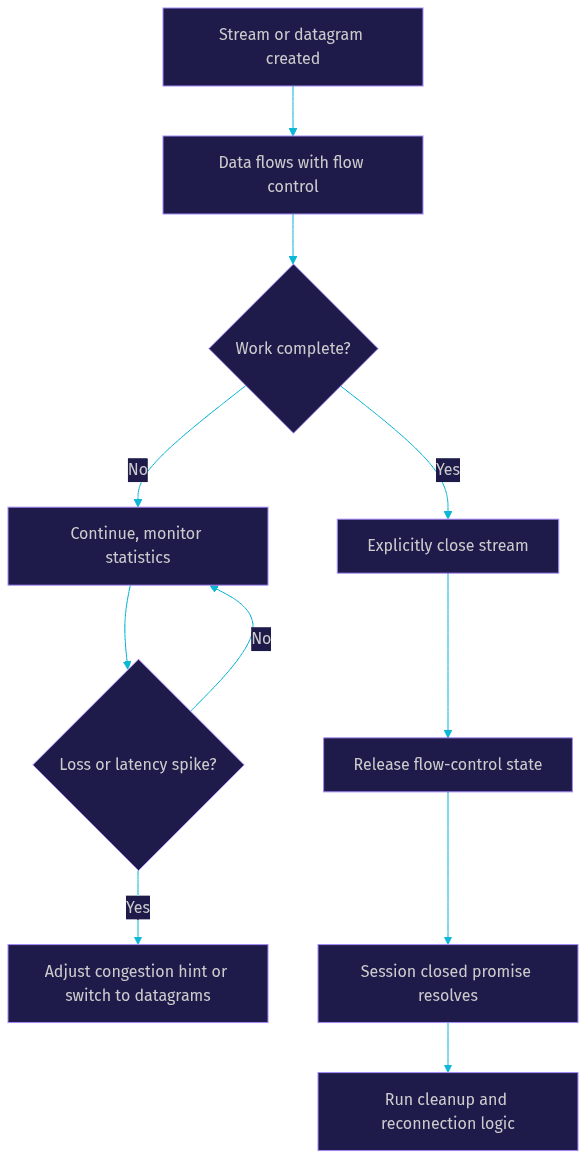
Choose congestion control per stream. Interactive traffic should request low-latency mode; bulk transfers like asset downloads should request throughput mode. Mixing both on one session is fine, since hints are per stream.
Manage stream lifecycles. Every opened stream holds memory and flow-control state until closed. Close streams explicitly when their work is done, and always handle the session's closed promise so a server-side disconnect triggers cleanup rather than a silent resource leak.
Monitor transport statistics. The API exposes a statistics method returning metrics such as packets sent and lost, bytes transmitted, and round-trip estimates. Polling these during development reveals loss patterns and latency spikes before users report them.
Plan a fallback. For browsers without support, fall back to WebSockets over HTTP/2, or better, to a managed real-time platform. Design your application protocol so the transport is swappable underneath.
Common Pitfalls and How to Avoid Them
The most frequent failure is a misconfigured secure context. A self-signed certificate without hash pinning, or a page served over plain HTTP, causes the transport constructor to reject immediately. Test on localhost or with valid certificates.
Ignoring browser compatibility is the second. Constructing a transport without feature detection throws a runtime error in unsupported browsers, so guard the code path.
Overusing datagrams for reliable data is a design error, not a crash. Datagrams have size limits and no delivery guarantees, so anything requiring completeness, like file chunks or transactional messages, belongs on a stream.
Finally, not handling the closed promise leaves applications hanging after a server restart. Treat session closure as a first-class event with cleanup and reconnection attached.
Future Outlook for WebTransport
As of 2026, the WebTransport API is a W3C Candidate Recommendation, meaning the specification is stable enough for broad implementation feedback. Expect continued convergence across browsers, richer statistics surfaces, and growing server ecosystem maturity as HTTP/3 adoption climbs.
Developers can track progress through the W3C WebTransport working group's mailing list and the specification's GitHub repository, where issues and editor drafts are public. For most teams, the pragmatic path is to prototype with the API now while keeping a managed fallback ready.
Definitions Glossary
WebTransport API: A browser interface for opening a low-latency transport session with an HTTP/3 server, supporting multiple streams and unreliable datagrams over one QUIC connection.
QUIC: A UDP-based transport protocol that multiplexes independent streams with built-in TLS 1.3 encryption, the foundation of HTTP/3 and the WebTransport API.
Datagram: A small, unordered, unreliably delivered message sent over the transport's datagram channel, suited to time-sensitive data where stale values are worthless.
Head-of-line blocking: The TCP behavior where a lost packet delays all subsequent data on a connection; QUIC's per-stream delivery eliminates it across streams.
Unidirectional stream: A stream carrying data in one direction only, opened by either the client or the server, useful for fire-and-forget messaging patterns.
Key Takeaways
- The WebTransport API runs over HTTP/3 and QUIC, giving developers multiple independent streams and unreliable datagrams in a single encrypted connection.
- Unlike WebSockets, it eliminates cross-stream head-of-line blocking and lets developers choose between reliable streams and loss-tolerant datagrams per message.
- Connections require a secure HTTPS context, an HTTP/3-capable server, and explicit handling of the readiness and closed promises.
- Best performance comes from matching congestion control hints to traffic type and closing streams deliberately to avoid resource leaks.
- For production real-time video, audio, and interactive streaming, a managed platform like VideoSDK with network-adaptive streaming outperforms a hand-rolled QUIC pipeline.
Conclusion
The WebTransport API is the most significant upgrade to browser networking since WebSockets: QUIC-based multiplexing, optional unreliable delivery, and modern congestion control in one interface. It is the right tool for custom low-latency protocols in gaming, collaboration, and telemetry. For real-time media, pairing your transport knowledge with a managed platform is the faster route to production, and you can start free by signing up at app.videosdk.live/login or exploring the VideoSDK docs. What are you building with the WebTransport API? Drop a comment, I'd love to hear what kind of real-time use case you're working on.
Free $20 Balance for AI Voice Agents & Video Calls
FAQ