


An AI telephony agent connects SIP phone calls to a real-time voice AI stack running speech-to-text, LLM reasoning, and text-to-speech in one session. Build one by wiring Twilio to VideoSDK's agent framework, deploying a FastAPI server for call webhooks, and implementing an Agent class for conversation logic.
Your support queue hits 400 missed calls before noon, and every one routes to voicemail. An AI telephony agent answers those calls in real time, confirms appointments, collects feedback, or places outbound follow-ups without adding headcount. This article defines what an AI telephony agent is, maps the SIP-to-AI architecture, walks through a Python build with VideoSDK and FastAPI, compares platform options, and covers the production challenges that tutorial posts skip.
What Is an AI Telephony Agent?
An AI telephony agent is defined as a software system that answers or initiates phone calls over SIP and VoIP networks while running conversational AI logic through speech-to-text, a large language model, and text-to-speech in a single real-time session.
An AI telephony agent works by receiving an inbound call webhook from a SIP provider, creating a media session in a real-time communication room, bridging the phone audio into that room, and piping the caller's speech through an AI pipeline that generates spoken responses. Outbound agents follow the same pipeline in reverse: your server initiates the call, connects the callee to the AI session, and the agent delivers a scripted or dynamic conversation.
Unlike traditional IVR systems that play fixed menu trees, AI telephony agents interpret natural language, maintain conversational context across multiple turns, and execute tool calls like checking CRM records or updating appointment databases. According to Grand View Research, the global conversational AI market size was valued at USD 14.3 billion in 2025 and is projected to grow from USD 17.7 billion in 2026 to USD 78.9 billion by 2033, growing at a CAGR of 23.8% from 2026 to 2033. North America is expected to hold a significant share of the global chatbot market, with a revenue share of over 31.1%by 2025..
Teams building on VideoSDK gain a unified stack where SIP call control, real-time audio transport, and the agent framework (LLM, STT, TTS plugins) run in one integration rather than stitching together separate media, AI, and telephony vendors.
How Does an AI Telephony Agent Work?
An AI telephony agent processes every phone call through five sequential stages: SIP signaling, media bridging, speech recognition, language model reasoning, and speech synthesis back to the caller.
SIP Signaling and Call Control
When a caller dials your Twilio number, Twilio sends an HTTP webhook to your FastAPI server's /inbound-call endpoint with call metadata (CallSid, From, To). Your server creates a VideoSDK room, retrieves the SIP endpoint for that room, and returns TwiML instructions that connect the phone call into the room via SIP dial. For SIP trunk setup details.
Media Bridging
The SIP provider bridges PSTN audio into the VideoSDK room as a SIP participant. The AI agent joins the same room as a software participant. Both sides share a real-time audio channel where the agent hears the caller and the caller hears the agent's synthesized voice.
Speech-to-Text, LLM, and Text-to-Speech
The agent framework captures incoming audio, converts it to text via STT (Google Cloud Speech, Deepgram, or similar), sends the transcript to an LLM (Google Gemini, OpenAI GPT, or a custom model), and converts the LLM response to audio via TTS (Google Cloud Text-to-Speech, ElevenLabs, or similar). According to Twilio's Voice API documentation, SIP-connected calls support standard codecs including G.711 (PCMU/PCMA) for PSTN interoperability.
Session Lifecycle
For inbound calls, the session starts when the webhook fires and ends when the caller hangs up or the agent calls on_exit. For outbound calls, your server POSTs to /outbound-call, creates the room and agent session first, then initiates the outbound dial so the AI is ready before the callee answers.
In practice, engineering teams that pre-warm the agent session before connecting the SIP leg report fewer dropped first utterances and lower perceived latency on outbound campaigns.
Architecture Overview: Modular, Extensible, Real-Time
Our architecture separates concerns for maximum flexibility:
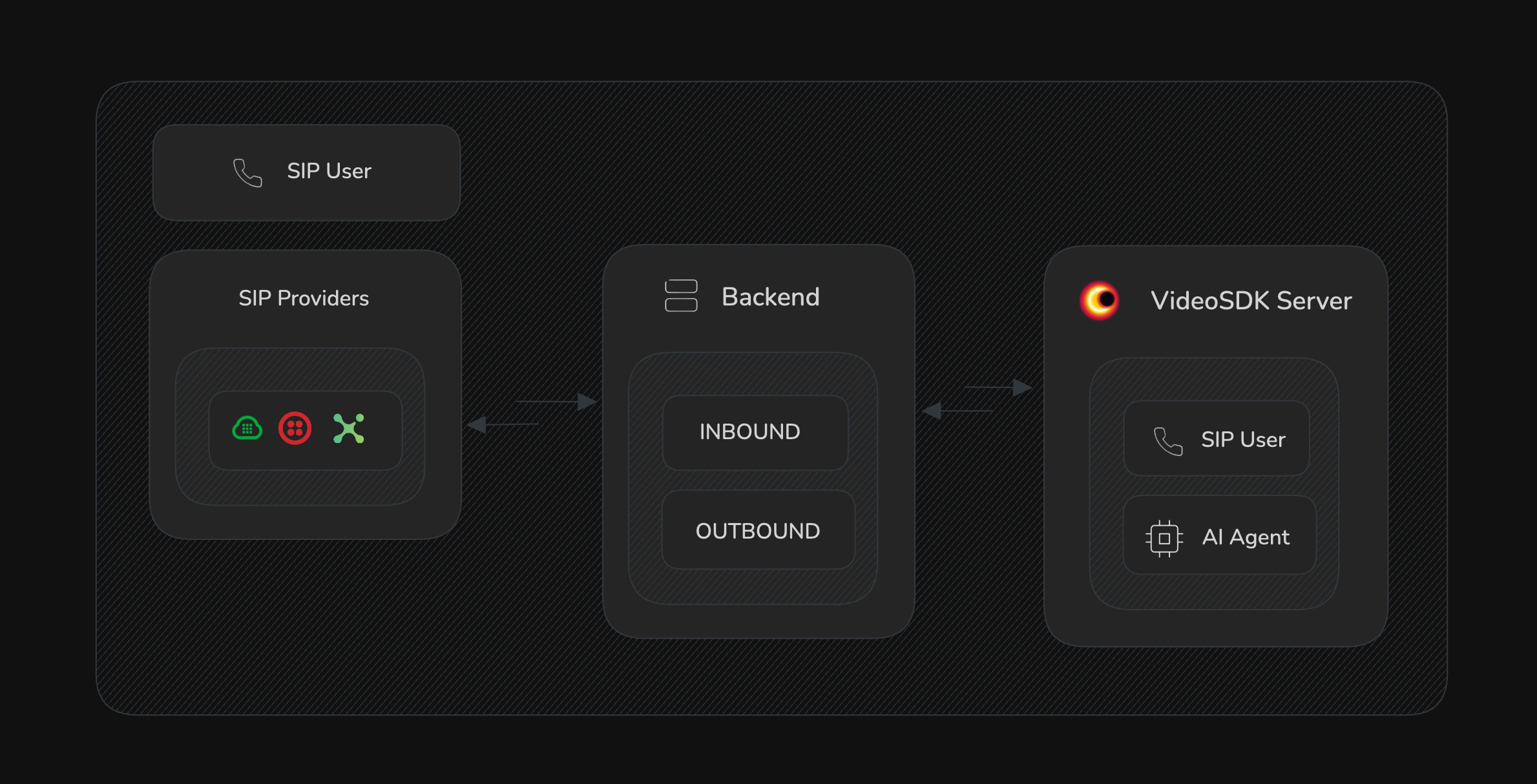
- SIP Integration (VoIP telephony, call control, DTMF, call transfer, call recording)
- AI Voice Agent (Powered by VideoSDK’s agent framework, integrates LLMs, STT, TTS, sentiment analysis)
- Session Management (Inbound/outbound call routing, session lifecycle)
- Provider Abstraction (Easily switch SIP providers—Twilio, Plivo, etc.)
- Pluggable AI Capabilities (Swap in Google, OpenAI, or custom models)
You can add features like runtime configuration, call transcription, web dashboards, and more—all with Python.
Project Structure
Let’s start by laying out the recommended project structure, just like the demo repo:
ai-telephony-demo/
├── ai/                  # AI and LLM plugins (optional, for custom logic)
├── providers/           # Telephony/SIP provider integrations
├── services/            # Business logic, utilities, and workflow services
├── voice_agent.py       # Core AI voice agent
├── server.py            # FastAPI application and entrypoint
├── config.py            # Environment-driven config
├── requirements.txt     # Python dependencies
Dependencies
Install the dependencies listed in requirements.txt:
pip install -r requirements.txt
Key dependencies include:
fastapi&uvicornfor the servervideosdk,videosdk-agents, and plugins for agent logictwilio,google-cloud-speech,google-cloud-texttospeechfor SIP & AIpython-dotenvfor config
Configuration
Create a .env file in your project root with all the required keys:
VIDEOSDK_AUTH_TOKEN=your_videosdk_auth_token
VIDEOSDK_SIP_USERNAME=your_sip_username
VIDEOSDK_SIP_PASSWORD=your_sip_password
GOOGLE_API_KEY=your_google_api_key
TWILIO_SID=your_twilio_sid
TWILIO_AUTH_TOKEN=your_twilio_auth_token
TWILIO_NUMBER=your_twilio_phone_number
Your config.py loads and validates these:
import os
import logging
from dotenv import load_dotenv

load_dotenv()
logging.basicConfig(level=logging.INFO, format='%(asctime)s - %(name)s - %(levelname)s - %(message)s')
logger = logging.getLogger(__name__)

class Config:
    VIDEOSDK_AUTH_TOKEN = os.getenv("VIDEOSDK_AUTH_TOKEN")
    VIDEOSDK_SIP_USERNAME = os.getenv("VIDEOSDK_SIP_USERNAME")
    VIDEOSDK_SIP_PASSWORD = os.getenv("VIDEOSDK_SIP_PASSWORD")
    GOOGLE_API_KEY = os.getenv("GOOGLE_API_KEY")
    TWILIO_ACCOUNT_SID = os.getenv("TWILIO_SID")
    TWILIO_AUTH_TOKEN = os.getenv("TWILIO_AUTH_TOKEN")
    TWILIO_NUMBER = os.getenv("TWILIO_NUMBER")

    @classmethod
    def validate(cls):
        required_vars = {
            "VIDEOSDK_AUTH_TOKEN": cls.VIDEOSDK_AUTH_TOKEN,
            "VIDEOSDK_SIP_USERNAME": cls.VIDEOSDK_SIP_USERNAME,
            "VIDEOSDK_SIP_PASSWORD": cls.VIDEOSDK_SIP_PASSWORD,
            "GOOGLE_API_KEY": cls.GOOGLE_API_KEY,
            "TWILIO_SID": cls.TWILIO_ACCOUNT_SID,
            "TWILIO_AUTH_TOKEN": cls.TWILIO_AUTH_TOKEN,
            "TWILIO_NUMBER": cls.TWILIO_NUMBER,
        }
        missing = [v for v, val in required_vars.items() if not val]
        if missing:
            for v in missing:
                logger.error(f"Missing environment variable: {v}")
            raise ValueError(f"Missing required environment variables: {', '.join(missing)}")
        logger.info("All required environment variables are set.")

Config.validate()
The Voice Agent: AI-Powered Call Automation
Your agent logic lives in voice_agent.py. Here’s the real implementation from the repo:
import logging
from typing import Optional, List, Any
from videosdk.agents import Agent

logger = logging.getLogger(__name__)

class VoiceAgent(Agent):
    """An outbound call agent specialized for medical appointment scheduling."""

    def __init__(
        self,
        instructions: str = "You are a medical appointment scheduling assistant. Your goal is to confirm upcoming appointments (5th June 2025 at 11:00 AM) and reschedule if needed.",
        tools: Optional[List[Any]] = None,
        context: Optional[dict] = None,
    ) -> None:
        super().__init__(
            instructions=instructions,
            tools=tools or []
        )
        self.context = context or {}
        self.logger = logging.getLogger(__name__)

    async def on_enter(self) -> None:
        self.logger.info("Agent entered the session.")
        initial_greeting = self.context.get(
            "initial_greeting",
            "Hello, this is Neha, calling from City Medical Center regarding your upcoming appointment. Is this a good time to speak?"
        )
        await self.session.say(initial_greeting)

    async def on_exit(self) -> None:
        self.logger.info("Call ended")
You can customize instructions, context, and plug in different tools/plugins for STT, TTS, or LLMs.
The Server: Handling Calls, Routing, and Agent Sessions
The server.py file uses FastAPI to handle incoming SIP webhooks, manage sessions, and glue everything together:
import logging
from fastapi import FastAPI, Request, Form, BackgroundTasks, HTTPException
from fastapi.responses import PlainTextResponse
from config import Config
from models import OutboundCallRequest, CallResponse, SessionInfo
from providers import get_provider
from services import VideoSDKService, SessionManager

logger = logging.getLogger(__name__)

app = FastAPI(
    title="VideoSDK AI Agent Call Server (Modular)",
    description="Modular FastAPI server for inbound/outbound calls with VideoSDK AI Agent using different providers.",
    version="2.0.0"
)

videosdk_service = VideoSDKService()
session_manager = SessionManager()
sip_provider = get_provider("twilio")  # Use your SIP provider

@app.get("/health", response_class=PlainTextResponse)
async def health_check():
    active_sessions = session_manager.get_active_sessions_count()
    return f"Server is healthy. Active sessions: {active_sessions}"

@app.post("/inbound-call", response_class=PlainTextResponse)
async def inbound_call(
    request: Request,
    background_tasks: BackgroundTasks,
    CallSid: str = Form(...),
    From: str = Form(...),
    To: str = Form(...),
):
    logger.info(f"Inbound call received from {From} to {To}. CallSid: {CallSid}")
    try:
        room_id = await videosdk_service.create_room()
        session = await session_manager.create_session(room_id, "inbound")
        background_tasks.add_task(session_manager.run_session, session, room_id)
        sip_endpoint = videosdk_service.get_sip_endpoint(room_id)
        twiml = sip_provider.generate_twiml(sip_endpoint)
        logger.info(f"Responding to {sip_provider.get_provider_name()} inbound call {CallSid} with TwiML to dial SIP: {sip_endpoint}")
        return twiml
    except HTTPException as e:
        logger.error(f"Failed to handle inbound call {CallSid}: {e.detail}")
        return PlainTextResponse(f"<Response><Say>An error occurred: {e.detail}</Say></Response>", status_code=500)
    except Exception as e:
        logger.error(f"Unhandled error in inbound call {CallSid}: {e}", exc_info=True)
        return PlainTextResponse("<Response><Say>An unexpected error occurred. Please try again later.</Say></Response>", status_code=500)

@app.post("/outbound-call")
async def outbound_call(request_body: OutboundCallRequest, background_tasks: BackgroundTasks):
    to_number = request_body.to_number
    initial_greeting = request_body.initial_greeting
    logger.info(f"Request to initiate outbound call to: {to_number}")

    if not to_number:
        raise HTTPException(status_code=400, detail="'to_number' is required.")

    try:
        room_id = await videosdk_service.create_room()
        session = await session_manager.create_session(
            room_id,
            "outbound",
            initial_greeting
        )
        background_tasks.add_task(session_manager.run_session, session, room_id)
        sip_endpoint = videosdk_service.get_sip_endpoint(room_id)
        twiml = sip_provider.generate_twiml(sip_endpoint)
        call_result = sip_provider.initiate_outbound_call(to_number, twiml)
        logger.info(f"Outbound call initiated via {sip_provider.get_provider_name()} to {to_number}. "
                   f"Call SID: {call_result['call_sid']}. VideoSDK Room: {room_id}")
        return CallResponse(
            message="Outbound call initiated successfully",
            twilio_call_sid=call_result['call_sid'],
            videosdk_room_id=room_id
        )
    except HTTPException as e:
        logger.error(f"Failed to initiate outbound call to {to_number}: {e.detail}")
        raise e
    except Exception as e:
        logger.error(f"Unhandled error initiating outbound call to {to_number}: {e}", exc_info=True)
        raise HTTPException(status_code=500, detail=f"Failed to initiate outbound call: {e}")

if __name__ == "__main__":
    import uvicorn
    uvicorn.run(app, host="0.0.0.0", port=8000)
Modular Providers, Services, and Models
The demo repo is designed to be modular and extensible:
providers/contains code for handling different SIP providers (Twilio, Vonage, etc).services/manages VideoSDK integration, room/session management, and business logic.models.pydefines request/response data for FastAPI endpoints.
You can easily add or swap providers, business rules, and AI models
Extending with MCP & Agent2Agent Protocol
To enable advanced features like agent-to-agent transfer, call control, and real-time management:
- Integrate the MCP protocol for call control, muting, and participant management.
- Use the Agent2Agent protocol to automate handoffs and workflows between agents.
You can build on the provided classes and add hooks in your VoiceAgent or session logic to coordinate with these protocols.
Running and Testing
- Use tools like ngrok to expose your server to the public internet for SIP webhooks.
- Configure your SIP provider (e.g., Twilio) to point to your
/inbound-callendpoint. - Trigger inbound or outbound calls and watch your AI agent handle real conversations!
Start your FastAPI server:
uvicorn server:app --reload
Key Takeaways
- This open-source project provides a real, modular foundation for AI-powered telephony using SIP, VoIP, and cloud AI.
- The code is production-grade and extensible—just add your workflows, providers, or AI plugins.
- You can enable advanced call control, routing, A2A communication, and more with VideoSDK protocols.
Resources & Next Steps
- Explore the ai-telephony-demo repo for the full codebase and more docs.
- Learn more about VideoSDK AI Agents, A2A, and MCP.
- Build your own use case: appointment scheduling, customer service automation, or scalable feedback collection!
Frequently Asked Questions
Developers building AI telephony agents most often ask about definition, implementation steps, SIP integration, outbound capability, routing mechanics, production requirements, and per-call cost.
What is an AI telephony agent?
An AI telephony agent is a software system that answers or places phone calls over SIP and VoIP while running conversational AI through speech-to-text, a large language model, and text-to-speech. The agent interprets natural language, maintains context across turns, and can execute tools like CRM lookups or appointment scheduling during the call.
How do you build an AI telephony agent?
Build an AI telephony agent by setting up a Python project with VideoSDK's agent framework, creating a FastAPI server with inbound and outbound webhook endpoints, configuring a SIP provider like Twilio, and implementing a VoiceAgent class with custom instructions and lifecycle hooks. Expose the server publicly, point your phone number's webhook to the inbound endpoint, and test with real calls.
What is SIP integration for voice AI?
SIP integration for voice AI connects PSTN phone calls to a real-time media room where an AI agent processes audio. Your SIP provider sends a webhook when a call arrives, your server creates a room and returns dial instructions, and the provider bridges the caller's audio into the room where STT, LLM, and TTS handle the conversation.
Can AI agents make outbound calls?
Yes, AI agents make outbound calls by accepting a target phone number through an API endpoint, pre-creating the agent session and media room, generating TwiML or SIP dial instructions, and initiating the call through the SIP provider. The agent delivers its greeting the moment the callee answers.
How does inbound call routing work with AI?
Inbound call routing with AI starts when the SIP provider sends a webhook to your server with call metadata. Your server creates a real-time room, launches the agent session in a background task, and returns instructions that connect the phone call into the room. The agent handles the conversation from the first ring answer through hangup.
What do you need to run an AI phone agent in production?
Running an AI phone agent in production requires a publicly reachable webhook server, valid SIP trunk credentials, VideoSDK auth tokens, STT/LLM/TTS API keys, error handling for failed sessions, latency optimization across the audio pipeline, TCPA compliance for outbound calls, and human handoff triggers for conversations the AI cannot resolve.
How much does an AI telephony agent cost?
An AI telephony agent costs the sum of SIP trunk minutes, real-time media session minutes, LLM token usage, and TTS synthesis charges. A typical 3-minute call with 10 conversational turns costs approximately $0.05 to $0.15 at published provider rates.