


AI voice agent use cases span customer service, healthcare, banking, retail, restaurants, and insurance, where agents handle scheduling, support, payments, and claims at scale. Teams deploy them to cut call volume, extend 24/7 coverage, and route complex issues to humans with full context. Start with high-volume, repeatable conversations on sub-300ms audio infrastructure.
Introduction
Developers and founders evaluating AI voice agent use cases need industry-specific examples tied to measurable deployment outcomes, not generic hype about conversational AI.
A missed restaurant call during Friday dinner rush costs revenue. A healthcare clinic that puts every patient on hold loses trust before a nurse answers. AI voice agents solve these problems by answering, routing, and completing routine conversations without waiting on staff.
This article maps the most valuable AI voice agent use cases by industry, explains how they work in production, and shows how developers build them with real-time voice infrastructure. You will see where voice AI delivers ROI, where it fails, and how to implement it without rebuilding your telephony stack from scratch.
What is AI Voice Agent?
An AI voice agent is defined as a software system that listens to spoken language, interprets intent with natural language processing, and responds with synthesized speech in real time. Unlike legacy interactive voice response menus that force callers through rigid button trees, modern voice agents hold multi-turn conversations and adapt based on context.
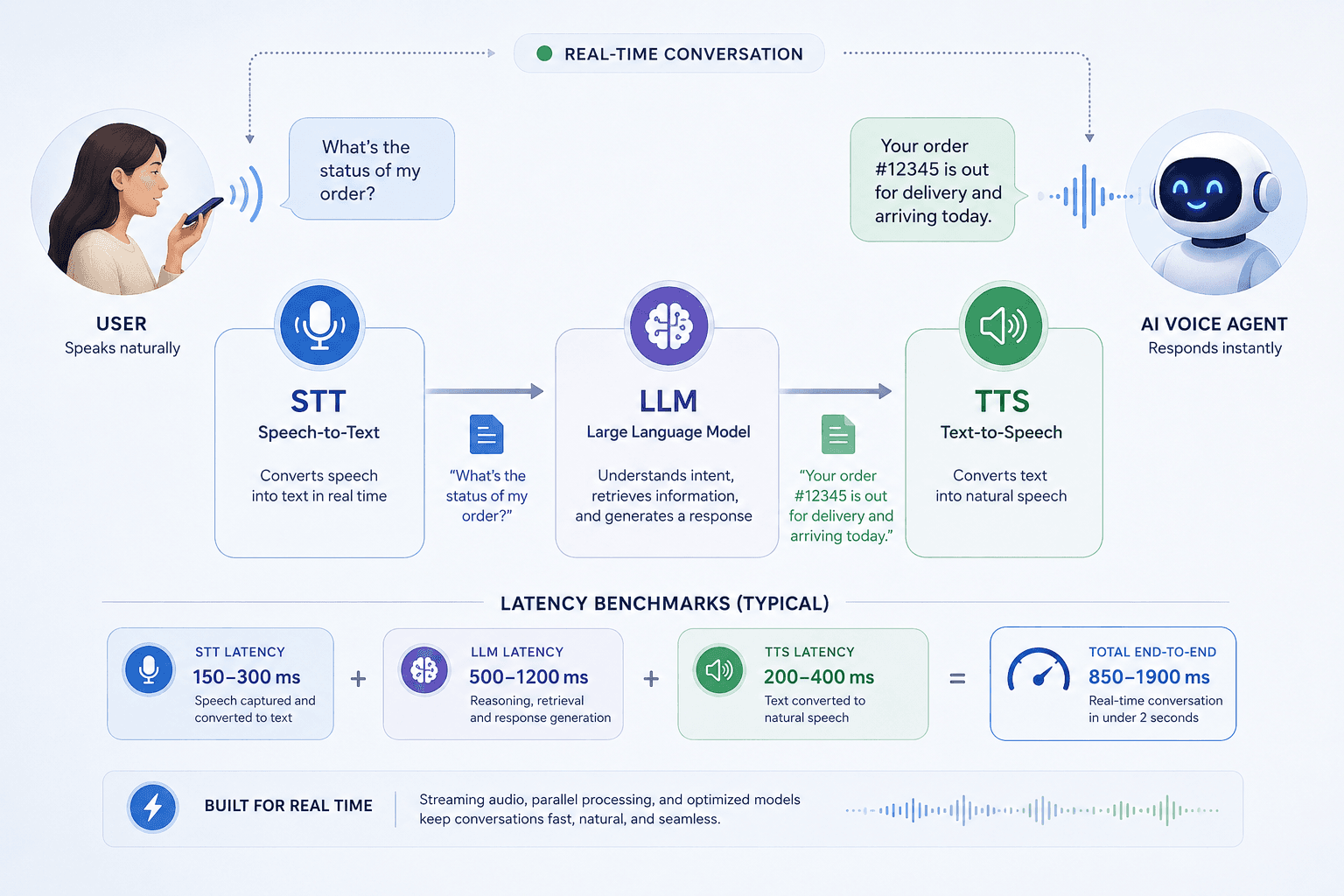
An AI voice agent works by streaming audio through a pipeline of speech-to-text transcription, large language model reasoning, and text-to-speech synthesis, all orchestrated over a low-latency real-time transport layer. The agent connects to phone networks through SIP/PSTN gateways or to in-app sessions through WebRTC, depending on where customers call from.
According to PwC's Global Artificial Intelligence Study, AI could contribute up to $15.7 trillion to the global economy by 2030, with customer-facing automation representing a large share of near-term enterprise spending. For developers and product teams, that shift means voice is no longer a novelty channel. It is a production interface that must meet telephony-grade reliability, compliance, and latency standards from day one.
AI voice agents differ from chatbots because they operate on spoken audio in real time rather than typed text in asynchronous threads.
How Do AI Voice Agents Work?
AI voice agents process live audio in a continuous loop where each spoken utterance becomes text, text becomes a model response, and the response becomes speech streamed back to the caller without perceptible delay.
Real-Time Audio Transport
The transport layer carries bidirectional audio between the user and the agent. Sub-300 millisecond round-trip latency keeps conversations natural. When latency exceeds roughly 500 milliseconds, callers perceive awkward pauses and repeat themselves, which increases handle time and abandonment rates.
Speech-to-Text and Text-to-Speech
Speech-to-text engines like Google Cloud Speech-to-Text and OpenAI Whisper convert incoming audio into text for the language model. Text-to-speech providers like ElevenLabs and OpenAI TTS render responses as human-sounding audio. Provider choice affects accent coverage, emotional tone, and per-minute cost at scale.
Agent Orchestration and Escalation
Orchestration coordinates STT, business logic or an LLM, TTS, and session state in a single pipeline. Production agents also need fallback paths for unrecognized intents, error handling, and warm handoff to human agents with conversation transcripts attached. Platforms like VideoSDK bundle this orchestration so teams focus on conversation design rather than wiring raw audio streams.
Every production voice agent runs the same listen-think-speak loop, and platform choice determines how reliably that loop completes under load.
The Most Impactful AI Voice Agent Use Cases by Industry
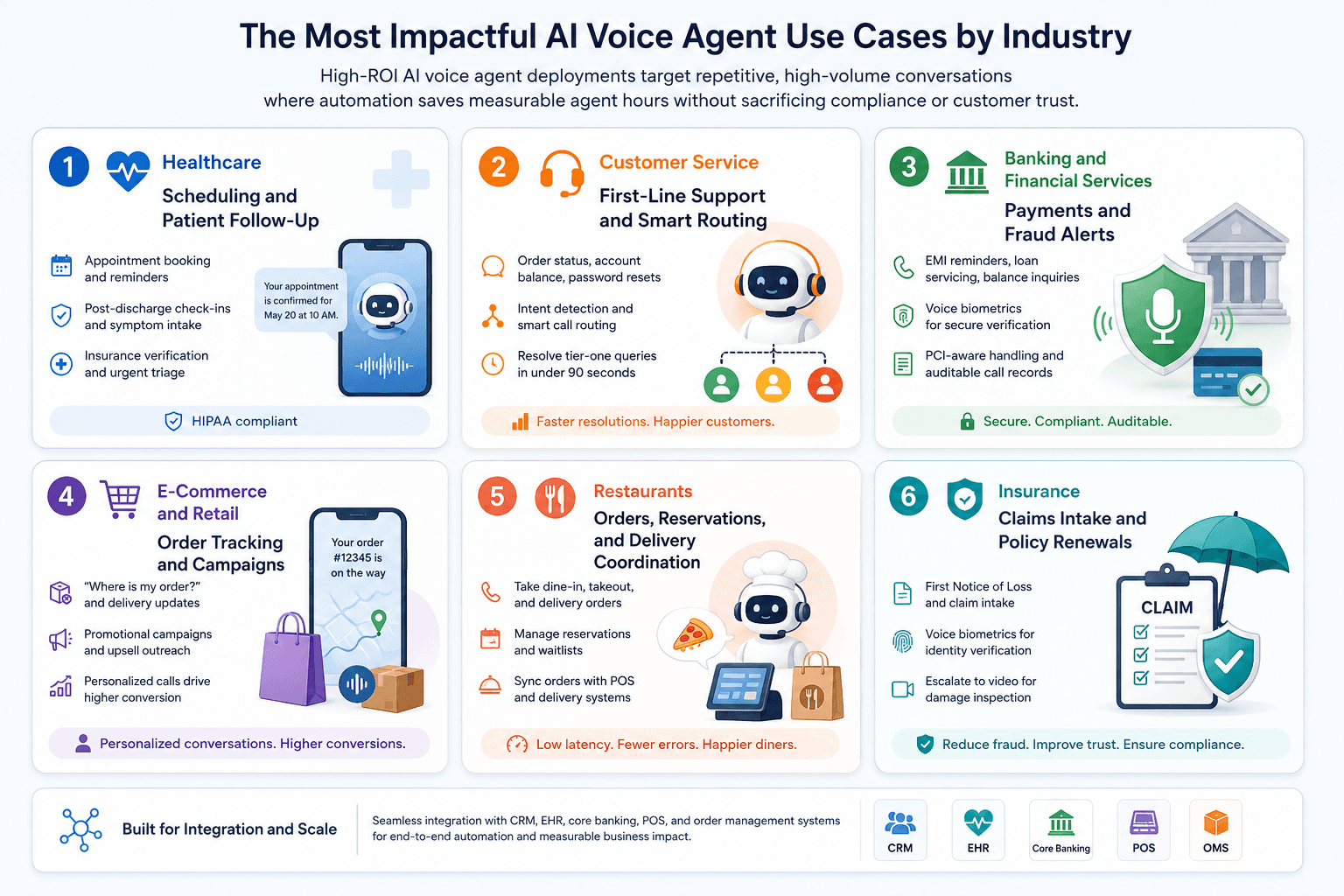
High-ROI AI voice agent deployments target repetitive, high-volume conversations where automation saves measurable agent hours without sacrificing compliance or customer trust.
Healthcare: Scheduling and Patient Follow-Up
Healthcare organizations deploy voice agents for appointment booking, reminder calls, and post-discharge check-ins. An agent can collect symptoms during intake, confirm insurance details, and flag urgent responses for nurse review.
HIPAA compliance is non-negotiable. Agents handling protected health information need encrypted transport, access controls, and business associate agreements with vendors. Teams building telehealth workflows often pair voice agents with HIPAA compliance.
Customer Service: First-Line Support and Smart Routing
Contact centers use voice agents as the first line for order status, account balance, password resets, and business hours inquiries. Intent detection routes complex or emotionally charged calls to specialists while passing full conversation context.
According to IBM's Cost of a Data Breach Report, faster incident response reduces breach costs, and the same principle applies to customer service: resolving simple queries instantly prevents queue buildup that damages satisfaction scores. Voice agents that resolve tier-one tickets in under 90 seconds free human agents for retention-sensitive conversations.
Banking and Financial Services: Payments and Fraud Alerts
Banks automate EMI reminders, loan servicing outreach, and balance inquiries through outbound and inbound voice agents. Voice biometrics add a verification layer before discussing account details.
Financial deployments require PCI-aware data handling, call recording policies, and clear disclosure when callers interact with AI. Regulated industries should treat every voice session as auditable, with transcripts stored under retention rules that match local banking regulations.
E-Commerce and Retail: Order Tracking and Campaigns
Retailers answer "where is my order?" at scale through CRM and order-management API integrations. Outbound agents run promotional campaigns and post-purchase feedback calls during peak seasons without hiring temporary call staff.
Personalization raises conversion on these calls. When an agent greets a returning buyer by name and references their open shipment, completion rates on upsell offers rise compared with generic scripts.
Restaurants: Orders, Reservations, and Delivery Coordination
Restaurants lose revenue when staff cannot answer phones during service peaks. Voice agents take complex food orders, manage reservations, and relay modifications to point-of-sale and delivery systems in real time.
Low-latency audio matters here more than in many other verticals. A two-second delay during order confirmation causes callers to repeat items, which introduces errors into kitchen tickets.
Insurance: Claims Intake and Policy Renewals
Insurers automate First Notice of Loss collection, policy renewal reminders, and identity verification through voice biometrics. Complex claims escalate to human adjusters, sometimes with a switch to video for virtual damage inspection.
The National Insurance Crime Bureau estimates that insurance fraud costs the United States more than $308 billion annually [UPDATE: verify date], which makes secure voice authentication and suspicious-pattern flagging high-value agent capabilities.
Across these six industries, the strongest AI voice agent use cases share structured dialog, clear escalation paths, and integrations with existing CRM, EHR, or order management systems.
Why Latency and Architecture Decide Voice Agent Success
Voice agents that feel robotic are usually slow agents, not poorly scripted ones, because human conversation tolerates only brief gaps before trust erodes.
The Latency Budget
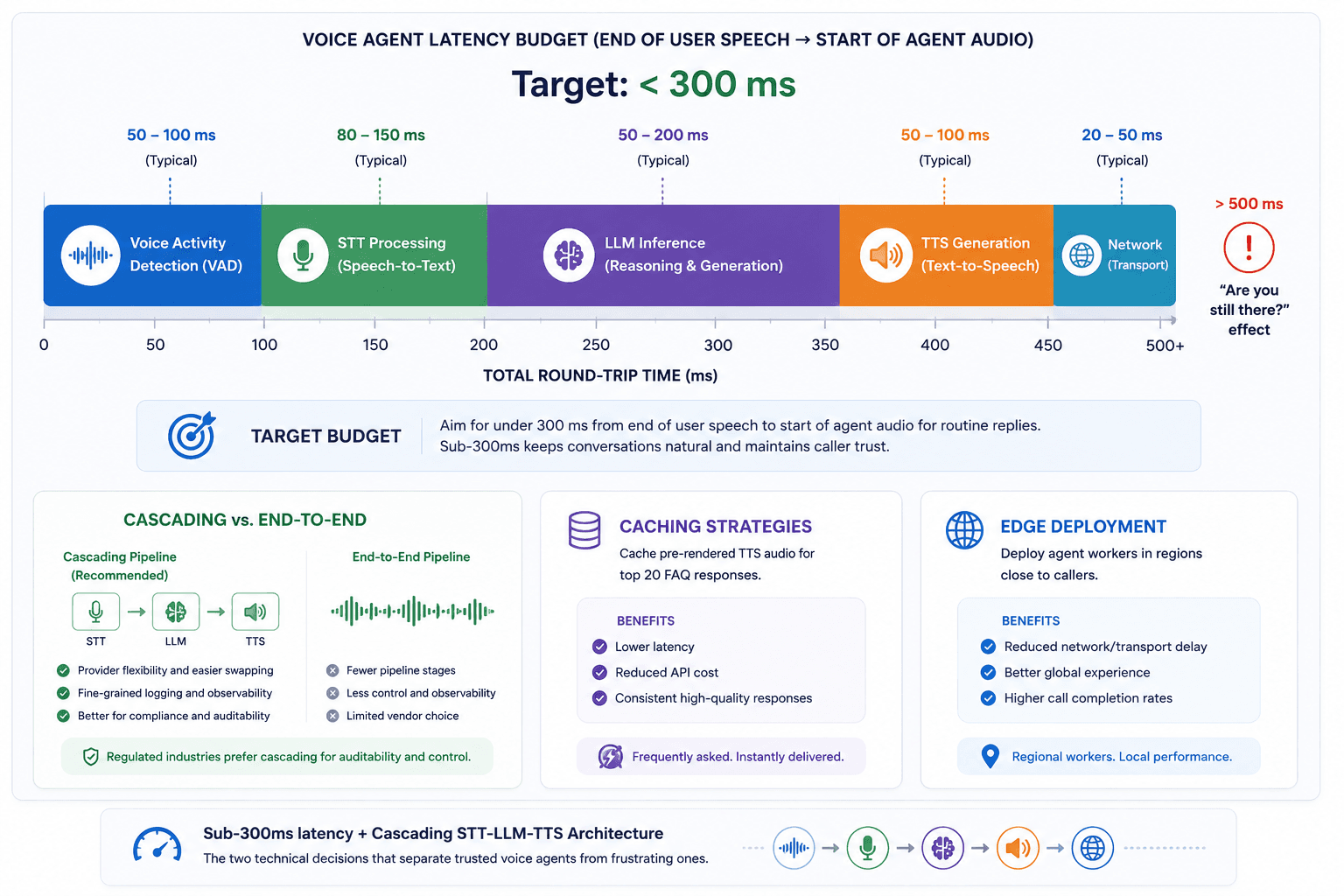
A production voice agent should target under 300 milliseconds from end of user speech to start of agent audio for routine replies. That budget splits across voice activity detection (roughly 50 to 100 milliseconds), STT processing (80 to 150 milliseconds), LLM inference (50 to 200 milliseconds for cached or short responses), and TTS generation (50 to 100 milliseconds). Exceeding 500 milliseconds total round-trip produces the "are you still there?" effect that drives hang-ups.
Cascading vs. End-to-End Pipelines
Most production systems use a cascading pipeline (STT, then LLM, then TTS) because it allows provider swapping and fine-grained logging. End-to-end speech models reduce pipeline stages but offer less control over compliance logging and vendor selection. Teams in regulated industries typically choose cascading architectures for auditability.
Caching and Edge Deployment
Caching pre-rendered TTS audio for top 20 FAQ responses cuts latency and API cost simultaneously. Deploying agent workers in regions close to callers reduces transport delay for international brands. VideoSDK's cloud deployment model supports regional worker placement so agents join sessions near the user.
Sub-300ms latency and a cascading STT-LLM-TTS architecture are the two technical decisions that separate trusted voice agents from frustrating ones.
When AI Voice Agents Are the Wrong Choice
Voice automation fails when organizations deploy agents before mapping conversation complexity, emotional stakes, and regulatory exposure.
Choose human-first handling when the conversation involves legally binding consent, nuanced medical diagnosis, or high-emotion disputes where empathy outweighs speed. Debt collection in certain jurisdictions, mental health triage, and executive escalations are poor fits for unsupervised voice AI.
Skip voice agents when your call volume is too low to justify integration cost. If a clinic receives 30 inbound calls daily and half require clinical judgment, a part-time receptionist plus online scheduling delivers better ROI than a full voice stack.
Avoid voice-only design when visual confirmation improves outcomes. Insurance adjusters inspecting vehicle damage and bankers walking customers through complex product comparisons often need screen sharing or video, not audio alone. VideoSDK supports voice-to-video escalation precisely for these hybrid workflows.
Teams that force full automation without a human escape hatch see higher churn. Always design a zero-friction path to a live agent within two conversational turns.
Voice AI delivers the worst ROI when teams automate conversations that demand clinical judgment, legal consent, or high-empathy dispute resolution without a human backup.
Compliance, Security, and Data Handling by Industry
Regulated voice agent deployments require encryption, access logging, and vendor contracts that match the data each industry touches.
Healthcare agents need HIPAA-aligned infrastructure, minimum necessary data collection, and BAAs with every subprocessors handling transcripts. Banking agents must respect call recording consent laws that vary by U.S. state and EU market. Retail agents interacting with European customers fall under GDPR purpose-limitation and deletion requirements.
In practice, engineering teams that implement voice agents for regulated clients report that transcript retention policy is decided before model selection, not after launch. Store only what you need, redact payment card numbers at the STT layer, and route sensitive fields through tokenized APIs rather than raw LLM prompts.
PCI DSS requirements apply when agents process or repeat payment card data aloud. SOC 2 Type II certification from your platform vendor provides third-party validation of security controls for enterprise procurement reviews. Call recording laws in two-party consent states like California and Florida require explicit disclosure at the start of each recorded session.
For authoritative guidance on healthcare privacy obligations, see HHS HIPAA guidance on telehealth and remote communications. Pair that reference with your legal team's state-by-state recording checklist before launching outbound campaigns.
Compliance architecture is a prerequisite for regulated AI voice agent use cases, not a post-launch patch.
How to Measure ROI on Voice Agent Deployments
Voice agent programs earn executive support when teams track operational metrics tied to revenue and cost, not vanity automation rates.
Track containment rate (calls resolved without human transfer), average handle time, cost per contained call, and customer satisfaction score segmented by agent vs. human resolution. Compare baseline metrics from the 30 days before launch against the same period after reaching stable traffic.
A mid-size e-commerce brand processing 12,000 monthly support calls illustrates the math. If tier-one inquiries represent 55% of volume and a voice agent contains 70% of those at $0.08 per minute versus $4.50 per human-handled minute, monthly savings exceed $15,000 while shaving average speed-to-answer from 4 minutes to under 10 seconds. Name your baseline, set a 90-day review, and kill workflows that transfer more than 40% of calls without improving CSAT.
According to McKinsey's research on AI in customer service, generative AI applied to customer care functions can improve issue resolution speed and customer satisfaction when paired with clear escalation design. Track first-call resolution alongside containment rate so you do not optimize for cheap transfers that frustrate callers.
Executives approve voice agent budgets when teams present containment rate, cost per call, and CSAT trends on a single dashboard updated monthly.
Implementing AI Voice Agents with VideoSDK
Understanding the potential of AI voice agents is the first step; building them is the next. A successful implementation requires orchestrating several complex technologies to create a fluid, human-like conversational experience. This is where a dedicated SDK designed for real-time communication becomes invaluable.
Getting Started with an AI Voice Agent SDK
To bring the use cases discussed above to life, developers need a streamlined way to integrate AI capabilities into a communication framework. An AI Voice Agent SDK, such as the one offered by VideoSDK, provides pre-built functionalities that handle the underlying complexities of real-time communication and AI integration. This allows developers to focus on crafting the agent's logic and personality rather than building the foundational infrastructure from scratch. The core of such an SDK revolves around four key components working in perfect harmony.
Overview of Core Components
- Real-Time Streaming: This is the backbone of any live conversation. The SDK must manage the low-latency, bidirectional streaming of audio data between the user and the AI agent, ensuring the conversation flows naturally without awkward delays or interruptions.
- Speech-to-Text (STT): To understand the user, the AI agent needs to convert their spoken words into text. The SDK integrates with powerful STT engines that transcribe the user's audio in real-time, providing an accurate textual input for the AI model to process.
- Text-to-Speech (TTS): Once the AI has formulated a response, it needs to be converted back into natural-sounding speech. The SDK uses advanced TTS engines to generate high-quality, human-like audio, which is then streamed back to the user. The quality of the TTS is critical for user adoption and a positive experience.
- Agent Orchestration: This is the brain of the operation. The SDK orchestrates the entire workflow, managing the real-time flow of data between the STT service, your business logic or large language model (LLM), and the TTS service. This ensures that the agent can listen, think, and speak in a seamless, uninterrupted loop.
Supported Integrations for Maximum Flexibility
No single AI provider excels at everything. A flexible platform should allow developers to choose the best tools for their specific needs. VideoSDK's AI Voice Agent framework is designed to be plug-and-play, supporting integrations with leading AI services. Developers can mix and match providers for different components, including:
- Speech-to-Text: Integrations with powerful engines like Google STT and OpenAI's Whisper ensure high-accuracy transcriptions across various languages and accents.
- Text-to-Speech: To create lifelike and emotionally resonant voices, the platform supports leading TTS providers like ElevenLabs and services from OpenAI.
This "bring your own AI" model gives developers the freedom to leverage the best-in-class technology and future-proof their applications against a rapidly evolving AI landscape.
SIP/PSTN Integration for Telephony-Grade Quality
While many AI interactions happen within apps, the ability to connect with traditional phone networks is crucial for countless business use cases, from customer service call centers to automated appointment reminders. The integration of Session Initiation Protocol (SIP) and Public Switched Telephone Network (PSTN) gateways is a vital feature. This allows the AI voice agent to make and receive calls from standard phone numbers, extending its reach beyond the digital-only world. VideoSDK's support for SIP/PSTN ensures that businesses can deploy AI agents into their existing telephony workflows, providing a seamless, telephony-grade quality experience for every user, regardless of how they connect.
Key Steps to Build Your Own Voice Agent
Here’s a step-by-step guide to creating your own AI voice agent using VideoSDK:
Step 1: Choose the Voice Model (TTS + STT)
The first step is to select the text-to-speech and speech-to-text models that best suit your application. Consider factors like language support, accuracy, and the desired vocal characteristics of your agent.
Select providers based on:
- Latency requirements (e.g., <300ms for real-time calls)
- Language coverage (multi-lingual support for global deployments)
- Voice customization (brand-aligned tone & gender)
Here is the example of the OpenAI TTS model.
from videosdk.plugins.openai import OpenAITTS
from videosdk.agents import CascadingPipeline

# Initialize the OpenAI TTS model
tts = OpenAITTS(
    # When OPENAI_API_KEY is set in .env - DON'T pass api_key parameter
    api_key="your-openai-api-key",
    model="tts-1",
    voice="alloy",
    speed=1.0,
    response_format="pcm"
)

#  Add tts to cascading pipeline
pipeline = CascadingPipeline(tts=tts)
Alternatively you can try Google Gemini and AWS Nova Sonice
Here is the example of the OpenAI STT model.
from videosdk.plugins.openai import OpenAISTT
from videosdk.agents import CascadingPipeline

# Initialize the OpenAI STT model
stt = OpenAISTT(
    # When OPENAI_API_KEY is set in .env - DON'T pass api_key parameter
    api_key="your-openai-api-key",
    model="whisper-1",
    language="en",
    prompt="Transcribe this audio with proper punctuation and formatting."
)

#  Add stt to cascading pipeline
pipeline = CascadingPipeline(stt=stt)
Step 2: Configure VideoSDK for real-time transport
Next, you'll need to set up your VideoSDK environment to handle the real-time transport of audio data. This involves configuring your authentication tokens and meeting IDs to enable the AI agent to join a communication session. You will need to set up a .env file to securely store your API keys and tokens.
Here is the OpenAI API key to Configure VideoSDK for real-time transport
VIDEOSDK_AUTH_TOKEN = your_videosdk_auth_token;
OPENAI_API_KEY = your_openai_api_key;
If you are using gemini or aws nova sonic you will need to provide their respective api key
Step 3: Create prompt-based flows
Define the conversational logic of your AI agent by creating prompt-based flows. This involves scripting the agent's initial greetings, questions, and responses based on potential user inputs. You can create a custom agent by inheriting from the base Agent class.
from videosdk.agents import Agent, AgentSession, WorkerJob, RoomOptions, JobContext
import asyncio

class VoiceAgent(Agent):
    def __init__(self):
        super().__init__(
            instructions="You are a helpful voice assistant that can answer questions and help with tasks."
        )

    async def on_enter(self) -> None:
        """Called when the agent first joins the meeting"""
        await self.session.say("Hi there! How can I help you today?")

    async def on_exit(self) -> None:
        """Called when the agent exits the meeting"""
        await self.session.say("Goodbye!")
Step 4: Add fallback and escalation logic
It's crucial to account for scenarios where the AI agent may not understand a user's request or when an error occurs. Implementing fallback logic to provide a helpful response and, if necessary, a mechanism to escalate the conversation to a human agent is a best practice.
The VideoSDK AI Agent SDK allows you to handle these situations by overriding specific methods in your custom agent class.
Handling Unrecognized Intents (Fallback)
If the Large Language Model (LLM) cannot determine the user's intent or if the user's speech is unclear, you can define a fallback behavior. In this example, if the agent doesn't understand, it will ask the user to rephrase their request.
from videosdk.agents import Agent, AgentSession
from videosdk.llm import LLM
from videosdk.stt import STT
from videosdk.tts import TTS

class VoiceAgent(Agent):
    def __init__(
        self,
        llm: LLM,
        stt: STT,
        tts: TTS,
    ):
        super().__init__(
            llm=llm,
            stt=stt,
            tts=tts,
            instructions="You are a helpful voice assistant that can answer questions and help with tasks."
        )

    async def on_enter(self) -> None:
        """Called when the agent first joins the meeting"""
        await self.session.say("Hi there! How can I help you today?")

    async def on_fallback(self) -> None:
        """Called when the agent cannot understand the user's intent."""
        await self.session.say("I'm sorry, I didn't quite catch that. Could you please rephrase?")

    async def on_exit(self) -> None:
        """Called when the agent exits the meeting"""
        await self.session.say("Goodbye!")
Handling Errors and Escalation
For more critical errors, or if the user explicitly asks to speak to a human, you can implement an escalation path. This could involve triggering a notification, transferring the call, or providing the user with contact information for human support.
The on_error method can be used to catch exceptions that occur during the agent's operation.
import logging

# ... (previous imports)

class VoiceAgent(Agent):
    # ... (__init__ and on_enter methods)

    async def on_fallback(self) -> None:
        """Called when the agent cannot understand the user's intent."""
        await self.session.say("I'm sorry, I didn't quite catch that. Could you please rephrase?")

    async def on_error(self, error: Exception) -> None:
        """Called when an error occurs."""
        logging.error(f"An error occurred: {error}")
        # Simple escalation: inform the user and provide a support email.
        await self.session.say("It seems I've run into a technical issue. Please contact our support team at support@example.com for assistance.")
        # In a more advanced scenario, you could trigger an API call
        # to a human handoff service here.

    async def on_exit(self) -> None:
        """Called when the agent exits the meeting"""
        await self.session.say("Goodbye!")
In a real-world application, the on_error or a custom function tool could be used to initiate a more sophisticated escalation process, such as:
- Human Handoff: Triggering a workflow in a CRM or helpdesk system to alert a human agent to join the call.
- Ticket Creation: Automatically creating a support ticket with the conversation transcript.
- SIP Transfer: If using SIP integration, transferring the call to a pre-defined human agent's phone number.
By implementing these fallback and escalation mechanisms, you ensure that your AI voice agent provides a reliable and helpful experience, even when faced with ambiguity or errors.
Step 5: Deploy to production
Once you have thoroughly tested your AI voice agent, you can deploy it. The VideoSDK CLI allows you to run your agent locally for testing and then deploy it to the VideoSDK Cloud.
# Run the AI Deployment locally
videosdk run

# Deploy the AI Deployment
videosdk deploy
Best Practices for Scale and Accuracy
To ensure your AI voice agent performs optimally and delivers a high-quality user experience as your user base grows, consider these best practices:
Use context-aware agents (via MCP or A2A Protocols)
A truly intelligent agent understands the flow of conversation. Instead of treating each user query as an isolated event, a context-aware agent maintains a memory of the dialogue. This allows for more natural and efficient interactions.
VideoSDK facilitates this through Agent-to-Agent (A2A) communication protocols. For example, a general-purpose AI voice agent could handle initial user queries and then, upon identifying a specialized need (like a technical support issue), can seamlessly forward the query and the conversation history to a specialist agent. This ensures the user doesn't have to repeat themselves, creating a smoother experience.
Cache common responses
Many businesses find that a significant portion of their customer inquiries are repetitive. For these frequently asked questions (e.g., "What are your business hours?" or "How do I reset my password?"), caching the generated audio response can significantly improve performance.
By storing the pre-rendered TTS audio for common answers, you can:
- Reduce Latency: Deliver answers almost instantaneously, as you're bypassing the real-time TTS generation step.
- Lower Costs: Minimize the number of API calls to TTS services, leading to direct cost savings, especially at scale.
- Increase Consistency: Ensure the answer to a common question is always delivered in the same clear and consistent manner.
Personalize with user metadata
Personalization is key to transforming a generic interaction into a memorable customer experience. By leveraging user metadata—such as their name, past purchase history, or support ticket status—your AI voice agent can provide tailored and empathetic responses.
For instance, an e-commerce voice agent could greet a returning customer with:
"Welcome back, [Customer Name]! I see your recent order for the [Product Name] has been shipped. Are you calling about that, or is there something else I can help you with today?"
This level of personalization, achievable by integrating your AI agent with your CRM or user database, makes the interaction feel more human and significantly improves customer satisfaction.
Use multi-turn dialogs via LLM
Early voice bots were often limited to simple, one-off commands. Modern AI voice agents, powered by sophisticated Large Language Models (LLMs), excel at handling multi-turn dialogues. This means the agent can manage complex, evolving conversations where the user's intent might be clarified over several exchanges.
For example, a user might start by saying, "I need a flight to New York." The agent can then ask clarifying questions like, "Which airport in New York?", "What date would you like to travel?", and "Are you looking for a one-way or round-trip ticket?" The LLM's ability to maintain context throughout this back-and-forth is what makes a truly conversational and useful AI possible. VideoSDK’s architecture is designed to support these stateful, long-running conversations seamlessly.
Definitions Glossary
AI voice agent: A software system that conducts spoken conversations by combining speech recognition, language understanding, and speech synthesis in real time.
Speech-to-text (STT): Technology that converts spoken audio into text so language models can process user intent.
Text-to-speech (TTS): Technology that converts text responses into synthetic speech streamed back to the caller.
SIP/PSTN integration: Connectivity that lets voice agents place and receive calls on traditional phone networks, not just internet apps.
Containment rate: The percentage of conversations an AI agent resolves without transferring to a human operator.
Voice biometrics: Authentication that verifies identity from unique vocal characteristics before discussing sensitive account information.
Key Takeaways
- AI voice agent use cases deliver the highest ROI on repetitive, high-volume calls such as scheduling, order tracking, payment reminders, and tier-one support.
- Sub-300ms round-trip latency and reliable SIP/PSTN connectivity separate production-grade agents from demo-quality prototypes.
- Regulated industries require compliance planning for HIPAA, PCI, GDPR, and call recording consent before launch, not after transcripts accumulate.
- Voice agents should always include fast human escalation with full conversation context for complex, emotional, or legally sensitive interactions.
- VideoSDK gives developer teams a single SDK for real-time audio, pluggable AI providers, telephony integration, and optional video handoff.
Conclusion
AI voice agent use cases are no longer experimental. Healthcare clinics, banks, retailers, and insurers deploy them to answer calls instantly, reduce operational cost, and pass rich context to humans when conversations outgrow automation.
Start with one high-volume workflow, measure containment and satisfaction for 90 days, and expand only where data supports it. VideoSDK provides the real-time audio infrastructure, AI provider integrations, and telephony reach to move from prototype to production without rebuilding your stack. Sign up for a free developer account and ship your first agent this week.
Frequently Asked Questions
What are the most common AI voice agent use cases?
The most common AI voice agent use cases are appointment scheduling, customer support tier-one resolution, order status inquiries, payment and policy reminders, restaurant order taking, and insurance First Notice of Loss intake. These workflows share high call volume, predictable dialog structure, and clear escalation rules when automation reaches its limits.
How do AI voice agents differ from traditional IVR?
AI voice agents differ from traditional IVR because they understand natural spoken language instead of forcing callers through fixed keypad menus. IVR systems follow pre-recorded trees, while voice agents use speech-to-text and large language models to manage multi-turn conversations and adapt responses based on caller intent.
Which industries benefit most from AI voice agents in 2026?
Healthcare, financial services, e-commerce, restaurants, insurance, and telecommunications benefit most because they combine high inbound call volume with repetitive intents that automation handles well. Industries with heavy compliance requirements still benefit when platforms provide encrypted transport, audit logging, and human escalation paths.
Are AI voice agents HIPAA compliant?
AI voice agents can support HIPAA-compliant workflows when deployed on infrastructure with encrypted audio transport, access controls, audit logs, and signed business associate agreements covering all AI and telephony vendors. Compliance depends on implementation choices, not the voice technology alone.
How much does it cost to run an AI voice agent?
Running an AI voice agent typically costs a blend of per-minute telephony fees, speech-to-text and text-to-speech API usage, LLM inference, and platform infrastructure charges. Total cost ranges from roughly $0.05 to $0.20 per contained minute for optimized deployments at scale, depending on provider selection and caching strategy [UPDATE: verify date].
Can AI voice agents transfer calls to human agents?
AI voice agents can transfer calls to human agents through SIP transfer, conference join, or CRM-triggered callbacks while attaching transcripts and detected intent. Warm handoff preserves customer trust because the human agent continues the conversation without asking the caller to repeat information.
What should developers look for in a voice agent SDK?
Developers should look for sub-300ms audio latency, bring-your-own STT/TTS/LLM support, SIP/PSTN telephony integration, built-in orchestration with fallback handling, and optional video escalation. VideoSDK provides these capabilities in a single SDK so teams ship production agents faster than assembling multiple point solutions.