


Real-time AI voice agents with Google Gemini 3.1 Flash Live are conversational systems that process audio natively without intermediate text conversion. This architecture reduces interaction latency to milliseconds. Implementing these agents requires a robust WebRTC media pipeline like VideoSDK to handle audio routing, stream synchronization, and connection stability.
Building conversational applications historically meant stacking three distinct systems: automatic speech recognition (ASR), a large language model (LLM), and text-to-speech (TTS). That cascaded architecture introduced compounding delays, making interactions feel robotic, highly structured, and unnatural. Google Gemini 3.1 Flash Live Preview changes this by handling audio-to-audio processing natively. When you combine this multimodal model with VideoSDK's real-time media pipeline, you can build agents that listen, think, and speak seamlessly. This technical walkthrough explores the architecture, production challenges, and exact implementation steps for deploying low-latency voice AI at scale.
What Is Google Gemini 3.1 Flash Live?
Google Gemini 3.1 Flash Live is a native multimodal model engineered specifically for low-latency, audio-first conversational experiences. Google Gemini 3.1 Flash Live is defined as an AI model that ingests and generates audio directly, bypassing traditional text conversion pipelines completely. This direct audio processing allows the model to preserve acoustic nuances such as pitch, tone, and pacing, which standard text transcripts inevitably discard.
Google Gemini 3.1 Flash Live works by utilizing a unified transformer architecture that treats audio frames as first-class tokens alongside text and vision. According to Google's 2026 AI developer documentation, this architecture enables the model to respond significantly faster than its predecessor, Gemini 2.5 Flash Native Audio. It natively supports over 90 languages and introduces the critical ability to trigger external API tools dynamically during an active audio stream. This allows the model to perform complex backend tasks, such as checking inventory, updating database records, or booking appointments, while maintaining a natural conversational flow with the user.
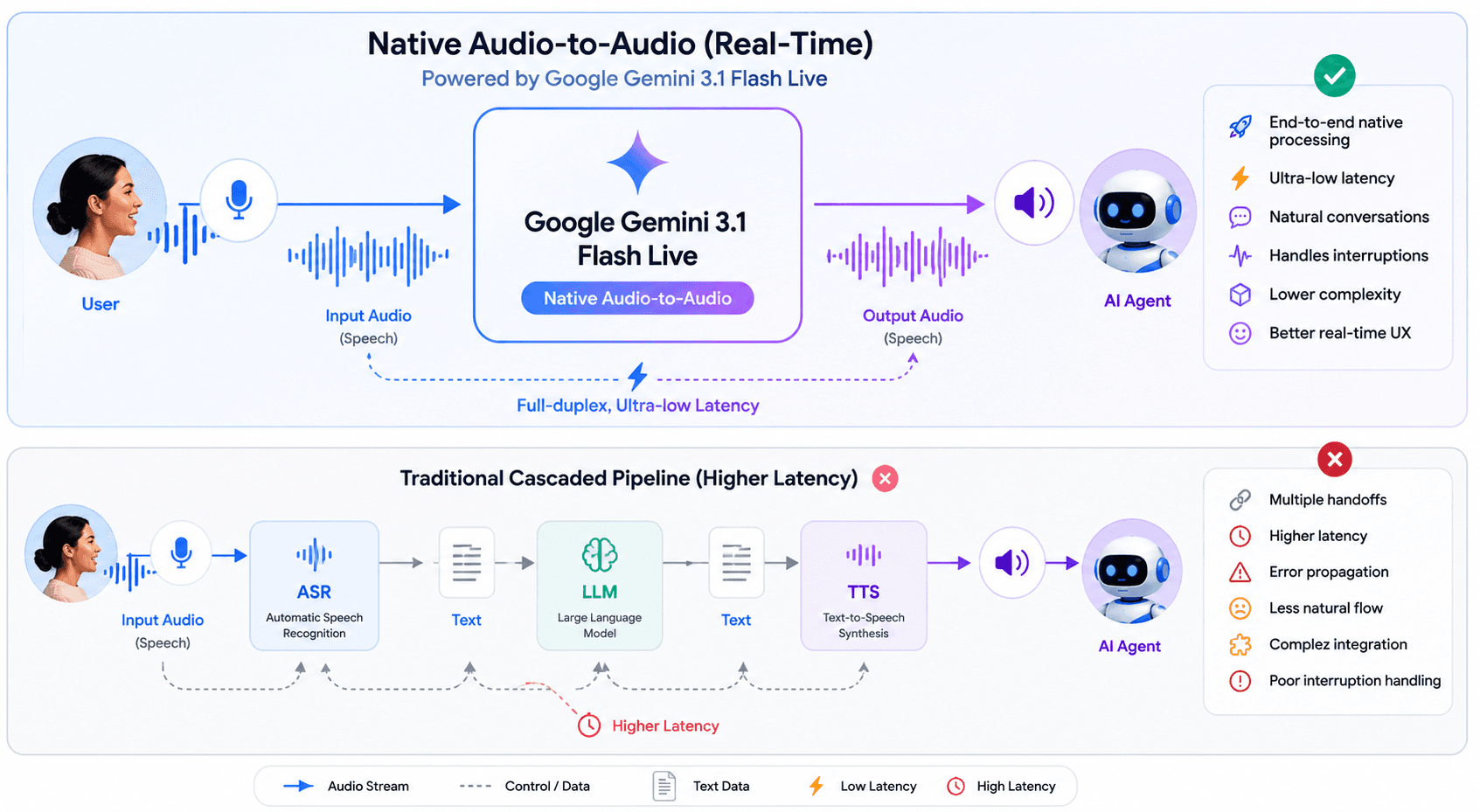
Here's what stands out:
- Lower latency than before. Compared to 2.5 Flash Native Audio, this model is noticeably faster. Fewer awkward pauses, snappier responses. That matters a lot when you're building voice agents where delays break the experience.
- It actually understands how you say things. The model picks up on acoustic nuances, pitch, pace, tone. So it can tell when you're asking a casual question vs. when you sound urgent or confused.
- Better background noise handling. It filters out noise more effectively, which means it works in real environments, not just quiet studios.
- Multilingual out of the box. Over 90 languages supported for real-time conversations.
- Longer conversation memory. It can follow the thread of a conversation for twice as long as the previous generation. So your agent won't "forget" what was said earlier in a long session.
- Tool use during live conversations. This one is huge for agent builders. The model can now trigger external tools (APIs, functions, searches) while a live conversation is happening not just at the end of a turn.
- Multimodal awareness. It handles audio and video inputs together, so you can build agents that respond to what they see and hear at the same time.
The model ID is: gemini-3.1-flash-live-preview
Building a Voice Agent with VideoSDK
VideoSDK gives you everything you need to wire Gemini 3.1 Flash Live into a real voice application. Here's how to get set up from scratch.
Step 1 : Create and Activate a Python Virtual Environment
First, create a clean Python environment so your project dependencies stay isolated.
python3 -m venv venvActivate it:
macOS/Linux
source venv/bin/activateWindows
venv\Scripts\activateYou should see (venv) in your terminal, which means you're good to go.
Step 2 : Set Up Your Environment Variables
Create a .env file in your project root and add your API keys:
VIDEOSDK_AUTH_TOKEN=your_videosdk_token_here
GOOGLE_API_KEY=your_google_api_key_here
You can get your VideoSDK auth token from the VideoSDK dashboard and your Google API key from Google AI Studio.
Important: when GOOGLE_API_KEY is set in your .env file, do not pass api_key as a parameter in your code the SDK picks it up automatically.
Step 3 : Install the Required Packages
Install VideoSDK's agents SDK along with the Google plugin:
pip install "videosdk-agents[google]"Step 4 : Create Your Agent (main.py)
Create a file called main.py in your project folder and paste in the following code:
from videosdk.agents import Agent, AgentSession, Pipeline, JobContext, RoomOptions, WorkerJob
from videosdk.plugins.google import GeminiRealtime, GeminiLiveConfig
import logging
logging.basicConfig(level=logging.INFO, format="%(asctime)s - %(name)s - %(levelname)s - %(message)s", handlers=[logging.StreamHandler()])

class MyVoiceAgent(Agent):
    def __init__(self):
        super().__init__(
            instructions="You Are VideoSDK's Voice Agent.You are a helpful voice assistant that can answer questions and help with tasks.",
        )

    async def on_enter(self) -> None:
        await self.session.say("Hello, how can I help you today?")

    async def on_exit(self) -> None:
        await self.session.say("Goodbye!")

async def start_session(context: JobContext):
    agent = MyVoiceAgent()
    model = GeminiRealtime(
        model="gemini-3.1-flash-live-preview",
        # When GOOGLE_API_KEY is set in .env - DON'T pass api_key parameter
        # api_key="AIXXXXXXXXXXXXXXXXXXXX",
        config=GeminiLiveConfig(
            voice="Leda", # Puck, Charon, Kore, Fenrir, Aoede, Leda, Orus, and Zephyr.
            response_modalities=["AUDIO"]
        )
    )

    pipeline = Pipeline(llm=model)
    session = AgentSession(
        agent=agent,
        pipeline=pipeline
    )

    await session.start(wait_for_participant=True, run_until_shutdown=True)

def make_context() -> JobContext:
    room_options = RoomOptions(
        # room_id="<room_id>", # Replace it with your actual room_id
        name="Gemini Realtime Agent",
        playground=True,
    )

    return JobContext(room_options=room_options)

if __name__ == "__main__":
    job = WorkerJob(entrypoint=start_session, jobctx=make_context)
    job.start()
To run the agent:
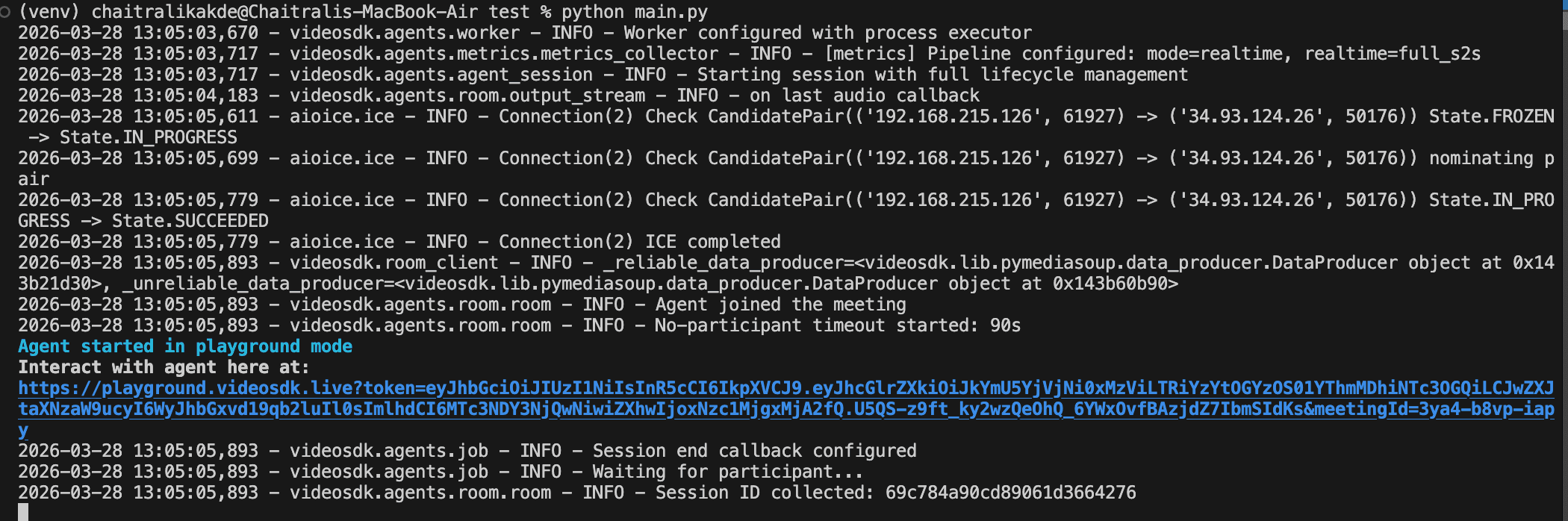
python main.pyOnce you run this command, a playground URL will appear in your terminal. You can use this URL to interact with your AI agent.
What Can You Build With This?
Gemini 3.1 Flash Live + VideoSDK opens up a pretty wide range of real-world use cases:
- Customer support voice bots. Replace or supplement your call center with agents that actually understand tone and can handle multilingual customers in real time.
- AI meeting assistants. Agents that join calls, take notes, answer questions from participants, and trigger follow-up actions mid-conversation.
- Healthcare intake agents. Voice-based triage agents that collect patient information, ask follow-up questions, and route to the right department all in a natural spoken conversation.
- Language tutors. Real-time conversation partners that catch pronunciation issues, adjust their pace based on the learner, and respond naturally.
- Voice-controlled IoT and home automation. Agents that listen continuously, understand context, and trigger device actions through tool use all in sub-second response times.
- Live interview prep tools. Candidates practice answering questions aloud and get spoken feedback instantly.
Conclusion
Gemini 3.1 Flash Live Preview is a meaningful step forward for real-time voice AI. The improvements in latency, noise handling, multilingual support, and especially live tool use make it a strong foundation for production voice agents.
VideoSDK wraps all of that into a clean Python SDK that gets you from zero to a running agent in a handful of lines. Whether you're prototyping or building something you intend to ship, the setup here gives you a solid starting point.
Next Steps and Resources
- Check Gemini3.1 implementation docs
- Learn how to deploy your agents
- 👉 Share your thoughts, roadblocks, or success stories in the comments or join our Discord community ↗. We’re excited to learn from your journey and help you build even better AI-powered communication tools!
Frequently Asked Questions
What is the main difference between Google Gemini 3.1 Flash Live and standard LLMs?
The main difference between Google Gemini 3.1 Flash Live and standard LLMs is its native audio-to-audio architecture. Standard models require external text conversion pipelines, whereas Gemini processes and generates raw audio, drastically reducing latency and preserving acoustic nuances.
Can VideoSDK and Google Gemini 3.1 Flash Live be used together?
Yes, VideoSDK and Google Gemini 3.1 Flash Live can be used together seamlessly. VideoSDK handles the complex WebRTC media transport and client connections, while Gemini serves as the core intelligence engine processing the audio streams.
Which is better, a cascaded voice architecture or a native audio model?
A native audio model is the better choice when your application requires sub-second conversational latency and the ability to detect user tone. A cascaded architecture is only preferable when you must integrate legacy LLMs that strictly accept text inputs.
How does WebRTC improve voice AI performance?
WebRTC improves voice AI performance by utilizing UDP transport, which prioritizes immediate data delivery over packet ordering. This eliminates the blocking delays common in TCP-based connections, ensuring smooth and continuous audio playback.
What is barge-in functionality in voice agents?
Barge-in functionality in voice agents is the system's ability to detect when a user starts speaking and immediately halt its own audio output. This feature is critical for creating natural conversations where users can interrupt the AI at any time.
Does Gemini 3.1 Flash Live support tool use during live conversations?
Yes, Gemini 3.1 Flash Live supports dynamic tool use during active audio streams. This allows the agent to query external APIs, fetch database records, or execute functions without terminating the conversational flow.