


Introduction
Here's everything this guide covers. AI voice agents in production depend on external STT, LLM, and TTS providers, and any of them can fail or slow down mid-call. The VideoSDK Fallback Adapter fixes that by automatically failing over to backup providers — on both errors and latency — without interrupting the session. We'll look at why that matters, walk through its features (automatic and latency-based fallback, cooldown-based retry, auto-recovery, and permanent disable), and show how to configure it in code (temporary_disable_sec, permanent_disable_after_attempts, latency_threshold_ms, and consecutive_latency_hits). Then we trace the full failover-and-recovery lifecycle and link a runnable example you can try yourself.
Production doesn't wait for your provider to come back
AI voice agents feel effortless in a demo. Then they hit production, and a different set of problems shows up — problems that have nothing to do with how smart your agent is.
A speech-to-text provider rate-limits you at peak. An LLM endpoint times out for ninety seconds. A text-to-speech voice that was snappy yesterday is suddenly crawling. None of these are model problems. They’re reliability problems. And in a live voice conversation, there’s no room to retry quietly in the background - every second of dead air is a user wondering if anyone is still there.
At VideoSDK, we believe a single provider hiccup shouldn’t take down a live conversation. Your agent should degrade gracefully, recover automatically, and keep talking.
Today, we’re introducing the Fallback Adapter - automatic failover and recovery built directly into the VideoSDK Agents pipeline. It switches providers the moment one fails or slows down, mid-session, without interrupting the conversation, and switches back the moment the healthy provider returns.
What the Fallback Adapter does
The Fallback Adapter provides automatic failover across multiple STT, LLM, or TTS providers. You give each component an ordered list of providers, and the adapter handles the rest.
It switches providers on two conditions:
- On Errors — when a provider fails or becomes unavailable.
- On Latency — when a provider stays slower than its configured budget.
In both cases, the system automatically moves to the next configured provider without interrupting the session. The caller never knows a provider just dropped out from under them.
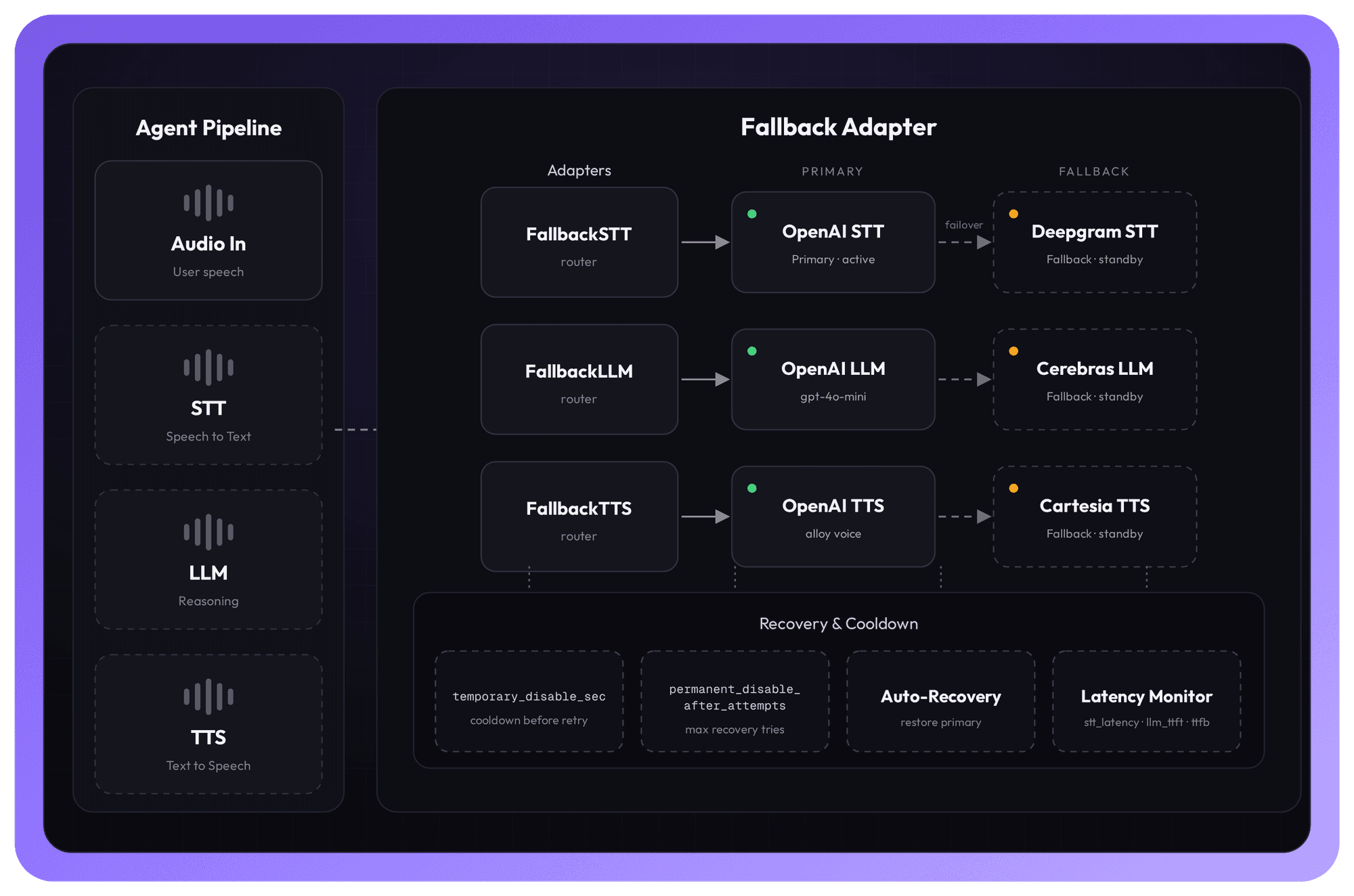
Each stage of the voice pipeline (STT → LLM → TTS) is wrapped in a Fallback Adapter holding a primary and one or more standby providers. A health-and-latency monitor watches every stage; an auto-recovery and cooldown controller decides when to fail over and when to switch back.
Why it matters: enterprise-grade reliability, zero extra plumbing
Imagine a financial-services team running thousands of AI-powered onboarding and support calls a day. Traffic spikes. Providers throttle. A regional TTS endpoint degrades for a few minutes during a deploy on the vendor's side.
Without fallback, every one of those moments is a failed call — a frustrated customer, a broken workflow, a support ticket. Building resilience by hand means writing retry logic, health checks, cooldown timers, and recovery state machines around every provider, then maintaining all of it.
The Fallback Adapter collapses that entire layer into a few lines of configuration. Your team keeps focusing on the conversation. The platform keeps the conversation alive.
Features at a glance
• Automatic Fallback — Switches to lower-priority providers if the primary provider fails.
• Latency-based Fallback — Optionally switches providers when a component stays above its latency budget for several consecutive turns.
• Cooldown-based Retry — Applies a cooldown period before retrying a failed provider, preventing immediate repeated failures.
• Auto-Recovery — Automatically switches back to a higher-priority provider once it becomes healthy again.
• Permanent Disable — Permanently disables a provider after a configured number of failed recovery attempts.
Error-based Fallback
This is the baseline behavior: when a provider fails or becomes unavailable, the adapter switches to the next provider in your list. Wrap each component with FallbackSTT, FallbackLLM, or FallbackTTS and pass an ordered list of providers.
from videosdk.agents import FallbackSTT, FallbackLLM, FallbackTTS
from videosdk.agents.plugins import OpenAISTT, OpenAILLM, OpenAITTS, DeepgramSTT
Configure Fallback STT
stt_provider = FallbackSTT(
       [OpenAISTT(), DeepgramSTT()],
       temporary_disable_sec=30.0,
       permanent_disable_after_attempts=3,
)
Configure Fallback LLM
llm_provider = FallbackLLM(
        [OpenAILLM(model="gpt-4o-mini"), CerebrasLLM()],
        temporary_disable_sec=30.0,
        permanent_disable_after_attempts=3,
)
Configure Fallback TTS
tts_provider = FallbackTTS(
       [OpenAITTS(voice="alloy"), CartesiaTTS()],
       temporary_disable_sec=30.0,
       permanent_disable_after_attempts=3,
)
Configuration Options
| Parameter | Description |
|---|---|
temporary_disable_sec | The duration (in seconds) to wait before trying a failed provider again. |
permanent_disable_after_attempts | The maximum number of recovery attempts allowed before a provider is permanently disabled. |
Latency-based Fallback
Hard failures are the obvious case. The subtler one is a provider that never errors out — it just gets slow. A model that takes two seconds to start streaming turns a natural conversation into an awkward one.
The Fallback Adapter handles this too. It can switch providers when a healthy provider becomes too slow, keeping conversations responsive even when a vendor degrades without ever returning an error.
A few things worth knowing about how it works:
• It’s off by default. Set latency_threshold_ms on a component to enable it.
• Each component measures the latency metric that matters for it. STT uses stt_latency, LLM uses llm_ttft (time to first token), and TTS uses ttfb (time to first byte).
• It won’t overreact to a single slow turn. A provider is only switched after it stays above the threshold for consecutive_latency_hits turns in a row.
• Recovery works the same way as the error path. Cooldown and recovery for a latency-disabled provider reuse the same temporary_disable_sec and permanent_disable_after_attempts settings.
To enable it, add latency_threshold_ms (and optionally consecutive_latency_hits) on top of your error-based configuration:
from videosdk.agents import FallbackSTT, FallbackLLM, FallbackTTS
from videosdk.agents.plugins import OpenAISTT, OpenAILLM, OpenAITTS, DeepgramSTT
Configure Fallback STT
stt_provider = FallbackSTT(
        [OpenAISTT(), DeepgramSTT()],
        temporary_disable_sec=30.0,
        permanent_disable_after_attempts=3,
        latency_threshold_ms=350,
        consecutive_latency_hits=3,
)
Configure Fallback LLM
llm_provider = FallbackLLM(
         [OpenAILLM(model="gpt-4o-mini"), CerebrasLLM()],
         temporary_disable_sec=30.0,
         permanent_disable_after_attempts=3,
         latency_threshold_ms=800,
        consecutive_latency_hits=3,
)
Configure Fallback TTS
tts_provider = FallbackTTS(
       [OpenAITTS(voice="alloy"), CartesiaTTS()],
       temporary_disable_sec=30.0,
       permanent_disable_after_attempts=3,
       latency_threshold_ms=250,
       consecutive_latency_hits=3,
)
Configuration Options
| Parameter | Description |
|---|---|
latency_threshold_ms |
Per-component latency budget in milliseconds
(STT stt_latency, LLM llm_ttft,
TTS ttfb). Disabled by default.
Pass a value to enable latency-based fallback.
|
consecutive_latency_hits |
The number of consecutive turns that must exceed
latency_threshold_ms before switching
providers. Defaults to 3.
|
How failover and recovery actually flow
Fallback isn't just "switch and forget." The adapter runs a full lifecycle for every provider, so a temporary outage doesn't permanently downgrade your stack — and a truly dead provider doesn't keep getting hammered.
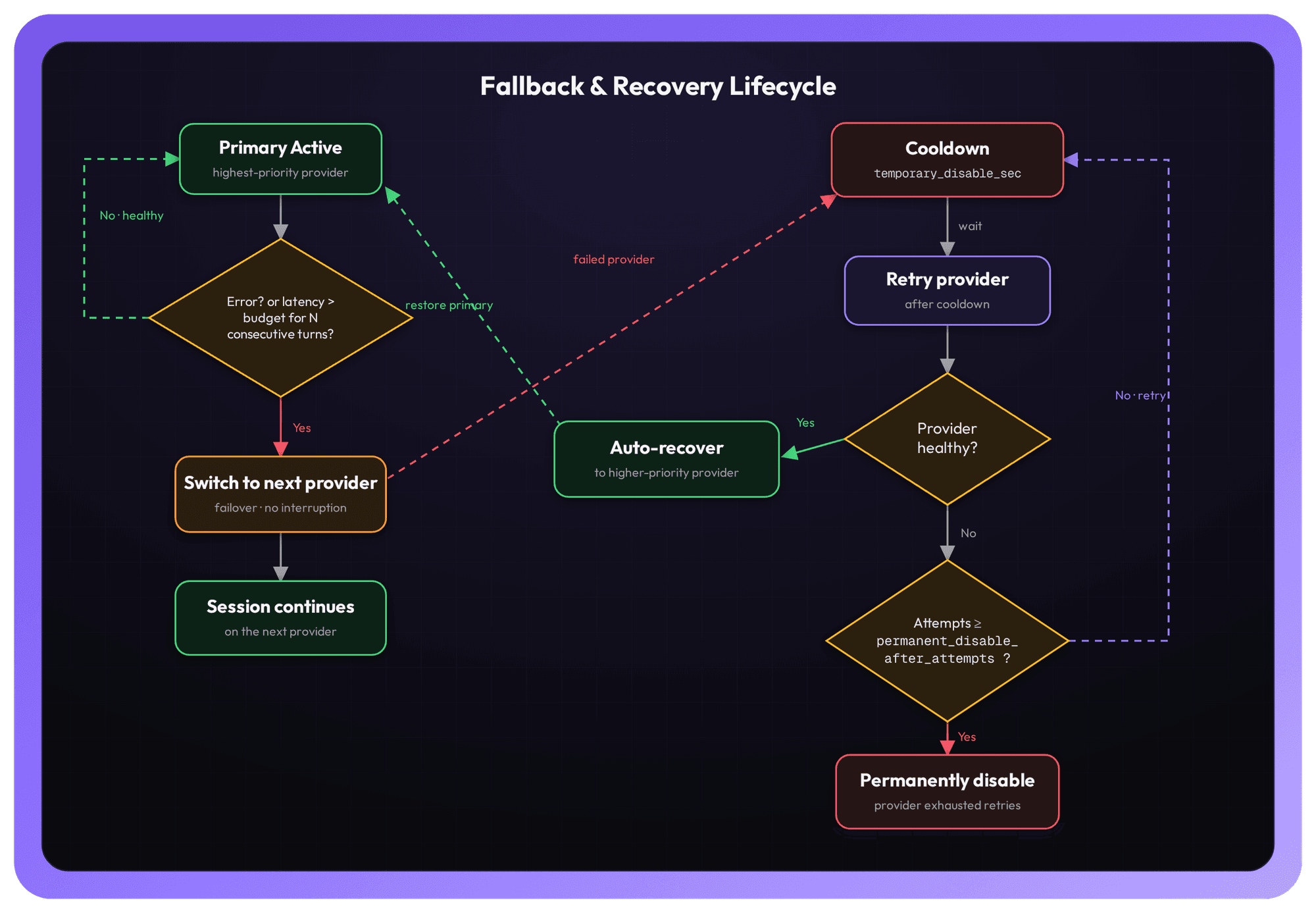
Here's the loop, end to end:
1. Primary Active. The highest-priority healthy provider handles the turn.
2. Detection. On every turn the adapter checks two things: did the provider error, and has it exceeded its latency budget for consecutive_latency_hits turns in a row?
3. Switch. If either is true, the session immediately moves to the next configured provider — the conversation never pauses.
4. Cooldown. The failed provider enters a cooldown for temporary_disable_sec seconds before it's eligible to be retried, which prevents a flapping provider from failing over and over in a tight loop.
5. Retry & Auto-Recovery. Once the cooldown elapses, the adapter retries the provider. If it’s healthy again, the adapter automatically recovers it and returns to the higher-priority provider.
6. Permanent Disable. If the provider keeps failing, after permanent_disable_after_attempts recovery attempts it’s permanently disabled — the adapter stops wasting turns on a provider that isn’t coming back.
The result: graceful degradation when things go wrong, automatic restoration when they recover, and a hard stop for providers that are genuinely down.
Resilience used to be the hardest part of shipping a voice agent — the retry logic, the health checks, the recovery state machines you had to build and babysit around every provider. With the Fallback Adapter, it's a few lines of configuration that ship with your pipeline.
Start with error-based fallback. Add latency budgets when you're ready. Tune cooldown and recovery to your SLA. Your agents stay up; your team stays focused on the conversation.
Read the full docs: Fallback Adapter — VideoSDK AI Agents.
Have feedback or ideas? Join our Discord community and tell us what you're building.
Want to ship resilient voice agents today? Sign in to the VideoSDK Dashboard and get started - it’s free.