


Introduction
Here's everything this guide covers. AI phone agents are great at handling the first mile of a conversation, but some calls need to reach a human or a different department — and making the caller hang up and redial is the fastest way to lose them. VideoSDK Call Transfer fixes that: the agent detects intent, triggers a function tool, and the live SIP call is forwarded to a new number instantly, without disconnecting or redialing. We'll cover how Call Transfer works, the code that drives it, how the agent decides when to transfer, a runnable example, and how it differs from Warm Transfer for human escalations.
When the best thing your agent can do is pass the call along
A good voice agent knows its limits. It can answer questions, take details, and resolve the routine cases - but eventually a caller asks for billing, or sales, or a human, and the agent's job becomes getting them to the right place quickly.
The old way to do that is painful: "Please hang up and call this other number." Every one of those handoffs is a chance for the caller to drop off, mis-dial, or land back in a queue from the start. The context is gone, the momentum is gone, and the experience feels broken.
At VideoSDK, we think a handoff should be invisible to the caller. The agent should be able to move a live call somewhere else the moment it's the right thing to do — and the caller should just hear the next person pick up.
Today, we're introducing Call Transfer - a built-in capability that lets your AI agent move an ongoing SIP call to another phone number without ending the current session.
What Call Transfer does
Call Transfer lets your AI Agent move an ongoing SIP call to another phone number without ending the current session. Instead of making the caller hang up and dial a new number, the agent can automatically route the call.
The key idea: the call is forwarded in place. There's no disconnect and no redial — the existing SIP call is handed to the new destination instantly, so the caller stays on the line the whole time.
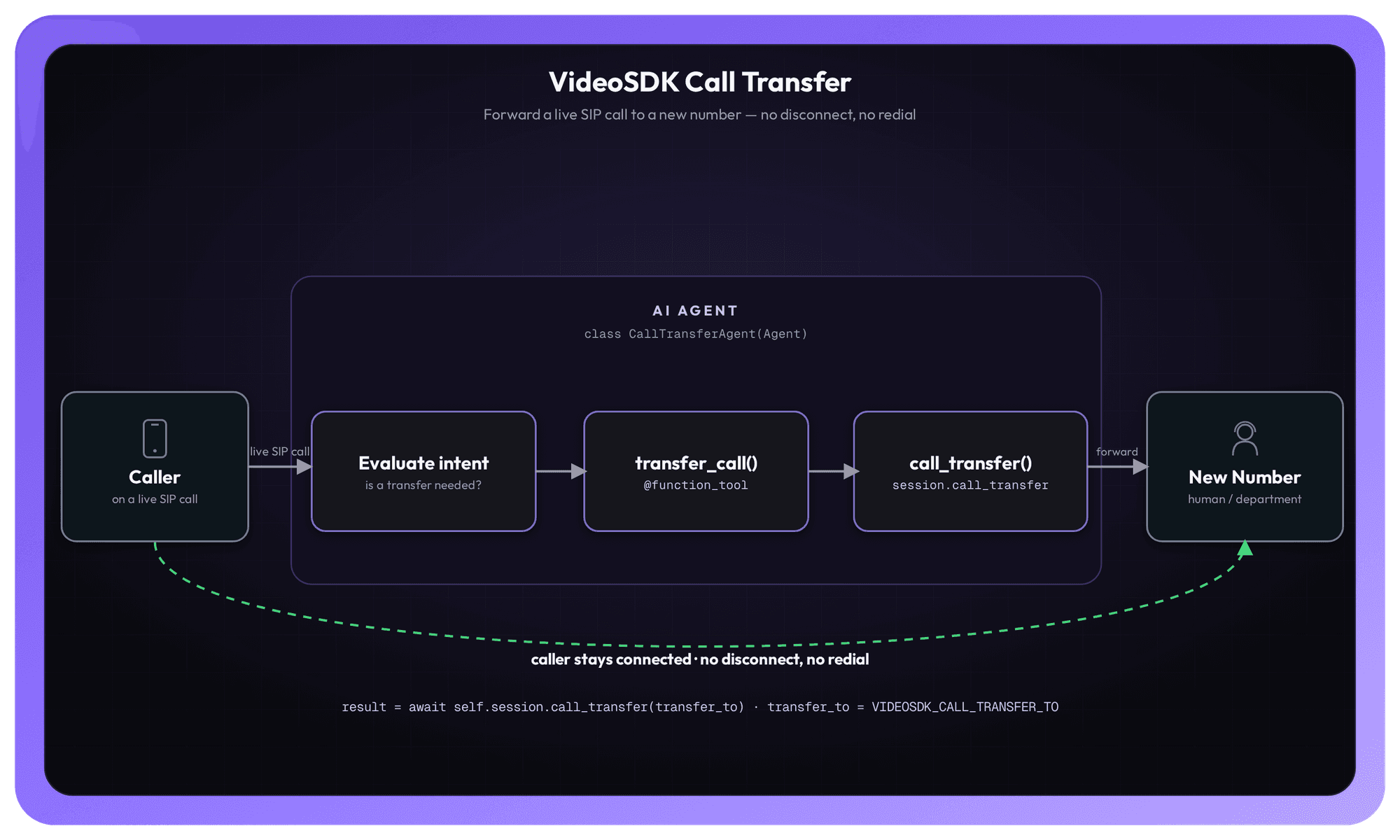
The caller is on a live SIP call with the AI agent. When the agent decides a transfer is needed, it triggers a function tool, which calls session.call_transfer(...). The platform forwards the ongoing SIP call to the new phone number - the caller is never disconnected.
How Call Transfer works
Under the hood, the flow is refreshingly simple — three steps, driven entirely by the agent's own decision-making:
- The agent evaluates intent. As the conversation unfolds, the agent determines when a call transfer is required and then triggers the function tool.
- The function tool fires. When triggered, it tells the system to move the call to another phone number.
- The call is forwarded instantly. The ongoing SIP call is forwarded to the new number immediately — without disconnecting or redialing.
Because the transfer is initiated as a function tool, the agent decides when to call it, based on what the caller actually says. You describe the tool and when to use it in the agent's instructions, and the LLM handles the rest — no rigid menu trees, no DTMF mazes
Triggering a Call Transfer
Here's the core of it. You define an agent with a transfer_call function tool, and inside that tool you call self.session.call_transfer(transfer_to) with the destination number. The agent's instructions tell it to use that tool whenever the caller needs to be moved.
import os
from videosdk.agents import Agent, function_tool

class CallTransferAgent(Agent):
    def __init__(self):
        super().__init__(
            instructions="You are the Call Transfer Agent Which Help and provide to transfer on going call to new number. use transfer_call tool to transfer the call to new number.",
        )

    async def on_enter(self) -> None:
        await self.session.say("Hello Buddy, How can I help you today?")

    async def on_exit(self) -> None:
        await self.session.say("Goodbye Buddy, Thank you for calling!")

    @function_tool
    async def transfer_call(self) -> dict:
        """Transfer the call to Provided number"""
        transfer_to = os.getenv("VIDEOSDK_CALL_TRANSFER_TO")
        if not transfer_to:
            return {"status": "error", "message": "No transfer destination configured."}
        result = await self.session.call_transfer(transfer_to)
        return {"status": "transferred", "result": result}
What each piece is doing
- instructions — This is where you tell the agent who it is and when to transfer. The LLM reads these instructions and decides, on its own, when to call transfer_call based on the conversation.
- on_enter — A lifecycle hook that runs when the agent joins the call. Here it greets the caller: "Hello Buddy, How can I help you today?"
- on_exit — Runs as the agent leaves, delivering a closing line: "Goodbye Buddy, Thank you for calling!"
- @function_tool — Marks transfer_call as a tool the agent can invoke. This is the bridge between the LLM's decision and the actual transfer.
- transfer_to — The destination number, read here from the VIDEOSDK_CALL_TRANSFER_TO environment variable. If it isn't set, the tool returns an error status instead of attempting the transfer.
- self.session.call_transfer(transfer_to) — The call that does the work. It forwards the live SIP call to the destination and returns a result, which the tool passes back as {"status": "transferred", "result": result}.
That status dictionary matters: returning a clear result lets the agent know the transfer succeeded (or didn't) and respond naturally to the caller.
Setting up the phone side. Call Transfer works on top of your telephony setup. To configure incoming call handling, outbound calling, and routing rules, follow the AI Telephony Agent Quick Start.
Try it yourself
Two complete, runnable examples are on GitHub:
- Call Transfer example — the minimal agent above, end to end:
examples/call_transfer.py. - Call Center Agent — a fuller use case that connects a telephony customer-care agent with human-agent handoff via call_transfer:
use_case_examples/call_center_agent.py.
Call Transfer vs. Warm Transfer: which one do you need?
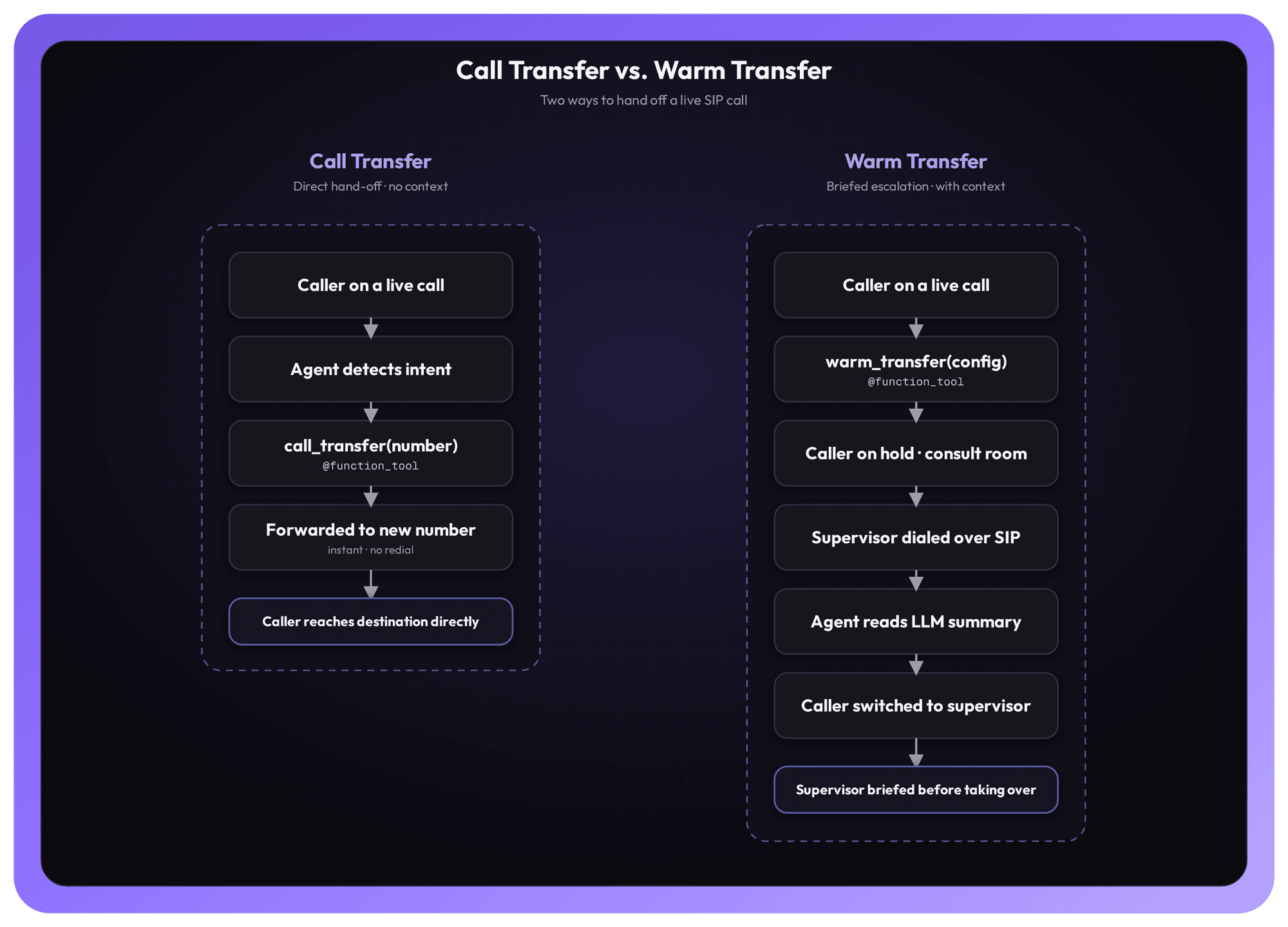
Call Transfer is a direct hand-off - it forwards the call straight to the new number without any handoff context. That's exactly what you want for routing to another department, an external line, or a number that doesn't need a briefing.
When you're escalating to a human supervisor and want them to know what's going on before they take over, reach for Warm Transfer instead. Warm Transfer places the caller on hold, spins up a private consultation room, dials the supervisor over SIP, and has the agent read out an LLM-generated summary of the call so far — so the supervisor never has to ask "what's this about?" - before the caller is switched over.
A simple rule of thumb: use Call Transfer when the destination just needs the call, and Warm Transfer when the person receiving the call needs the context.
Ship it
Call Transfer turns "please hang up and dial this number" into a single function the agent can call on its own. Define the tool, point it at a destination, describe when to use it — and your agent can move callers to the right place the instant the conversation calls for it, without ever dropping the line.
Read the full docs: Call Transfer - VideoSDK AI Agents.
Have feedback or ideas? Join our Discord community and tell us what you're building.
Want to give your AI agents the power to route calls? Sign in to the VideoSDK Dashboard and get started - it's free.