


Introduction
Here's everything this guide covers. When an AI voice agent needs to escalate to a human, forwarding the call cold means the supervisor opens with "what's this about?" and the caller has to start over. VideoSDK Warm Transfer fixes that: it brings the supervisor up to speed before they take the call. We'll walk through what Warm Transfer does, the phase-by-phase state machine behind it, how to trigger it from a function tool, how to listen for phase events, how to customize the briefing (summary LLM, prompt, and consultation pipeline), what the result object gives you back, and how it differs from a basic Call Transfer.
A cold handoff makes the caller start all over again
Plenty of calls reach a point where the best move is to bring in a human - a refund that needs approval, an angry customer who wants a manager, an edge case the agent wasn't built for. The escalation itself isn't the hard part. The context is.
With a plain transfer, the human inherits a live caller and zero background. They have to ask who they're talking to, what the issue is, and what's already been tried - while the caller, who has explained all of this once already, repeats themselves with rising frustration. The handoff works mechanically but fails as an experience.
At VideoSDK, we think the human should walk into the conversation already informed. The caller shouldn't have to re-explain anything, and the supervisor shouldn't have to guess.
That's what Warm Transfer does.
What Warm Transfer does
Warm Transfer hands off an ongoing SIP call to a human supervisor after the agent has briefed them on what the caller wants. The caller is placed on hold, a private consultation room is created, the supervisor is dialed in over SIP, the agent delivers an LLM-generated summary of the call so far, and only then is the caller switched over. The supervisor never has to ask "what's this about?"
This is the key difference from the basic Call Transfer, which forwards the call directly with no handoff context. Warm Transfer trades a little extra orchestration for a supervisor who is ready the moment they connect.
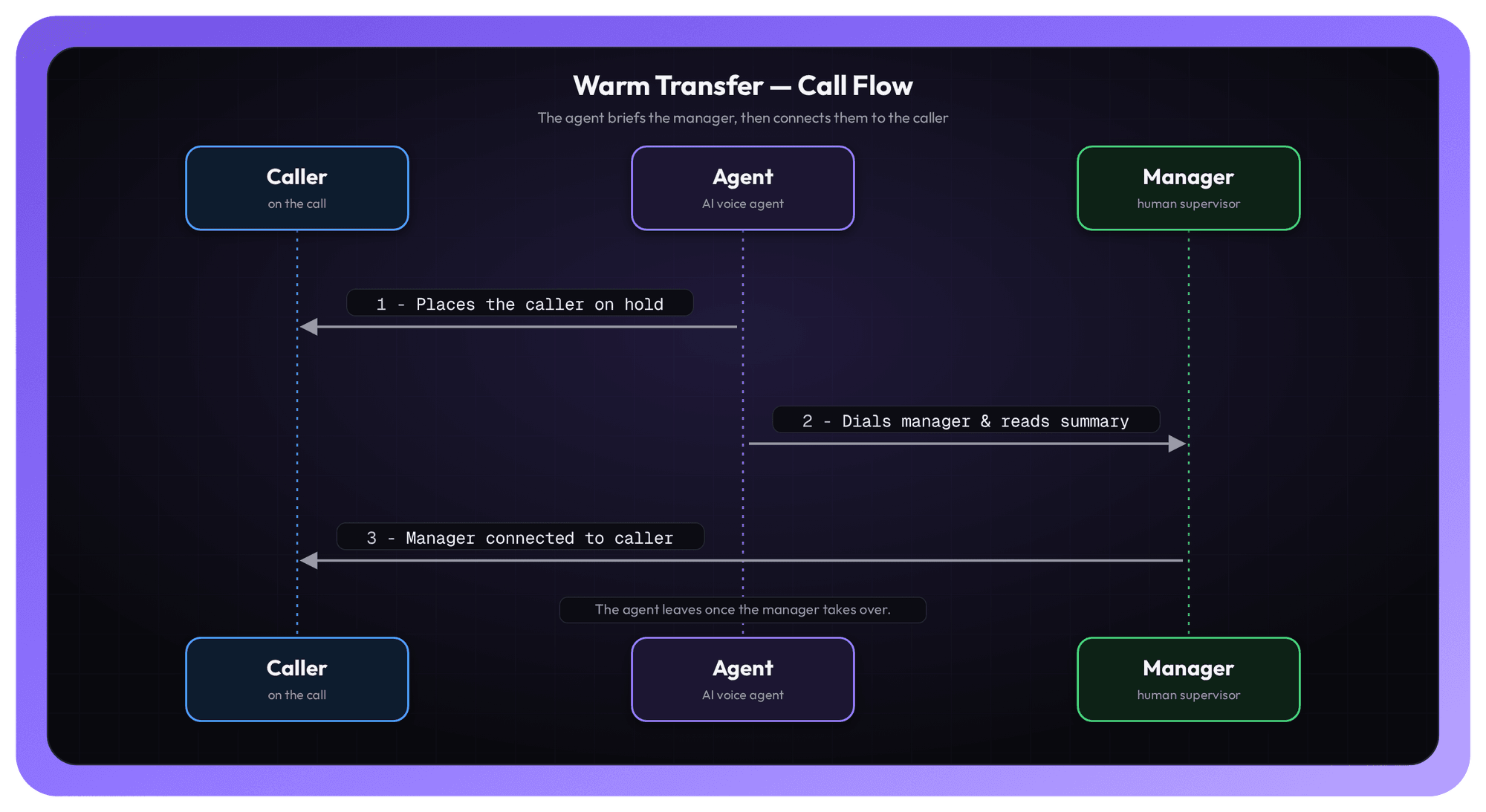
The caller is held while the agent and the human supervisor meet in a private consultation room. The agent reads an LLM summary of the conversation, the supervisor acknowledges, and only then is the caller moved in - and the agent steps out.
How Warm Transfer works
Under the hood, a Warm Transfer runs as a state machine, and you can observe every phase through @session.on_warm_transfer(...). Here's the full sequence, in order:
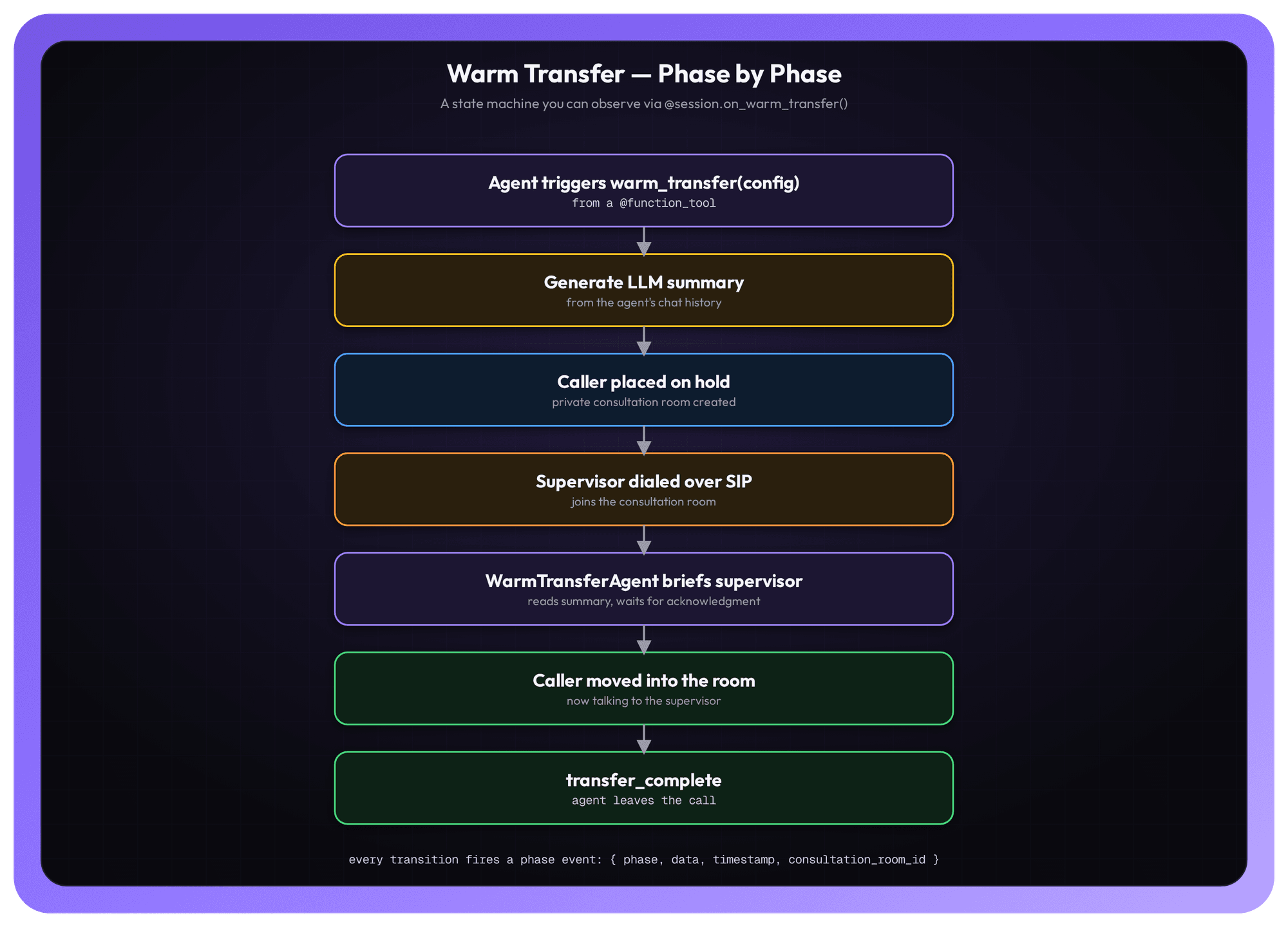
- The agent triggers it. From inside a function tool, the agent calls session.warm_transfer(config).
- A summary is generated. An LLM produces a summary of the conversation so far, built from the agent's chat history.
- The caller goes on hold. While the caller waits, a private consultation room is created.
- The supervisor is dialed in. The supervisor is called over SIP and joins the consultation room.
- The agent briefs the supervisor. A built-in WarmTransferAgent reads the summary out to the supervisor and waits for them to acknowledge it.
- The caller is brought in. The caller is moved into the consultation room and is now talking to the supervisor.
- The agent bows out. The transfer completes and the agent leaves the call.
The important detail: the summary briefing (steps 2–5) all happens off to the side, in a consultation room the caller never hears, before the caller is connected in step 6.
Triggering a Warm Transfer
You expose the escalation as a @function_tool and call session.warm_transfer() inside it, so the agent decides when to escalate based on the conversation. Describe when to escalate in the agent's instructions, and the LLM handles the trigger.
python
from videosdk.agents import Agent, function_tool
from videosdk.agents.warm_transfer import SIPDestination, WarmTransferConfig

class CustomerServiceAgent(Agent):
    def __init__(self) -> None:
        super().__init__(
            instructions=(
                "You are a helpful customer service agent. "
                "If the caller asks for a manager or needs a human, "
                "call escalate_to_human."
            )
        )

    @function_tool
    async def escalate_to_human(self, reason: str) -> str:
        """Escalate this call to a human supervisor with a warm transfer.

        Args:
            reason: Short description of why the escalation is happening.
        """
        config = WarmTransferConfig(
            destination=SIPDestination(
                routing_rule_id="rr_xxxxxxxx",
                sip_call_to="+1XXXXXXXXXX",     # Supervisor's number (E.164)
                sip_call_from="+1XXXXXXXXXX",   # Caller-ID to present
            ),
        )
        result = await self.session.warm_transfer(config)
        if result.success:
            return "Connected to a supervisor."
        return "I couldn't reach a supervisor right now. Let me keep h
What each piece is doing
- instructions — Tell the agent when to escalate. Here, any time the caller asks for a manager or a human, the LLM calls escalate_to_human on its own.
- @function_tool escalate_to_human(reason) — The escalation tool. The reason argument lets the model record why it's escalating, which is useful for logging and analytics.
- WarmTransferConfig — The configuration object for the transfer. At minimum it carries the destination.
- SIPDestination — Where the supervisor is reached:
- routing_rule_id — The routing rule that governs the outbound SIP call.
- sip_call_to — The supervisor's phone number, in E.164 format.
- sip_call_from — The caller-ID presented on the outbound leg.
- await self.session.warm_transfer(config) — Kicks off the whole state machine and returns a result once it settles.
- result.success — Lets the agent respond naturally: confirm the connection on success, or gracefully keep helping the caller if a supervisor couldn't be reached.
Heads-up on caller-ID. sip_call_from must be a number your routing rule or trunk is authorized to send. If it isn't, carriers may reject or drop the call.
Listening for phase events
Because Warm Transfer is a state machine, you can subscribe to its phase changes with @session.on_warm_transfer(). An undecorated handler receives every phase; pass a phase name to filter for just one.
python
@session.on_warm_transfer()
def on_any_phase(payload):
    # payload = {"phase": WarmTransferPhase, "data": {...},
    #            "timestamp": float, "consultation_room_id": Optional[str]}
    print(f"[WARM TRANSFER] phase={payload['phase'].value}")

@session.on_warm_transfer("transfer_complete")
def on_done(payload):
    print("Caller is now talking to a supervisor.")
Each event hands you a payload with the current phase, any phase-specific data, a timestamp, and the consultation_room_id once one exists. The first handler above logs every transition; the second fires only on transfer_complete, the moment the caller is connected to the supervisor. This is where you'd hook in your own logging, dashboards, or analytics for each step of the handoff.
Customizing the briefing
Out of the box, the SDK keeps things simple: it generates the summary using your session's own LLM with a default 150-word briefing prompt, and it builds the consultation room's pipeline by re-instantiating your STT, LLM, TTS, VAD, and turn-detector classes with no arguments — which works as long as those providers read their credentials from the environment.
When you need more control, every part of that is overridable through optional WarmTransferConfig fields:
python
from videosdk.agents import Pipeline
from videosdk.agents.plugins import AnthropicLLM, DeepgramSTT, CartesiaTTS, SileroVAD, TurnDetector

config = WarmTransferConfig(
    destination=SIPDestination(routing_rule_id="rr_xxx", sip_call_to="+1...", sip_call_from="+1..."),
    summary_llm=AnthropicLLM(model="claude-3-5-sonnet"),
    summary_prompt="Summarize the call for a supervisor in under 100 words.",
    # Pass briefing_pipeline_factory if your providers need constructor args
    # (model ids, voice ids, keys not in env) instead of relying on defaults.
    briefing_pipeline_factory=lambda: Pipeline(
        stt=DeepgramSTT(model="nova-3"),
        llm=AnthropicLLM(model="claude-3-5-sonnet"),
        tts=CartesiaTTS(voice="..."),
        vad=SileroVAD(),
        turn_detector=TurnDetector(),
    ),
)- summary_llm — Use a specific model to write the briefing (for example, a stronger model just for summarization), instead of the session's default LLM.
- summary_prompt — Replace the default 150-word prompt with your own instructions — shorter, longer, or focused on the details your supervisors care about.
- briefing_pipeline_factory — A factory that builds the consultation room's Pipeline explicitly. Reach for this when your providers need constructor arguments — model IDs, voice IDs, or keys that aren't in the environment — rather than relying on the no-argument defaults.
What you get back - and what happens if the caller hangs up
session.warm_transfer() returns a WarmTransferResult. It tells you whether the transfer succeeded (success), the terminal phase it ended on, the consultation room and SIP call IDs, the generated summary, and an optional errorif something went wrong.
There's one more behavior worth calling out: the transfer is shielded from cancellation. If the function tool that triggered it gets cancelled — say the caller interrupts mid-escalation — the transfer doesn't abort. It keeps running to completion in the background; the only thing that changes is that its result is no longer awaited. In other words, once a warm transfer is in motion, it finishes cleanly rather than leaving a half-connected call.
Try it yourself
A complete, runnable warm-transfer agent with supervisor escalation is on GitHub: examples/warm_transfer.py. It's the fastest way to see the full phase sequence in action.
Warm Transfer vs. Call Transfer: which one do you need?
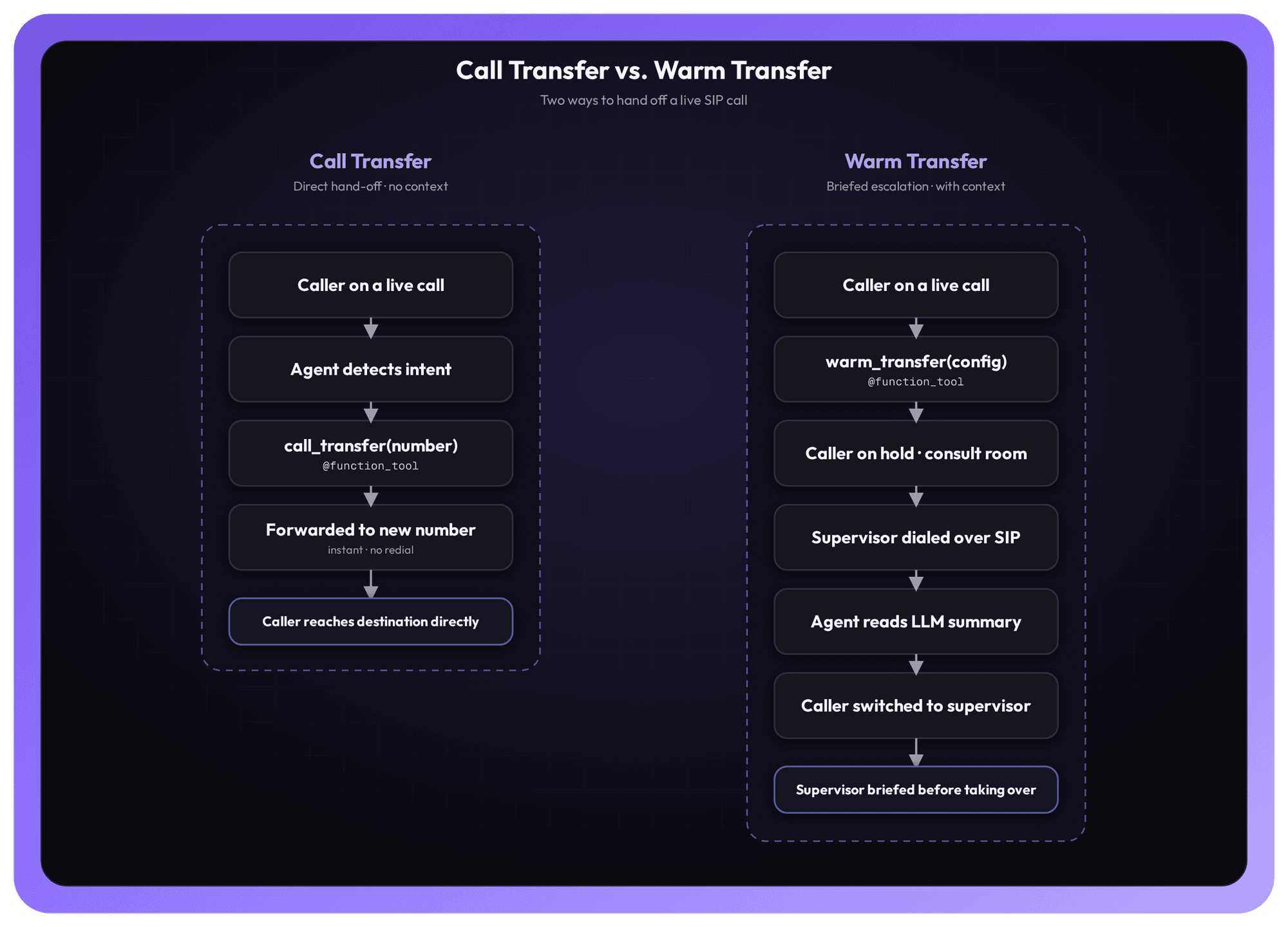
Both move a live SIP call somewhere else without making the caller redial — the difference is context.
- Use Call Transfer when the destination just needs the call: routing to another department, an external line, or any number that doesn't need a briefing. It forwards the call directly and instantly.
- Use Warm Transfer when the person receiving the call needs to know what's going on first: escalating to a human supervisor, a specialist, or a manager who should never have to ask the caller to repeat themselves.
A simple rule of thumb: Call Transfer moves the call; Warm Transfer moves the call and the context.
Ship it
Warm Transfer turns a jarring "let me transfer you" into a smooth, briefed handoff. Your agent decides when to escalate, summarizes the conversation, gets the supervisor up to speed in a private room, and only then connects the caller — all from a single function tool, with full visibility into every phase and a result object you can act on.
Read the full docs: Warm Transfer — VideoSDK AI Agents.
Have feedback or questions? Join our Discord community and tell us what you're building.
Ready to give your AI agents context-aware human escalation? Sign in to the VideoSDK Dashboard and get started — it's free.