


Use WebRTC when your application requires sub-500ms browser-native delivery, bidirectional communication, or interactive real-time features like video calls and live auctions. Use RTMP when ingesting streams from hardware encoders, OBS Studio, or professional broadcast gear into a media server. Use both together when building a production broadcast pipeline where RTMP handles encoder-to-server contribution and WebRTC handles low-latency delivery to viewer browsers. The most common mistake is treating these as competing alternatives when most production workflows use them as complementary layers.
Choosing the wrong streaming protocol costs you in ways that compound quickly. A broadcaster using WebRTC at scale hits SFU infrastructure limits. A developer building a live auction using RTMP for last-mile delivery adds 3-5 seconds of lag that breaks the bidding experience. The decision between WebRTC vs RTMP comes down to where in the streaming pipeline you are solving a problem, not which protocol is generically "better."
This article maps the architectural differences, latency characteristics, browser support, scalability ceilings, and combination patterns so you can match the right protocol to each layer of your stack.
What is WebRTC?
WebRTC is defined as an open-source, browser-native real-time communication framework standardized by the W3C and IETF that enables direct peer-to-peer audio, video, and data transmission without plugins or additional software installations.
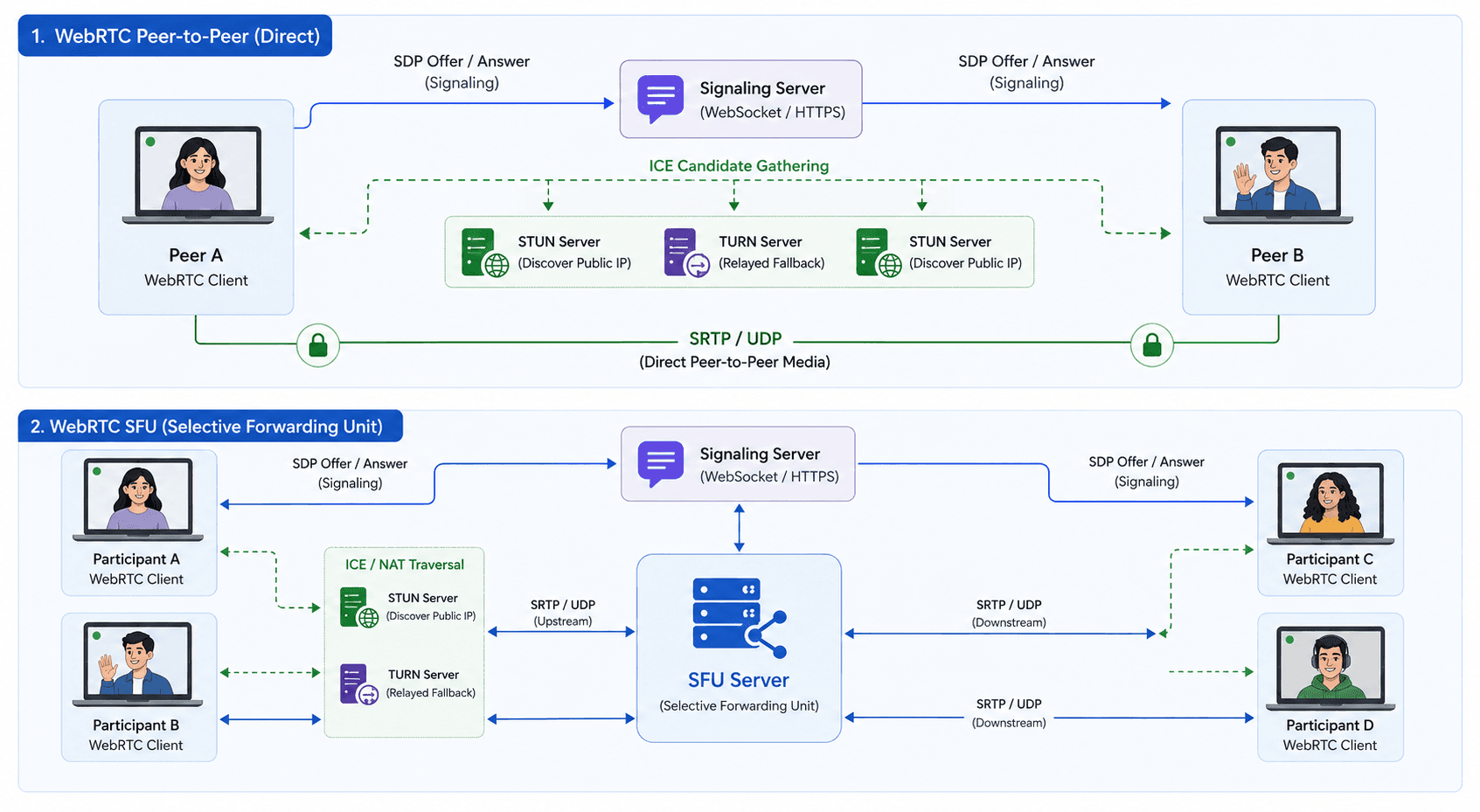
WebRTC works by establishing encrypted peer-to-peer connections using the Interactive Connectivity Establishment (ICE) framework, STUN servers for NAT traversal, and TURN relay servers as fallback when direct connections fail. Media is transmitted over SRTP (Secure Real-time Transport Protocol) with DTLS-SRTP for key exchange, making encryption mandatory by specification, not optional.
WebRTC is best known for powering video conferencing tools such as Google Meet, Zoom's browser client, and Microsoft Teams Web, as well as interactive live streaming applications where viewer latency below 500ms is required.
Key technical characteristics:
- Transport layer: UDP (avoids TCP retransmission delays that inflate latency)
- Encryption: Mandatory SRTP + DTLS, no unencrypted WebRTC streams are possible
- Native browser support: Chrome, Firefox, Safari (version 11+, 2017), Edge
- Codec support: VP8, VP9, H.264, and emerging AV1 support for video; Opus for audio
- Typical glass-to-glass latency: 100-500ms in controlled conditions
WebRTC's peer-to-peer architecture becomes a scaling challenge at high viewer counts. Sending 1,000 simultaneous streams peer-to-peer is impractical, so production deployments route WebRTC media through a Selective Forwarding Unit (SFU), a media server that receives one stream and forwards it to multiple recipients without decoding and re-encoding.
What Is RTMP?
RTMP (Real-Time Messaging Protocol) is defined as a TCP-based streaming protocol originally developed by Macromedia and maintained by Adobe, designed to transport audio, video, and data from an encoder to a streaming server for broadcast distribution.
RTMP works by opening a persistent TCP connection between an encoder (such as OBS Studio, a hardware encoder, or a production switcher) and a streaming server, then multiplexing interleaved audio and video chunks over that connection. The TCP transport guarantees packet delivery, which makes RTMP reliable for contribution workflows where dropped frames are unacceptable.
RTMP is best known as the universal ingest protocol for streaming platforms including YouTube Live, Twitch, and Facebook Live; all three accept RTMP streams from encoders and repackage them for distribution over HLS or other delivery protocols.
Key technical characteristics:
- Transport layer: TCP (reliable delivery, but retransmission adds latency)
- Encryption: RTMPS (RTMP over TLS) for secure ingest, supported by major platforms
- Native browser support: None. Flash Player was officially discontinued by Adobe in December 2020. RTMP requires a server-side receiver, not a browser client.
- Codec support: H.264 for video; AAC, MP3 for audio
- Typical ingest-to-server latency: 2-5 seconds
RTMP's TCP foundation makes it predictable and compatible with virtually every professional encoder built in the last 15 years. According to the Haivision 2025 Broadcast Transformation Report, RTMP remains the second most-used live video transport protocol among professionals, with 58% adoption, trailing only SRT at 77%.
How WebRTC Works
WebRTC establishes a connection through a multi-phase handshake that happens in the background before any media flows.
Phase 1: Signaling. WebRTC does not define its own signaling protocol. Applications implement signaling using WebSockets, HTTP long-polling, or any custom mechanism to exchange Session Description Protocol (SDP) offers and answers between peers. The SDP describes codec capabilities and network parameters.
Phase 2: ICE candidate gathering. Each client queries a STUN server to discover its public IP address. The ICE framework then tries multiple connection paths in priority order: direct peer-to-peer, peer-to-peer via a different network interface, and relayed through a TURN server as a final fallback.
Phase 3: DTLS handshake. Once a connection path is established, both peers perform a DTLS handshake to exchange encryption keys for the SRTP media streams.
Phase 4: Media flow. Audio and video packets travel over SRTP/UDP. WebRTC's congestion control algorithms (Google Congestion Control, or GCC) continuously monitor network conditions and adjust bitrate in real time, targeting the 100-500ms latency range.
For multi-participant applications, an SFU sits between participants. VideoSDK, for example, builds its real-time video infrastructure on an SFU architecture that delivers sub-80ms audio latency globally, handling the complexity of codec negotiation and relay routing so developers interact only with the SDK rather than WebRTC primitives directly.
How RTMP Works
RTMP streams flow in a defined two-stage pipeline from encoder to viewer.
Stage 1: Ingest (RTMP contribution). The encoder opens a persistent TCP connection to an ingest endpoint using an RTMP URL and stream key. OBS Studio, hardware encoders from Blackmagic Design or Teradek, and software encoders all support RTMP natively. The encoder sends an H.264 video stream and AAC audio stream interleaved in RTMP chunks.
Stage 2: Transcoding and repackaging. The ingest server receives the RTMP stream and transcodes it into one or more delivery formats. Most platforms transcode to HLS (HTTP Live Streaming) or low-latency HLS for end-user delivery. Some platforms, including those using RTMP-to-WebRTC pipelines, transcode directly to WebRTC-compatible formats (H.264 or VP8 video, Opus audio) for sub-second viewer delivery.
RTMP does not define a playback protocol. No modern browser plays RTMP directly. The ingest role is RTMP's production purpose in 2026.
An emerging alternative to RTMP ingest is WHIP (WebRTC HTTP Ingest Protocol), standardized by the IETF as RFC 9725 in March 2025. WHIP allows WebRTC to serve as an ingest protocol using HTTP-based signaling, eliminating the need for custom RTMP integration while delivering sub-500ms contribution latency. Cloudflare, Red5 Pro, and Wowza have all added WHIP support.
WebRTC vs RTMP: Side-by-Side Comparison
| Feature | WebRTC | RTMP | Winner |
|---|---|---|---|
| Latency | 100–500ms glass-to-glass | 2–5 seconds ingest-to-server | WebRTC for interactive delivery requiring sub-second response |
| Transport | UDP (with TURN fallback) | TCP | RTMP for reliability on unreliable encoder connections; WebRTC for browser delivery |
| Browser support | Native in Chrome, Firefox, Safari, Edge | None (Flash deprecated December 2020) | WebRTC for all browser-based delivery scenarios |
| Encryption | Mandatory SRTP + DTLS | Optional RTMPS (RTMP over TLS) | WebRTC for applications with mandatory security compliance |
| Encoder compatibility | Limited (WHIP is new; OBS WHIP support is growing) | Universal — every professional encoder supports RTMP | RTMP for production workflows using OBS, hardware encoders, or legacy broadcast gear |
| Scalability | Requires SFU for 3+ participants; high infrastructure cost at scale | Server-side relay scales to millions of viewers via CDN | RTMP + HLS/DASH for broadcast to large concurrent audiences |
| Codec support | VP8, VP9, H.264, emerging AV1; Opus audio | H.264 video; AAC audio | WebRTC for quality-per-bitrate efficiency using VP9 or AV1 |
| Bidirectionality | Native — designed for two-way communication | One-directional (encoder to server) | WebRTC for any use case requiring viewer interaction |
| Setup complexity | Higher — signaling, ICE, SFU routing | Lower — URL + stream key | RTMP for teams prioritizing rapid ingest integration |
VideoSDK: Leveraging the Power of WebRTC & RTMP
What is VideoSDK?
VideoSDK is a revolutionary live video infrastructure designed for developers across the USA & India, providing the ultimate flexibility, scalability, and control over audio-video conferencing and interactive live streaming in web and mobile apps.
How does VideoSDK incorporate both WebRTC and RTMP?
VideoSDK seamlessly integrates the strengths of WebRTC and RTMP, offering developers the best of both worlds. Whether it's the low-latency real-time communication of WebRTC or the versatile streaming capabilities of RTMP, VideoSDK ensures a comprehensive solution.
Leveraging VideoSDK: Features and Integration
- Real-Time Communication: Enable peer-to-peer communication with minimal latency.
- Scalability: Easily scale your applications to accommodate growing user bases.
- Security: Leverage robust encryption protocols to safeguard user data.
When to Use WebRTC
WebRTC is the right protocol choice across a specific set of interactive and latency-sensitive scenarios.
- If you are building a video conferencing or group calling application, WebRTC is the correct choice because its bidirectional, SFU-routed architecture is designed exactly for this use case.
- If you are building a live auction, live betting, or any feature where a viewer action must respond within 500ms of a live event, WebRTC is the correct choice because RTMP's 2-5 second lag makes real-time interaction impossible.
- If you are building a browser-based application with no client-side install requirement, WebRTC is the correct choice because RTMP has no native browser playback support.
- If your application requires mandatory end-to-end encryption, WebRTC is the correct choice because SRTP encryption is required by the specification — there is no way to deploy an unencrypted WebRTC stream.
- If you are building a telehealth, remote education, or customer support tool where participants speak to each other in real time, WebRTC is the correct choice because sub-500ms audio latency is essential for natural conversation.
- If you need sub-80ms audio-focused real-time communication in production, platforms like VideoSDK provide an SFU-backed WebRTC infrastructure that achieves this without building the SFU layer from scratch.
When to Use RTMP
RTMP remains the dominant ingest protocol for broadcast and one-to-many streaming workflows because of its universal encoder compatibility and reliability.
- If you are ingesting a live stream from OBS Studio, a hardware encoder, or a production broadcast switcher, RTMP is the correct choice because virtually every professional encoder ships with native RTMP support and no additional configuration is needed.
- If you are publishing a live stream to YouTube Live, Twitch, or Facebook Live, RTMP is the correct choice because all three platforms accept RTMP as the standard ingest protocol.
- If your streaming workflow involves a CDN-backed distribution layer to thousands or millions of concurrent viewers, RTMP ingest into an HLS or DASH delivery pipeline is the correct choice because it separates the reliable contribution layer from the scalable distribution layer.
- If your team is operating in a network environment with high packet loss or jitter — such as a remote broadcast from an event venue over a cellular connection — RTMP's TCP transport provides more predictable ingest reliability than UDP-based protocols.
- If you are maintaining existing broadcast infrastructure built before 2020, RTMP is the correct choice for short-term compatibility while you evaluate WHIP or SRT as a migration path.
Using WebRTC and RTMP Together
The most effective production streaming architecture uses RTMP and WebRTC at different stages of the same pipeline, not as competing choices.
The standard production pattern works as follows:
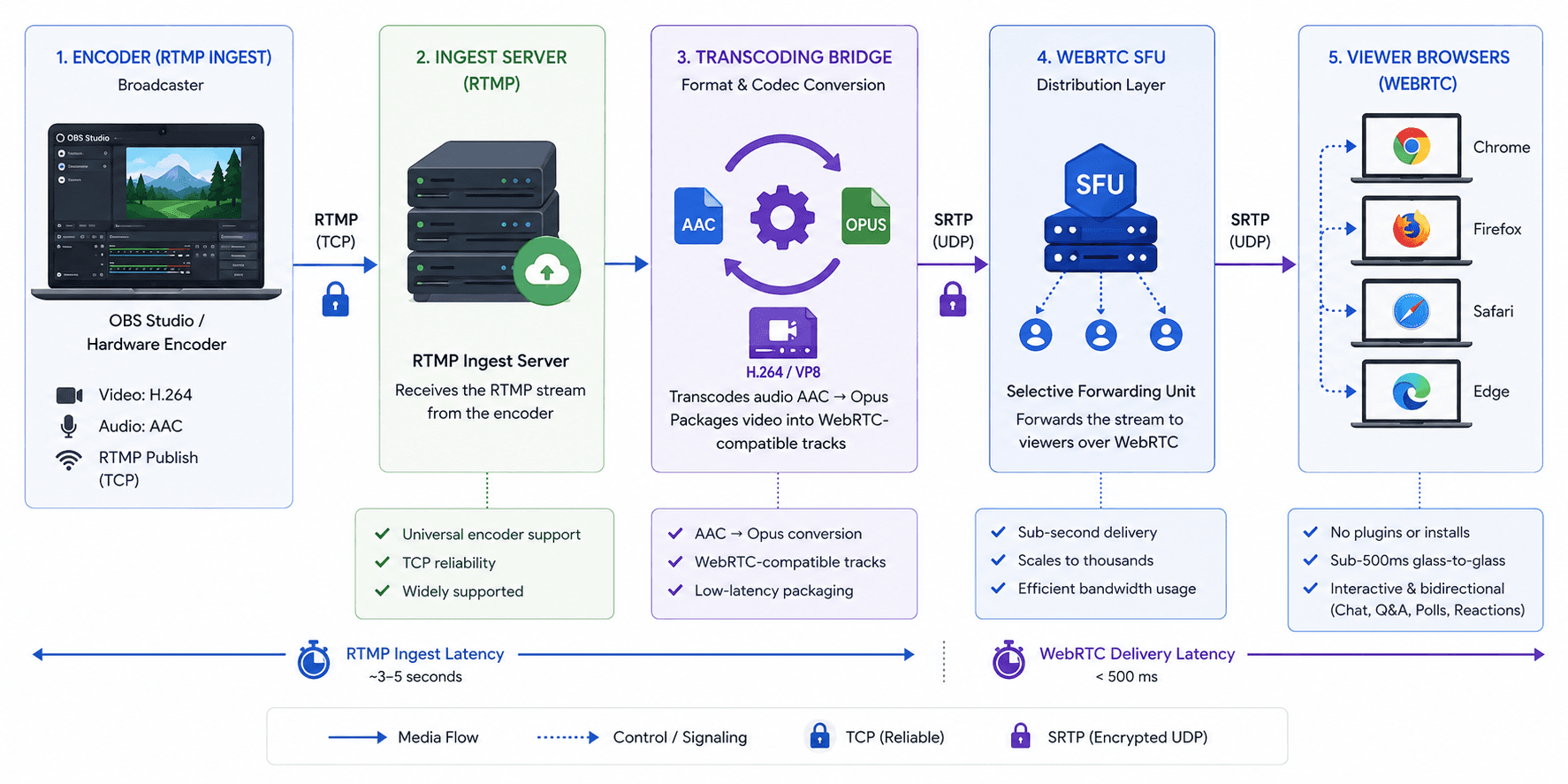
- Encoder layer (RTMP ingest): A broadcaster using OBS Studio or a hardware encoder sends an RTMP stream to an ingest server. This layer benefits from RTMP's universal encoder support and TCP reliability. The encoder does not need to be WebRTC-capable.
- Transcoding bridge: The ingest server receives the RTMP stream, transcodes the audio from AAC to Opus (the native WebRTC audio codec), and packages the video (H.264 or VP8) into WebRTC-compatible tracks.
- SFU distribution layer (WebRTC delivery): The transcoded media is injected into an SFU, which forwards it to viewer browsers over WebRTC. Viewers receive sub-500ms glass-to-glass latency regardless of the 3-5 second delay introduced at the RTMP ingest stage — because the SFU delivers only the most recent WebRTC-timed frame.
- Viewer layer: Viewers receive the stream natively in Chrome, Firefox, Safari, or Edge with no plugin or application install. Interactive features — viewer reactions, Q&A, live polls — are possible because the viewer connection is bidirectional WebRTC.
This RTMP-in / WebRTC-out architecture is how platforms including Twitch, Cloudflare Stream, and VideoSDK's interactive live streaming product handle large-scale interactive broadcasts. The broadcaster's workflow (OBS + RTMP) stays unchanged, and viewers get sub-second interactive delivery.
Real-World Example: Interactive Live Commerce
The RTMP-plus-WebRTC architecture is the infrastructure backbone behind interactive live commerce platforms, a category that grew significantly in markets including India and Southeast Asia between 2023 and 2026.
A retailer hosting a live product sale on a mobile app faces two conflicting requirements: the host broadcasts from a phone using a professional mobile encoder (which outputs RTMP), and viewers must be able to ask questions and get answers with latency under one second to replicate the feel of in-store interaction.
Solving this with RTMP alone would give viewers 3-5 seconds of delay, enough to make real-time Q&A feel broken. Solving this with WebRTC alone would require every broadcaster to use a browser-based interface, losing compatibility with professional mobile encoders.
The production solution: RTMP ingest from the broadcaster's mobile encoder, WebRTC delivery to viewer devices. Companies building this pattern on VideoSDK use the interactive live streaming API to handle SFU routing, transcoding, and viewer connection management without building the bridge layer themselves.
Definitions Glossary
WebRTC (Web Real-Time Communication): An open-source protocol and browser API standardized by the W3C and IETF for sub-500ms peer-to-peer audio, video, and data transmission without plugins.
RTMP (Real-Time Messaging Protocol): A TCP-based protocol developed by Adobe for transmitting audio, video, and data from an encoder to a streaming server; the universal ingest standard for live broadcast platforms.
SFU (Selective Forwarding Unit): A media server architecture used in WebRTC deployments that receives one media stream and forwards it to multiple recipients without re-encoding, enabling scalable multi-participant video.
STUN (Session Traversal Utilities for NAT): A protocol WebRTC uses to help clients discover their public IP address when behind a NAT router, enabling direct peer-to-peer connections.
TURN (Traversal Using Relays around NAT): A relay server used as a fallback in WebRTC when direct peer-to-peer connection fails; adds latency but guarantees connectivity.
SRTP (Secure Real-time Transport Protocol): The encrypted media transport layer WebRTC uses for all audio and video, SRTP is mandatory by the WebRTC specification, making encryption non-optional.
WHIP (WebRTC HTTP Ingest Protocol): An IETF-standardized protocol (RFC 9725, March 2025) that enables WebRTC to function as an ingest protocol using HTTP-based signaling, positioned as a modern alternative to RTMP ingest.
Key Takeaways
- WebRTC delivers 100-500ms glass-to-glass latency using UDP transport and mandatory SRTP encryption; it is the correct choice for any application requiring browser-native, sub-second, bidirectional communication.
- RTMP delivers 2-5 seconds of ingest-to-server latency over TCP and remains the universal ingest standard for hardware encoders, OBS Studio, and major streaming platforms, including YouTube Live and Twitch.
- The most common architectural mistake is treating WebRTC vs RTMP as a binary choice, production broadcast workflows use RTMP for encoder contribution and WebRTC for last-mile viewer delivery in the same pipeline.
- WebRTC has no native browser playback for RTMP; RTMP has no browser client. Neither protocol can replace the other at its primary stage of the pipeline.
- WHIP (RFC 9725, standardized March 2025) is the emerging replacement for RTMP ingest in new WebRTC-native pipelines, offering sub-500ms contribution latency with HTTP-based signaling.
Conclusion
The WebRTC vs RTMP decision is a pipeline-stage decision, not a product preference. WebRTC is the right choice for browser-native, sub-500ms, interactive delivery to viewers. RTMP is the right choice for reliable encoder-to-server contribution from professional broadcast gear. Most production streaming workflows are not an either/or choice, they use RTMP for ingest and WebRTC for delivery in a single coordinated architecture.
If you are building an interactive live streaming product, a video calling application, or a real-time broadcast workflow, VideoSDK provides the SFU infrastructure, RTMP-to-WebRTC transcoding bridge, and WebRTC SDKs to deploy the full pipeline without managing media server infrastructure. Start building with VideoSDK's free tier, $20 credit, no credit card required: https://app.videosdk.live/signup.
Frequently Asked Questions
What is the main difference between WebRTC and RTMP?
WebRTC and RTMP differ primarily in transport layer, latency, and where they operate in the streaming pipeline. WebRTC uses UDP transport to achieve 100-500ms latency for browser-native bidirectional communication. RTMP uses TCP transport to achieve reliable 2-5 second ingest from encoders to servers. WebRTC is a delivery protocol; RTMP is an ingest protocol.
Can WebRTC and RTMP be used together?
WebRTC and RTMP are used together in the most common production broadcast architecture. An encoder sends an RTMP stream to an ingest server, which transcodes the audio (AAC to Opus) and video (H.264 to WebRTC-compatible format), then injects the media into a WebRTC SFU for sub-500ms delivery to viewer browsers. RTMP handles contribution; WebRTC handles delivery.
Which is better, WebRTC or RTMP?
Neither is categorically better, each is correct for a specific stage of the pipeline. WebRTC is the better choice when you need browser-native delivery, bidirectional interactivity, sub-500ms latency, or mandatory encryption. RTMP is the better choice when you need universal encoder compatibility, reliable TCP-based contribution, or integration with platforms like YouTube Live, Twitch, or Facebook Live. Most production systems require both.
Does RTMP work in modern browsers?
RTMP does not work in modern browsers. Adobe officially discontinued Flash Player in December 2020, removing the only native browser mechanism for RTMP playback. RTMP streams must be received by a server-side media ingest endpoint. No mainstream browser in 2026 supports direct RTMP playback.
What is WHIP and how does it relate to WebRTC vs RTMP?
WHIP (WebRTC HTTP Ingest Protocol) is an IETF-standardized protocol (RFC 9725, March 2025) that allows WebRTC to function as an ingest protocol using HTTP-based signaling. WHIP is designed as a modern replacement for RTMP ingest in new streaming pipelines, it delivers sub-500ms contribution latency from encoders to servers, where RTMP delivers 2-5 seconds. OBS Studio and platforms including Cloudflare Stream and Wowza have added WHIP support.
What latency does WebRTC achieve compared to RTMP?
WebRTC achieves 100-500ms glass-to-glass latency in controlled network conditions, with sub-80ms achievable for peer-to-peer audio in optimized SFU deployments. RTMP delivers 2-5 seconds of ingest-to-server latency due to TCP retransmission overhead and buffering at the ingest stage. The latency gap narrows on high-packet-loss networks where WebRTC's UDP transport loses packets without retransmission, affecting stream quality.
Is WebRTC secure compared to RTMP?
WebRTC is secure by specification: SRTP encryption and DTLS key exchange are mandatory for all WebRTC sessions and cannot be disabled. RTMP is unencrypted by default; RTMPS (RTMP over TLS) adds encryption but must be explicitly configured and is not universally supported by all ingest endpoints. For applications with security compliance requirements, WebRTC's mandatory encryption model provides stronger guarantees than RTMP's optional encryption model.