


WebRTC vs WebSocket comes down to what you send. WebSocket keeps one TCP connection open between a client and your server, which suits chat, presence and live updates. WebRTC carries audio, video and data between peers, mostly over UDP.
A chat message can wait for a lost packet to be resent. A video frame can't: by the time it arrives again, the moment it showed has passed. That one difference drives most of the WebRTC vs WebSocket decision.
This guide compares WebRTC vs WebSockets across ten dimensions, runs the same echo in each API, and shows how they work together in production, including the signalling work VideoSDK's React SDK does for you.
What is the difference between WebRTC and WebSocket?
WebSocket is a client-to-server message pipe over TCP, while WebRTC is a peer-to-peer media and data stack that runs mainly over UDP.
What is WebSocket?
WebSocket is defined as a protocol that turns an HTTP connection into a persistent, two-way channel between a client and a server. WebSocket works by sending an HTTP Upgrade request, then exchanging text or binary frames over the same TCP connection until either side closes it.
RFC 6455 (December 2011) describes it as an independent TCP-based protocol whose only link to HTTP is the handshake. It uses port 80 for ws:// and port 443 for wss://, which runs over TLS. Every message passes through the server, which can store and fan it out.
What is WebRTC?
WebRTC is defined as a set of browser APIs and IETF protocols for sending real-time audio, video and data directly between endpoints. WebRTC works by exchanging session descriptions through a signalling channel you provide, finding a network path with ICE, then sending media over SRTP and data over DTLS.
The W3C WebRTC specification defines the browser API, including RTCPeerConnection and RTCDataChannel. It deliberately leaves signalling out, which is why WebRTC needs a second channel to get started.
The practical split: WebSocket moves messages through a server you run, in order, with every byte delivered. WebRTC moves media and data between endpoints with loss-tolerant delivery, but needs a signalling channel to start. VideoSDK follows the same pattern: its SDKs keep a signalling connection on TCP port 443 and send media on separate UDP ports.
In short, WebSocket is a messaging transport and WebRTC is a real-time media stack.
WebRTC vs WebSocket Comparison table
WebRTC and WebSocket differ at every layer that matters for real-time features, from transport and topology to encryption and cost.
| Dimension | WebRTC | WebSocket | Better for |
|---|---|---|---|
| Transport | UDP: SRTP for media, SCTP over DTLS for data. TCP only as a fallback | TCP, with TLS on wss:// | WebRTC for media |
| Topology | Peer to peer, or a media server (SFU) for group calls | Client to server | WebSocket for one source, many subscribers |
| Payload | Audio and video tracks, plus text or binary data | Text or binary messages | WebRTC for camera and microphone |
| NAT traversal | ICE, with STUN to find addresses and TURN to relay | Not needed: outbound connection, like HTTPS | WebSocket |
| Encryption | Mandatory: DTLS-SRTP for media, DTLS for data | Optional: TLS on wss:// | WebRTC |
| Ordering and reliability | Per data channel: ordered or not, full or partial reliability | Always ordered and reliable | WebRTC for data that goes stale |
| Head-of-line blocking | Avoidable with unordered channels | Yes: one lost TCP segment holds back later messages | WebRTC on lossy networks |
| Browser support | Data channels Baseline since January 2020 | Baseline since July 2015 | A tie in current browsers |
| Server cost | Signalling and STUN are light; TURN and media servers carry bandwidth | Your servers carry every message and one open connection per client | WebSocket for light message traffic |
| Typical use | Calls, screen share, interactive streaming, peer data | Chat, presence, notifications, live scores, signalling | Match the column to your payload |
Payload and ordering decide most projects. A camera or microphone means WebRTC; messages that must arrive in order and be stored mean WebSocket.
The encryption row comes from RFC 8827 (see our SRTP guide); browser dates are MDN's Baseline data for WebSocket and createDataChannel, checked September 2026.
WebRTC vs WebSocket performance: Which is faster?
Neither protocol is faster on a clean network; the gap opens when packets get lost, and only with WebRTC's unordered delivery.
Path length
A WebSocket message always makes two trips: sender to server, then server to receiver. A WebRTC data channel takes the direct path between peers when ICE finds one, or goes through a TURN relay when it can't. Group calls usually route through a media server to save upload bandwidth, as our guide to SFU, MCU and mesh topologies explains.
Packet loss and head-of-line blocking
TCP delivers bytes in order, so when one segment is lost, everything behind it waits for the retransmission. RFC 8835 gives head-of-line blocking as one reason TCP between a TURN server and a peer can perform worse than UDP.
WebRTC media uses RTP over UDP, so a late packet is concealed or skipped instead of stalling the stream. For data channels, RFC 8831 says zero retransmissions plus unordered delivery gives "a UDP-like service where each user message is sent exactly once".
One thing that bites people here: data channels are ordered and reliable by default, so they behave much like TCP under loss. You only get the advantage by passing ordered: false plus maxRetransmits or maxPacketLifeTime.
Message size and backpressure
RFC 8831 says a sender without message interleaving should keep messages to 16 KB, because one large message can monopolise the connection. MDN notes that most browsers accept at least 256 KB, but large messages still cause head-of-line blocking.
MDN also states that the WebSocket interface doesn't support backpressure, so messages arriving faster than your code handles them pile up in memory. Data channels offer bufferedAmountLowThreshold and a bufferedamountlow event for pacing sends.
Published millisecond figures rarely state a method, so time messages yourself, on a lossy connection too.
WebSocket vs RTCDataChannel: the same echo in code
The same echo in each API shows the core difference: WebSocket needs a server, and WebRTC needs a signalling step.
Both examples were run in September 2026: the WebSocket pair on Node.js 22 with ws 8.21.3, and the data channel in Chrome 152.
WebSocket echo: Node.js server and browser client
The server is adapted from the Simple server example, in this github example. Install it with npm install ws and run node server.mjs.
// server.mjs
import { WebSocketServer } from 'ws';

const wss = new WebSocketServer({ port: 8080 });

wss.on('connection', function connection(ws) {
  ws.on('error', console.error);

  ws.on('message', function message(data) {
    ws.send(`echo: ${data}`);
  });
});
The client uses the browser's built-in WebSocket object.
const socket = new WebSocket('ws://localhost:8080');

socket.addEventListener('open', () => {
  socket.send('hello');
});

socket.addEventListener('message', (event) => {
  console.log(event.data); // "echo: hello"
});
The server sees every message, which suits chat history and moderation.
RTCDataChannel echo: two peers in one browser tab
Paste this into a browser console. Both peers live in one tab, so no server is needed.
const alice = new RTCPeerConnection();
const bob = new RTCPeerConnection();
alice.onicecandidate = (e) => e.candidate && bob.addIceCandidate(e.candidate);
bob.onicecandidate = (e) => e.candidate && alice.addIceCandidate(e.candidate);

bob.ondatachannel = ({ channel }) => {
  channel.onmessage = (e) => channel.send(`echo: ${e.data}`);
};

const dc = alice.createDataChannel('chat', { ordered: false, maxRetransmits: 0 });
dc.onopen = () => dc.send('hello');
dc.onmessage = (e) => console.log(e.data); // "echo: hello"

// Signalling: in a real app, this offer and answer travel over a WebSocket.
await alice.setLocalDescription(await alice.createOffer());
await bob.setRemoteDescription(alice.localDescription);
await bob.setLocalDescription(await bob.createAnswer());
await alice.setRemoteDescription(bob.localDescription);
The { ordered: false, maxRetransmits: 0 } options make this channel UDP-like. The last four lines are what a real app can't skip: on separate devices, the offer, answer and ICE candidates travel through a signalling server, usually a WebSocket.
So WebRTC still needs a server in production, just not for the data itself.
When to use WebSockets?
Use WebSockets when a server is the source of truth and every message must reach every client, in order.
- Chat with history. Messages must arrive in order, be stored, and reach people who join later. The server persists each one and fans it out to the room.
- Presence and typing indicators. Small, frequent state changes go to many clients, and only the server knows who is online.
- Live scores, prices and dashboards. One source pushes updates to thousands of subscribers, so peer-to-peer adds nothing.
It is not for live audio or video. TCP turns packet loss into stalls, and you would have to rebuild jitter buffering, codecs and echo cancellation yourself.
If the data starts on your server or has to be saved, a WebSocket is the shorter path to a working feature.
When to use WebRTC?
Use WebRTC when you are moving live audio or video, or data that is worthless once it arrives late.
- Video and voice calls. A telehealth consultation or tutoring session needs capture, codecs, jitter buffers, echo cancellation and encryption. WebRTC ships all of them in the browser.
- Screen sharing and interactive live streaming. Viewers who can be pulled on stage need the same real-time path as the host, which is what interactive live streaming is built on.
- Low-latency peer data. Multiplayer game state, whiteboard cursors and remote-control input go stale fast. An unordered data channel delivers the newest update without waiting for an old one.
WebRTC is not the tool for notifications or chat history: a data channel keeps nothing after it closes.
If losing a packet should mean skipping it rather than waiting for it, WebRTC is the right transport.
Using both together: how WebSocket signalling starts a WebRTC call
In most production apps, WebSocket and WebRTC aren't alternatives: the WebSocket carries the setup messages, and WebRTC carries the call.
That also answers the common "WebRTC to WebSocket" question. You don't convert one into the other; they run side by side:
- Connect. Both clients open a WebSocket to a signalling server.
- Offer and answer. The caller sends an SDP offer over the WebSocket, and the callee replies with an SDP answer.
- Exchange candidates. Each side sends ICE candidates over the WebSocket as it discovers them.
- Start media. ICE picks a direct path, or a TURN relay if none works, and WebRTC sends media over UDP with DTLS-SRTP.
- Stay connected. The WebSocket stays open for renegotiation, ICE restarts, mute state and leave events.
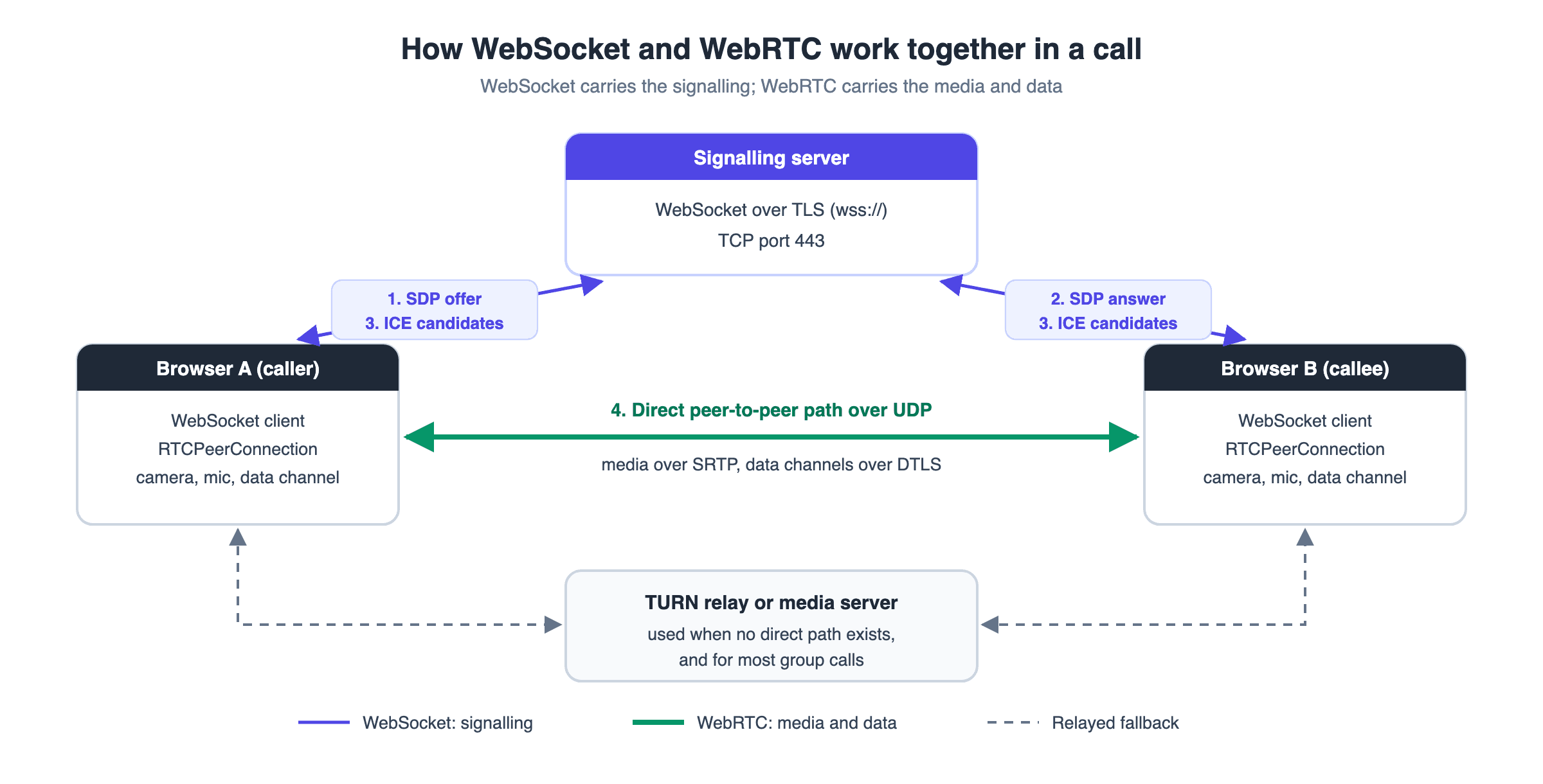
Traffic can also flow the other way: a server-side participant can forward WebRTC audio to a WebSocket-only service, such as a streaming speech-to-text API.
With VideoSDK, you don't build steps 1 to 3. The SDK opens its own connection to VideoSDK's signalling servers, which the firewall guide lists on TCP port 443. Media flows to VideoSDK's media servers on UDP ports 40000 to 60000, with TCP fallback on the same range, and TURN runs on port 3478 or TCP 443. For the full message flow, read how WebRTC signalling works.
This WebRTC WebSocket split is the standard architecture, and a managed SDK takes the signalling half off your hands.
Where WebTransport and WebSocket over HTTP/3 fit
Two newer options now sit next to the classic pair: WebSocket over HTTP/2 or HTTP/3, and the WebTransport API.
RFC 8441 (September 2018) and RFC 9220 (June 2022) let a WebSocket run as a stream inside an HTTP/2 or HTTP/3 connection. Your application code doesn't change, and each socket still delivers its messages in order.
WebTransport is the bigger shift. MDN describes unreliable datagrams, unidirectional streams, out-of-order delivery and built-in backpressure, and lists it as Baseline 2026, working in the latest major browsers since March 2026. It is still client to server, and carries bytes, not media: no codecs or jitter buffers.
For server-routed data that should behave like UDP, WebTransport is now a real candidate. For calls, WebRTC remains the browser's media stack. Our WebSocket vs WebTransport comparison covers that choice.
How VideoSDK handles WebRTC and WebSocket for you
VideoSDK runs the signalling and media servers, so your app calls SDK methods instead of managing sockets and peer connections.
Media travels over WebRTC to VideoSDK's media servers. For messages, the React SDK offers two tools that mirror this article's split:
- PubSub is topic-based messaging through
usePubSub. Withpersist: true, messages are kept for the session, delivered to late joiners, and downloadable as CSV from the session dashboard. That's the WebSocket-style job: chat, polls and raised hands. - DataStream sends text or binary through
send()andonDatainuseMeeting, with no topics or persistence. It hasreliableandunreliablemodes and a 15 KiB limit per message, so larger payloads need chunking. That's the data channel-style job: cursors, game state and quick signals.
To try both, follow the React quickstart; new accounts get $20 free credit. As of September 2026, the React SDK is at version 1.1.1. For more on the data side, see our WebSocket vs WebRTC DataChannel guide.
With VideoSDK, PubSub does the WebSocket jobs and DataStream does the data channel jobs, over a connection you don't manage.
Definitions glossary
Signalling: The exchange of session descriptions and network candidates that two WebRTC endpoints need before they connect. VideoSDK's SDKs handle signalling through VideoSDK's servers on TCP port 443.
ICE, STUN and TURN: ICE finds a network path; STUN tells a client its public address, and TURN relays traffic when no direct path exists. VideoSDK runs TURN on port 3478, with TCP 443 as fallback.
Head-of-line blocking: A stall where one lost or oversized message holds back everything queued behind it. VideoSDK's DataStream has an unreliable mode that drops lost messages instead of waiting for them.RTCDataChannel: The WebRTC API for sending text or binary data between peers over SCTP and DTLS, with configurable ordering and reliability. In a VideoSDK meeting, DataStream plays this role.
PubSub: A pattern where senders post to a named topic and every subscriber receives the message. VideoSDK's usePubSub hook implements it, with optional persistence for the session.Key takeaways
- WebSocket is a reliable, ordered client-to-server pipe over TCP; WebRTC is a peer-to-peer media and data stack that runs mainly over UDP.
- For data, WebRTC only beats WebSocket under packet loss when channels use
ordered: falseand a retransmission limit. - Production video apps use both: WebSocket carries the signalling and WebRTC carries the media.
- WebRTC encryption is mandatory, while WebSocket traffic is encrypted only on
wss://. - VideoSDK runs the signalling and media servers and offers PubSub and DataStream for in-meeting data.
Conclusion
The WebRTC vs WebSocket choice is rarely either-or. Use WebSocket for messages that must be stored and delivered in order, WebRTC for media and data that goes stale, and let the WebSocket carry the WebRTC handshake. If you'd rather not run signalling servers, TURN relays and media servers yourself, the VideoSDK React quickstart gets a call running, and you can sign up with $20 free credit.
What are you building with VideoSDK? Drop a comment and tell us which transport your real-time feature ended up on.
Frequently asked questions
What is the main difference between WebRTC and WebSocket?
The main difference is the communication model. WebRTC sends audio, video and data between endpoints, mainly over UDP, after a separate signalling step. WebSocket keeps one persistent TCP connection between a client and a server.
Can WebRTC and WebSocket be used together?
Yes, and in production they usually are. WebSocket carries the signalling: the SDP offer, answer and ICE candidates. Once WebRTC is connected, the WebSocket still carries control messages such as mute state and leave events.
Which is better, WebRTC or WebSocket?
Neither is better in general; it depends on what you send. WebRTC is better for live audio, video and data that loses value when late. WebSocket is better for chat, notifications, live feeds and signalling, where every message must arrive in order.
Does WebRTC require a server?
Yes, WebRTC always needs a signalling channel, usually a server, although a two-person call can then send media directly. Peers behind strict NATs need a TURN relay, and group calls usually add a media server to save upload bandwidth.
What is the latency difference between WebRTC and WebSocket?
The latency difference comes from the path and from packet loss. A WebSocket message always goes through a server, while a WebRTC data channel can go directly between peers. Under loss, TCP holds back later WebSocket messages, while WebRTC media and unordered data channels keep going.
Is WebSocket secure for real-time applications?
Yes, WebSocket is secure on wss://, which wraps the connection in TLS, like HTTPS. Plain ws:// is unencrypted and shouldn't carry user data. WebRTC goes further and requires DTLS-SRTP for media and DTLS for data channels.
How does VideoSDK use WebRTC and WebSocket?
VideoSDK uses WebRTC to carry media to its media servers, and its SDKs keep a separate signalling connection on TCP port 443, so you never run a signalling server. Inside a meeting, PubSub handles persistent messages and DataStream handles reliable or unreliable data.