



Bitrate is the number of bits a stream sends per second, measured in kilobits per second (kbps). In a WebRTC call it keeps changing: congestion control estimates the available bandwidth and moves each encoder's target up or down. Video uses almost all of it, while clear speech needs roughly 16 to 40 kbps of Opus.
A group video call that looks perfect on office Wi-Fi can turn to blocks on a commuter train. The difference is bitrate: how many bits each participant can send and receive every second, and how quickly the call adapts when that number drops.
So what is bitrate in WebRTC, and how much do you need for 720p, 1080p or 4K? This guide defines audio and video bitrate, shows how WebRTC adapts it, and gives a formula for checking any setting. It then lists recommended settings from VideoSDK's documented presets and shows how to measure bitrate in a live call.
What is Bitrate in WebRTC?
Bitrate is defined as the number of bits a stream uses for each second of media. In WebRTC, bitrate works per track: each camera, screen share and microphone track has its own encoder and its own target, and the browser moves those targets as the network changes.
The units are decimal. One kilobit per second (kbps) is 1,000 bits per second, and one megabit per second (Mbps) is 1,000 kbps. Storage counts bytes of 8 bits, so 1 Mbps for an hour is 450 MB. "Bit rate", "bitrate" and "data rate" all mean the same thing.
A video file's bitrate is decided once, at export. A call's bitrate isn't, because the same 720p stream has to survive fibre, office Wi-Fi and a weak 4G cell. In a VideoSDK call, the JavaScript SDK's camera presets set 1,500 kbps for 720p in the default BALANCED mode, and the default speech_standard microphone preset sets 24 kbps.
What is video bitrate?
Video bitrate is the share of a call's budget spent on the picture, and it is almost all of it. It rises with resolution, frame rate and motion, and falls with a more efficient codec. RFC 7742 requires every WebRTC browser to implement VP8 and H.264; VideoSDK supports VP8 (its default), H264, VP9 and AV1.
What is audio bitrate?
Audio bitrate is the share spent on sound. RFC 7874 requires WebRTC endpoints to implement Opus alongside G.711, and Opus runs from 6 to 510 kbps (RFC 7587). Speech needs well under 64 kbps, so audio is a small slice next to a 1,500 kbps camera.
Does bitrate affect video quality in a WebRTC call?
Does total bitrate affect video quality? Yes, but only relative to the pixels it must cover and the codec that spends it. The same 1,500 kbps gives each pixel far fewer bits at 1080p than at 720p, because 1080p has 2.25 times as many pixels.
Bitrate vs resolution is a triangle, with frame rate as the third corner. Fix the bitrate and raise either of the other two, and each pixel gets fewer bits. When the budget runs short, the encoder has to give up detail, frame rate or resolution.
The codec decides how far each bit goes. VideoSDK's video codecs guide says VP9 and AV1 compress more efficiently than VP8 and H264, so they can deliver sharper video over the same connection. The trade-off is that they may need more processing power and, in VideoSDK, publish no simulcast layers.
There is also a ceiling. Once the codec has enough bits for the scene, extra bitrate adds little, and in a call it can push the uplink into congestion, which costs more quality than a softer picture. For a closer look at the picture side alone, see what WebRTC video bitrate is.
Bitrate sets the ceiling on call quality, while resolution, frame rate and codec decide how close you get to it.
How to calculate bitrate for a WebRTC call
A first estimate multiplies the pixels you send each second by the bits each pixel gets.
Bitrate (bits per second) = width × height × frames per second × bits per pixel
Bits per pixel is the number the codec and the use case decide. Run VideoSDK's BALANCED presets backwards through the formula and you get 0.174 bits per pixel at 180p, 0.087 at 360p, 0.054 at 720p and 0.035 at 1080p. Small frames get far more bits per pixel than large ones.
Worked example 1: 720p HIGH_QUALITY or 1080p BALANCED? The two presets are close in bitrate, 2,000 kbps against 2,200 kbps. But 1080p has 2.25 times the pixels, so it gets 0.035 bits per pixel where 720p gets 0.072. For about the same bitrate, 720p gives each pixel twice the bits; 1080p pays off only when viewers show the video large.
Worked example 2: uplink for a 1080p speaker. The 1080p HIGH_QUALITY preset (2,700 kbps) plus speech_standard audio (24 kbps) comes to 2,724 kbps. Add 20% headroom, our planning margin rather than a VideoSDK rule, and budget about 3.3 Mbps of upload. That excludes the lower simulcast layers and packet overhead, and an hour at 2,724 kbps is about 1.2 GB.
The formula won't predict what a busy scene needs, but it tells you quickly whether a setting is plausible for the connection you have.
Bitrate in WebRTC calls vs Bitrate in Streaming
A WebRTC call adjusts bitrate at the sender during the call; a stream fixes its bitrates in advance and lets each player choose.
Bitrate for streaming works the other way round. In HTTP streaming, the source is encoded into several versions at set bitrates, and the player switches between them as its connection changes, a method called adaptive bitrate streaming. The HLS specification (RFC 8216) calls each version a variant stream, encoded at a particular bitrate and resolution. The player buffers segments ahead, which hides the switches.
A call can't wait for a buffer, so bitrate adapts at the source: congestion control moves each encoder's target, and simulcast gives each receiver a layer it can take.
| WebRTC call | HTTP streaming (HLS) | |
|---|---|---|
| Who sets the bitrate | The sender's encoder, moved live by congestion control | The encoding ladder, fixed before playback |
| How it adapts | Target bitrate follows RTCP feedback on delay and loss | Player switches to another pre-encoded version |
| Per-viewer quality | Media server forwards a simulcast layer | Player picks a variant stream |
| Buffering | Short jitter buffer; late packets are dropped | Segments buffered before playback |
| VideoSDK setting | encoderConfig, bitrateMode and multiStream on createCameraVideoTrack() | quality on startHls(): low (SD), med (HD, default) or high (FHD) |
In VideoSDK the two run side by side: participants join over WebRTC, and startHls() streams that meeting to viewers.
Recommended WebRTC video bitrate by resolution
In a VideoSDK call, encoderConfig picks the resolution and frame rate, and bitrateMode picks one of three bitrates for it. These are the 16:9 presets from the JavaScript docs, updated September 11, 2026.
| Encoder config | Resolution and frame rate | BANDWIDTH_OPTIMIZED | BALANCED (default) | HIGH_QUALITY |
|---|---|---|---|---|
| h90p_w160p | 160×90, 15 fps | 60 kbps | 100 kbps | 150 kbps |
| h180p_w320p | 320×180, 15 fps | 100 kbps | 150 kbps | 250 kbps |
| h216p_w384p | 384×216, 15 fps | 120 kbps | 200 kbps | 350 kbps |
| h360p_w640p | 640×360, 20 fps | 200 kbps | 400 kbps | 600 kbps |
| h540p_w960p | 960×540, 25 fps | 350 kbps | 550 kbps | 800 kbps |
| h720p_w1280p (default) | 1280×720, 30 fps | 1,000 kbps | 1,500 kbps | 2,000 kbps |
| h1080p_w1920p | 1920×1080, 30 fps | 1,600 kbps | 2,200 kbps | 2,700 kbps |
| h1440p_w2560p | 2560×1440, 30 fps | 5,000 kbps | 5,500 kbps | 6,000 kbps |
| h2160p_w3840p | 3840×2160, 30 fps | 8,000 kbps | 8,500 kbps | 9,000 kbps |
In short, a WebRTC 720p bitrate runs 1,000 to 2,000 kbps in these presets, a 1080p bitrate 1,600 to 2,700 kbps and a 4K bitrate 8,000 to 9,000 kbps. The docs list matching 4:3 presets too, from 160×120 to 1920×1440.
Per the docs, BANDWIDTH_OPTIMIZED suits poor or unstable networks, BALANCED suits most calls, and HIGH_QUALITY suits calls where viewers are expected to have strong connections. If the webcam can't deliver the configured resolution, VideoSDK adjusts to the highest one the device can handle.
Resolution also sets the price. VideoSDK's pricing bills video by resolution tier: $0.004 per participant minute for 720p and $0.008 for 1080p.
Recommended audio bitrate for WebRTC calls
Clear speech in a WebRTC call needs roughly 16 to 40 kbps of Opus, while stereo music needs 64 to 128 kbps. RFC 7587 recommends these ranges for Opus at 20 ms frames:
| Audio content | Opus bitrate |
|---|---|
| Narrowband speech | 8 to 12 kbps |
| Wideband speech | 16 to 20 kbps |
| Full-band speech | 28 to 40 kbps |
| Full-band mono music | 48 to 64 kbps |
| Full-band stereo music | 64 to 128 kbps |
VideoSDK's createMicrophoneAudioTrack() presets cover the same span:
| Encoder config | Bitrate | Echo cancellation, noise suppression, auto gain |
|---|---|---|
| speech_low_quality | 16 kbps | On |
| speech_standard (default) | 24 kbps | On |
| music_standard | 32 kbps | Off |
| standard_stereo | 64 kbps | Off |
| high_quality | 128 kbps | Off |
| high_quality_stereo | 192 kbps | Off |
Opus also manages its own bitrate. RFC 7587 calls variable bitrate the best choice for most voice applications, because the encoder spends less during silence. Discontinuous transmission (DTX) goes further and stops sending silent parts entirely. In-band forward error correction works the other way, adding redundant data about the previous packet when the encoder expects loss.
How does WebRTC bitrate work?
WebRTC bitrate works as a feedback loop: receivers report delay and loss, the sender re-estimates bandwidth, and each encoder moves to a new target.
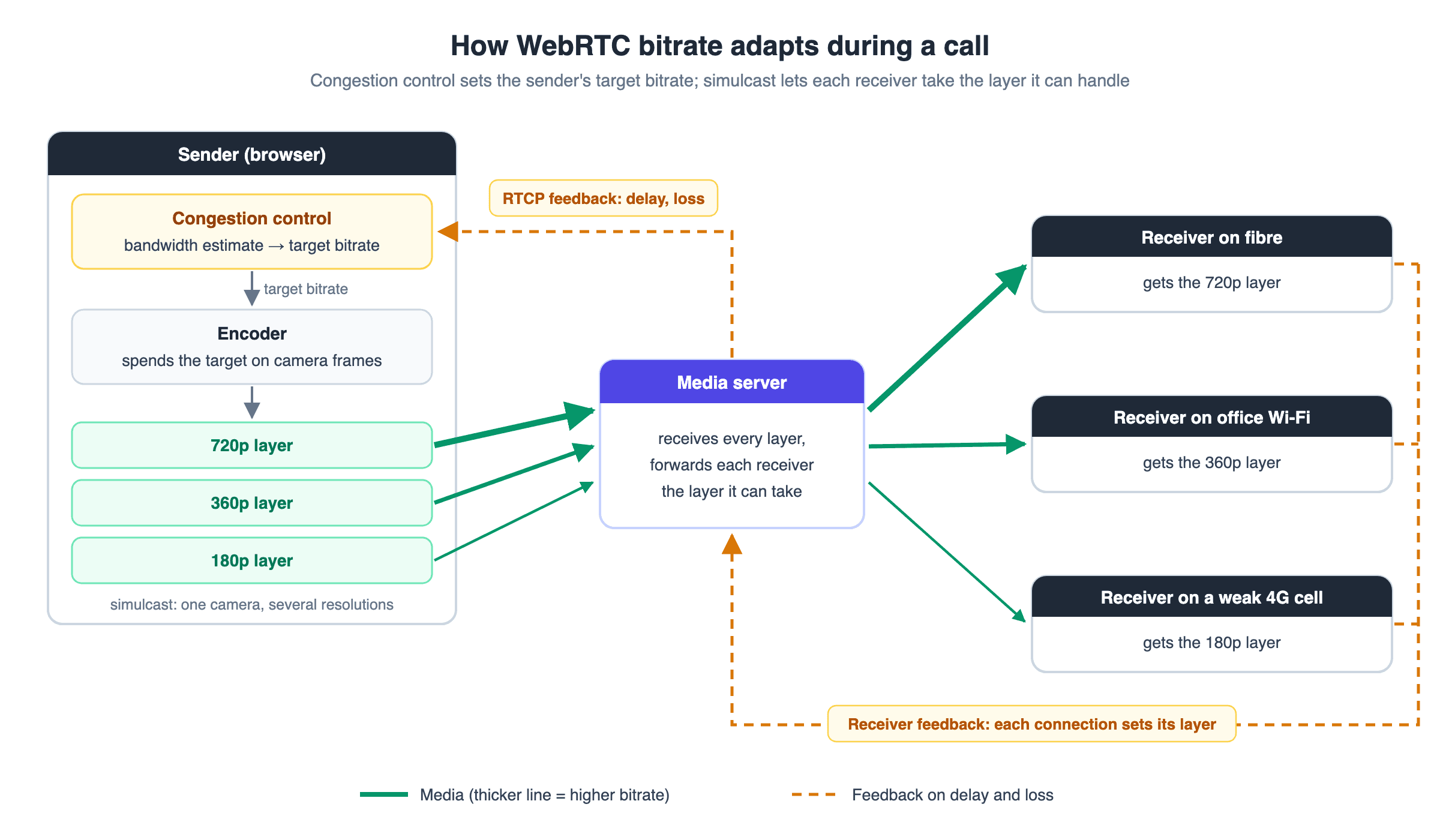
The sender estimates available bandwidth from RTCP feedback about packet delay and loss, then raises or lowers the encoders' targets. RFC 8836 sets out the IETF's requirements for this congestion control, written for media that needs low-delay, semi-reliable delivery. An app can also cap a sender with maxBitrate through RTCRtpSender.setParameters(), the most bits per second the browser may grant that encoding.
Group calls add simulcast. Each sender publishes the same camera at several resolutions, and a media server forwards each receiver the layer its connection and screen can take. One slow receiver then gets a lighter layer without dragging everyone else down to it.
How VideoSDK manages bitrate in a call
VideoSDK wraps the loop in a few settings. With multiStream on, which is the default, a 720p camera also sends 360p and 180p layers so VideoSDK can deliver each participant a stream that fits their bandwidth. A video whose width or height is 960 or more gets three layers, 480 to 959 gets two, and anything smaller gets one.
maxLayer: 2publishes only the highest and lowest layers, keeping a low-bandwidth fallback without the overhead of a third stream.- Receivers request a layer with
setQuality()(low,medorhigh) or match it to the tile withsetViewPort(). - VP9 and AV1 don't support
multiStream, so they publish a single layer. - If a device can't encode the chosen codec, or another participant can't decode it, VideoSDK switches that video to VP8 so the call keeps running.
How to measure bitrate in a WebRTC call
You measure WebRTC bitrate by sampling byte counters over time, because the API reports totals rather than rates.
The W3C WebRTC statistics API gives each outbound stream a bytesSent counter, which includes retransmissions. Bitrate is the change in bytesSent multiplied by 8, divided by the seconds between samples. If bytesSent grows by 187,500 in one second, the stream is sending 1,500 kbps.
The same stats show why bitrate moved. targetBitrate is the encoder's current target, and qualityLimitationReason reads none, cpu, bandwidth or other. On the active candidate pair, availableOutgoingBitrate gives the congestion controller's estimate for all outgoing streams together.
VideoSDK does the arithmetic for you. getTransportStats() returns outgoingBitrate and incomingBitrate in kbps for any participant, as a snapshot you poll on a short interval. Right after joining, those values can be 0 or null until media flows. The quality-limitation event fires when CPU, bandwidth or congestion limits quality, and again when the limit clears.
Low bitrate in WebRTC: what happens and how to cope
At low bitrates, a WebRTC encoder must drop detail, frames or resolution, and callers see which one it chose.
- Blocking: the picture breaks into visible squares and smeared edges, worst during motion.
- Resolution or frame-rate drops: the W3C content hints spec tells encoders to keep frame rate for "motion" video and resolution for "detail" or "text". VideoSDK's
optimizationModeuses the same three names. - Freezes: VideoSDK's remote stream state event reports when a stream is stuck or frozen.
Audio should be the last thing to go. RFC 8837 notes that in a video conference "the audio flow may be more important than the video flow," and recommends Expedited Forwarding for audio at medium and high priority.
How to cope with a low bitrate
- Lower the budget. BANDWIDTH_OPTIMIZED cuts 720p from 1,500 to 1,000 kbps; a smaller
encoderConfigcuts more. - Keep simulcast on. Stay on VP8 or H264 with
multiStreamso weak receivers fall back to 360p or 180p;maxLayer: 2trims the sender's load while keeping that fallback. - Match the mode to the content. Use
optimizationMode: "text"or"detail"for slides and screen share so text stays legible. - Fall back to audio. When
quality-limitationreports bandwidth or a participant's connection weakens, offer audio-only, as VideoSDK's docs suggest.
The low-connectivity video call guide covers the network side in more depth.
Definitions glossary
Target bitrate: The bitrate an encoder is currently aiming for, raised or lowered by congestion control. VideoSDK's presets set the starting bitrate for each resolution and mode, such as 1,500 kbps for 720p in BALANCED.
Congestion control: Sender-side logic that estimates available bandwidth from network feedback and moves the target bitrate to match. VideoSDK's quality-limitation event reports when bandwidth or congestion is limiting quality.Simulcast: Sending one camera at several resolutions so a media server can forward each receiver a layer it can handle. VideoSDK calls this multiStream; it's on by default for VP8 and H264 and unavailable for VP9 and AV1.Bits per pixel: Bitrate divided by pixels per second, a codec-neutral way to compare settings. VideoSDK's 1080p BALANCED preset works out to about 0.035 bits per pixel.
Bitrate mode: A preset that trades bandwidth against picture quality at a fixed resolution. VideoSDK offers BANDWIDTH_OPTIMIZED, BALANCED and HIGH_QUALITY through bitrateMode.Key takeaways
- Bitrate in WebRTC is set per track and keeps changing, because congestion control moves each encoder's target with the network.
- Bitrate affects quality relative to the pixels it covers: VideoSDK's 1080p BALANCED preset gives each pixel half the bits of 720p HIGH_QUALITY.
- VideoSDK's presets put a 720p bitrate at 1,000 to 2,000 kbps and a 1080p bitrate at 1,600 to 2,700 kbps.
- Speech needs roughly 16 to 40 kbps of Opus; VideoSDK's default speech preset is 24 kbps.
- You can measure bitrate from
bytesSentdeltas, or read it directly from VideoSDK'sgetTransportStats().
Conclusion
What is bitrate in a WebRTC call? A moving budget: the preset sets where it starts, congestion control decides what the network allows, and simulcast lets every receiver take what it can handle. Pick the resolution and mode for your users' connections, then measure instead of guessing. The VideoSDK JavaScript quickstart gets a call running, and you can sign up with $20 free credit.
What are you building with VideoSDK?
Frequently asked questions
What is a good bitrate for a WebRTC video call?
A good bitrate for a WebRTC video call is 1,000 to 2,000 kbps at 720p and 30 fps, the range of VideoSDK's three 720p presets. Use the lower end on unstable networks and the higher end when participants have strong connections.
What bitrate does WebRTC use for 1080p?
The bitrate WebRTC uses for 1080p depends on the app's settings. VideoSDK's 1080p preset at 30 fps is 1,600, 2,200 or 2,700 kbps depending on bitrateMode, and congestion control lowers the actual rate when the network can't carry it.
Does WebRTC adjust bitrate automatically?
Yes, WebRTC adjusts bitrate automatically. The sender estimates available bandwidth from RTCP feedback on delay and loss and moves each encoder's target. In group calls, a media server also forwards each receiver a simulcast layer it can take.
Is a higher bitrate always better?
A higher bitrate is better only until the codec has enough bits for the resolution and motion. Past that point it adds little to the picture, and it raises the risk of congestion on the sender's uplink.
What is the difference between bitrate and bandwidth?
Bitrate is how much data a stream uses per second; bandwidth is how much a connection can carry. A call stays smooth only while the combined bitrate of its tracks stays below the available bandwidth. The bandwidth vs latency guide explains the connection side.
What is a good audio bitrate for voice calls?
A good audio bitrate for voice calls is 16 to 40 kbps of Opus, the range RFC 7587 recommends for wideband and full-band speech. VideoSDK's default speech_standard preset uses 24 kbps with echo cancellation and noise suppression on.
How does VideoSDK control bitrate in a call?
VideoSDK controls call bitrate with a resolution preset (encoderConfig) and one of three bitrateMode profiles, which set 720p at 1,000, 1,500 or 2,000 kbps. Simulcast layers give each participant a stream that fits their network, and getTransportStats() reports live bitrate in kbps.