



WebRTC latency is the end-to-end delay between capturing audio or video on one device and playing it on another during a real-time session. Interactive calls typically land between 150 and 500 milliseconds on stable networks. Developers reduce delay by deploying regional SFU servers, tuning jitter buffers, and using managed platforms like VideoSDK.
A remote surgeon calls out "clamp now," but the operating-room team hears it 1.8 seconds later. A live-auction bidder places a bid three seconds after the hammer drops. These are not hypothetical edge cases. They are what happens when WebRTC latency climbs above the threshold users tolerate. This article breaks down every stage of the WebRTC delay pipeline, shows you how to measure latency in production with real APIs, and walks through the engineering levers that bring mouth-to-ear delay below 300 milliseconds.
What Is WebRTC Latency?
WebRTC latency is defined as the total elapsed time from when a sender's camera or microphone captures a media frame to when that frame renders on the receiver's screen or speaker during a peer-to-peer or server-relayed session.
WebRTC latency works by accumulating delay across a fixed pipeline: device capture, encoding (VP8, VP9, H.264, or AV1), packetization into RTP packets, network transit over UDP, jitter buffer queuing, decoding, and final render. Each stage contributes milliseconds. The sum of all stages determines whether a conversation feels natural or broken.
According to the W3C WebRTC 1.0 specification, WebRTC is designed for real-time, peer-to-peer or relayed media exchange directly between browsers and native clients over UDP-based transports. That architectural choice is the reason WebRTC achieves lower end-to-end delay than HTTP segment-based protocols like HLS, which buffer multiple seconds of content before playback begins.
Three delay categories define every WebRTC latency budget:
Propagation Delay
Propagation delay is the physical transit time for packets to cross fiber, copper, and wireless links. Speed-of-light limits apply. A one-way path from New York to Mumbai adds roughly 200 milliseconds of pure transit even on the cleanest route. No software optimization removes propagation delay. The only mitigation is placing media servers closer to both endpoints.
Processing Delay
Processing delay covers capture, encoding, decoding, and rendering. VP8 encodes faster but produces larger frames. H.264 offers better compression at higher CPU cost. Hardware encoders on modern smartphones reduce this bucket compared to software-only paths, but generating simulcast or SVC layers adds extra encoder cycles.
Transmission and Queuing Delay
Transmission and queuing delay includes serialization on congested links, RTP retransmissions triggered by NACK requests after packet loss, and jitter buffer depth. A deeper jitter buffer smooths choppy networks but adds intentional delay to maintain playback continuity. Engineering teams that set aggressive low-latency buffer targets on unreliable networks trade smoothness for more audio gaps and frozen frames.
This section covered the three fundamental delay categories that combine to produce the total mouth-to-ear WebRTC latency number you measure in production.
What Causes High WebRTC Latency?
Every millisecond of WebRTC delay traces back to one of five root causes in the capture-to-playback pipeline.
Network Congestion and Bandwidth Limits
When available bandwidth drops below the encoded stream's bitrate, packets queue at intermediate routers. Queuing delay spikes. WebRTC uses UDP, so congestion does not trigger TCP-style backoff that halts entire streams. However, sustained congestion forces the sender to adapt bitrate downward or accept visible quality loss. Teams that skip bandwidth estimation before sessions see latency climb during peak office hours and on mobile networks with variable throughput.
Packet Loss and Retransmission
Lost RTP packets force receivers to request retransmissions via NACK or conceal gaps using packet loss concealment (PLC) algorithms. Each recovery cycle adds delay. According to Google's WebRTC network resilience documentation, sustained packet loss above 5% degrades both quality and interactive responsiveness on typical consumer connections.
Jitter and Buffer Depth
Jitter is variation in packet arrival intervals. Receivers use jitter buffers to reorder and smooth arrivals before decoding. A larger buffer tolerates more jitter but increases playback delay. In practice, engineering teams find that an adaptive jitter buffer starting at 50 milliseconds and expanding to 200 milliseconds under stress produces the best balance for interactive calls.
Encoding and Resolution Choices
Higher resolutions and complex codecs increase encode and decode time. A 1080p60 H.264 stream on a mid-range Android device adds significantly more processing delay than a 480p30 VP8 stream. Simulcast helps SFUs adapt quality per subscriber without full renegotiation, but generating multiple resolution layers consumes additional encoder cycles on the sender.
Signaling and ICE Negotiation Overhead
Before media flows, WebRTC runs ICE candidate gathering, STUN binding requests, and optional TURN relay allocation. This connection-setup phase does not count toward steady-state mouth-to-ear delay, but it directly affects how long users stare at a "connecting" spinner. Symmetric NAT environments that require TURN relay add an extra network hop that persists for the entire session duration.
This section covered the five primary latency drivers in production WebRTC deployments: congestion, packet loss, jitter buffering, encoding overhead, and connection setup.
How Does WebRTC Latency Compare to Other Protocols?
WebRTC delivers the lowest end-to-end latency among widely deployed streaming protocols because it streams individual RTP packets over UDP rather than buffering content into multi-second HTTP segments.
| Protocol | Typical Latency | Transport | Best For |
|---|---|---|---|
| WebRTC | 150–500 ms | UDP (RTP/SRTP) | Interactive calls, telehealth, live auctions |
| RTMP | 1–5 seconds | TCP | Ingest to media servers for repackaging |
| LL-HLS | 2–6 seconds | HTTP (TCP) | Large-audience one-way streaming with Apple ecosystem support |
| Standard HLS | 6–30 seconds | HTTP (TCP) | VOD and non-interactive broadcast at massive scale |
| SRT | 0.5–3 seconds | UDP | Point-to-point contribution over unreliable networks |
| MPEG-DASH + LL-CMAF | 2–6 seconds | HTTP (TCP) | Adaptive streaming with DRM across browsers |
The most important row for developers choosing a protocol is transport type. WebRTC and SRT both use UDP, which avoids TCP head-of-line blocking. RTMP, HLS, and DASH use TCP, which guarantees delivery but introduces buffering that compounds latency. For any use case requiring two-way interaction below one second of delay, WebRTC is the only production-proven option with native browser support.
HLS and MPEG-DASH serve large one-way audiences efficiently, but their segment-based architecture makes sub-second delivery architecturally impossible without protocol extensions. RTMP remains useful as an ingest protocol that feeds a transcoding server, which then repackages streams into HLS or WebRTC for delivery.
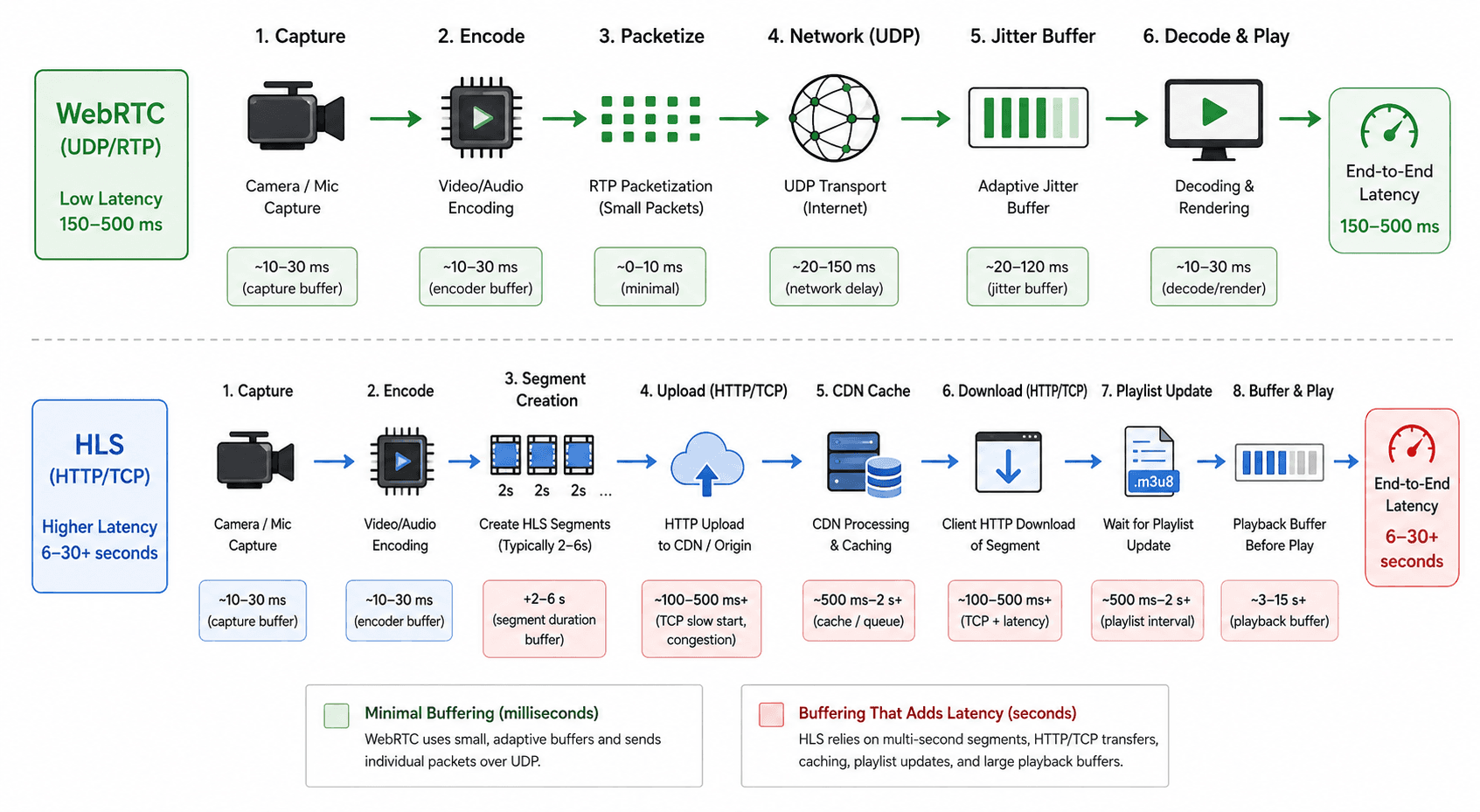
This section covered how WebRTC latency compares to RTMP, HLS, SRT, and MPEG-DASH across transport model, typical delay, and ideal use case.
How Do You Measure WebRTC Latency?
Measuring WebRTC latency in production requires combining browser-native APIs with application-level timing tests, because no single metric captures the full mouth-to-ear delay.
- Pull stats from RTCPeerConnection.getStats() — Call
getStats()on the active peer connection at regular intervals (every 2–5 seconds). ExtractcurrentRoundTripTimefrom thecandidate-pairreport,jitterandpacketsLostfrom theinbound-rtpreport, andqualityLimitationReasonfrom theoutbound-rtpreport. These values expose network-layer and codec-layer delay in real time. - Run a mouth-to-ear clap test — Have the sender produce a sharp audio event (a clap or tone burst) while recording both the sender's local output and the receiver's playback. Measure the time delta between the two waveforms. This captures true perceived latency including device buffers, OS audio routing, and rendering delay that
getStats()cannot see. - Log timestamps at capture and render — Embed a timestamp in each video frame's metadata at capture time. Read the timestamp at the receiver after decode. The difference is the frame-level end-to-end latency. This approach requires application-layer instrumentation but produces the most accurate per-frame measurement.
- Instrument TURN relay detection — Check
getStats()candidate-pair reports for relay candidates. If the selected pair uses a TURN relay, log the relay's geographic region. TURN adds a full extra hop. Teams that discover 40% of sessions routing through distant TURN servers typically reduce P90 latency by deploying regional relay infrastructure. - Build a latency dashboard — Aggregate
getStats()data across sessions into a monitoring system (Grafana, Datadog, or a custom panel). Track P50, P90, and P99 round-trip time, jitter, and packet loss. Alert when P90 RTT exceeds your latency budget.
In practice, teams that instrument getStats() from day one catch latency regressions within hours instead of waiting for user complaints.
This section covered five concrete steps for measuring WebRTC latency, from browser API extraction through production dashboarding.
How to Reduce WebRTC Latency in Production
Reducing WebRTC latency is not a single fix. It requires coordinated optimization across network topology, codec configuration, buffer tuning, and infrastructure placement.
Deploy Regional SFU and TURN Servers
Place Selective Forwarding Unit (SFU) servers and TURN relays in every region where your users concentrate. A user in São Paulo routing media through a single SFU in Virginia adds 150+ milliseconds of pure propagation delay. Regional deployment cuts that to under 30 milliseconds for local participants.
Tune Jitter Buffer Aggressiveness
Configure adaptive jitter buffers to start at the lowest viable depth (40–60 ms) and expand only under measured jitter spikes. Static buffers set to 200 milliseconds "just in case" add constant delay to every session, even on clean networks.
Cap Resolution to Product Requirements
Not every use case needs 1080p. A telehealth consultation runs well at 720p30. A group call with gallery view performs better at 360p per tile. Lower resolution reduces encode time, decode time, and bandwidth pressure simultaneously. Simulcast lets the SFU serve each subscriber the layer that matches their downstream bandwidth.
Enable Trickle ICE and Aggressive Nomination
Trickle ICE sends candidates to the remote peer as they are discovered instead of waiting for the full gathering phase to complete. Aggressive nomination selects the best candidate pair faster. Together, these reduce the "connecting" phase by 500 to 2,000 milliseconds on typical consumer NAT configurations.
Use a Managed Platform with Built-in Optimization
Building and maintaining SFU clusters, TURN relays, codec pipelines, and monitoring dashboards in-house requires a dedicated media infrastructure team. Managed platforms like VideoSDK bundle globally distributed SFU infrastructure, adaptive bitrate streaming, simulcast, optimized ICE/TURN paths, and cross-platform SDK defaults tuned for interactive sessions. Engineering teams using VideoSDK report connecting rooms in under 10 minutes of integration time instead of weeks of self-hosted infrastructure setup. Start building with VideoSDK's free tier.
This section covered five engineering levers for reducing WebRTC latency: regional server deployment, buffer tuning, resolution capping, ICE optimization, and managed platform adoption.
How VideoSDK Optimizes WebRTC for Reduced Latency?
VideoSDK
VideoSDK is a comprehensive live video infrastructure designed for developers across the USA & India. It offers real-time audio-video SDKs that provide complete flexibility, scalability, and control, making it seamless for developers to integrate audio-video conferencing and interactive live streaming into their web and mobile applications.
Features of VideoSDK
- Low-latency streaming capabilities: VideoSDK is engineered to deliver low-latency streaming, ensuring minimal delays in audio-video communication. This is particularly crucial for applications where real-time interaction is paramount.
- Adaptive bitrate streaming: VideoSDK employs adaptive bitrate streaming, dynamically adjusting the quality of the video stream based on network conditions. This not only mitigates the impact of packet loss but also ensures a consistent viewing experience for users across varying internet speeds.
IImplementing VideoSDK to Combat Latency Issues in WebRTC
- Real-time video optimization: VideoSDK optimizes real-time video streaming by minimizing transmission and processing delays. This is achieved through advanced encoding and decoding algorithms, ensuring a smooth and responsive user experience.
- Adaptive algorithms for network conditions: VideoSDK's adaptive algorithms intelligently adapt to changing network conditions, optimizing the audio-video stream in real time. Whether faced with network congestion or packet loss, VideoSDK dynamically adjusts, ensuring a reliable and low-latency connection.
In the dynamic landscape of real-time communication, addressing latency is paramount for developers aiming to provide optimal user experiences. VideoSDK stands out as a powerful ally, offering a comprehensive solution to mitigate latency challenges in WebRTC. By integrating VideoSDK into their applications, developers can unlock the full potential of real-time audio-video communication, providing users with a seamless and immersive experience. It's time for developers to explore the possibilities that VideoSDK opens up and elevate their applications to new heights of performance and user satisfaction.
Real-World Example: Telehealth Platform Cuts Latency by 60%
Consider a telehealth startup running doctor-patient video consultations across India and the United States. Their initial architecture used a single SFU cluster in AWS us-east-1 (Virginia). Indian patients experienced P90 mouth-to-ear latency of 800 milliseconds, with frequent audio gaps during peak hours.
The engineering team made three changes. First, they deployed SFU nodes in Mumbai (ap-south-1) and Frankfurt (eu-central-1) to reduce propagation delay for their two largest user regions. Second, they switched from static 200 ms jitter buffers to adaptive buffers starting at 50 ms. Third, they enabled simulcast so the SFU could serve 720p to broadband users and 360p to mobile users on congested 4G connections.
After these changes, P90 latency for Indian patients dropped from 800 ms to 320 ms, a 60% reduction. Audio gap incidents fell by 75%. The team achieved these results in two sprint cycles by migrating to VideoSDK's managed SFU infrastructure, which handled regional deployment and adaptive bitrate configuration out of the box.
This example shows that WebRTC latency improvements come from infrastructure placement, buffer tuning, and resolution adaptation working together.
Definitions Glossary
WebRTC Latency: The total end-to-end delay from media capture at the sender to playback at the receiver in a WebRTC session, measured in milliseconds.
SFU (Selective Forwarding Unit): A media server that receives streams from each participant and forwards them to other participants without mixing or transcoding, preserving low latency.
Jitter Buffer: A receive-side buffer that reorders and smooths incoming RTP packets to compensate for variable network transit times before handing frames to the decoder.
ICE (Interactive Connectivity Establishment): A protocol framework defined in RFC 8445 that discovers the optimal network path between two WebRTC peers through STUN and TURN server coordination.
Trickle ICE: An optimization that sends ICE candidates to the remote peer incrementally as they are gathered, rather than waiting for the complete candidate list before starting connectivity checks.
Key Takeaways
- WebRTC latency is the sum of propagation, processing, and queuing delays across the full capture-to-playback pipeline, and interactive calls require total delay below 400 milliseconds.
- The five root causes of high WebRTC latency are network congestion, packet loss, jitter buffer depth, encoding overhead, and ICE/TURN relay hops.
- Measuring latency requires combining RTCPeerConnection.getStats() API data with application-level mouth-to-ear timing tests, because no single metric captures full perceived delay.
- Regional SFU deployment is the highest-impact single optimization, reducing propagation delay from hundreds of milliseconds to under 30 milliseconds for local participants.
- Managed platforms like VideoSDK eliminate the infrastructure burden of building and maintaining SFU clusters, TURN relays, and monitoring systems in-house.
Conclusion
WebRTC latency determines whether your real-time application feels like a conversation or a voicemail exchange. The delay pipeline runs from device capture through encoding, network transit, jitter buffering, decoding, and render. Each stage offers optimization levers: regional SFU placement, adaptive buffer tuning, resolution capping, and trickle ICE. For teams that want production-grade WebRTC latency without building media infrastructure from scratch, VideoSDK's free tier provides globally distributed SFUs, adaptive bitrate, and cross-platform SDKs ready to integrate in minutes.
Frequently Asked Questions
What is latency in WebRTC?
Latency in WebRTC is the end-to-end delay between capturing audio or video at one device and playing it back on another during a real-time session. The delay includes encoding, network transit, jitter buffering, decoding, and rendering. Interactive video calls typically target 150 to 400 milliseconds of mouth-to-ear delay on stable networks.
What causes high latency in WebRTC?
High latency in WebRTC is caused by network congestion, packet loss recovery cycles, deep jitter buffers, heavy encoding workloads from high-resolution streams, and TURN relay hops when direct peer connectivity fails. Each factor adds milliseconds that compound across the full capture-to-playback pipeline.
How do you reduce WebRTC latency?
You reduce WebRTC latency by deploying regional SFU and TURN servers, enabling trickle ICE for faster connection setup, capping video resolution to match product needs, tuning adaptive jitter buffers to start at low depth, and using hardware-accelerated codecs. Managed platforms like VideoSDK bundle these optimizations into production-ready SDKs.
What is acceptable WebRTC latency for video calls?
Acceptable WebRTC latency is 150 to 300 milliseconds for conversational video calls, up to 400 milliseconds for telehealth and sales demos, and under 150 milliseconds for latency-critical use cases like competitive gaming or remote music collaboration. Users perceive noticeable lag in turn-taking conversations beyond 500 milliseconds.
Is WebRTC faster than HLS for live streaming?
WebRTC is faster than standard HLS for interactive media because it streams individual RTP packets over UDP without multi-second segment buffering. Standard HLS typically delivers 6 to 30 seconds of latency, while WebRTC achieves sub-second delay on healthy networks. HLS serves large passive audiences more efficiently but cannot match WebRTC for two-way interaction.
How do you measure WebRTC latency in production?
You measure WebRTC latency using the RTCPeerConnection.getStats() API to extract round-trip time, jitter, and packet loss from candidate-pair and inbound-rtp reports. Combine API data with mouth-to-ear clap tests or frame-level timestamp comparisons to capture the full perceived delay including device and OS buffers.
Can VideoSDK reduce WebRTC latency?
Yes, VideoSDK reduces WebRTC latency by providing globally distributed SFU infrastructure, adaptive bitrate streaming, simulcast support, optimized ICE and TURN paths, and cross-platform SDK defaults tuned for interactive sessions. Developers integrate VideoSDK rooms in minutes instead of self-hosting and maintaining media relay and signaling infrastructure.