


RTMP In is the ingest endpoint where a streaming platform receives a live video feed over TCP. RTMP Out is the encoder-side push that sends that feed from software like OBS or an SDK to the platform URL and stream key. Together they form the first mile of most live broadcasts before HLS or WebRTC delivers video to viewers.
A developer wiring live video into a product quickly learns that "RTMP" on a dashboard rarely means one thing. Platforms expose an ingest URL, encoders ask for a stream key, and documentation swaps between RTMP In and RTMP Out without explaining direction. Confusing the two breaks streams before a single viewer connects.
This article defines RTMP In and RTMP Out, walks through the full ingest-to-playback pipeline, covers production failures teams hit after launch, and shows how to implement RTMP Out from an application using VideoSDK.
What is RTMP Streaming?
RTMP stands for Real-Time Messaging Protocol. It is a specialized communication protocol that allows for the low-latency transmission of live video and audio data across the Internet. Unlike traditional web protocols like HTTP, which focus on providing entire files, RTMP promotes real-time data packet transmission, allowing for seamless playing without buffering.
History of RTMP
RTMP was developed by Macromedia (later bought by Adobe) and was designed to interact with Adobe Flash Player, the dominant multimedia platform in the early days of the Internet. Flash Player's ability to handle audio, video, and interaction made it an ideal choice for live streaming, and RTMP became the de facto standard for sending live video content.
While Flash Player's popularity has dropped, RTMP remains a viable and extensively used protocol for live streaming due to its primary qualities of low latency and stability. Nowadays, it serves as a link between encoder software (which collects and processes video) and streaming platforms or media servers. Encoders employ RTMP to transfer encoded video data to the platform for distribution and playing on viewers' devices.
Understanding RTMP In and RTMP Out
The words RTMP In and RTMP Out relate to the video stream's direction relative to a particular device or platform.
RTMP In (or Ingest)
This is the video stream's receiving end. When a platform, such as YouTube or Facebook Live, accepts an RTMP stream, it operates as an RTMP In destination. These systems often include an RTMP server address and a stream key, which you may enter into your encoder software to create the connection. These platforms' servers are particularly built to receive and handle incoming RTMP streams, eventually making the video available to users.
RTMP Out (or Output)
This refers to the video stream's transmitting end. RTMP Out refers to an encoder program that collects video from a camera or other source and sends it to a streaming platform over RTMP. Popular encoder tools such as OBS Studio and XSplit enable RTMP output, allowing users to seamlessly broadcast live material to several devices.
Analogy
Imagine a live sports event being aired. The video feed is captured by the stadium's outdoor broadcast van and sent via satellite. This vehicle serves as the RTMP Outsource, transmitting the video feed. The satellite uplink facility receives the signal and sends it via satellite to broadcasters. This facility serves as the RTMP IN destination.
How does RTMP streaming work?
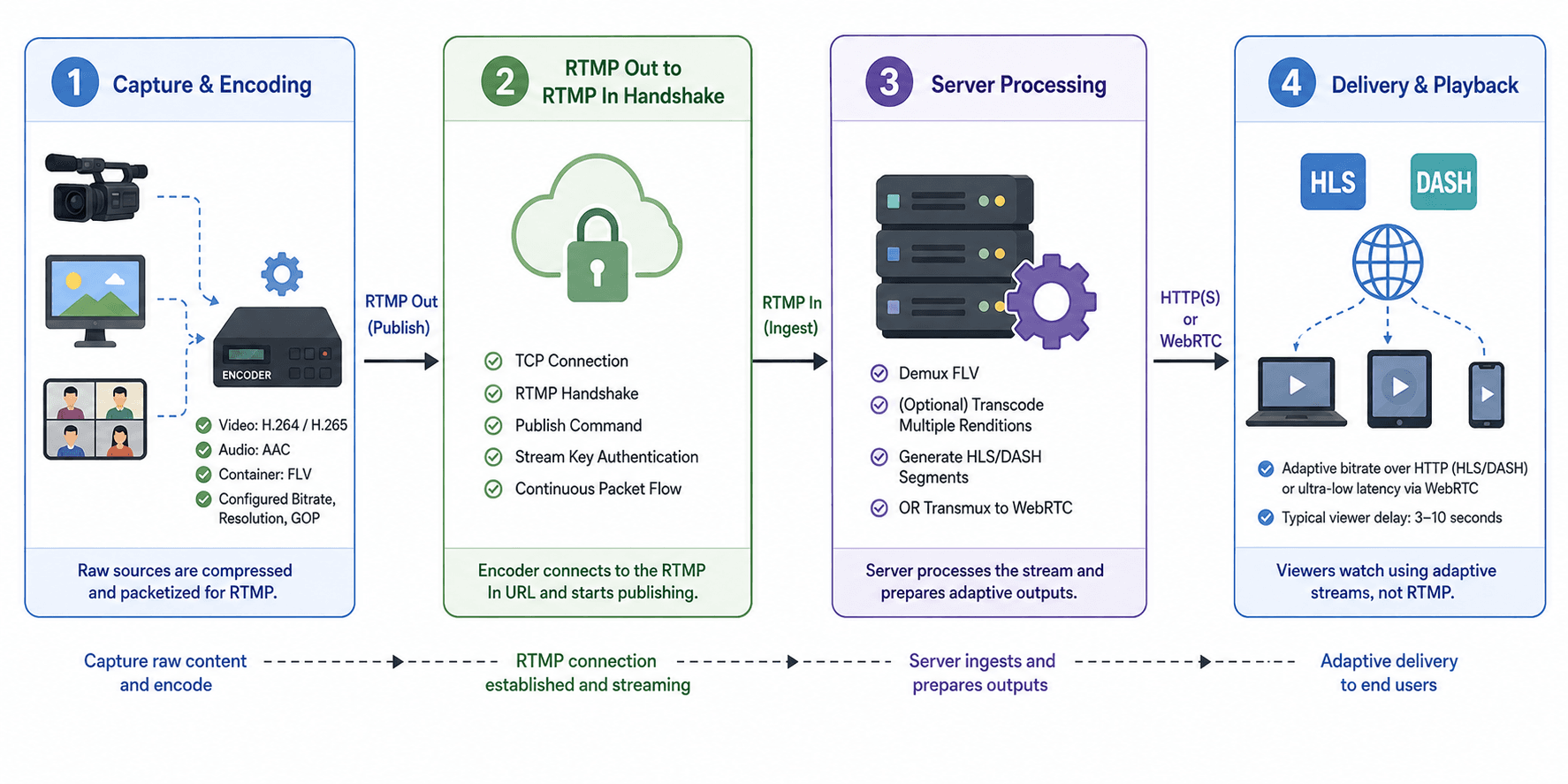
RTMP streaming moves live video from a source device to viewers through four sequential stages: capture, encode, ingest, and adaptive delivery.
Capture and Encoding
A camera, screen capture, or composited meeting layout feeds raw frames into an encoder. The encoder compresses video with H.264 or H.265 and audio with AAC, then wraps chunks in FLV containers suitable for RTMP packetization. Bitrate, resolution, and keyframe interval settings at this stage determine downstream quality and stability.
RTMP Out to RTMP In Handshake
The encoder opens a TCP connection to the RTMP In URL, performs the RTMP handshake, and calls publish with the stream key as authentication. Once the server acknowledges, encoded packets flow continuously. If the connection drops, most encoders attempt automatic reconnect, though duplicate stream keys can cause conflicts on some platforms.
Server Processing
The RTMP In server demuxes incoming FLV, optionally transcodes into multiple renditions, and prepares outputs. Cloud platforms generate HLS or DASH segments for browser playback. Interactive platforms transmux into WebRTC for sub-second latency. This server stage is where latency accumulates beyond the RTMP link itself.
Delivery and Playback
Viewers pull adaptive streams over HTTP (HLS/DASH) or WebRTC rather than RTMP. According to Apple's HLS authoring guidelines, segment duration and playlist type directly affect end-to-end delay, which is why a 3 to 10 second viewer delay is common even when RTMP ingest latency stays under one second.
What Are the Benefits of Using RTMP for Live Streaming?
RTMP remains the default ingest protocol for live video because it combines encoder compatibility, connection reliability, and operational simplicity in a single TCP-based push model.
Low Ingest Latency
RTMP prioritizes continuous packet delivery over HTTP-style request-response cycles. In practice, engineering teams that tune encoders for 2-second keyframe intervals and stable bitrates report sub-second delay on the ingest leg itself, before platform transcoding adds buffer time.
Reliable TCP Transport
RTMP runs over TCP, which retransmits lost packets instead of dropping frames silently. That reliability matters for broadcast-grade feeds where a dropped GOP can produce visible artifacts for several seconds. Production encoders depend on this behavior for hour-long streams.
Universal Encoder Support
OBS Studio, Streamlabs, vMix, Wirecast, FFmpeg, and hardware appliances from Blackmagic and Teradek all ship RTMP Out by default. No competing ingest protocol matches that hardware and software footprint, which reduces vendor lock-in at the source.
Configurable Security
Standard RTMP sends stream keys in plaintext unless you use RTMPS (RTMP over TLS). Platforms including YouTube and Facebook support RTMPS ingest URLs, and private stream keys rotate independently of public playback URLs.
RTMP ingest delivers a proven first-mile pipeline, but it solves only the path from encoder to server, not browser playback or interactive latency on the viewer side.
What Happens Inside an RTMP In Server After Ingest?
An RTMP In server performs demuxing, transcoding, and repackaging that determine whether viewers see a stable stream or a buffering slideshow.
Once RTMP In receives a published stream, the media server parses FLV tags into separate audio and video elementary streams. It validates codec profiles, rejects unsupported combinations, and writes segments to short-term buffer storage. Most cloud ingest endpoints enforce maximum bitrates; exceeding them triggers throttling or hard disconnects.
Transcoding follows. A 1080p60 source at 6 Mbps becomes multiple adaptive renditions (1080p, 720p, 480p) through real-time transcoding farms. Each rendition gets its own HLS playlist or WebRTC simulcast layer. CPU cost scales with concurrent ingests, which is why platforms charge by ingest hours or concurrent stream limits.
Metadata and timed events travel inside RTMP onMetadata packets. Stream titles, resolution changes, and cue points for ad insertion ride alongside media. Teams building ad-supported live products must confirm their RTMP In provider forwards these signals to the ad decision server.
Understanding server-side processing explains why ingest can feel instant while viewer playback lags several seconds behind. The delay often lives in segment packaging, not in the RTMP link itself.
Common RTMP Production Failures and How to Fix Them
Most RTMP stream failures in production trace to encoder settings, network instability, or stream key mismatches rather than protocol bugs.
Keyframe interval too long. Many CDNs require a keyframe every 2 seconds for clean segment boundaries. Set keyint=2 in FFmpeg or equivalent in OBS under Output > Streaming. Streams with 5-second GOPs produce frozen frames after adaptive switches.
Bitrate exceeds upload capacity. A 6 Mbps encode on a 5 Mbps uplink causes TCP backoff and rising latency. Measure upload speed before going live and cap video bitrate at 70% of sustained upload capacity.
Duplicate stream key sessions. Starting RTMP Out twice with the same key disconnects the first publisher on platforms like YouTube. Always stop the previous session before reconnecting, or generate a fresh stream key for test runs.
Wrong RTMP URL path. YouTube uses rtmp://a.rtmp.youtube.com/live2, Twitch uses ingest endpoints tied to server selection, and self-hosted servers append application names like /live. Copy URLs exactly; a missing path segment fails the handshake silently in some encoders.
Firewall blocking port 1935. Corporate networks often block outbound RTMP. Switch to RTMPS on port 443 when the platform supports it, or tunnel through a VPN dedicated to production traffic.
In practice, teams that log RTMP connection state changes through SDK events like VideoSDK's livestream-state-changed catch outbound failures before viewers notice a black screen.
When RTMP In and RTMP Out Are the Wrong Choice
RTMP In and RTMP Out fit broadcast-style push workflows but break down when an application needs browser-native playback, bidirectional interaction, or sub-second peer latency without a repackaging server.
RTMP Out is the wrong ingest method when the source is a mobile browser tab that cannot run OBS. Browser-based capture requires WebRTC getUserMedia and a WebRTC-capable ingest endpoint, not a raw RTMP publish from the client.
RTMP In is irrelevant for end-user playback. Modern browsers removed Flash Player in 2020 when Adobe ended support, and no major browser ships a native RTMP player. Sending viewers an RTMP URL guarantees failure; always transcode to HLS, DASH, or WebRTC first.
Interactive use cases like video telehealth, live tutoring, or multiplayer watch parties need WebRTC or a managed SFU, not one-way RTMP push. Latency targets under 500 milliseconds are unreachable when ingest feeds into 6-second HLS segments.
Choose RTMP In and RTMP Out for one-to-many broadcasts from professional encoders or SDK-composed layouts. Choose WebRTC when participants talk to each other in real time inside the browser.
How to Set Up RTMP In and RTMP Out Step by Step
Setting up RTMP In and RTMP Out requires pairing a platform ingest endpoint with an encoder configured to push encoded media to that endpoint.
- Create an RTMP In destination Log into your target platform (YouTube Studio, Twitch Dashboard, or VideoSDK live session). Copy the RTMP server URL and generate a private stream key. Treat the stream key like a password; anyone with both values can hijack your channel.
- Configure the encoder for RTMP Out Open OBS, FFmpeg, or your application SDK. Paste the RTMP URL into the server field and the stream key into the key field. Set video to H.264, audio to AAC, resolution to 720p or 1080p, and keyframe interval to 2 seconds.
- Test with a private or unlisted stream Start RTMP Out and confirm the platform dashboard shows "live" status within 5 to 15 seconds. Open the playback URL on a second device to verify audio sync and buffer behavior before promoting the stream publicly.
- Monitor connection health Watch encoder logs for dropped frames and RTMP disconnect events. In SDK integrations, subscribe to state change callbacks and alert operators when status moves from
LIVESTREAM_STARTEDtoLIVESTREAM_STOPPEDunexpectedly. - Stop RTMP Out cleanly End the stream from the encoder first, then confirm the platform marks the session offline. Abrupt network loss without graceful teardown leaves ghost sessions that block the next publish on some CDNs.
For developer-led RTMP Out from a web or mobile app, VideoSDK's startLivestream() method accepts an array of output objects with url and streamKey, supports simultaneous multi-platform simulcast, and exposes layout configuration for grid or speaker-priority compositions.
Getting Started with RTMP
To begin using RTMP streaming, you will require the following equipment and software:
- Encoder
- Streaming Platform.
The encoder, whether software or hardware, collects video and audio and transforms them into a streaming format. The streaming platform accepts and distributes your stream to viewers; notable examples include YouTube Live, Twitch, and Facebook Live. To configure your encoder, input the RTMP server URL and streaming key provided by your platform into the encoder's settings. Once set up, you can start the stream, and the encoder will send it to the RTMP server for distribution to viewers.
For more thorough instructions, see the resources below.
Resources
Definitions Glossary
RTMP: Real-Time Messaging Protocol, a TCP-based protocol for continuous live audio and video transfer from a publisher to a media server.
RTMP In: The server-side ingest endpoint that receives and processes an incoming RTMP publish stream from an encoder or SDK.
RTMP Out: The client-side action of pushing encoded live media from an encoder or application to an RTMP In URL using the RTMP publish command.
Stream Key: A secret token paired with an RTMP URL that authenticates a publisher and prevents unauthorized hijacking of a live channel.
RTMPS: RTMP wrapped in TLS encryption, typically over port 443, used to protect stream keys and media during transit.
Ingest: The first-mile stage where live media enters a platform's infrastructure, distinct from CDN delivery to end viewers.
Transmuxing: Repackaging compressed audio and video into a different container or protocol without re-encoding the underlying streams.
Conclusion
RTMP In and RTMP Out name the two directions of the ingest pipeline that still powers most live broadcasts in 2026. Master the distinction, tune encoder settings for stable TCP push, and pair RTMP ingest with modern delivery protocols for viewers. If you are building RTMP Out into a product rather than streaming from a desktop, start with VideoSDK's live streaming SDK to push interactive sessions to any RTMP In endpoint from a single API call.
Frequently Asked Questions
What is the difference between RTMP In and RTMP Out?
The difference between RTMP In and RTMP Out is direction: RTMP Out is the encoder or application sending live media, and RTMP In is the platform server receiving it. Both sides use the same RTMP protocol, but Out initiates the publish connection and In accepts, validates, and processes the stream.
How do I find my RTMP In URL and stream key?
You find your RTMP In URL and stream key in the live streaming or go-live settings of your destination platform. YouTube Studio, Twitch Dashboard, and Facebook Live Creator Studio each display a server URL and a regenerate-able stream key labeled for encoder setup.
Can one RTMP Out stream go to multiple RTMP In destinations?
Yes, one RTMP Out source can simulcast to multiple RTMP In endpoints simultaneously. OBS supports this through multi-output plugins, FFmpeg through tee muxers, and VideoSDK through the startLivestream() outputs array for 20 or more concurrent platform targets.
Why does my RTMP stream work in OBS but not in my app?
An RTMP stream works in OBS but not in an app when the app sends wrong codec profiles, omits the stream key, or uses an HTTP URL instead of an RTMP scheme. Compare OBS output settings (H.264, AAC, 2-second keyframes) against your SDK encoder configuration line by line.
Is RTMP still used in 2026?
Yes, RTMP is still used in 2026 as the dominant ingest protocol even though browsers no longer play it natively. Platforms accept RTMP In from encoders and repackage streams into HLS or WebRTC for viewer playback.
What latency should I expect with RTMP In and RTMP Out?
You should expect sub-second to 2-second latency on the RTMP ingest link itself and 3 to 15 seconds end-to-end once the platform packages HLS segments for viewers. Interactive products that need under 500 milliseconds require WebRTC delivery, not RTMP playback.
How does VideoSDK handle RTMP Out?
VideoSDK handles RTMP Out through the startLivestream() method on an active meeting, accepting platform RTMP URLs and stream keys, optional layout themes, and transcription settings. The livestream-state-changed event reports when RTMP Out starts, stops, or fails so applications can update UI and alert operators.