


An Angular WebSocket setup gives your app a persistent, bidirectional connection to the server, eliminating polling and cutting latency to milliseconds. The right approach is a dedicated injectable Angular service that wraps the native browser WebSocket API with RxJS streams, automatic reconnection, and token-based authentication. For full video, audio, and interactive live features, VideoSDK adds production-ready real-time infrastructure on top.
Real-time features have moved from nice-to-have to expected. A chat app that updates only on refresh feels broken. A dashboard that lags behind live data costs decisions. A collaborative editor that conflicts on every keystroke loses users in minutes. Angular developers building these experiences consistently hit the same wall: plain HTTP was designed for request-response, not for pushing data to the browser the instant it changes.
That wall is exactly what the WebSocket protocol removes. Instead of the client repeatedly asking "anything new?", the server simply speaks when it has something to say. The result is lower latency, less wasted bandwidth, and a programming model that maps naturally onto Angular's reactive core, RxJS.
This guide walks through how WebSocket actually works, how to structure a production-grade Angular WebSocket service, the pitfalls that bite teams in production, and how to scale the pattern. By the end, you'll have a clear architectural blueprint for real-time communication in Angular, plus pointers on when a managed real-time platform like VideoSDK saves you from building the hard parts yourself.
What Is Angular WebSocket and Why Does It Matter?
Angular WebSocket is defined as the practice of using the WebSocket protocol inside an Angular application, typically through an injectable service that wraps the browser's native WebSocket API and exposes messages as RxJS streams. WebSocket itself is a standardized protocol, defined in RFC 6455, that starts as an HTTP request and then upgrades into a persistent, full-duplex TCP connection.
WebSocket works by letting the client and server keep a single long-lived connection open, over which either side can send framed messages at any time. Compare that with HTTP polling, where the client must open a new request for every check, or long polling, where the server holds requests open until data arrives. Polling at one-second intervals means up to 3,600 requests per hour per user, most of them empty. A WebSocket connection sends data only when there is data to send.
For Angular specifically, the advantage compounds. Angular ships with RxJS as its reactive backbone, and a WebSocket message stream is a natural fit for Observables, Subjects, and operators. You get filtering, mapping, debouncing, and error handling on a live data stream using the same tools you already use for forms and HTTP.
How WebSocket Works Under the Hood
Every WebSocket connection begins its life as an ordinary HTTP request and then permanently changes character. Understanding that transformation matters for Angular developers because it explains where authentication happens, why proxies and load balancers need special configuration, and why connections drop in ways HTTP requests never do.
The Handshake Process
The handshake is the moment an HTTP request becomes a WebSocket connection. The client sends an HTTP GET request carrying special upgrade headers, including a randomly generated security key. The server, if it supports the protocol, responds with a 101 Switching Protocols status confirming the upgrade. From that point forward, the TCP connection underneath is no longer speaking HTTP at all. It speaks the WebSocket wire format.
This has two practical consequences for Angular apps. First, custom headers on the handshake are restricted by the browser, which is why token authentication over WebSocket is usually done through query parameters, subprotocols, or an initial authentication message after connect. Second, any intermediary that doesn't understand the upgrade, some corporate proxies and older load balancers, will break the connection before it starts.
Message Framing and Payload Types
After the handshake, all data travels in frames. Each frame carries a small header describing its length and whether it's the final fragment of a larger message, followed by the payload. Frames can carry text, typically JSON in Angular apps, or binary data such as images, audio chunks, or protocol buffers.
Framing matters to Angular developers for two reasons. Large messages get fragmented across multiple frames, so your service must reassemble them before parsing. And binary frames arrive as raw blobs, so your stream pipeline needs a decoding step before JSON parsing applies. A well-structured Angular WebSocket service handles both cases explicitly rather than assuming every message is a complete text frame.
Choosing the Right Angular WebSocket Strategy
The first architectural decision is how much machinery you build versus adopt. The native browser WebSocket API is small and universally supported, but it is also low-level: no reconnection, no observables, no serialization. Angular-focused libraries add those layers at the cost of a dependency.
Native WebSocket API vs Libraries
The native API wins on bundle size and control. There is nothing to install, nothing to update, and no abstraction leaking between you and the protocol. For a single, simple, low-stakes connection, wrapping it yourself in a small service is often the right call.
Libraries win on production concerns. Established wrappers handle exponential backoff reconnection, heartbeat pings, message serialization, and multiplexing over a single socket. The trade-off is dependency risk: a stale library that lags behind Angular's release cadence becomes a liability. Evaluate any candidate on maintenance activity, Angular version compatibility, and whether its abstractions match how your team already uses RxJS.
When to Use an Injectable Angular Service
Encapsulating WebSocket logic in an injectable service is the pattern most Angular teams converge on, and for good reason. A service gives you a single owner for the connection lifecycle, a single place to enforce authentication and reconnection policy, and a testable seam you can mock in unit tests.
Provided at the root level, one service instance can share a single connection across the entire app, which matters when multiple components need the same live feed. Provided at a feature level, each lazy-loaded feature gets its own connection, which suits isolated real-time modules. The choice is yours, but make it deliberately: a root-scoped service shared by everything is simpler, while feature-scoped services give you teardown for free when the feature unloads.
Setting Up a Robust Angular WebSocket Service
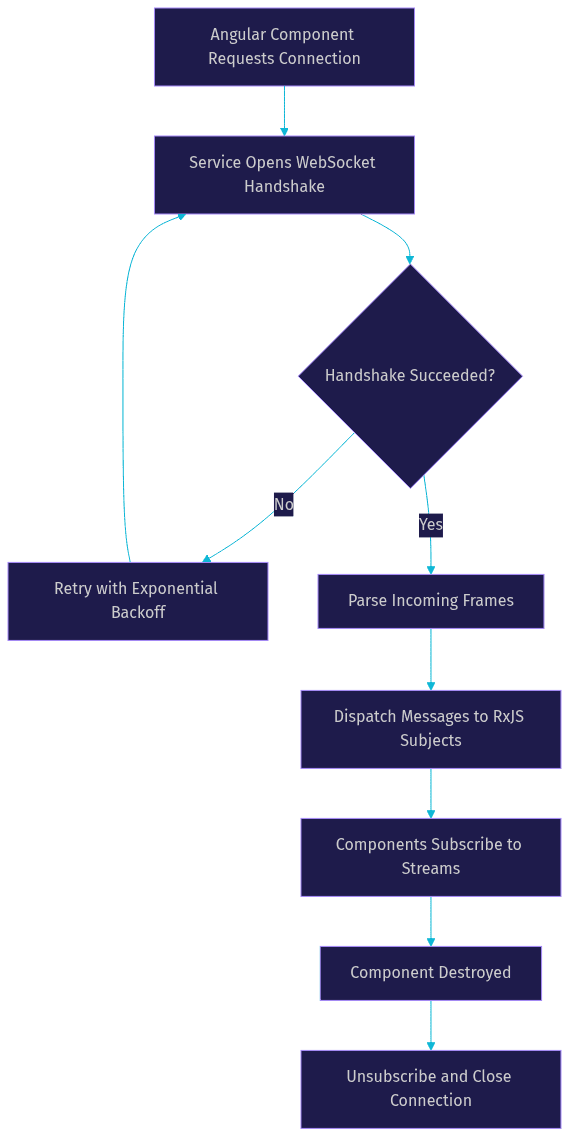
A production-grade Angular WebSocket service has four responsibilities: establish the connection, expose incoming messages as an observable stream, accept outgoing messages through a subject-like interface, and tear everything down cleanly when the app or feature goes away. Teams that skip any of the four pay for it later with leaked connections and ghost listeners.
The lifecycle below is the blueprint. The service opens the connection, routes incoming frames through parsing into streams, handles errors by triggering reconnection, and closes explicitly on teardown:
Dependency Injection and Service Scope
Register the service at root scope when the connection is app-wide, such as a notification channel or a presence feed. Register it in a feature module or lazy route when the real-time functionality belongs to one area, such as a live auction view inside a larger e-commerce app. Feature scoping pairs naturally with Angular's lazy loading: when the route unloads, the service instance and its connection are garbage-collected, preventing socket leaks as users navigate.
Managing the Connection Lifecycle
Open connections lazily, on first subscription, rather than eagerly at app startup. This avoids paying for a socket users may never use. On the teardown side, unsubscribe subscribers when components are destroyed and close the socket when the last subscriber leaves. Angular's cleanup hook on component destruction is the natural place to release subscriptions, and a well-built service counts its subscribers so the underlying socket closes only when nobody is listening.
Handling Reconnects and Heartbeats
Networks are unreliable, and a WebSocket connection that dies silently is worse than one that fails loudly. Production services implement two mechanisms: heartbeats, periodic ping frames that detect dead connections before users notice, and reconnection with exponential backoff, retrying at increasing intervals so a downed server isn't hammered by thousands of clients simultaneously.
The reconnection flow deserves its own picture, because the decision points are where most homegrown implementations go wrong:
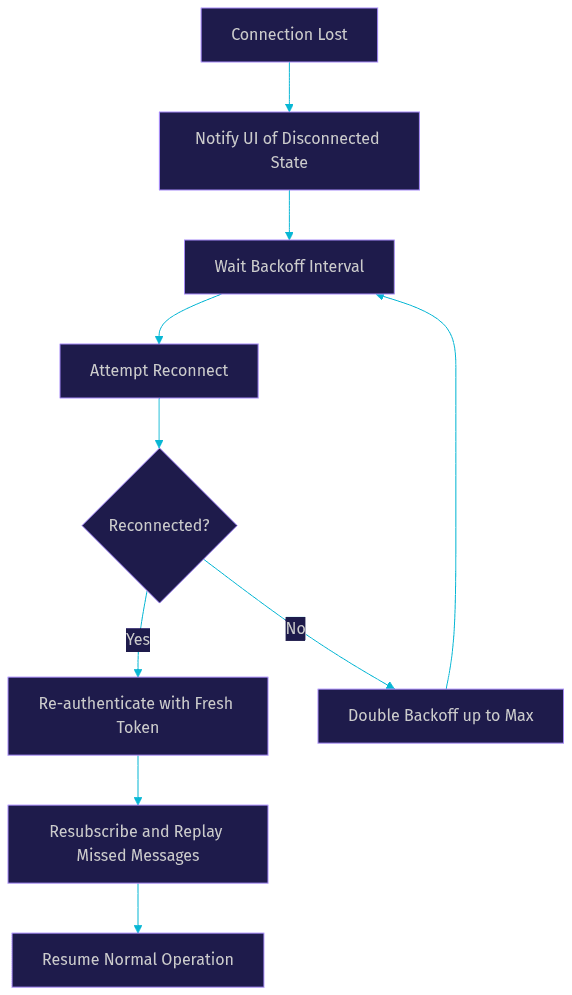
Note the re-authentication step. Tokens that were valid at initial connect may have expired during the outage, so a reconnecting service must fetch a fresh token before resubscribing.
Common Pitfalls and Angular WebSocket Best Practices
Most Angular WebSocket failures in production trace back to a short list of mistakes. The good news is that each has a proven fix.
The most frequent offender is skipping cleanup. Subscriptions created in components but never released keep firing handlers for destroyed views, causing memory leaks and bizarre cross-page behavior. The second is assuming the connection is immortal. Mobile networks switch between Wi-Fi and cellular constantly, and every switch can silently kill the socket. The third is trusting the handshake for authentication without verifying it server-side, a gap that turns your real-time channel into an open door.
Authentication and Token Management
Because the browser restricts custom headers on the WebSocket handshake, Angular teams typically authenticate in one of three ways: appending a short-lived token to the connection URL, negotiating it through a subprotocol header, or sending an authentication message as the first frame after connecting. The first-frame approach is generally the safest, since it keeps tokens out of server logs and URL history.
Whatever the transport, the token must be short-lived and scoped to the real-time channel, never the same long-lived session token used elsewhere. And the server must validate it on every (re)connection, not just the first one. A reconnected client without re-validation is a classic privilege-escalation gap.
Dealing with Network Instability
Graceful degradation beats silent failure. When the connection drops, the UI should immediately reflect a disconnected state, queue or flag outbound actions, and show progress when reconnecting. Exponential backoff with jitter, adding a random component to each retry interval, prevents thundering herds when a server restarts and thousands of Angular clients retry in lockstep.
Buffering is the other half of the story. Messages the user sends while offline should queue locally and flush on reconnect, and messages missed while disconnected should be replayed from the server, which requires sequence numbers or timestamps in your message protocol. Design the protocol for reconnection from day one; retrofitting replay into a live system is painful.
Monitoring and Debugging Angular WebSocket Connections
You cannot fix what you cannot see. Real-time bugs are notoriously hard to reproduce because they depend on timing, network state, and server behavior, so visibility tooling pays for itself quickly.
Using Browser DevTools
Chrome and Firefox DevTools both list WebSocket connections in the Network tab, and selecting one reveals a frame-by-frame log of every message sent and received, with timestamps and payload previews. This is the fastest way to answer "is the client even receiving messages?" and to inspect what your Angular service is actually putting on the wire, which is often not what you think it is. Filter the network log by the WebSocket type to isolate the connection from ordinary HTTP noise.
Logging Strategies
For server-side and cross-user debugging, structured logging wins. Tag every log line with a connection identifier, user identifier, and event type, such as connect, disconnect, message-received, or reconnect-attempt. On the Angular side, pipe connection lifecycle events through your logging service so client-side diagnostics can be correlated with server logs by connection ID. RxJS operators make this clean: tap into the stream at lifecycle points and emit structured log entries without polluting your message-handling logic.
Scaling Real-Time Features with Angular WebSocket
A single service handling a single channel is easy. Real products need many channels, many users, and predictable behavior under load. Scaling the Angular WebSocket pattern touches both the client architecture and the server behind it.
Integrating with RxJS for Stream Composition
RxJS is what makes the Angular WebSocket pattern scale on the client. Model each logical channel, notifications, chat, presence, live scores, as its own Subject or Observable derived from the single raw connection stream. Then compose: filter the raw stream by channel, map payloads into typed objects, and expose purpose-built observables that components subscribe to. This keeps one socket while giving every feature a clean, narrow API, and operators like share give you multicast behavior so hundreds of components can subscribe without multiplying work.
Load Balancing and Server Considerations
On the server, WebSockets complicate horizontal scaling because a connection is pinned to one server instance. The standard answers are sticky sessions at the load balancer, so a reconnecting client lands on the same backend, plus a pub-sub backbone like Redis so any instance can push to any connected client. Set aggressive idle timeouts and heartbeat intervals, because half-open connections, dead sockets the server hasn't noticed, consume capacity invisibly.
This is also the point where many teams evaluate a managed real-time platform. Once you need presence, reconnection semantics, multi-region routing, or media transport, building and operating that infrastructure yourself competes poorly with shipping your product. VideoSDK, for example, provides managed real-time rooms with sub-second latency, token-based authentication, and SDKs across JavaScript and ten-plus other platforms, so your Angular service consumes a battle-tested real-time layer instead of becoming distributed-systems code. See the JavaScript SDK quickstart and the REST API reference for how a managed layer fits the same service-oriented pattern described above.
Definitions Glossary
WebSocket: A standardized protocol, defined in RFC 6455, that upgrades an HTTP request into a persistent, full-duplex TCP connection so client and server can exchange framed messages at any time.
Handshake: The initial HTTP request-and-response exchange, ending in a 101 Switching Protocols status, that converts an ordinary request into a WebSocket connection.
Message Frame: The wire-format unit of WebSocket data, carrying a header with length and fragmentation flags plus a text or binary payload.
Exponential Backoff: A reconnection strategy that doubles the retry interval after each failed attempt, often with jitter, to avoid overwhelming a recovering server.
Heartbeat: A periodic ping-pong exchange used to detect dead connections before users notice, triggering reconnection when responses stop arriving.
RxJS Subject: An RxJS construct that acts as both an observable and an observer, commonly used in Angular WebSocket services to multicast incoming messages to many subscribed components.
Key Takeaways
- An Angular WebSocket service should be a single injectable owner of the connection lifecycle, exposing messages as RxJS streams that components subscribe to and release on destruction.
- The handshake is where authentication, proxy configuration, and load balancer behavior intersect, so design token passing and infrastructure with the upgrade process in mind.
- Reconnection with exponential backoff, heartbeats, and re-authentication is not optional polish; it is the difference between a demo and a production Angular WebSocket implementation.
- Model multiple logical channels over one socket using RxJS filtering and Subjects, so features stay decoupled while the connection stays shared.
- When real-time requirements grow toward media, presence, or global scale, a managed platform like VideoSDK provides the same architecture with the infrastructure already solved.
Conclusion
Angular WebSocket development comes down to a handful of disciplined choices: wrap the connection in a service, treat messages as RxJS streams, plan for reconnection and re-authentication from the first commit, and instrument the connection so you can see what it's doing. The protocol itself is simple; the production behavior around it is where apps succeed or fail.
Start by building the service blueprint from this guide into a sample project, a live notification feed is a perfect first target, then iterate toward heartbeats and message replay. When your roadmap points toward video, voice, or large-scale interactive streaming, explore VideoSDK's documentation and grab a free API key at app.videosdk.live to skip the hardest infrastructure work entirely.
What are you building with Angular WebSocket? Drop a comment, I'd love to hear what kind of real-time feature you're working on.
Free $20 Balance for AI Voice Agents & Video Calls
FAQ