


Use WebRTC when your application needs sub-second latency for video calls, live co-hosting, or real-time collaboration. Use HLS when you need adaptive bitrate playback for large audiences across browsers, mobile devices, and smart TVs. Use both together when hosts broadcast via WebRTC and the same feed is packaged as HLS for passive viewers at CDN scale.
Pick the wrong streaming protocol and your live auction ships with a 20-second viewer delay, or your video call stack collapses under 500 concurrent users because every viewer got routed through peer-to-peer connections. HLS and WebRTC are frequently compared as direct alternatives, but they solve fundamentally different problems: one is an HTTP-based adaptive delivery format, the other is a real-time media transport stack built for interactive communication. This article delivers a conditional verdict, not a neutral feature list, so you can architect the right media pipeline on the first attempt.
What is HLS (HTTP Live Streaming)?
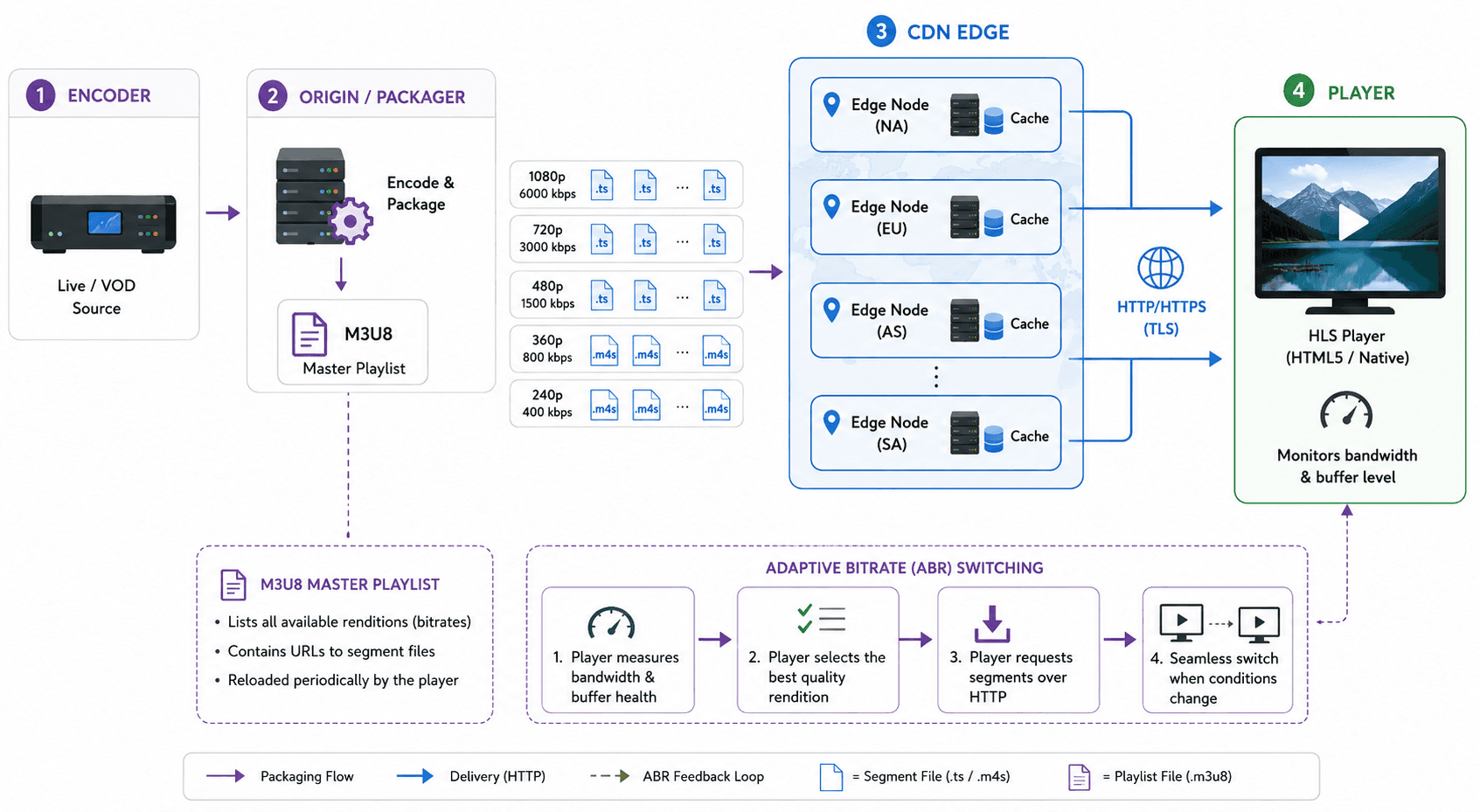
HLS (HTTP Live Streaming) is defined as an adaptive bitrate streaming protocol developed by Apple and standardized in IETF RFC 8216. HLS works by segmenting encoded video into small HTTP-deliverable files (.ts or .m4s chunks), publishing an M3U8 playlist manifest, and letting client players pull segments sequentially. Because every segment is a standard HTTP object, CDNs cache and distribute HLS content the same way they serve static web files.
How HLS Works
HLS delivers video at massive scale by treating streams as cacheable HTTP files rather than persistent real-time connections.
Connection Model
HLS uses a unidirectional client-pull model. The player downloads an M3U8 master playlist, selects a quality rendition based on available bandwidth, then fetches .ts or .m4s segment files sequentially over standard HTTP/HTTPS. No persistent socket remains open between the player and origin server beyond standard HTTP keep-alive. CDNs cache segments at edge nodes worldwide, which is why a single HLS origin can serve millions of concurrent viewers without the origin server handling every connection directly.
Latency Profile
Standard HLS latency comes from a hold-back rule in the specification, not from the network. HTTP Live Streaming 2nd Edition, the draft that supersedes RFC 8216, defines HOLD-BACK as the server-recommended minimum distance from the end of the playlist at which clients should begin to play, and requires that its value "MUST be at least three times the Target Duration". RFC 8216 puts the same rule on the client directly: "the client SHOULD NOT choose a segment that starts less than three target durations from the end of the Playlist file" (section 6.3.3).
Apple's HLS authoring specification for Apple devices says target durations "SHOULD be 6 seconds" (requirement 7.5). Three times six is eighteen seconds of hold-back before you count encoding, packaging or CDN propagation, which is where the commonly quoted fifteen-to-thirty-second range for standard HLS comes from. Shortening the target duration shortens the hold-back proportionally. Two-second segments put the floor nearer six seconds, at the cost of three times as many playlist and segment requests per viewer per minute.
Low-Latency HLS does not remove the hold-back, it changes the unit the hold-back counts. Apple's Low-Latency HLS documentation describes partial segments that might be "only 200 milliseconds" where a regular segment is six seconds, and the 2nd Edition draft requires that PART-HOLD-BACK "MUST be at least twice the Part Target Duration" and "SHOULD be at least three times". Apple's own example playlist pairs PART-TARGET=0.33334 with PART-HOLD-BACK=1.0. That puts the playlist-driven part of the budget near one second, and the two-to-five-second figure usually quoted for LL-HLS is that one second plus encoding, packaging and delivery. LL-HLS needs a player that understands the extensions and a server that implements blocking playlist reloads, preload hints and rendition reports.
Codec and Format Support
HLS supports H.264, H.265 (HEVC), and AV1 video codecs depending on player and platform capabilities. Audio tracks commonly use AAC or AC-3. The M3U8 manifest declares all available renditions, and the player handles adaptive bitrate (ABR) switching client-side without server-side per-viewer logic. Apple mandates HLS for all long-form video delivery on iOS and tvOS, making HLS the default delivery format across the entire Apple ecosystem.
Scalability
HLS scales horizontally through CDN infrastructure because each segment is a static file. Adding viewers increases CDN cache hit rates, not origin connection counts. This architecture is why large broadcast and video-on-demand platforms deliver passive viewer streams over HLS or DASH even when their ingest path upstream uses a lower-latency protocol such as RTMP or SRT.
HLS excels wherever the priority is reliable adaptive playback to large audiences on variable networks, not sub-second bidirectional interaction.
What is WebRTC?
WebRTC (Web Real-Time Communication) is defined as an open-source framework standardized by the W3C WebRTC specification and IETF. WebRTC works by establishing encrypted, peer-to-peer (or server-relayed) media channels using ICE candidate negotiation, DTLS-SRTP encryption, and RTP/RTCP transport. Browsers and mobile SDKs implement WebRTC natively, eliminating the need for plugins or third-party downloads.
How WebRTC Works
WebRTC enables sub-second, bidirectional media transport directly between browsers or devices without requiring plugins, downloads, or media server intermediaries for basic peer-to-peer sessions.
Connection Model
WebRTC establishes bidirectional media channels through a multi-step negotiation process. A signaling server (typically using WebSocket or HTTP) exchanges Session Description Protocol (SDP) offers and answers between peers. ICE (Interactive Connectivity Establishment) then discovers the optimal network path, attempting direct peer-to-peer connections first and falling back to TURN relay servers when firewalls or symmetric NATs block direct connectivity. Once connected, media flows over encrypted RTP (SRTP) channels. For production-scale applications, a Selective Forwarding Unit (SFU) replaces the mesh topology, receiving one upstream from each publisher and forwarding it to all subscribers.
Latency Profile
WebRTC has no hold-back term in its latency budget, and that is the structural difference between the two protocols. There is no playlist, so there is no rule telling the client to start playing a fixed distance behind the live edge. Media travels as individual RTP packets over UDP and is buffered only for jitter, in milliseconds rather than seconds.
The W3C Recommendation "WebRTC: Real-Time Communication in Browsers" (13 March 2025) defines the browser APIs and the mandatory DTLS-SRTP security model. It states no latency figure, and neither do the companion IETF documents it references. Published end-to-end measurements for production WebRTC deployments sit under one second and are commonly quoted between 200 and 500 milliseconds, but those are vendor field observations rather than a specified bound, and they move with network path, SFU placement and jitter-buffer tuning.
What the missing hold-back buys is the ability to build interaction into the stream: a speaker can interrupt, a bidder can outbid, an instructor can correct a movement mid-rep. What it costs is that every viewer consumes a forwarding path on a server instead of a cache hit on a CDN edge.
Codec and Format Support
WebRTC mandates support for VP8 and Opus (audio) as baseline codecs per the W3C specification. Modern browser implementations also support H.264, VP9, and AV1 for video, plus Opus and G.711 for audio. Codec negotiation happens during the SDP offer/answer exchange, and both parties must agree on a common codec. Unlike HLS, WebRTC does not use manifest files or segment containers. Media is transmitted as individual RTP packets.
Scalability
Pure peer-to-peer WebRTC scales poorly beyond 4 to 6 participants because each peer must encode and transmit a separate stream to every other peer (mesh topology). Production deployments solve this with SFU (Selective Forwarding Unit) architecture, where each participant sends one upstream to the SFU, and the SFU forwards streams to all subscribers.
WebRTC excels wherever the priority is real-time, interactive, bidirectional communication with sub-second latency guarantees.
Is HLS or WebRTC Better for Live Streaming?
The answer depends entirely on what "live streaming" means for your specific application, because the term covers two fundamentally different interaction models.
For broadcast-style live streaming where one or a few hosts deliver content to thousands or millions of passive viewers (sports broadcasts, concert streams, news feeds), HLS is the better choice. CDN-native scalability, universal device support, and adaptive bitrate switching make HLS the industry standard for one-to-many delivery. The 15-to-30-second latency of standard HLS is acceptable when viewers are watching, not interacting.
For interactive live streaming where participants need to speak, react, or collaborate in real time (live auctions, watch parties with co-hosts, fitness classes with instructor feedback, telehealth consultations), WebRTC is the only viable option. No segment-based protocol can match the sub-500ms latency required for natural, real-time human interaction.
In practice, most production live streaming platforms use both. The host room runs on WebRTC for interactive participants, and the same media stream gets transcoded and packaged as HLS for the broader passive audience. This hybrid approach is the dominant architecture pattern across live commerce, education and large-audience event platforms.
Key Differences: HLS vs WebRTC
The comparison table below maps the dimensions that matter most when choosing between HLS and WebRTC for a production streaming pipeline.
| Feature | HLS | WebRTC | Winner |
|---|---|---|---|
| Latency | about 18s standard, 2-5s with LL-HLS | Under 1s; no playlist hold-back in the budget | WebRTC for any application requiring sub-second response times |
| Scalability | Millions of viewers via CDN caching | Requires SFU infrastructure beyond 6 peers | HLS for audiences exceeding 10,000 concurrent viewers cost-effectively |
| Direction | Unidirectional (server to client) | Bidirectional (full duplex audio/video) | WebRTC for any application requiring two-way communication |
| Browser Support | Universal via HTML5 video element | All modern browsers (Chrome, Firefox, Safari, Edge) | HLS for maximum device coverage including legacy smart TVs |
| Encryption | HTTPS + optional AES-128/FairPlay DRM | Mandatory DTLS-SRTP on all connections | Context-dependent: HLS for mature DRM workflows, WebRTC for built-in encryption without DRM licensing |
| Infrastructure Cost | Low per-viewer (leverages existing CDN) | Higher per-viewer (SFU servers + TURN relays) | HLS for cost-sensitive deployments at scale |
| Adaptive Bitrate | Client-side ABR via M3U8 manifest | Sender-side bandwidth estimation + simulcast | HLS for smoother quality switching on variable mobile networks |
| Best For | VOD, broadcast live streams, OTT platforms | Video calls, co-hosting, interactive live events | Depends on use case |
The most important row is latency. If your application tolerates 2+ seconds of delay, HLS (especially LL-HLS) gives you simpler infrastructure and lower cost per viewer. If your application breaks when latency exceeds one second, WebRTC is the only production-grade option. Every other dimension follows from this core trade-off.
When to Use HLS
HLS is the right protocol when your primary goal is reliable, adaptive content delivery to a large audience that does not need to interact with the stream in real time.
- Choose HLS when your application delivers video-on-demand (VOD) content that viewers consume asynchronously, such as course libraries, media archives, or entertainment catalogs.
- Choose HLS when your live stream targets more than 10,000 concurrent passive viewers and infrastructure cost per viewer is a primary concern.
- Choose HLS when you need DRM-protected content delivery using Apple FairPlay, Google Widevine, or Microsoft PlayReady, because the HLS DRM ecosystem is the most mature in the industry.
- Choose HLS when your audience includes smart TVs, set-top boxes, and legacy devices that support HTML5 video but lack WebRTC implementations.
- Choose HLS when your streaming product must work across every browser and operating system without fallback logic, because M3U8 playback is universally supported.
- Choose HLS when 2-to-5-second latency (via LL-HLS) is acceptable and you want to avoid the infrastructure complexity of managing SFU clusters and TURN relay servers.
HLS is definitively not the right choice when your application requires participants to speak, react, or make time-sensitive decisions based on what they see (live auctions, multiplayer game streaming, or telehealth consultations).
When to Use WebRTC
WebRTC is the right protocol when your application requires real-time, bidirectional media exchange where latency directly impacts user experience and business outcomes.
- Use WebRTC when your application provides video conferencing or group calls where participants expect natural, conversation-speed interaction with sub-500ms round-trip latency.
- Use WebRTC when you are building live co-hosting or co-streaming features where multiple broadcasters interact on-screen and viewers expect synchronized, real-time conversation.
- Use WebRTC when your product involves live auctions, sports betting, or financial trading where a 5-second delay creates material business risk (a bidder seeing prices 5 seconds late loses money).
- Use WebRTC when your application requires screen sharing, remote desktop, or collaborative whiteboarding where input latency must stay below 300ms to feel responsive.
- Use WebRTC when you need browser-native media capture (camera and microphone access) without requiring users to install plugins, desktop apps, or browser extensions.
- Use WebRTC when your architecture already includes a signaling server and you need to add real-time media transport on top of an existing WebSocket-based communication layer.
WebRTC is definitively not the right choice when you need to deliver a pre-recorded video library to millions of viewers across every device category, because the infrastructure cost of routing every viewer through SFU servers far exceeds CDN-based HLS delivery.
Using HLS and WebRTC Together
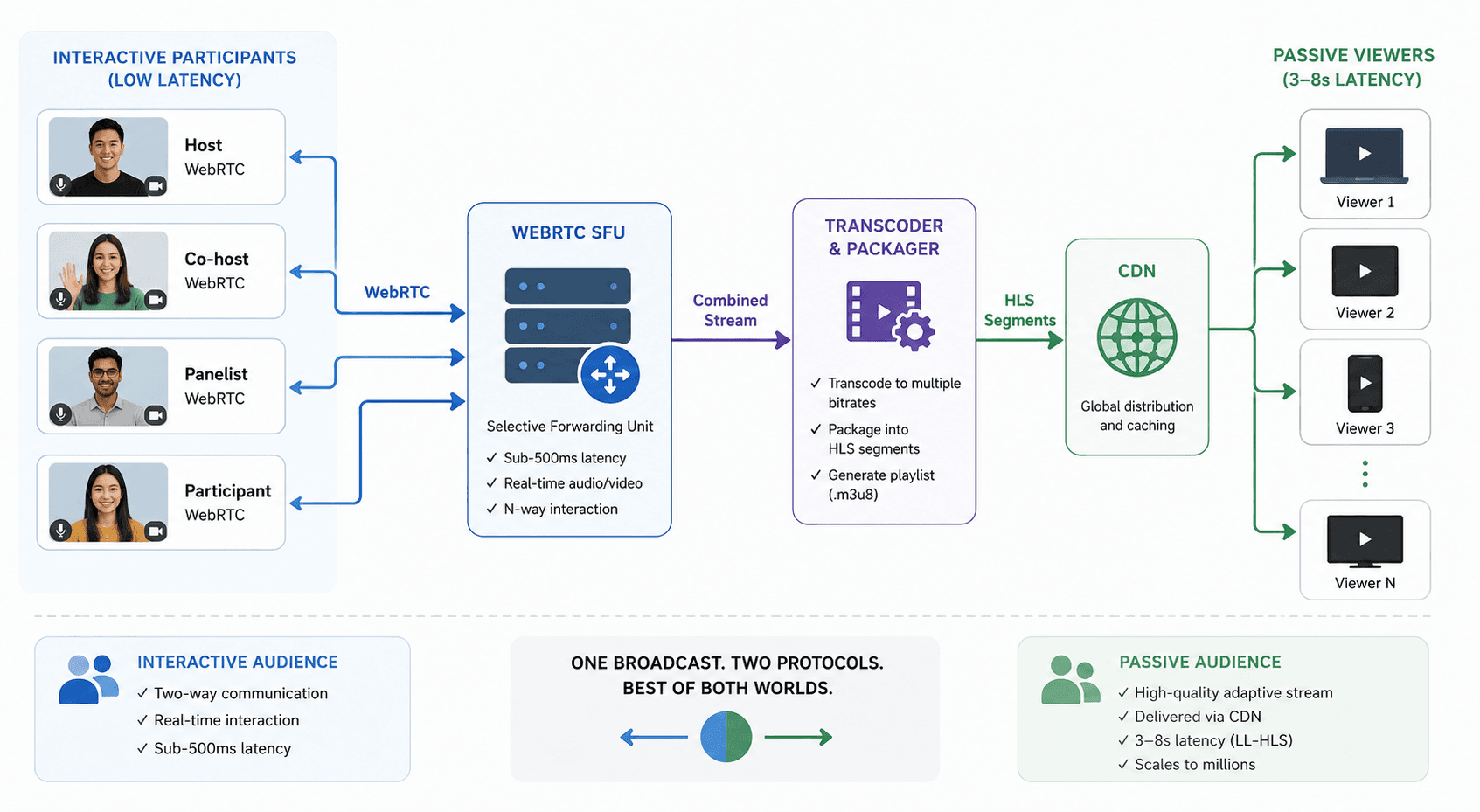
Most production streaming platforms are not choosing between HLS and WebRTC. They are running both protocols simultaneously in a hybrid architecture that combines WebRTC's real-time interaction with HLS's CDN-scale delivery.
The combined architecture works as follows: hosts and interactive participants connect to WebRTC-powered rooms via an SFU, where they exchange audio and video with sub-500ms latency. The SFU simultaneously feeds the combined media stream to a transcoding pipeline that packages it into HLS segments. Those HLS segments are pushed to a CDN for distribution to the broader passive audience. Interactive participants experience real-time communication. Passive viewers receive a high-quality, adaptive-bitrate stream with 3-to-8-second latency, depending on LL-HLS support.
The same split shows up wherever an audience is much larger than the group of people talking. Large broadcast platforms keep streamers and co-hosts on a low-latency path and send the broadcast audience an HLS stream through a CDN. Education platforms do the same for live lectures: the instructor and panellists join a real-time room, and students watch a packaged feed a few seconds behind.
Managed platforms package this pattern so you do not build the packager yourself. On VideoSDK it is called interactive live streaming: hosts join a room with SEND_AND_RECV permission while the audience joins with RECV_ONLY, as described in the interactive live streaming guide. A single POST to https://api.videosdk.live/v2/hls/start with that room's roomId starts HLS packaging for the same session and returns a playbackHlsUrl for the viewer side, so the interactive room and the HLS output are one session rather than two pipelines you wire together yourself. Size the audience against the documented quotas rather than a marketing figure; the concurrent host and viewer ceilings differ by plan.
The combination achieves what neither protocol delivers alone: real-time interaction for active participants and cost-effective, reliable delivery for passive audiences at any scale.
Where DASH and RTMP fit
DASH and RTMP turn up in the same searches as WebRTC and HLS, but only one of them is an alternative to either.
MPEG-DASH (Dynamic Adaptive Streaming over HTTP) is the codec-agnostic parallel to HLS, standardised as ISO/IEC 23009-1 rather than defined by a single vendor. It splits media into segments and describes them in an XML Media Presentation Description instead of an M3U8 playlist, and like HLS it is pulled by the client from ordinary HTTP servers that need no DASH-specific capability. Because the latency budget is assembled the same way, from segment duration and a client hold-back, DASH lands in the same range as HLS and changes nothing about the WebRTC decision. Apple platforms play HLS natively, so products that ship DASH generally ship HLS alongside it rather than instead of it.
RTMP is not a playback protocol, which is why "WebRTC vs RTMP vs HLS" is not a three-way choice. The Real-Time Messaging Protocol multiplexes audio, video and data over a persistent TCP connection, and the current Enhanced RTMP specification from the Veovera Software Organization describes it as "an ingest and contribution protocol". It carries a stream from an encoder or a broadcast tool up to a media server. What the server does next, whether that is forwarding it over WebRTC, packaging it as HLS or DASH, or both at once, is a separate decision. RTMP sits upstream of the comparison this page is about, not inside it.
VideoSDK: Leveraging the Power of WebRTC:
Introduction to VideoSDK:
VideoSDK, powered by WebRTC, offers real-time audio-video SDKs with complete flexibility, scalability, and control for seamless integration into web and mobile apps.
How VideoSDK Utilizes WebRTC for Seamless Video Streaming:
VideoSDK leverages WebRTC's peer-to-peer communication to deliver low-latency and high-quality audio-video experiences.
Key Features and Benefits of Using VideoSDK:
- Real-time communication capabilities
- Scalability for varying user loads
- Developer-friendly APIs for easy integration
Have questions about integrating HLS and Webrtc? Our team offers expert advice tailored to your unique needs. Unlock the full potential, sign up now to access resources and join our developer community. Schedule a demo to see features in action and discover how our solutions meet your streaming app needs.
A worked example: a live shopping app
Imagine a live shopping app. A host demonstrates products, answers questions as they come in, and opens a flash sale that closes in ninety seconds.
Run the whole thing on HLS and the flash sale breaks. The hold-back arithmetic above puts viewers roughly eighteen seconds behind the host at Apple's recommended six-second target duration, so buyers click offers that closed before their screen caught up.
Run the whole thing on WebRTC and the sale works, but every viewer now consumes a forwarding path on an SFU instead of a cached segment on a CDN edge, and the marginal cost of the ten-thousandth viewer looks nothing like it does on the HLS path.
The hybrid split resolves it. The host and a handful of invited guests publish over WebRTC, so they can talk over each other the way people actually do. Everyone else watches the packaged HLS output. One detail is worth copying from production systems: send the time-sensitive events, the countdown, the buy button, the current price, over a data channel or a WebSocket rather than letting viewers infer them from the video. The viewer on the HLS path then gets the prompt on time even though their video is behind.
Glossary
HLS (HTTP Live Streaming): An adaptive bitrate streaming protocol developed by Apple that delivers video as segmented HTTP files via M3U8 playlists, standardized in IETF RFC 8216.
WebRTC (Web Real-Time Communication): An open-source framework standardized by W3C and IETF that enables encrypted, low-latency, bidirectional audio/video communication natively in browsers and mobile devices.
SFU (Selective Forwarding Unit): A media server architecture that receives one media stream from each publisher and selectively forwards it to all subscribers, replacing peer-to-peer mesh topology for scalable WebRTC deployments.
Adaptive Bitrate (ABR): A streaming technique where the player automatically switches between multiple quality renditions of the same content based on current network bandwidth and device capabilities.
LL-HLS (Low-Latency HLS): An extension of the HLS protocol introduced by Apple that reduces end-to-end latency from 15-30 seconds to 2-5 seconds using partial segments and blocking playlist reload.
DTLS-SRTP: The mandatory encryption stack for WebRTC connections, combining Datagram Transport Layer Security (DTLS) for key exchange with Secure Real-time Transport Protocol (SRTP) for media encryption.
Key Takeaways
- The core decision rule is latency: if your application breaks when delay exceeds one second, use WebRTC; if 2-5 seconds is acceptable, use HLS (LL-HLS) for simpler infrastructure and lower cost.
- HLS scales to millions of viewers through CDN caching at near-zero marginal cost per viewer, while WebRTC requires dedicated SFU infrastructure that scales linearly with participant count.
- WebRTC is the only production-grade option for video conferencing, co-hosting, live auctions, and any scenario requiring bidirectional, real-time media exchange.
- HLS delivers the most mature DRM ecosystem (FairPlay, Widevine, PlayReady) and universal device compatibility, including smart TVs and set-top boxes that lack WebRTC support.
- The hybrid architecture pattern, where WebRTC handles the interactive room and HLS handles audience delivery, is the dominant production approach for live commerce, education and large-audience events, and is the sensible starting point for any new live streaming product.
Conclusion
WebRTC and HLS are not competing answers to one question. They are the interactive layer and the delivery layer of the same live product, and the only real decision is which of your users sits on which. Start from the hold-back arithmetic: if a feature breaks when a viewer is a second behind, that viewer belongs on WebRTC, and everyone else belongs on HLS.
Build the hybrid path from the HLS streaming API reference, using the $20 credit on a new account.
Frequently Asked Questions
What is the main difference between HLS and WebRTC?
The main difference between HLS and WebRTC is their transport architecture and latency profile. HLS delivers video as segmented HTTP files through CDN infrastructure, producing 15-to-30-second latency (2-5 seconds with LL-HLS). WebRTC establishes direct, encrypted media channels that achieve 200-to-500ms latency. HLS is built for one-to-many passive delivery. WebRTC is built for real-time, bidirectional interactive communication.
Can HLS and WebRTC be used together?
Yes, HLS and WebRTC can be used together in a hybrid streaming architecture, and this is the dominant pattern in production. Interactive participants (hosts, co-hosts, panelists) connect through WebRTC-powered rooms for real-time interaction. The SFU simultaneously feeds the media stream to a transcoder that packages it as HLS for passive viewers at CDN scale. VideoSDK provides this hybrid output through a single API.
Which is better, HLS or WebRTC?
HLS is better for large-scale broadcast delivery where 2-to-30-second latency is acceptable, infrastructure cost must stay low, and DRM protection is required. WebRTC is better for interactive applications where sub-second latency is critical, including video conferencing, live auctions, and co-hosted streams. For most live streaming products, the right answer is to use both: WebRTC for interaction, HLS for audience delivery.
What is the latency difference between HLS and WebRTC?
The gap is set by a rule in the HLS specification, not by the network. HLS clients must start playing at least three target durations behind the live edge, and Apple recommends a six-second target duration, so standard HLS lands near eighteen seconds before encoding and delivery are counted. Low-Latency HLS applies the same three-times rule to partial segments of a few hundred milliseconds, which brings it to roughly two to five seconds. WebRTC has no hold-back at all and runs under a second.
Does WebRTC work on all browsers?
WebRTC is supported natively in all modern browsers, including Chrome, Firefox, Safari, Edge, and Opera, on both desktop and mobile platforms. The W3C WebRTC 1.0 specification reached Recommendation status, and browser vendors maintain active implementations. Legacy browsers (Internet Explorer, pre-Chromium Edge) do not support WebRTC. For maximum device coverage including smart TVs and older set-top boxes, HLS remains the more universally supported option.
Can HLS achieve low latency like WebRTC?
HLS cannot match WebRTC's sub-second latency because its segment-based architecture introduces inherent buffering delays. Low-Latency HLS (LL-HLS) reduces latency to 2-to-5 seconds by using partial segments and blocking playlist requests, which is a significant improvement over standard HLS's 15-to-30 seconds. However, the 2-second floor of LL-HLS remains 4x-to-10x slower than WebRTC's 200-to-500ms performance, making LL-HLS unsuitable for truly interactive use cases.
What infrastructure does WebRTC need to scale?
WebRTC requires Selective Forwarding Unit (SFU) servers to scale beyond 4-to-6 participants. The SFU receives one media stream per publisher and forwards it to all subscribers, replacing the unscalable peer-to-peer mesh topology. Large deployments also need TURN relay servers for NAT traversal and signaling servers for connection establishment. Managed platforms like VideoSDK handle SFU, TURN, and signaling infrastructure, so development teams focus on application logic rather than media server operations.
Is WebRTC more secure than HLS?
WebRTC enforces mandatory DTLS-SRTP encryption on every connection by specification. No unencrypted WebRTC session can exist. HLS supports encryption via HTTPS transport and optional AES-128 segment encryption, plus mature DRM integration (FairPlay, Widevine, PlayReady). Neither protocol is inherently "more secure" than the other. WebRTC provides stronger default encryption out of the box. HLS provides a more mature and widely deployed DRM ecosystem for premium content protection.
Do I still need RTMP if I already use WebRTC and HLS?
Only for ingest. RTMP does not compete with WebRTC or HLS for delivery to viewers; the Enhanced RTMP specification calls it "an ingest and contribution protocol". You need it when a stream originates outside the browser, typically from OBS, a hardware encoder or a broadcast truck, because those tools speak RTMP and not WebRTC. If every publisher is already in a browser or a mobile SDK, WebRTC handles ingest and RTMP adds nothing.