
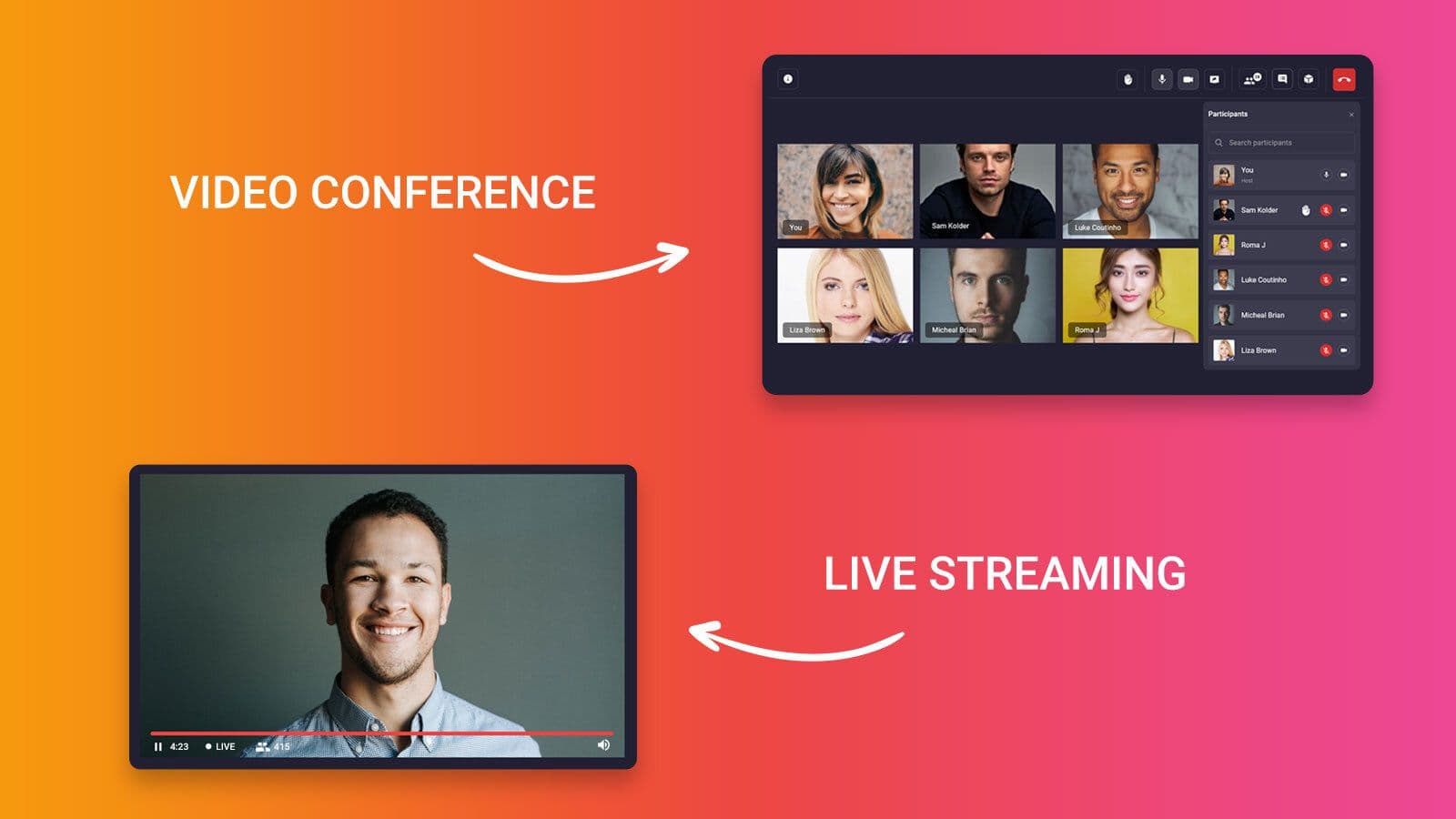


Use live streaming when you need one-to-many CDN broadcast to thousands of viewers and 5-30 second latency is acceptable. Use video conferencing when 2-50 participants need sub-second two-way audio and video for meetings or telehealth. Use both when a public HLS keynote pairs with a private WebRTC Q&A room. The most common mistake is choosing live streaming for small-group collaboration.
Pick the wrong real-time video architecture and you ship a product launch that reaches 50 people instead of 50,000, or you run a team standup where every speaker waits 10 seconds for the audience to hear a reply. Live streaming and video conferencing look similar because both move video over the internet in real time, but they solve opposite scale and interactivity problems. This article delivers a conditional verdict, not a neutral overview, so you choose the right stack on the first build.
What is Live Streaming?
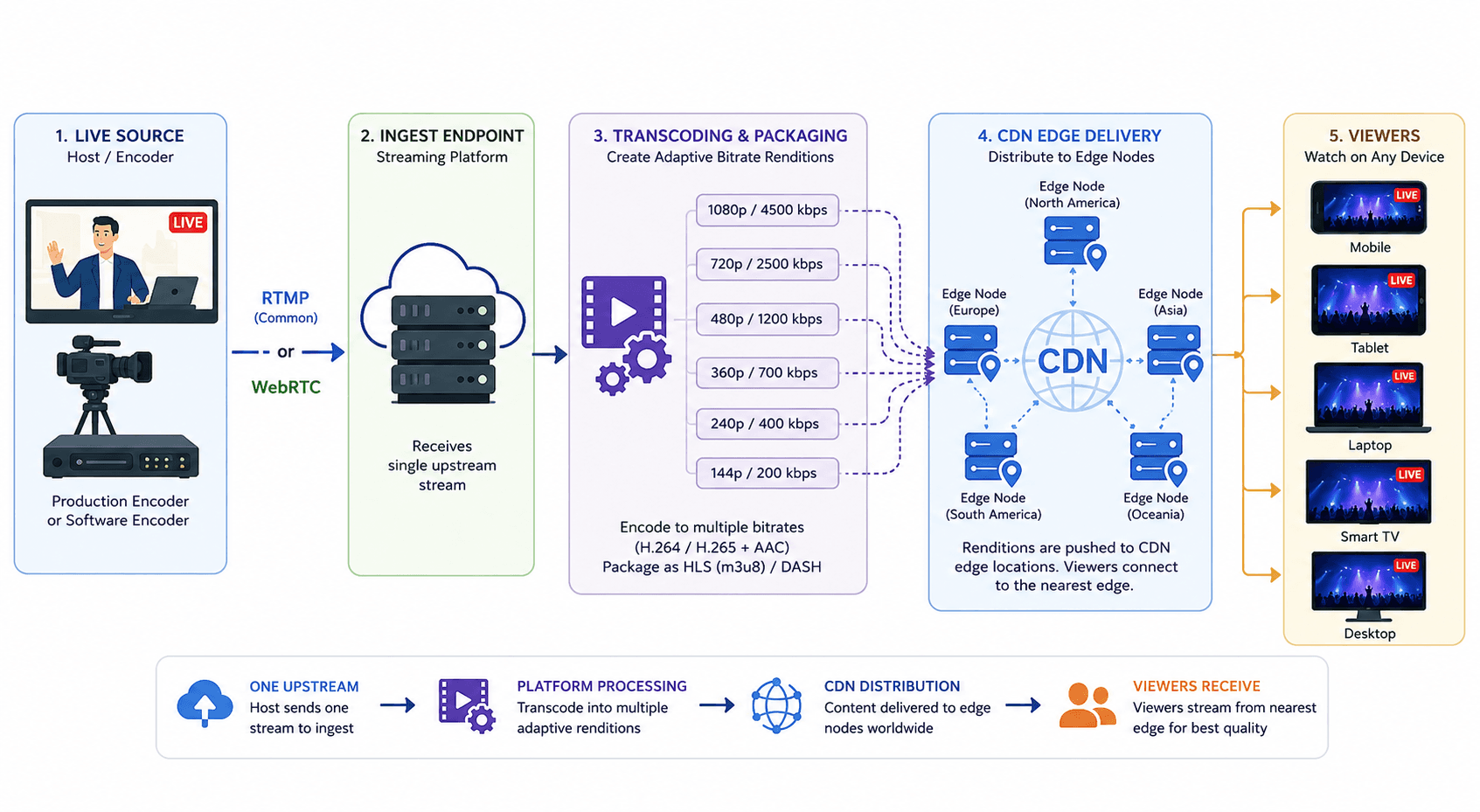
Live streaming is defined as the one-to-many transmission of live video and audio from a host or encoder to a large audience over the internet, typically delivered through a Content Delivery Network (CDN) using segmented protocols like HLS or DASH. Live streaming works by ingesting a single encoded stream (often via RTMP or WebRTC ingest), transcoding it into multiple bitrate renditions, and distributing those segments to viewers who pull content rather than maintaining individual peer connections to the host.
Live streaming is an essential tool for both large corporations and small businesses, aiding in branding, marketing, and advancement. It has become a modern technology that enhances digital presence in the community. Live streaming has gained popularity not only in gaming, content creation, and education but also in the media, entertainment, and business, healthcare and many more.
Live streaming happens to broadcast media online over several social media platforms. A live streamer, at once can stream content over multiple platforms increasing reach with broader visibility. A live stream is organized by a host who invites the viewers to his streaming session. A live stream allows a comment and chat facility on an ongoing streaming session. It also allows a huge number of viewers to participate in the stream.
Live streaming is telecasted with a delay or lag of 5 to 10 seconds for the viewers. It is encoded in different resolutions, enabling the support for Adaptive Bitrate Streaming (ABS) and the good part is that live streaming can be recorded for viewing later using the VoD facility, allowing video playback. It is a boon that with unstable internet connectivity, the streaming on our device doesn’t stop, as it adjusts the viewing quality of the video. Unfortunately, if a viewer faces disconnection, live streaming is a benefit in this case, as it allows playback of the recorded stream.
What is Video Conferencing?
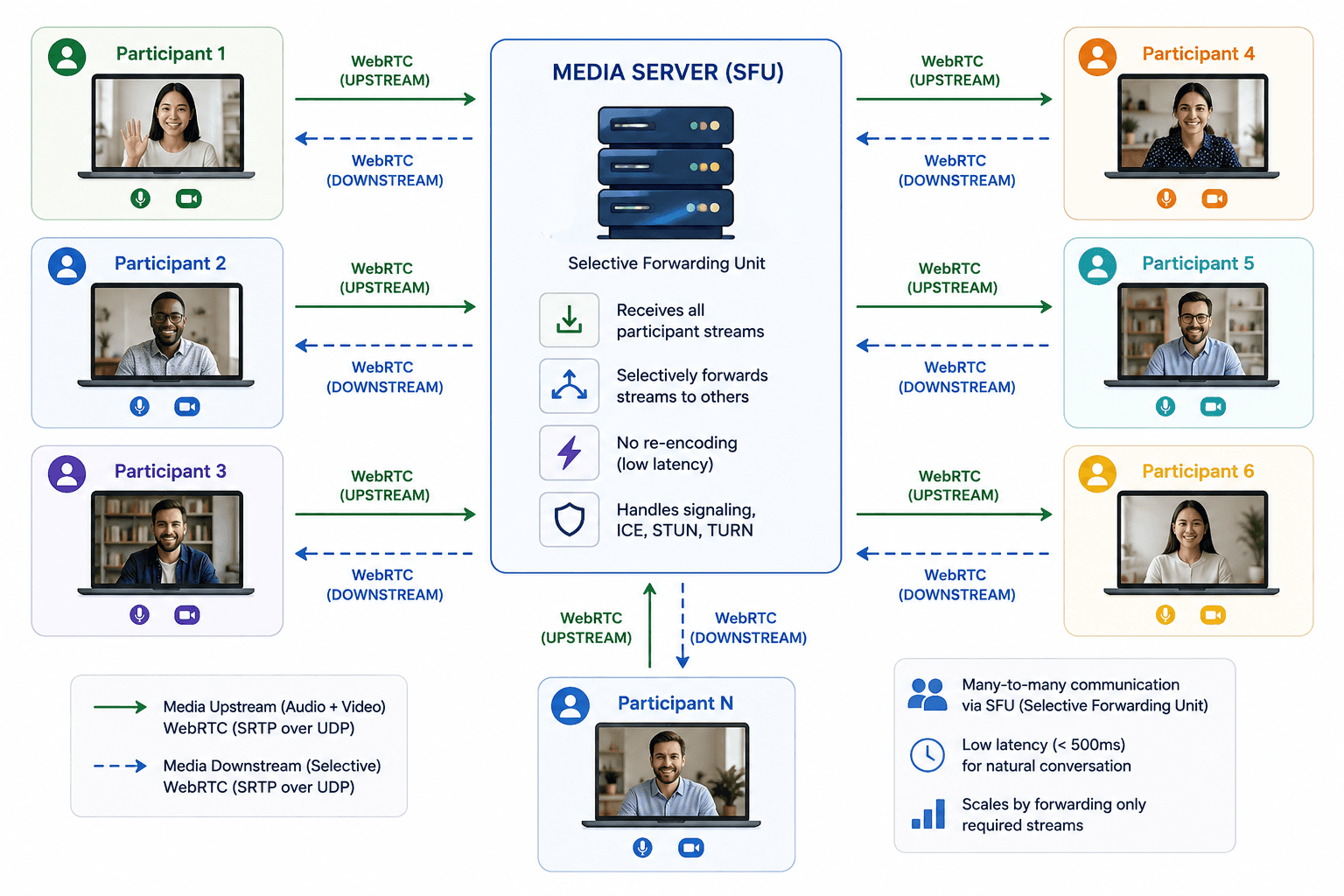
Video conferencing is defined as a many-to-many real-time communication system that connects a limited group of participants in interactive audio and video sessions with bidirectional media exchange. Video conferencing works by establishing low-latency media paths between participants through WebRTC, often routed through a Selective Forwarding Unit (SFU) or Multipoint Control Unit (MCU) that manages per-participant upload and download streams while preserving sub-second conversational timing.
Video conferencing connects people over a low-latency video and audio transmission over IP. It allows talk and chat features over conferencing where people can be verbally communicative and can discuss and generate solutions. A video conference generally has limited participants, who are the ones invited by the host. Generally, video conferencing systems are secured with passcodes initiated by the host for the participants.
A video conferencing system provides no lag in the delivery of messages to the participants. Under low latency streaming, video conferencing often causes participants a glitch, in case of poor connectivity. When a participant of a conference faces a power cut or a disconnection, the conference immediately stops for him. Concerning this, he cannot view the previous discussions. A video conference can only be streamed on-demand when it is recorded.
How Live Streaming Works
Live streaming is a broadcast pipeline engineered to scale one encoded signal to thousands or millions of concurrent viewers without multiplying upstream bandwidth on the host device.
Connection Model
Live streaming uses a one-to-many connection model. A single host (or production encoder) sends one upstream stream to an ingest endpoint. The streaming platform transcodes that stream into adaptive bitrate renditions and pushes segments to CDN edge nodes. Viewers connect to the nearest CDN node and download segments on demand. Viewers do not open direct media connections back to the host.
Latency Profile
Standard live streaming delivered over HLS typically produces 5-30 seconds of glass-to-glass latency, depending on segment duration, CDN configuration, and player buffer settings. Low-Latency HLS (LL-HLS) and WebRTC-based ingest can reduce this to 2-5 seconds for near-real-time broadcasts, but that still exceeds the sub-500ms target required for conversational turn-taking. According to Akamai's State of the Internet reports, live video traffic continues to dominate peak CDN bandwidth consumption during major broadcast events.
Codec and Format Support
Live streaming platforms typically encode video in H.264 or H.265 and audio in AAC, packaging output as HLS (.m3u8) or MPEG-DASH segments. Adaptive Bitrate Streaming (ABS) switches renditions based on each viewer's available bandwidth, which is why a live stream often continues playing (at lower quality) when a viewer's connection degrades. RTMP remains a common ingest protocol even as delivery shifts to HTTP-based segment protocols.
Scalability Characteristics
Live streaming scales horizontally through CDN distribution. Adding 10,000 viewers does not require the host to upload 10,000 separate streams. The host maintains one upstream feed regardless of audience size. This architecture is why product launches, sports broadcasts, and creator streams reach massive audiences from a single encoder.
Where Live Streaming Excels
Live streaming excels when the goal is reach, not round-table dialogue: public announcements, virtual summits with a keynote stage, gaming broadcasts, and shoppable live commerce events where viewers watch and comment rather than appear on camera.
How Video Conferencing Works
Video conferencing is a real-time collaboration stack engineered to keep every participant visible, audible, and responsive within a single conversational window.
Connection Model
Video conferencing uses a many-to-many connection model mediated by a media server. Each participant captures local audio and video, then sends separate upstream streams to an SFU or MCU. The server forwards the relevant streams to every other participant. In a 10-person call, each participant receives up to nine remote video streams (or a composited layout from an MCU). WebRTC is the dominant browser and mobile transport layer for these sessions.
Latency Profile
Video conferencing targets sub-500ms glass-to-glass latency for interactive conversation. WebRTC uses UDP-based transport (SRTP) that prioritizes timeliness over guaranteed delivery, dropping late packets instead of retransmitting them. When latency rises above roughly one second, participants begin talking over each other, which is why conferencing platforms optimize for speed over adaptive buffering. According to a 2026 Wyzowl survey, 91% of businesses use video as a marketing and communication tool, with internal meetings and customer calls driving sustained conferencing demand.
Codec and Format Support
Video conferencing systems standardize on Opus for audio and VP8, VP9, or H.264 for video within WebRTC implementations. Simulcast and SVC (Scalable Video Coding) allow the SFU to forward the resolution and frame rate each receiver can handle without re-encoding the entire stream. Screen sharing, virtual backgrounds, and noise suppression run as client-side or server-side processing layers on top of the base media pipeline.
Scalability Characteristics
Video conferencing scales vertically per active participant, not horizontally like a CDN. Each additional participant increases server forwarding load and multiplies per-user bandwidth consumption. Most production systems cap active speakers or use audio-only fallback for large grids. Beyond roughly 50-100 interactive participants, teams typically shift to webinar mode (broadcast + moderated Q&A) rather than full conferencing.
Where Video Conferencing Excels
Video conferencing excels when every participant must speak, share a screen, and see reactions in real time: team meetings, job interviews, telehealth consultations, and remote sales calls where dialogue drives the outcome.
Key Differences: Live Streaming vs Video Conferencing
The architectural split between live streaming and video conferencing comes down to audience scale, latency tolerance, and whether viewers need a camera tile or a chat box.
| Feature | Live Streaming | Video Conferencing | Winner |
|---|---|---|---|
| Communication Model | One-to-many broadcast | Many-to-many interactive | Live streaming for broadcasts beyond 100 passive viewers |
| Typical Latency | 5-30 seconds (HLS); 2-5 seconds (LL-HLS) | Sub-500ms (WebRTC/SFU) | Video conferencing for conversational turn-taking under 1 second |
| Audience Scale | Thousands to millions via CDN | Typically 2-50 active participants | Live streaming for audiences above 500 concurrent viewers |
| Viewer Camera Access | Chat and reactions; camera rarely enabled | Full audio/video participation | Video conferencing for meetings requiring every participant on camera |
| Network Resilience | Adaptive Bitrate Streaming maintains playback at lower quality | Low-latency path degrades visibly under packet loss | Live streaming for viewers on unstable mobile networks |
| Infrastructure Stack | Ingest, transcoder, CDN, player | SFU/MCU, signaling server, TURN relay | Live streaming when concurrent viewers exceed 1,000; video conferencing when active speakers stay below 50 |
| Recording and Replay | Native DVR and VoD from segmented archives | Requires explicit cloud recording per session | Live streaming for automatic time-shifted replay at scale |
| Best For | Product launches, gaming streams, public events | Team meetings, interviews, telehealth calls | N/A (use case dependent) |
Use cases
LIVE STREAMING
- Virtual summits and events
- Public announcements
- Webinars
- Gaming
- Education
- Health care
VIDEO CONFERENCING
- Business communication
- Interviews
- Education
- Social media conversations
- Retail
- Telehealth
What does the blog explain?
This blog explains how live streaming differs from video conferencing. Both live streaming and video conferencing are real-time technologies. These are the modern technologies of the digitally trending community. Beyond par, we are increasingly consuming these forefront advancements. They have been among the most useful communication tools in recent times. In this blog, we will learn how these technologies have their pros and cons and how they are similar to and different from each other.
Live streaming - Pros and Cons
PROS
- A huge number of participants can join a live stream
- A live stream also works in an unstable internet connection
- It allows the video playback option
- A live stream can be recorded in HD quality
- It supports on-demand services
- A live stream supports streaming over multiple platforms at once
- Supports screen sharing
CONS
- Two-way communication is difficult
- It does not support participants’ visibility to the host
- A chat box is available only for comments
Video conferencing - Pros and cons
PROS
- Possible two-way communication
- Supports screen sharing
- Allotted space for participants’ visibility
- Saves time and money
- Easy scheduling of meetings
- Real-time communication without lags
CONS
- A limited number of participants can join
- Poor video quality in case of unstable internet connection
- Limited streaming platform support
Similarities between live streaming and video conferencing
- Live-action: Both technologies work on live platforms. They stream the content live to the viewers, where the viewers can chat and converse to bring out conclusions.
- Involvement of participants: These technologies are designed to draw maximum engagement. Participants are allowed to join the stream with their audio and video by the hosts.
- Screenshare: Both live streaming and video conferencing allow screen sharing options, displaying pre-recorded content and images to the screen.
- Chat features: These technologies allow chat options for the participants in ongoing streaming. The participants can comment/converse with the host via chatbox.
Dissimilarities between live streaming and video conferencing
- Viewer screen space- Live streaming does not allow viewers to share screen space with the live streamer. One can only communicate via chat. In video conferencing, the participants have an allotted box where they can be seen as well as the other participants in the meeting.
- Accessibility- Live streaming is accessible to a huge number of viewers at once, also on different platforms. Whereas, in video conferencing, only limited participants are allowed into the meeting, making it a kind of closed group meeting.
- Communication ease- There is an ease of communication with video conferencing due to a limited audience in the meeting, where everyone can put their points to conclude. In a live stream, no conclusion can be derived as it is merely a stream where people can only watch certain content and comment on the same.
- Scalability- A live stream is encoded in several resolutions to make it available in a manageable quality for each device type and its connectivity. Whereas in video conferencing, the video outcome becomes poor due to low latency.
Which Is Better, Live Streaming or Video Conferencing?
Neither live streaming nor video conferencing is universally better; the correct choice depends on whether the session optimizes for audience reach or participant interactivity.
Live streaming is better when the session has a central stage, a passive majority audience, and a latency budget above five seconds. Product announcements, creator broadcasts, esports streams, and public webinars fit this profile. Video conferencing is better when every attendee is an active contributor who must speak, share a screen, and read real-time reactions with sub-second delay. Internal meetings, interviews, telehealth, and sales calls fit this profile.
When an event needs both a mass-audience keynote and interactive backstage rooms, the better answer is both technologies in a combined architecture, not a forced choice between them. Interactive live streaming covers the middle ground when a small set of co-hosts needs real-time dialogue while thousands watch.
Definitions Glossary
Live Streaming: The one-to-many real-time delivery of video and audio from a host to a large audience, typically distributed through a CDN using segmented protocols like HLS or DASH.
Video Conferencing: A many-to-many real-time communication system that connects a limited group of participants in bidirectional audio and video sessions with sub-second conversational latency.
HLS (HTTP Live Streaming): An Apple-origin adaptive bitrate streaming protocol that delivers video as small HTTP segments, commonly used for live streaming with 5-30 second end-to-end latency in standard configurations.
WebRTC: A browser and native SDK standard for real-time peer-to-peer and server-mediated audio, video, and data transmission, forming the transport layer for most video conferencing systems.
SFU (Selective Forwarding Unit): A media server that receives streams from multiple participants and selectively forwards them to others, enabling group video conferencing without requiring each participant to upload to every other peer.
Adaptive Bitrate Streaming (ABS): A delivery technique that switches between multiple pre-encoded quality renditions based on a viewer's available bandwidth, maintaining playback during network fluctuations.
Interactive Live Streaming: A hybrid architecture that delivers a CDN-based live stream to a large passive audience while allowing selected co-hosts or participants to join via low-latency WebRTC for real-time on-stage interaction.
Conclusion
Live streaming vs video conferencing is a decision about audience scale and interaction depth, not a popularity contest. Live streaming reaches thousands through CDN broadcast. Video conferencing connects small groups through low-latency WebRTC. Production event platforms combine both: a public stream for reach and private conferencing rooms for dialogue. Map each session in your product to broadcast, interactive live, or full conferencing before writing code.
Frequently Asked Questions
What is the main difference between live streaming and video conferencing?
The main difference between live streaming and video conferencing is the communication model and latency target. Live streaming delivers a one-to-many broadcast from a host to a large audience through CDN-based protocols like HLS, typically with 5-30 seconds of latency. Video conferencing connects a limited group of participants in many-to-many interactive sessions through WebRTC and SFU infrastructure with sub-500ms latency. Live streaming optimizes for reach; video conferencing optimizes for dialogue.
Can live streaming and video conferencing be used together?
Yes, live streaming and video conferencing can be used together, and most production virtual event platforms do exactly this. The main stage keynote runs as a CDN-delivered live stream for thousands of passive viewers, while backstage rooms, workshops, and VIP Q&A sessions run on video conferencing infrastructure with full camera and microphone access. A compositor or RTMP egress bridge can promote conferencing participants to the public live stream when they are cleared to appear on stage.
Which is better, live streaming or video conferencing?
Live streaming is better for public broadcasts, product launches, gaming streams, and webinars where a central stage reaches thousands of viewers who primarily watch and comment. Video conferencing is better for team meetings, interviews, telehealth, and sales calls where 2-50 participants need real-time two-way conversation. For events that require both a mass-audience keynote and interactive breakout sessions, a combined architecture using both technologies is the better production answer than choosing one alone.
When should I use live streaming instead of video conferencing?
Use live streaming instead of video conferencing when your session has a central stage, a mostly passive audience above 100 viewers, and a latency budget above five seconds. Product announcements, esports broadcasts, virtual summits with keynote speakers, and shoppable live commerce events fit this profile. If every attendee must speak on camera with sub-second response time, video conferencing is the correct choice regardless of audience size.
What is interactive live streaming?
Interactive live streaming is a hybrid architecture that combines CDN-based one-to-many delivery for the majority of viewers with WebRTC-based low-latency participation for selected co-hosts or audience members who join the stage. It sits between standard live streaming (passive audience, chat only) and full video conferencing (every participant on camera). Live shopping shows, panel discussions with guest speakers, and live classrooms with student spotlighting are common interactive live streaming use cases.
How much latency does live streaming have?
Standard HLS live streaming typically produces 5-30 seconds of glass-to-glass latency, depending on segment size, player buffer, and CDN configuration [UPDATE: verify date]. Low-Latency HLS and WebRTC-based ingest can reduce this to 2-5 seconds for near-real-time broadcasts. Video conferencing targets sub-500ms latency for conversational interaction. The latency difference exists because live streaming prioritizes adaptive playback stability while video conferencing prioritizes immediate media delivery.
Is a webinar live streaming or video conferencing?
A webinar can be either live streaming or video conferencing depending on its format. A webinar with one presenter broadcasting to 500 registrants who watch and type questions in chat is live streaming. A webinar with 20 participants on camera discussing topics in real time is video conferencing. Many production webinars use both: a live-streamed presentation segment followed by a video conferencing Q&A room for selected attendees who join with microphone access.
How does VideoSDK support both live streaming and video conferencing?
VideoSDK supports both use cases through separate SDK products within one platform. The Interactive Live Streaming SDK handles broadcast-scale delivery with co-host participation for hybrid events. The Real-time Audio and Video SDK handles sub-500ms video conferencing with SFU routing for meetings, interviews, and telehealth. Teams integrate both SDKs with unified session management, recording, and pay-as-you-go pricing across React, mobile, and web platforms.