


What is the streaming protocol?
The Streaming Protocol governs the transmission of multimedia content over the internet, ensuring real-time delivery. Various protocols, such as RTMP (Real-Time Messaging Protocol) and HLS (HTTP Live Streaming). RTMP excels in low-latency live video streaming, while HLS breaks content into small chunks, enabling adaptive streaming. These protocols collectively enhance the user experience by optimizing playback and minimizing buffering for diverse streaming needs.
What is RTMP (Real-Time Messaging Protocol)?
RTMP, or Real-Time Messaging Protocol, is a proprietary protocol developed by Adobe Systems for high-performance audio, video, and data transmission over the Internet. RTMP was initially designed for streaming audio, video, and data between a Flash player and a server. It gained popularity for its low latency and real-time capabilities, making it suitable for interactive and live-streaming applications.
How Does RTMP Work in Video Streaming?
RTMP (Real-Time Messaging Protocol) is used for streaming audio, video, and data over the internet. It operates by establishing a persistent connection between a server and a client, allowing for low-latency transmission of media. RTMP divides the stream into small packets, ensuring efficient delivery and reducing buffering. It's commonly used in live broadcasts and interactive applications due to its ability to provide real-time communication, making it ideal for platforms like Twitch and Facebook Live.
Advantages and disadvantages of RTMP:
Advantages:
- Low-latency streaming.
- Real-time communication capabilities.
- Widely supported by Flash players.
Disadvantages:
- Lack of native browser support.
- Security concerns, as RTMP doesn't encrypt data by default.
What is HLS(HTTP Live Streaming)?
HLS, or HTTP Live Streaming, is an adaptive streaming protocol developed by Apple. It breaks down video files into small chunks and delivers them over standard HTTP protocols. HLS was introduced by Apple in 2009 to support video streaming on iOS devices. It has since become a widely adopted protocol due to its compatibility with various devices and browsers.
How Does HLS Work in Live Streaming?
HTTP Live Streaming (HLS) breaks video content into small, manageable chunks. These chunks are delivered over HTTP, allowing adaptive streaming. A manifest file, usually in M3U8 format, contains information about the chunks, enabling devices to adapt to varying network conditions and dynamically switch between different quality levels for smooth playback.
Advantages and disadvantages of HLS:
Advantages:
- Broad compatibility with devices and browsers.
- Effective adaptive streaming for varying network conditions.
- Improved security as data is transmitted over standard HTTP.
Disadvantages:
- Higher latency compared to RTMP.
- Increased complexity in server-side implementations.
HLS vs RTMP: A Direct Comparision
Comparison of streaming quality: While RTMP offers low-latency streaming suitable for real-time applications, HLS provides adaptive streaming for improved video quality under varying network conditions.
Latency considerations for live streaming: RTMP excels in low-latency scenarios, making it ideal for live broadcasts and interactive applications. HLS, on the other hand, has slightly higher latency due to its chunk-based delivery system.
Device and browser compatibility: HLS boasts broad compatibility across devices and browsers, making it a versatile choice for reaching a diverse audience. RTMP, however, may require additional plugins for certain browsers.
Adaptive streaming capabilities: HLS stands out with its adaptive bitrate streaming, adjusting video quality based on network conditions. RTMP provides consistent quality but may struggle with varying bandwidth.
Security features: HLS, transmitting data over HTTP, offers improved security. RTMP, lacking default encryption, may raise security concerns, but encryption can be implemented separately.
Below is the comparison table between RTMP (Real-Time Messaging Protocol) and HLS (HTTP Live Streaming).
| Feature | RTMP | HLS |
|---|---|---|
| Protocol Type | Proprietary protocol developed by Adobe. | HTTP-based protocol developed by Apple. |
| Streaming Method | Real-time streaming. | Adaptive streaming with chunks. |
| Latency | Lower latency (2-3 seconds typically). | Higher latency (10-30 seconds typically). |
| Compatibility | Widely supported in Flash-based players. | Widely supported on various platforms and devices (HTML5, iOS, Android, etc.). |
| Firewall/Proxy Friendly | May encounter issues with firewalls/proxies. | Generally more firewall/proxy-friendly as it uses standard HTTP ports (80, 443). |
| Adaptive Bitrate (ABR) | Limited support for ABR. | Designed for ABR with multiple quality levels and adaptive streaming. |
| Live Streaming Focus | Primarily designed for live streaming. | Supports both live and on-demand streaming. |
| Encoding Overhead | Lower encoding overhead. | Higher encoding overhead due to multiple bitrate renditions. |
| Supported Devices | Historically Flash-based, limited on mobile. | Widespread support on various devices, including mobile and smart TVs. |
| Playback Continuity | More susceptible to interruptions and buffering. | More robust in handling network fluctuations with adaptive streaming. |
| Use Cases | Older live streaming scenarios, interactive applications. | Mainly used for on-demand video streaming, live events, and broadcasts. |
| Development Status | Adobe has officially deprecated RTMP. | HLS is widely adopted and continues to be a standard for HTTP-based streaming. |
| Security | Limited security features. | Improved security with HTTPS transport. |
Use Cases:
Common scenarios where RTMP excels:
- Real-time applications like live gaming and video conferencing.
- Low-latency requirements for interactive streaming.
Situations where HLS is the preferred choice:
- Wide distribution across diverse devices and browsers.
- Adaptive streaming for varying network conditions.
Which Streaming Protocol is Best for You?
The best protocol choice depends on which part of the streaming pipeline you are optimizing and what latency your use case requires.
Choose RTMP when:
- You are connecting a hardware encoder or broadcasting software (OBS, Wirecast) to a media server.
- You need sub-3-second latency for live sports commentary, auction bidding, or interactive game shows.
- Your infrastructure is encoder-to-server, not server-to-viewer.
Choose HLS (or LL-HLS) when:
- You are delivering video to end viewers across browsers, phones, smart TVs, or set-top boxes.
- Your audience exceeds a few hundred concurrent viewers and you need CDN-level scale.
- You need adaptive bitrate playback to handle viewers on variable mobile connections.
- You need HTTPS encryption at the transport layer by default.
Use both together when:
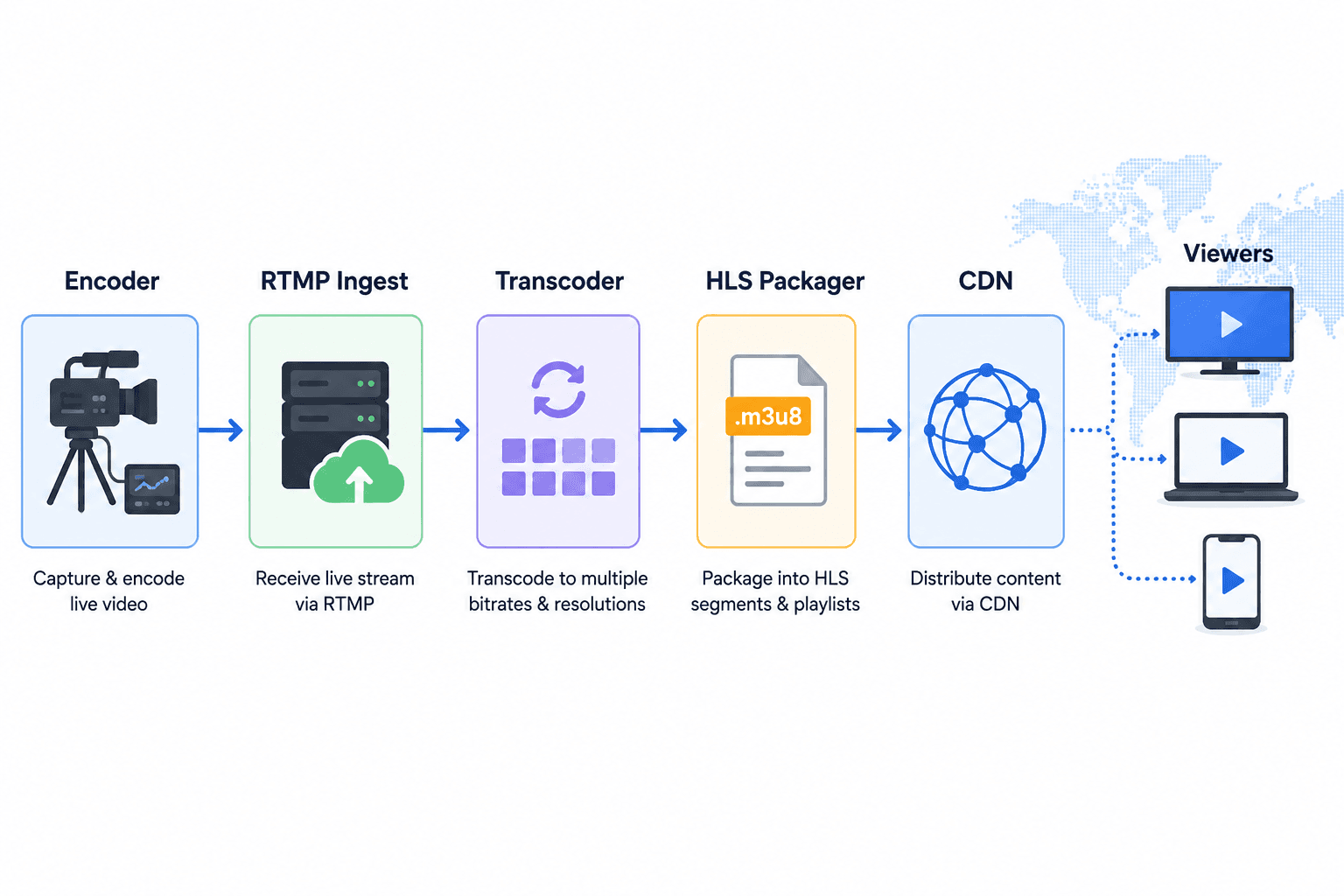
- You are building any production live streaming product. The standard pipeline is: Encoder sends RTMP to ingest server, ingest server transcodes and packages as HLS, CDN delivers HLS segments to viewers.
For interactive broadcasts where viewer latency matters (Q&A sessions, live shopping, real-time events), LL-HLS at 2-3 seconds is now a practical replacement for legacy RTMP delivery workarounds.
The Role of VideoSDK in Enhancing Streaming
VideoSDK offers real-time audio-video SDKs, providing flexibility, scalability, and control for seamless integration of audio-video conferencing and interactive live streaming into web and mobile apps.
Features that make VideoSDK stand out:
- Real-time capabilities for interactive applications.
- Compatibility with both RTMP and HLS for versatile streaming options.
Have questions about integrating HLS & LL-HTTP and VideoSDK? Our team offers expert advice tailored to your unique needs. Unlock the full potential—sign up now to access resources and join our developer community. Schedule a demo to see features in action and discover how our solutions meet your streaming app needs.
Real-World Example: RTMP Ingest with HLS Delivery
Consider a live education platform serving 50,000 concurrent students across 80 countries on mobile and desktop.
Using RTMP only would be impossible for delivery: no modern browser plays RTMP natively, and a stateful RTMP connection cannot leverage CDN caching to serve 50,000 simultaneous viewers.
Using HLS only would be impossible for ingest: the instructor's OBS setup and classroom capture hardware output RTMP, not HLS segments.
The production architecture is OBS on the instructor's machine streams RTMP to VideoSDK's ingest endpoint at roughly 1.5 seconds of ingest latency. VideoSDK transcodes this into 5 ABR renditions and packages as LL-HLS. Students' players fetch HLS segments from the CDN at 3-5 seconds of viewer latency. Total end-to-end latency for a student in a different country is approximately 5-7 seconds, well within the threshold for live Q&A interaction.
This is a typical architecture that hundreds of platforms use in production with VideoSDK.
Definitions Glossary
RTMP (Real-Time Messaging Protocol): A proprietary streaming protocol developed by Adobe that maintains a persistent TCP connection between an encoder and a media server, achieving 1-3 seconds of live streaming latency.
HLS (HTTP Live Streaming): An adaptive bitrate streaming protocol developed by Apple that segments video into short files delivered over HTTP, enabling broad device compatibility and automatic quality adjustment based on viewer bandwidth.
Adaptive Bitrate Streaming (ABR): A technique where the video player automatically switches between multiple quality renditions of a stream in real time based on the viewer's available network bandwidth, preventing buffering.
Low-Latency HLS (LL-HLS): An extension of the HLS protocol introduced by Apple in 2019 that uses smaller partial segments and proactive server push to reduce delivery latency from 10-30 seconds down to 2-5 seconds.
M3U8 Manifest: A playlist file in UTF-8 encoded M3U format that HLS players use to discover the segment URLs, quality renditions, and timing information for an HLS stream.
Key Takeaways
- RTMP is the universal standard for sending a live stream from an encoder to a media server, achieving 1-3 seconds of ingest latency, but it cannot be played in modern browsers or on mobile devices without conversion.
- HLS is the dominant delivery protocol for end viewers because it works natively in every modern browser and mobile OS, supports adaptive bitrate streaming, and scales to millions of viewers via CDN.
- Most production live streaming architectures use RTMP for ingest and HLS for delivery: these protocols are complementary layers, not competing alternatives.
- Low-Latency HLS (LL-HLS) reduces viewer-facing HLS latency to 2-5 seconds, making it viable for interactive broadcasts that previously required more complex real-time protocols.
- VideoSDK provides a unified API that handles both RTMP ingest and HLS delivery as a managed service, eliminating the infrastructure complexity of running and scaling your own streaming pipeline.
Conclusion
The RTMP vs HLS debate resolves cleanly once you map each protocol to its role: RTMP for getting the stream in, HLS for getting it out to viewers at any scale. Building a production streaming product means handling both, which is exactly what VideoSDK makes simple through a single developer-friendly platform. Start your free VideoSDK account and launch a working RTMP-in, HLS-out live stream in under 30 minutes.
Frequently Asked Questions
What is the main difference between RTMP and HLS?
RTMP differs from HLS in that RTMP maintains a persistent TCP connection for low-latency media ingest (1-3 seconds) while HLS delivers video as small HTTP segments with adaptive bitrate switching (10-30 seconds for standard HLS, 2-5 seconds for LL-HLS). RTMP is used by encoders to push streams to a media server; HLS is used by that server to deliver the stream to viewers across browsers and mobile devices.
Is RTMP still used in 2026?
Yes, RTMP is still actively used in 2026 as the dominant ingest protocol for live streaming, despite Adobe deprecating the Flash Player. Every major platform including YouTube Live, Twitch, and Facebook Live continues to accept RTMP ingest streams from broadcasters using OBS, Wirecast, and similar tools. What changed is that RTMP is no longer used for browser playback, which is now handled exclusively by HLS or WebRTC. [UPDATE: verify date]
Which protocol has lower latency, RTMP or HLS?
RTMP has significantly lower latency than standard HLS. RTMP achieves 1-3 seconds of ingest latency compared to HLS's 10-30 seconds of typical delivery latency. However, Low-Latency HLS (LL-HLS) closes this gap to 2-5 seconds, making it suitable for interactive live streaming scenarios that previously required RTMP or WebRTC for viewer delivery.
Can I use RTMP and HLS together in the same application?
Yes, using RTMP and HLS together in the same application is the standard production architecture for live streaming. The typical pipeline is: an encoder sends a stream via RTMP to an ingest server, the server transcodes and packages the stream as HLS, and a CDN delivers HLS segments to viewers. VideoSDK manages this entire pipeline as a single managed service through one unified API.
Does VideoSDK support both RTMP and HLS?
Yes, VideoSDK supports both RTMP ingest and HLS delivery, including Low-Latency HLS (LL-HLS). VideoSDK provides a managed RTMP ingest endpoint that accepts streams from any standard broadcasting software, automatically transcodes them into multiple ABR renditions, and serves the output as HLS playback URLs via CDN. Developers integrate both capabilities through VideoSDK's SDK and REST API without managing any streaming infrastructure themselves.
What latency can I expect with HLS vs RTMP?
With RTMP, you can expect 1-3 seconds of latency from the encoder to the ingest server. With standard HLS delivery to viewers, expect 10-30 seconds of latency depending on segment duration and player buffering. With Low-Latency HLS (LL-HLS), viewer-facing latency drops to 2-5 seconds. Total end-to-end latency in a production pipeline using RTMP ingest and LL-HLS delivery typically lands at 3-7 seconds. [UPDATE: verify with VideoSDK performance benchmarks]
Is HLS more secure than RTMP?
Yes, HLS is more secure than RTMP by default because HLS transmits data over standard HTTPS, providing transport-layer encryption without additional configuration. RTMP transmits data unencrypted by default over TCP port 1935. To secure an RTMP stream, you must use RTMPS (RTMP over TLS), which wraps the RTMP connection in SSL/TLS encryption, similar to how HTTPS wraps HTTP. Most modern streaming platforms enforce RTMPS for all ingest connections.