


SIP Connect is VideoSDK's telephony bridge that lets PSTN phone callers and softphone users join WebRTC meeting rooms as audio participants. Each meeting receives a unique SIP URI at sip.videosdk.live, and inbound calls authenticate with dashboard-generated credentials. SIP Connect eliminates the need for a custom media gateway between traditional phone networks and WebRTC infrastructure.A PSTN caller should be able to reach a developer's WebRTC meeting room without custom gateway code. SIP Connect makes that possible by routing traditional phone signaling directly into VideoSDK's media infrastructure. The caller dials a phone number, the SIP trunk forwards the call to a VideoSDK SIP endpoint, and the caller joins the same session as browser and mobile SDK participants, no app install required.
This article defines SIP Connect, explains the protocol stack beneath it, walks through a complete Twilio implementation, and addresses the four misconceptions that cause the most debugging time for developers building phone dial-in features.
What Is SIP Connect?
SIP Connect is defined as a VideoSDK feature that assigns each meeting a unique SIP URI and accepts authenticated inbound calls from PSTN networks, softphones, or SIP trunk providers, placing those callers as audio participants alongside WebRTC SDK users.
SIP Connect works by mapping a VideoSDK meeting ID to a SIP address in the format sip:<meeting-id>@sip.videosdk.live, validating inbound SIP INVITE requests against credentials generated in the VideoSDK dashboard, and bridging the resulting audio stream into VideoSDK's Selective Forwarding Unit (SFU) where WebRTC participants already exist.
SIP Connect is best known for enabling mixed-mode meetings: a customer calls from a landline, a clinician joins from a browser tab using the VideoSDK JavaScript SDK, and a specialist joins from a mobile app using the React Native SDK. All three participants hear each other in real time without any of them needing to install extra software.
The underlying signaling standard is the Session Initiation Protocol, defined in IETF RFC 3261. VideoSDK uses SIP as the call setup and teardown layer. The Real-time Transport Protocol (RTP)signalling carries the actual audio media packets between the phone network and VideoSDK's bridge. These two protocols work together: SIP handles the conversation, RTP carries the sound.
The combination of SIP signalling and RTP media transport is what separates phone-network communication from WebRTC. VideoSDK's SIP Connect bridge translates between both worlds transparently, so neither side needs to be aware of the other's protocol stack.
The Protocol Stack Behind SIP Connect
SIP Connect sits at the intersection of PSTN circuit-switched telephony and WebRTC IP-based communication, and understanding both architectures is required knowledge for any developer implementing PSTN dial-in.
PSTN (Public Switched Telephone Network)
PSTN is the global circuit-switched telephone infrastructure that has carried voice calls for over 150 years. PSTN works by reserving a dedicated physical path between caller and receiver for the duration of each call. This architecture delivers predictable audio quality on the voice side but limits scalability and carries higher per-minute costs compared to VoIP.
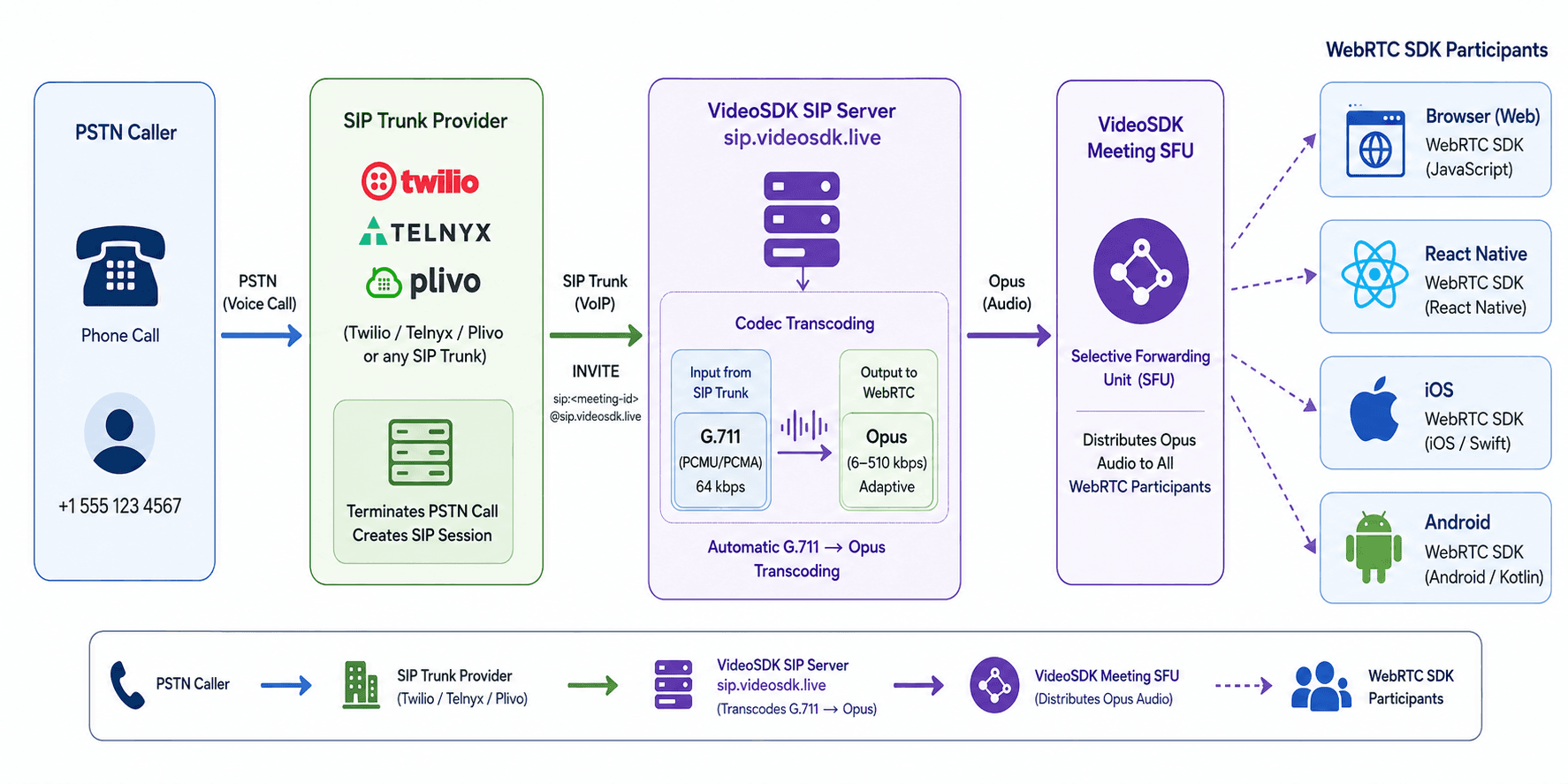
When a caller dials a phone number and reaches a VideoSDK meeting, the PSTN leg terminates at a SIP trunk provider (such as Twilio, Telnyx, or Plivo). The trunk provider converts the circuit-switched signal into an IP-based SIP session and forwards the INVITE request to VideoSDK's SIP server at sip.videosdk.live.
VoIP and SIP Trunking
VoIP (Voice over Internet Protocol) is defined as a technology that transmits voice as digital IP packets rather than using dedicated circuits. VoIP works by compressing analog audio using codecs such as G.711 (PCMU/PCMA), G.722, or Opus, then routing those packets over any IP network.
SIP trunking is the specific combination of VoIP with the SIP signaling protocol. A SIP trunk provider receives a PSTN call, terminates it as a VoIP session, and forwards it to a SIP address, in this case, sip:<meeting-id>@sip.videosdk.live. Twilio, Telnyx, and Plivo all support this routing pattern, as does any provider that supports outbound SIP dialing with digest authentication.
Codec Switching and Automatic Transcoding
Codec switching is the dynamic selection of an audio codec during or before a call, based on network conditions or endpoint capabilities. This step is critical for SIP Connect deployments because PSTN legs typically arrive encoded as G.711 (64 kbps, uncompressed PCM audio) while WebRTC clients prefer Opus (6-510 kbps, adaptive compression).
VideoSDK's bridge handles G.711-to-Opus transcoding automatically. Neither the developer's application code nor the WebRTC SDK clients manage codec negotiation. A PSTN caller encoded in G.711 is transcoded to Opus before the audio stream reaches browser or mobile SDK participants. This is the step that most SIP tutorials skip explaining, and it is the reason phone callers and WebRTC users hear each other clearly without any codec configuration in application code.
How Does SIP Connect Work with VideoSDK?
SIP Connect joins external callers to VideoSDK meetings by binding each meeting ID to a unique SIP URI and authenticating inbound INVITE requests with credentials generated in the VideoSDK dashboard.
The end-to-end flow follows four stages:
- Meeting creation. Your backend creates a VideoSDK room using the REST API and distributes the meeting ID to both SDK clients and phone-routing logic.
- SIP credential provisioning. You enable SIP on an API key in the VideoSDK dashboard and store the generated username and password on your SIP trunk or webhook server, never in client-side code.
- Inbound call routing. A PSTN caller dials your published phone number, or a softphone user dials
sip:<meeting-id>@sip.videosdk.live. Your SIP trunk provider (such as Twilio) forwards the call to VideoSDK's SIP endpoint with those credentials. - Media bridging. VideoSDK accepts the SIP session, negotiates audio codecs, and places the caller in the meeting alongside WebRTC participants who joined through JavaScript, React, React Native, or other SDK clients.
Codec negotiation is the critical step competitors rarely explain. PSTN legs often arrive as G.711 (PCMU/PCMA) audio, while WebRTC clients prefer Opus. VideoSDK's bridge transcodes between these formats so both sides hear intelligible audio without manual codec configuration in your application layer.
VideoSDK SIP Connect is currently available in US and EU regions only. Teams deploying in Asia-Pacific or other regions should contact VideoSDK support before committing to a SIP dial-in product roadmap.
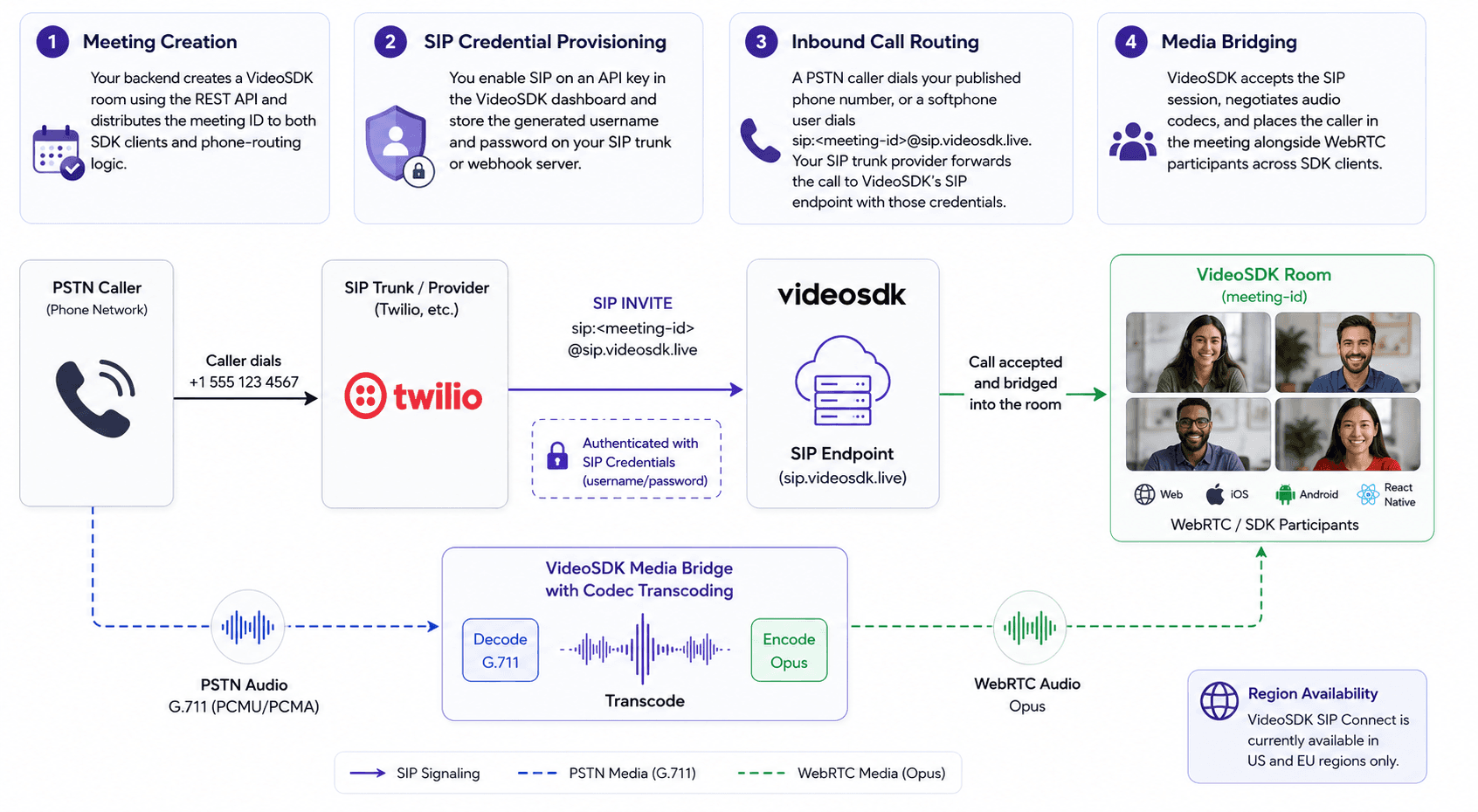
The bridge handles one meeting per SIP URI, which keeps routing deterministic for support lines and scheduled telehealth sessions.
How to Implement SIP Connect with VideoSDK?
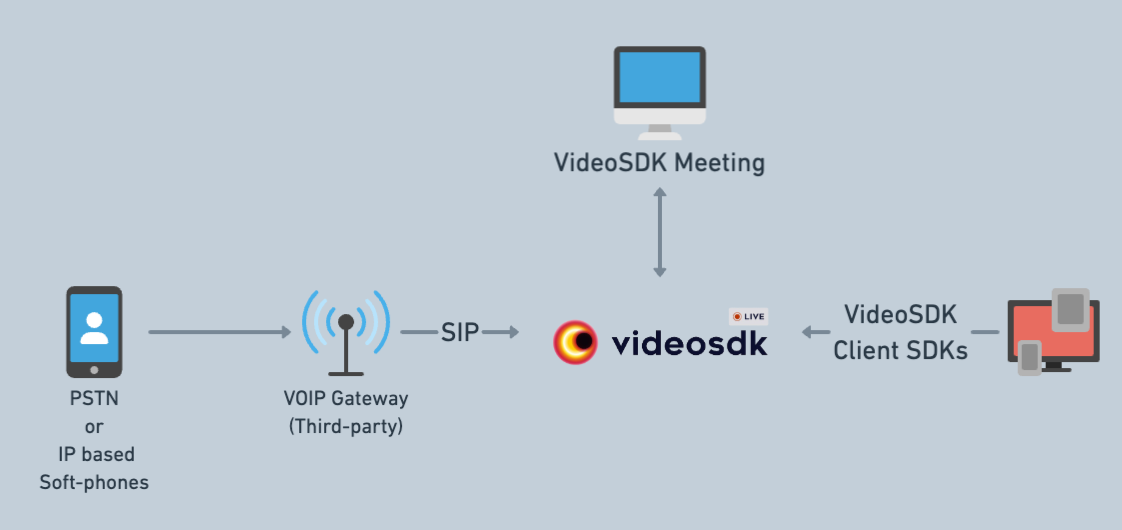
With VideoSDK's SIP Connect feature, you can enable your users to join VideoSDK meetings via VOIP using third-party service providers. This allows for establishing a bridge between participants using our client SDKs and those joining via SIP, enhancing the accessibility and connectivity of your video meetings.
Getting SIP Credentials
To use SIP Connect Protocol, you will first need to generate the credentials for the SIP. Go to the VideoSDK dashboard and under the API Keys sections, first enable the SIP for the desired API key. Afterward, you will be presented with the SIP username and password to establish a connection with our SIP servers.
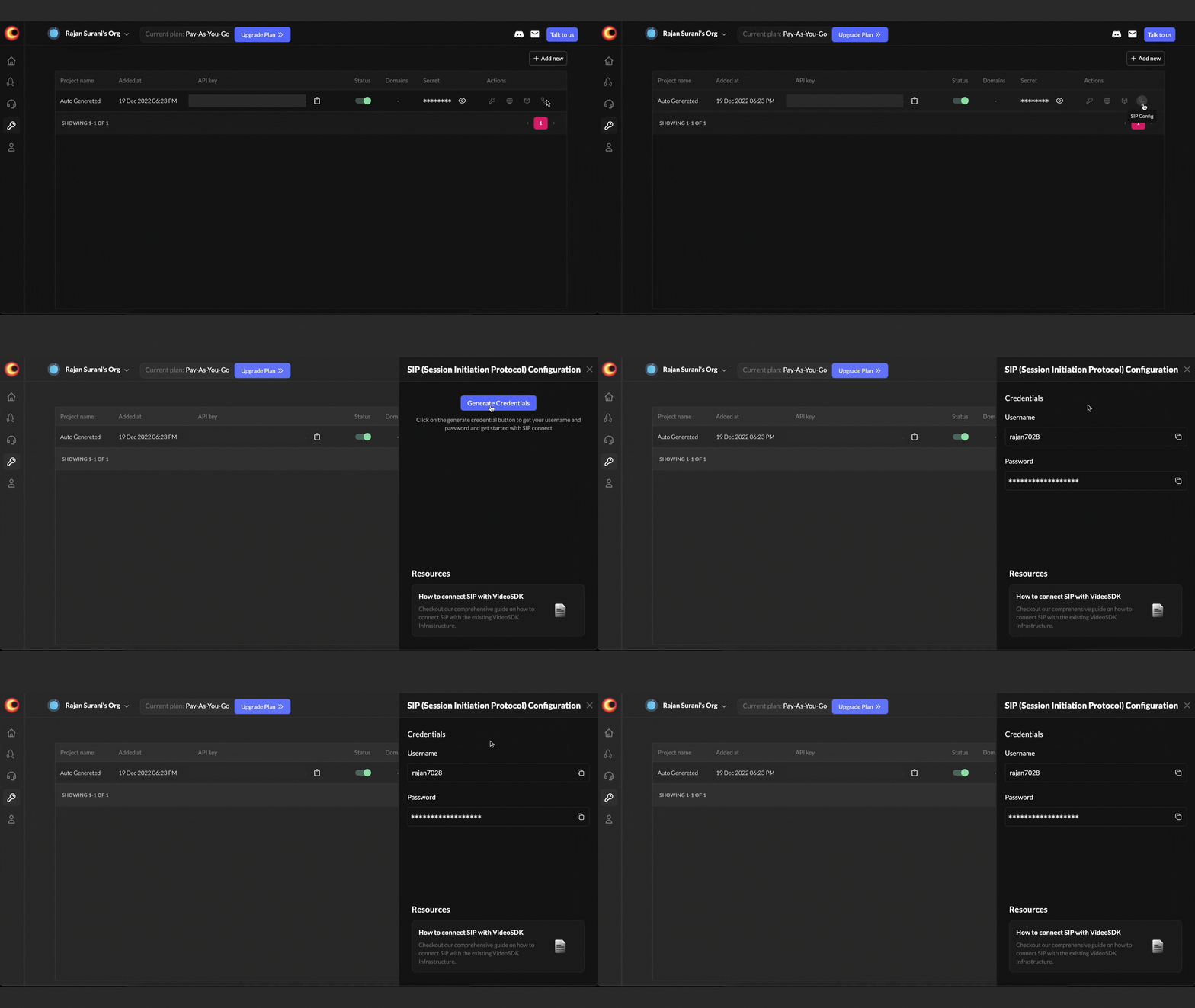
Use SIP to join an individual meeting
Once you have the credentials, you can use any of the softphones like Linphone, or Zoiper, or use a third-party service provider like Twilio to connect with a VideoSDK meeting by initiating an SIP call to sip:<meeting-id>@sip.videosdk.live.
For example, if you want to connect to abcd-abcd-abcd meeting then the SIP address will look like sip:abcd-abcd-abcd@sip.videosdk.live.
Integration with Twilio PSTN
To utilize third-party PSTN (Public Switched Telephone Network) providers like Twilio for calls via SIP (Session Initiation Protocol), follow these steps:
- Log in to your Twilio account and navigate to the Phone Numbers section
- Purchase a phone number and access its configuration settings
- Set up a Webhook handler that will initiate a call to the VideoSDK SIP endpoint whenever an incoming call is received on the selected phone number
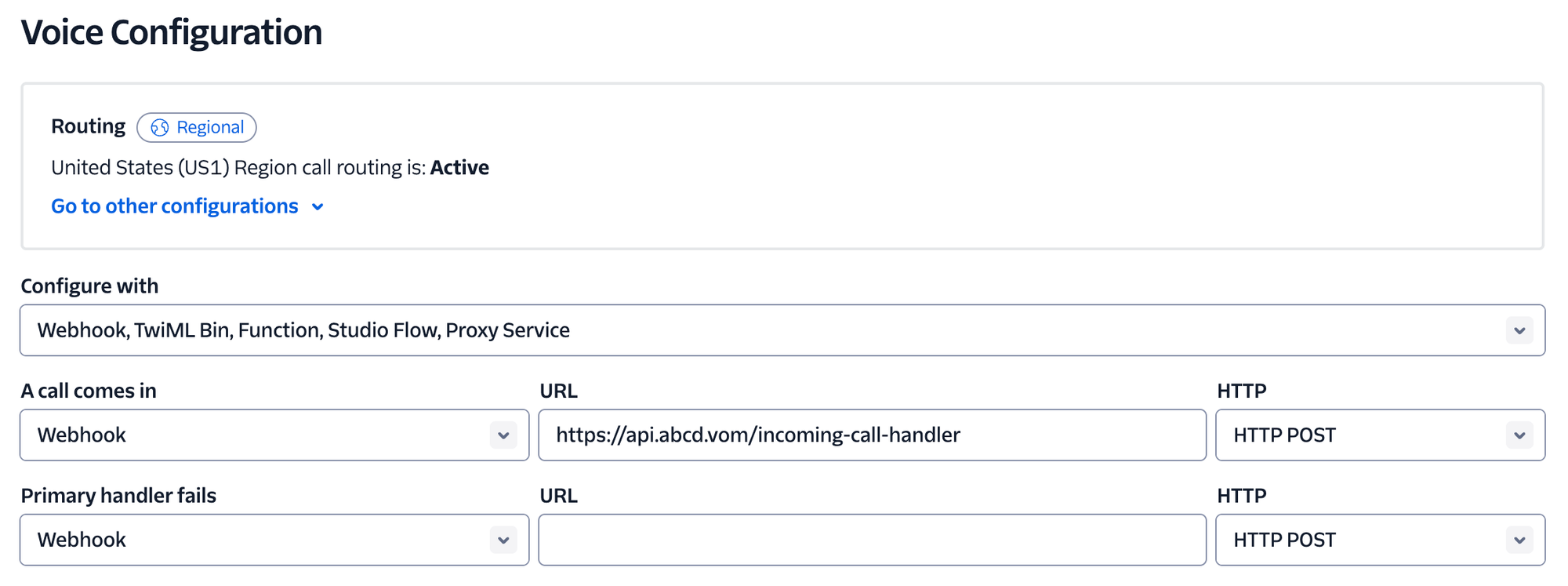
Example for Creating Webhook using Express
const express = require("express");
const VoiceResponse = require("twilio").twiml.VoiceResponse;
const urlencoded = require("body-parser").urlencoded;

const app = express();

// Parse incoming POST params with Express middleware
app.use(urlencoded({ extended: false }));

// Webhook route which will be called by twilio when a call is received
app.post("/incoming-call-handler", (request, response) => {
  console.log({ request });
  // Use the Twilio Node.js SDK to build an XML response
  const twiml = new VoiceResponse();

  const dial = twiml.dial();
  dial.sip(
    {
      username: "<User name generated for dashboard>",
      password: "<Password generated from dashboard>",
    },
    "sip:<meetingId>@sip.videosdk.live"
  );

  // Render the response as XML in reply to the webhook request
  response.type("text/xml");
  response.send(twiml.toString());
});

//Start the express app on port 8000
app.listen(8000, () => {
  console.log(`Server listening on port ${8000}.`);
});
Why Integrate SIP in Communication Systems?
Improved User Experience
SIP integration elevates user interactions by enabling smooth transitions between various communication modes. Users can effortlessly shift from video to phone calls without disruptions, maintaining conversation flow and engagement.
Global Reach
SIP allows businesses to connect with clients and teams worldwide, with international calls and enabling collaboration across geographical barriers.
Adaptability
SIP's flexibility enables businesses to connect calls to video conferences and switch between media types, ensuring seamless and uninterrupted communication.
Cost Efficiency
Combining platforms through SIP protocol integration reduces hardware dependency and any subscription expenses, streamlining their operations and making them more cost-effective.
Why Use SIP Connect? Real-World Use Cases
SIP Connect is the right integration for any platform that must serve callers on PSTN landlines, legacy VoIP systems, or enterprise telephony infrastructure that cannot or will not use a browser-based or mobile SDK client.
Telehealth and patient communication. A patient calls a published clinic number from a landline. The call routes through a SIP trunk to the VideoSDK meeting room where the clinician is already connected via the web app. No app download, no link required on the patient's side. For populations with lower smartphone adoption, PSTN dial-in significantly increases session completion rates.
Enterprise contact centers. Customer support teams often run on legacy PBX systems that route calls internally via SIP trunks. SIP Connect lets agents join VideoSDK-powered support sessions directly from their existing desk phones or soft clients without migrating the entire telephony stack.
Financial services client calls. Regulatory environments in several markets require that client calls happen on recorded PSTN lines. SIP Connect enables a hybrid setup: the advisor joins via the VideoSDK browser SDK while the client calls in from a recorded PSTN line, and VideoSDK's session recording captures the full mixed audio stream.
AI voice agent fallback. In VideoSDK's AI voice agent pipeline, a PSTN caller can reach an AI agent deployed on VideoSDK without the caller needing any internet connectivity. The call arrives via SIP trunk, the agent processes speech-to-text and text-to-speech within the same VideoSDK session, and the entire interaction runs over phone audio. This is a natural integration point for VideoSDK's AI voice agent infrastructure.
Low-connectivity regions. G.711 voice calls operate reliably at very low network speeds. In rural or emerging-market deployments where WebRTC performance degrades below 200 kbps, a PSTN phone dial-in provides a reliable audio floor that browser-based WebRTC cannot match.
Common Misconceptions About SIP Connect
Developers new to SIP Connect consistently misunderstand the relationship between SIP and WebRTC, the scope of SIP credentials, and the video capabilities available to phone callers.
Misconception: SIP Connect and WebRTC use the same protocol. Reality: SIP and WebRTC are separate protocol stacks that were designed independently. SIP is a text-based signaling protocol that runs over UDP or TCP. WebRTC uses ICE for connection establishment, DTLS for key negotiation, and SRTP for encrypted media delivery. VideoSDK's bridge translates between the two stacks so both sides can share a session, but neither side speaks the other's native protocol.
Misconception: Any SIP provider works automatically without configuration. Reality: The SIP trunk provider must specifically support outbound SIP dialing with digest authentication. Providers that only support inbound PSTN call forwarding without a SIP trunking tier will not route calls to an external SIP URI. Before building the integration, verify that your chosen provider (Twilio, Telnyx, Plivo) offers SIP trunking as a distinct product feature and test SIP header compatibility during the pilot phase.
Misconception: PSTN callers joining via SIP Connect can see and send video. Reality: Phone callers joining through SIP Connect participate in audio only. The SIP protocol and PSTN infrastructure do not carry video media streams. WebRTC SDK participants can continue publishing video to each other, but the phone caller transmits G.711 audio only and cannot send or receive video frames.
Misconception: SIP credentials in VideoSDK are per-meeting. Reality: SIP credentials in VideoSDK are per-API-key, not per-meeting. The same username and password authenticate all SIP calls for a given API key. The specific meeting a caller joins is determined by the meeting ID in the SIP URI user part (<meeting-id>@sip.videosdk.live), not by separate per-meeting credentials. Rotating credentials at the API-key level rotates access for all SIP endpoints simultaneously.
Definitions Glossary
SIP (Session Initiation Protocol): A text-based application-layer signaling protocol defined in IETF RFC 3261 that establishes, modifies, and terminates real-time communication sessions including voice calls, video conferences, and instant messaging.
PSTN (Public Switched Telephone Network)the : The global circuit-switched telephone infrastructure that routes voice calls over physical copper wire, fiber, and radio links to any standard telephone number worldwide.
SIP URI: A SIP Uniform Resource Identifier that addresses a specific endpoint in a SIP network, formatted as sip:user@domain. VideoSDK assigns a SIP URI to each meeting in the format sip:<meeting-id>@sip.videosdk.live.
SIP Trunk: A VoIP service from a provider (Twilio, Telnyx, Plivo) that connects an organization's internal communication system to the PSTN and can forward calls to external SIP URIs using digest authentication.
SFU (Selective Forwarding Unit): A media server architecture that receives streams from all participants and selectively forwards them to others. VideoSDK runs an SFU that routes both WebRTC streams and SIP-bridged audio in a unified session.
RTP (Real-time Transport Protocol): The network protocol that carries actual audio and video media packets in both SIP and WebRTC sessions. SIP handles call signaling; RTP carries the media stream.
Codec Transcoding: The real-time conversion of compressed audio from one format to another. VideoSDK transcodes G.711 audio from PSTN legs to Opus for WebRTC participants automatically, with no configuration required in application code.
Key Takeaways
- SIP Connect is VideoSDK's PSTN bridge that lets callers from phone networks, softphones, and SIP trunk providers join WebRTC meeting rooms as audio participants without installing any app or client software.
- Each VideoSDK meeting maps to a SIP URI formatted as
sip:<meeting-id>@sip.videosdk.live. Inbound calls authenticate with per-API-key credentials generated in the VideoSDK dashboard. - VideoSDK automatically transcodes G.711 phone audio to Opus for WebRTC clients, eliminating manual codec configuration in application code.
- Compatible SIP trunk providers include Twilio, Telnyx, and Plivo. Any provider that supports outbound SIP dialing with digest authentication will work.
- Phone callers joining via SIP Connect participate in audio only. They cannot send or receive video through the SIP or PSTN layer.
- SIP Connect is currently available in the US and EU regions only. Contact VideoSDK support at support@videosdk.live for other regions.
- Start with the VideoSDK SIP Connect quickstart to deploy your first PSTN dial-in in under an hour.
Conclusion
SIP Connect bridges two communication worlds that were never designed to interoperate: the PSTN phone network and WebRTC-based video infrastructure. By mapping each meeting to a SIP URI and handling G.711-to-Opus transcoding transparently, VideoSDK removes the integration work that normally makes PSTN dial-in a multi-week engineering project.
The four-stage flow (meeting creation, credential provisioning, trunk routing, media bridging) works with any SIP-compatible trunk provider and requires no custom media gateway code on your side. If your platform needs to serve landline callers, legacy VoIP users, or enterprise telephony systems, SIP Connect is the fastest path from a dial tone to a shared VideoSDK session. Follow the VideoSDK SIP Connect quickstart to deploy your first sip connect dial-in today.
Frequently Asked Questions
What is SIP Connect protocol?
SIP Connect protocol is VideoSDK's telephony bridge feature that maps each meeting ID to a SIP URI at sip.videosdk.live and accepts authenticated inbound SIP INVITE requests from PSTN networks or SIP trunk providers. Authenticated callers join the designated meeting as audio participants alongside WebRTC SDK users. The term refers both to VideoSDK's specific implementation and to the broader practice of bridging SIP endpoints into a WebRTC conferencing platform.
How does SIP Connect work with VideoSDK?
SIP Connect works with VideoSDK by creating a SIP endpoint (sip:<meeting-id>@sip.videosdk.live) for each meeting, validating INVITE requests against dashboard-generated per-API-key credentials, transcoding G.711 phone audio to Opus for WebRTC participants, and routing the caller into the meeting SFU alongside SDK users. The process requires a SIP trunk provider (Twilio, Telnyx, Plivo) to bridge the PSTN phone call to the VideoSDK SIP server.
How do I join a VideoSDK meeting via SIP?
Joining a VideoSDK meeting via SIP requires dialing sip:<meeting-id>@sip.videosdk.live from a configured softphone (Linphone or Zoiper) using VideoSDK SIP credentials as the SIP account. For PSTN callers, a Twilio webhook (or compatible trunk provider) must be configured to forward inbound phone calls to the SIP URI with dashboard-generated credentials. The caller joins as an audio-only participant in the meeting room.
Can PSTN callers join a VideoSDK video meeting?
PSTN callers can join a VideoSDK meeting through SIP Connect and participate in audio alongside video SDK users. Phone callers dial in via a SIP trunk provider (Twilio, Telnyx, Plivo) which forwards the PSTN call to the VideoSDK SIP endpoint. Phone participants transmit and receive audio only. They cannot send or see video because PSTN and SIP carry no video media stream.
What is the difference between SIP and WebRTC?
SIP is a call signaling protocol (IETF RFC 3261) that establishes, modifies, and terminates telephone and VoIP sessions. WebRTC is a browser and mobile SDK standard that handles real-time media delivery using ICE for connection discovery, DTLS for key exchange, and SRTP for encrypted media transport. The two protocols use different security models, codec sets, and signaling mechanisms. VideoSDK's SIP Connect bridge translates between them so callers on either system can share one session.
Which SIP providers are compatible with VideoSDK SIP Connect?
Twilio, Telnyx, and Plivo are compatible with VideoSDK SIP Connect, along with any provider that supports outbound SIP dialing with digest authentication. The provider must be able to forward inbound PSTN calls to an external SIP URI, which is a feature of SIP trunking products specifically, not standard PSTN forwarding. Test your provider's SIP header compatibility during pilot deployment before routing production traffic.