



A WebRTC leak exposes your real public or local IP address through browser STUN-based ICE candidate gathering, even when a VPN is active. Leak tests detect ICE candidates outside the VPN tunnel. Users prevent leaks with VPN WebRTC shields or browser settings; developers use TURN relay architecture.
You connect to a VPN in Berlin, run a standard IP check, and see a German exit node. Then a WebRTC leak test reveals your home ISP address in Mumbai. That mismatch is a WebRTC leak, and it happens because browsers gather ICE candidates on a path that bypasses the VPN tunnel. This article defines WebRTC leaks, explains the STUN and ICE mechanism behind them, walks through leak testing and prevention, and covers what developers building real-time video apps must handle differently from end users protecting browser privacy.
What is WebRTC Leak?
A WebRTC leak is defined as the unintended exposure of a device's local or public IP address through the browser's Web Real-Time Communication stack, typically during ICE candidate gathering, independent of whether a VPN is routing other traffic.
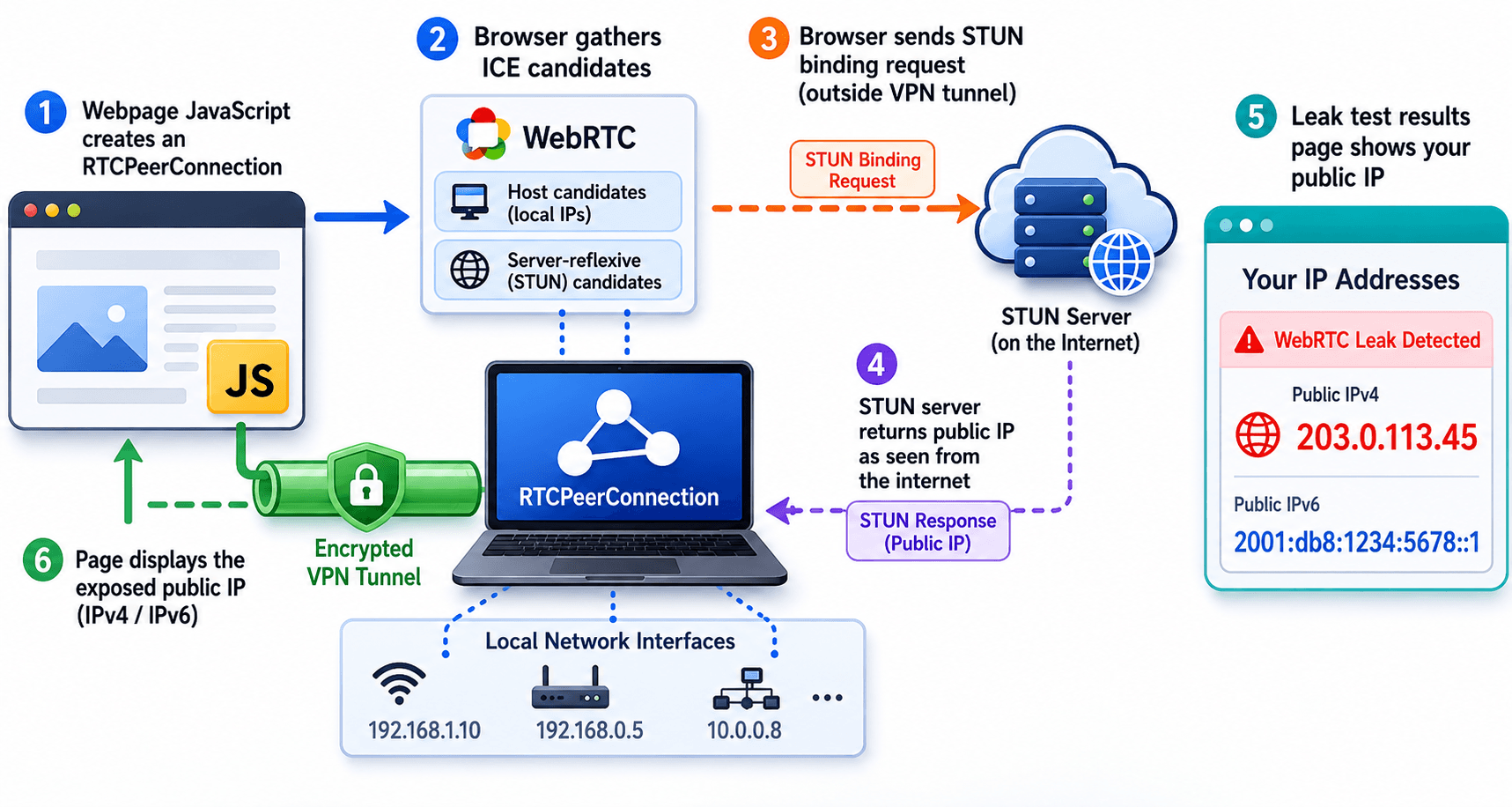
A WebRTC leak works by requesting network interface data from the operating system during peer connection setup. The browser contacts STUN servers to learn server-reflexive (public) addresses and enumerates host candidates that reveal local LAN IPs. Websites with embedded JavaScript can read these candidates through the RTCPeerConnection API without starting an actual video call. According to the IETF WebRTC security architecture in RFC 8827, ICE is designed for connectivity, not anonymity, which is why candidate gathering can conflict with VPN-based IP masking.
WebRTC leaks differ from DNS leaks and standard IP leaks. A DNS leak exposes which DNS resolver your system uses. A WebRTC leak exposes IP addresses gathered specifically through the browser's real-time media stack. Both can occur simultaneously on the same page.
If you are building or debugging real-time features, read what WebRTC is for the full protocol stack before focusing on leak mechanics.
This section established that WebRTC leaks expose IP addresses through ICE candidate gathering, not through ordinary page loads.
How Does a WebRTC Leak Happen?
A WebRTC leak happens because ICE candidate gathering queries local network interfaces and STUN servers on a network path that VPN clients often exclude from the encrypted tunnel.
STUN Requests Outside the VPN Tunnel
When a page creates an RTCPeerConnection, the browser gathers ICE candidates. Host candidates list local interface addresses such as 192.168.x.x. Server-reflexive candidates come from STUN binding requests defined in IETF RFC 5389, which ask a STUN server to report the client's public IP as seen from the internet. Many VPN clients route web traffic through the tunnel but leave local interface binding available to the browser for WebRTC performance reasons.
JavaScript Access Without User Consent for a Call
A leak test page does not need you to accept a camera or microphone prompt. Creating a peer connection and listening for icecandidate events is enough. Malicious or analytics scripts on any webpage can perform the same technique. The W3C WebRTC 1.0 specification exposes ICE gathering to JavaScript because peer connections require candidate exchange for NAT traversal in legitimate video calls.
VPN Split-Tunnel Behavior
Split-tunnel VPN configurations route only selected traffic through the VPN. Local network access for WebRTC remains on the physical interface. Even full-tunnel VPNs can leak if the VPN client does not block WebRTC interface binding at the OS level. In practice, privacy auditors who test corporate remote-work setups report that WebRTC leaks are among the most common causes of VPN IP masking failure in browser sessions.
This section explained how STUN queries, JavaScript ICE access, and VPN routing gaps combine to produce a WebRTC leak.
Why Do WebRTC Leak Shields Matter for VPN Users?
WebRTC leak shields matter for VPN users because a functioning VPN can mask ordinary IP checks while still leaving ICE-derived addresses visible to websites through the browser.
VPN services encrypt and route TCP and UDP traffic through a remote exit node. That design protects against IP discovery through standard HTTP requests and many tracker pixels. WebRTC operates at a different layer. ICE gathering binds to local interfaces and sends STUN packets that reveal the address your ISP assigns, not the VPN exit IP.
A WebRTC leak shield forces all ICE traffic through the VPN tunnel or blocks candidate types that expose local addresses. Without this protection, a streaming site, ad network, or fingerprinting script correlates your real ISP address with your VPN exit IP, which defeats the purpose of using a VPN for location privacy or censorship circumvention.
According to Mullvad VPN's published WebRTC leak documentation, browsers can expose the underlying connection address unless the VPN application or browser explicitly blocks WebRTC candidate leakage [UPDATE: verify date]. Leak shields are not optional extras for privacy-focused VPN users. They are a required layer when the browser runs WebRTC-capable pages.
This section showed why VPN encryption alone does not prevent WebRTC leaks without a dedicated shield or browser mitigation.
The Significance of WebRTC Leak Shields
WebRTC leak shields, as the name suggests, act as protective barriers, preventing the leakage of your IP address during online communication. They ensure that the only IP address visible to the websites you visit is that of the VPN server you are connected to.
Using a VPN with WebRTC leak shield capabilities is a proactive way to ensure your online activities remain private and secure. To check if your VPN has WebRTC leak protection, you can perform a WebRTC leak test.
How Do I Test for a WebRTC Leak?
A WebRTC leak test determines whether your browser exposes local or public IP addresses through ICE candidate gathering while your VPN or privacy tools are active.
Follow these steps to run a reliable WebRTC leak test:
- Connect your VPN. Activate the VPN and confirm the exit location with a standard IP lookup tool. Note the IP address and country displayed.
- Open a trusted leak test page. Visit a WebRTC leak test site in the same browser you use daily. Avoid unknown domains that themselves harvest IP data.
- Run the test without starting a video call. The test creates a peer connection automatically. Wait for the results panel to populate with detected IP addresses.
- Compare detected IPs to your VPN exit IP. If the test shows your home ISP address, a local LAN address, or any IP that does not match the VPN exit node, you have a WebRTC leak.
- Repeat in each browser you use. Chrome, Firefox, Safari, and Edge handle ICE gathering differently. A clean result in one browser does not guarantee protection in another.
- Document results before changing settings. Screenshot or record the leak test output. This baseline helps you verify that browser extensions, VPN settings, or policy changes actually fix the issue.
In practice, privacy-conscious users who test only a generic "what is my IP" page miss WebRTC leaks entirely because that page never triggers ICE gathering.
This section provided a six-step WebRTC leak test procedure you can repeat across browsers and VPN configurations.
How to Prevent WebRTC Leaks
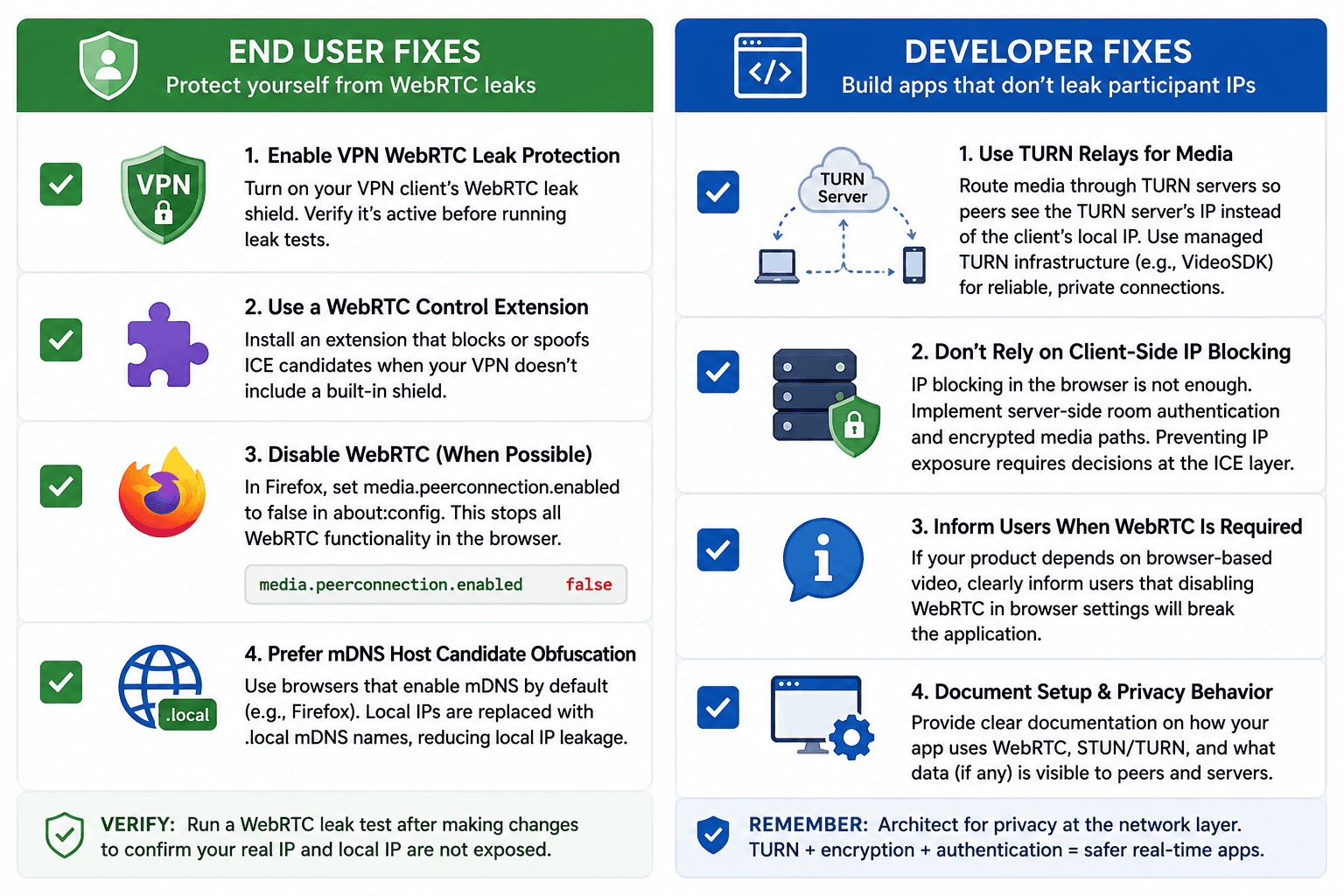
Preventing WebRTC leaks requires blocking or routing ICE candidate exposure at the browser, VPN, or application architecture level depending on whether you are an end user or a developer.
For VPN Users and Privacy-Conscious Browsers
- Enable your VPN's WebRTC leak protection. Major privacy VPNs include a WebRTC leak shield toggle in client settings. Verify it is active before running leak tests.
- Use a browser extension designed for WebRTC control. Extensions that block or spoof ICE candidates add protection when the VPN client lacks a built-in shield.
- Disable WebRTC in browsers that allow it. Firefox users can set
media.peerconnection.enabledtofalseinabout:config. This stops all WebRTC functionality, including legitimate video calls in the browser. - Prefer browsers with mDNS host candidate obfuscation. Firefox replaces raw local IP host candidates with
.localmDNS names by default, reducing local IP leakage according to Mozilla's WebRTC privacy documentation [UPDATE: verify date].
For Developers Building Real-Time Apps
- Route media through TURN relays when IP privacy matters. TURN relay candidates present the TURN server's address to remote peers instead of the client's local interface. VideoSDK provides managed TURN infrastructure so applications do not expose participant local IPs during SFU or mesh sessions.
- Never rely on client-side IP blocking alone. Server-side room authentication and encrypted media paths address session security. IP exposure prevention requires architectural decisions at the ICE layer.
- Inform users when browser WebRTC is required. If your product depends on browser-based video, document that disabling WebRTC in browser settings will break your application.
This section covered end-user mitigations (VPN shields, extensions, browser settings) and developer mitigations (TURN relay architecture).
Browser-by-Browser WebRTC Leak Behavior
WebRTC leak behavior varies by browser engine because each vendor implements ICE gathering, mDNS obfuscation, and VPN interaction differently.
Google Chrome and Chromium Browsers
Chrome on desktop exposes host candidates with local IP addresses during ICE gathering unless enterprise policy or extensions block it. Chromium's WebRTC implementation prioritizes connection speed for Google Meet, Discord, and other WebRTC services. Privacy extensions and VPN leak shields are the primary mitigation for Chrome users who need IP masking.
Mozilla Firefox
Firefox enables mDNS host candidate anonymization by default, replacing raw local IPs with .local names during ICE gathering. According to Mozilla's release notes for Firefox 76, this change reduced local IP leakage in WebRTC connections. Server-reflexive candidates from STUN requests can still reveal the public ISP address when the VPN does not block STUN traffic.
Apple Safari
Safari on macOS and iOS implements WebRTC with stricter privacy controls than early Chrome builds, but ICE gathering still occurs for WebRTC-enabled pages. Safari users on VPN should run leak tests specifically in Safari rather than assuming results from Chrome apply.
Microsoft Edge
Edge uses the Chromium engine and exhibits Chrome-like leak behavior. Edge users should apply the same VPN leak shields and extension mitigations recommended for Chrome.
Cross-browser testing is mandatory. A VPN that blocks WebRTC leaks in Firefox does not automatically produce clean results in Chrome without verifying each browser independently.
This section compared how Chrome, Firefox, Safari, and Edge handle ICE gathering and leak risk.
Definitions Glossary
WebRTC Leak: Unintended exposure of a device's local or public IP address through browser ICE candidate gathering, often visible even when a VPN masks other traffic.
ICE Candidate: A network address and port combination that WebRTC uses to establish a media path, classified as host, server-reflexive, or relay depending on how it was discovered.
STUN Server: A Session Traversal Utilities for NAT server that returns a client's public IP address through a binding request, which leak tests exploit to detect ISP-assigned addresses.
TURN Relay: A relay server that forwards media traffic when direct peer connections fail, presenting the TURN server's address instead of the client's local interface to remote peers.
WebRTC Leak Shield: A VPN or browser feature that blocks or routes ICE candidate traffic through the VPN tunnel to prevent IP addresses from leaking outside the encrypted connection.
Key Takeaways
- A WebRTC leak exposes IP addresses through ICE candidate gathering, not through ordinary HTTP requests, which is why standard VPN IP checks miss it.
- Run a dedicated WebRTC leak test in every browser you use after connecting to your VPN, because Chrome, Firefox, Safari, and Edge behave differently.
- VPN encryption alone does not prevent WebRTC leaks; you need a WebRTC leak shield, browser extension, or browser setting that blocks or routes ICE traffic.
- Disabling WebRTC stops leaks completely but also breaks browser-based video calls, telehealth sessions, and support tools that depend on WebRTC.
- Developers prevent participant IP exposure by routing media through TURN relays and SFU infrastructure such as VideoSDK rather than relying on end-user VPN settings.
FAQs
Q: Can WebRTC leaks be harmful?
A: Yes, they can compromise your online privacy by revealing your real IP address, allowing websites to track your online activities.
Q: Are all VPNs equipped with WebRTC leak protection?
A: No, not all VPNs have WebRTC leak protection. It's essential to choose a VPN with this feature if online privacy is a priority.
Q: Can disabling WebRTC affect my web browsing experience?
A: Yes, disabling WebRTC may affect your ability to use certain web services that rely on it. It's a trade-off between privacy and functionality.
Q: Are WebRTC leak tests reliable?
A: WebRTC leak tests are generally reliable in identifying IP leakage. However, always ensure you're using a trusted testing platform.
Q: How often should I update my browser?
A: Regularly updating your browser is recommended. It helps keep your online experience secure by patching vulnerabilities.
Q: What is DNS, and how does it relate to WebRTC leaks?
A: DNS (Domain Name System) translates website addresses into IP addresses. Using a secure DNS can help prevent IP leakage during WebRTC communication.
Conclusion
Understanding WebRTC leaks, the significance of WebRTC leak shields, conducting WebRTC leak tests, and implementing effective preventive measures are crucial for safeguarding your online privacy. By following the guidelines outlined in this article, you can ensure that your online activities remain secure and confidential.
Take Advantage of WebRTC with VideoSDK
With the rapid growth of online communication and real-time video interactions, harnessing the power of WebRTC (Web Real-Time Communication) through a VideoSDK can greatly enhance your applications and services. Whether you're looking to integrate video capabilities into your web or mobile applications, We support various frameworks and provide comprehensive documentation to make the process seamless.
WEB SDK:
Our Web SDK offers prebuilt solutions for quick and easy integration, supporting popular JavaScript and React frameworks. Our API reference, developer blogs, and code samples are available to guide you through the implementation process.
MOBILE SDK:
For mobile app development, our SDK supports React Native, Flutter, Android, and iOS platforms, ensuring a consistent and reliable video experience across devices.
Use Cases:
Our VideoSDK finds applications across multiple industries, such as:
- Video KYC: Streamline and secure your Know Your Customer processes with real-time video verification.
- Telehealth: Enable high-quality video consultations for healthcare professionals and patients.
- Education: Enhance online learning experiences with interactive video classes and collaboration tools.
- Live Shopping: Create engaging live shopping experiences, enabling customers to interact with sellers in real time.
- Virtual Events: Host virtual conferences, expos, and trade shows with integrated video features.
- Social Media: Enhance social platforms with live video streaming for more engaging user interactions.
- Live Audio Streaming: Offer real-time audio streaming for podcasts, music, and more.
More importantly, it is FREE to start. You are guaranteed to receive 10,000 minutes of free EVERY MONTH.
Schedule a Demo with Our Live Video Expert!
Discover how VideoSDK can help you build a cutting-edge real-time video app.